If you drive a Jeep Grand Cherokee, you probably know the feeling: you start your engine, and suddenly the Perform Service light comes on. It can be confusing, especially if you don’t know why it appeared or how to turn it off. Sometimes, this light comes on even after you’ve already completed the required service. For many drivers, the glowing warning leads to worry, frustration, or even unnecessary trips to the mechanic. But in reality, turning off the Perform Service light is often a simple process you can do yourself. Let’s explore how you can reset this light, why it appears, and what steps you should follow to keep your Jeep running smoothly.
What Is The Perform Service Light?
The Perform Service light is a reminder on your Jeep Grand Cherokee’s dashboard. It alerts you when your vehicle needs routine maintenance, such as an oil change or replacing the air filter. Unlike other warning lights, it is not about a dangerous fault. It is simply a notification from your car’s computer that service is due based on mileage or time.
This light is common in Grand Cherokees from the late 2000s onward. The system uses sensors and software to track your driving habits and trigger alerts. Sometimes, the light appears for minor tasks, like replacing the crankcase ventilation filter or resetting the oil life. If you ignore the reminder, your vehicle won’t break down right away, but regular service is important for long-term reliability.
Why Does The Perform Service Light Turn On?
Understanding why the Perform Service light turns on can help you avoid stress. Most often, the light comes on due to:
- Scheduled maintenance: The onboard computer counts miles driven and triggers the reminder when it’s time for service.
- Sensor readings: If a sensor detects dirty oil, a clogged filter, or another issue, it activates the light.
- Reset required: After a service is completed, the light needs manual resetting. If not reset, it stays on.
Some Jeep Grand Cherokee models track specific service items. For example, the 3.0L diesel engine variant often triggers the light for the crankcase ventilation filter replacement. Other models use the light to signal an oil change.
Steps To Turn Off The Perform Service Light Jeep Grand Cherokee
Resetting the Perform Service light is usually straightforward. You don’t need special tools or advanced knowledge. Here’s how you can do it yourself:
Step 1: Complete Required Maintenance
Before you reset the light, make sure you’ve done the recommended service. This could be an oil change, replacing the crankcase ventilation filter, or another item listed in your owner’s manual. Resetting the light without proper maintenance can lead to engine damage over time.
Step 2: Insert Key And Turn Ignition
- Sit in the driver’s seat.
- Insert your key into the ignition.
- Turn the key to the ON/RUN position (do not start the engine).
For push-button start models:
- Press the Start button without pressing the brake. The dashboard should light up, but the engine should stay off.
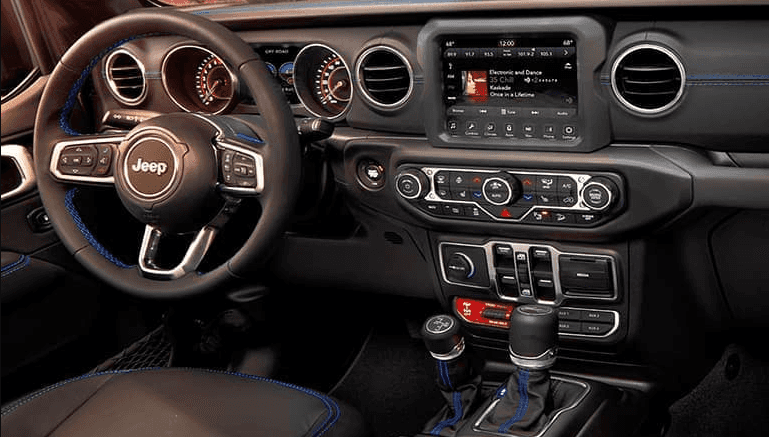
Your Jeep Grand Cherokee has a digital display. Use the steering wheel buttons to access the menu:
- Locate the menu navigation buttons on the left side of your steering wheel.
- Press the down arrow to scroll through the options.
- Find the Vehicle Info or Service section.
Step 4: Find The Perform Service Option
Once in the correct section, look for the Perform Service option. This may be called Service Reminder, Oil Life, or something similar, depending on your Jeep’s year and model.
Step 5: Reset The Light
Follow these steps to reset:
- When Perform Service is highlighted, press and hold the OK or Reset button for about 5 seconds.
- The light should disappear, and the system will confirm the reset.
- If your Jeep has a touch screen, you may need to use it instead of steering wheel buttons.
If the light remains, repeat the process. Some models require you to turn the ignition off and back on after resetting.
Step 6: Verify The Reset
Start your engine. Check the dashboard. The Perform Service light should be gone. If it comes back, double-check your maintenance work and repeat the reset steps.
Common Problems When Resetting The Perform Service Light
Sometimes, the light does not turn off as expected. Here are some reasons why:
- Wrong menu selection: You might not be on the correct menu.
- Incomplete service: If the service was not done, the computer may not accept the reset.
- Electrical issues: Rarely, a faulty sensor or wiring can keep the light on.
- Model-specific steps: Some Jeep Grand Cherokee models require extra steps.
If you have trouble, consult your owner’s manual or contact a Jeep dealer. They can guide you based on your vehicle’s year and engine type.

Which Models And Years Does This Apply To?
Not every Jeep Grand Cherokee uses the same system. Here’s a quick comparison of how the Perform Service light works across different years and engines:
| Model Year | Engine Type | Light Trigger | Reset Method |
|---|---|---|---|
| 2007-2010 | 3.0L Diesel | Crankcase filter replacement | Steering wheel buttons |
| 2011-2013 | 3.6L Gasoline | Oil change reminder | Touch screen or buttons |
| 2014-2020 | All engines | Service intervals | Menu navigation |
| 2021+ | Hybrid/Diesel | Advanced diagnostics | Touch screen reset |
Always check your owner’s manual for the exact process. Newer models sometimes update the steps.
Diy Or Mechanic: Which Is Better?
Resetting the Perform Service light is a simple task. Most drivers can do it themselves in minutes. Here’s a quick comparison:
| Method | Cost | Time | Difficulty |
|---|---|---|---|
| DIY | Free | 5-10 minutes | Easy |
| Mechanic | $20-$50 | Same day or longer | Very easy |
If you are comfortable with your Jeep’s menu system, you can save money and time by doing it yourself.
Tips For A Smooth Reset
Here are some practical tips to avoid trouble when turning off the Perform Service light:
- Read your owner’s manual: Every Jeep Grand Cherokee model has slightly different instructions.
- Complete all service tasks: Don’t reset the light before finishing maintenance.
- Use the correct menu: Some models have multiple service reminders.
- Turn the ignition off and on again: Sometimes, this is needed for the reset to take effect.
- Record the reset date: Keep track of your maintenance and reset history. This helps for resale or warranty claims.
A non-obvious tip: If your Jeep has a crankcase ventilation filter, reset the light only after replacing this part. Many drivers miss this detail, leading to repeated reminders.
Another insight: Some mechanics forget to reset the light after service. If you see the light after a visit, don’t assume the work was not done. Ask them if they forgot to reset it.
What Happens If You Ignore The Perform Service Light?
Many Jeep Grand Cherokee owners ignore the Perform Service light for weeks or months. This is risky. Here’s why:
- Reduced engine life: Delaying service can cause engine wear.
- Poor performance: Dirty oil or filters make your Jeep run less smoothly.
- Warranty risks: Skipping scheduled maintenance can void your warranty.
According to Jeep, regular service keeps your vehicle reliable and safe. Ignoring reminders increases repair costs over time.
Advanced Reset Methods For Older Models
Some older Jeep Grand Cherokee models require a manual reset using a sequence of pedal presses. Here’s how:
- Insert the key and turn to ON (not start).
- Press the gas pedal three times within 10 seconds.
- Turn the ignition off.
- Start the vehicle. The light should be off.
This method is less common but can be useful if your steering wheel buttons or touchscreen are not working.
When Should You Seek Professional Help?
Most resets are easy, but sometimes you need expert help:
- The light won’t turn off after reset.
- You see other warning lights.
- Electrical or sensor problems are suspected.
- You’re unsure about the required service.
A certified Jeep mechanic can diagnose deeper issues. You can also find official instructions at the Jeep website or trusted sources like Jeep Owners.
How Often Should You Perform Service?
Jeep recommends service every 7,500–10,000 miles for most Grand Cherokee models. For diesel engines, the crankcase filter should be replaced every 20,000–30,000 miles. Always follow your manual’s advice. If you drive in dusty or harsh conditions, more frequent service is wise.
Comparing Jeep Grand Cherokee’s Perform Service Light With Other Brands
It’s useful to know how Jeep’s system compares to other brands:
| Brand | Service Reminder Type | Reset Process |
|---|---|---|
| Jeep Grand Cherokee | Perform Service light | Menu/steering wheel buttons |
| Toyota Highlander | Maintenance Required light | Trip meter button sequence |
| Ford Explorer | Oil Change Required | Menu navigation |
| Honda Pilot | Service Minder system | Menu/touch screen |
Jeep’s system is user-friendly, but always check your manual for specific instructions.

Frequently Asked Questions
How Do I Know What Service Is Needed When The Perform Service Light Comes On?
Your Jeep’s display or owner’s manual will specify the required service. Usually, it’s an oil change or crankcase filter replacement. Check the message in the menu or ask your dealer.
Can I Drive With The Perform Service Light On?
Yes, you can drive, but it’s not recommended. The light signals needed maintenance.
Driving without service may reduce engine life and performance.
Does Resetting The Perform Service Light Void My Warranty?
No, resetting the light does not void your warranty. However, skipping the actual service can cause warranty issues. Always complete the required maintenance before resetting.
Is The Perform Service Light The Same As The Check Engine Light?
No, they are different. The Perform Service light is a maintenance reminder, while the Check Engine light signals a problem. If both are on, seek professional help.
What If The Light Comes Back After Reset?
If the light returns soon after resetting, double-check your maintenance work. Sometimes, a sensor or electrical issue needs repair. If unsure, visit a certified mechanic.
Turning off the Perform Service light on your Jeep Grand Cherokee is simple and safe when you follow the right steps. Completing regular maintenance and keeping track of resets will help your vehicle stay reliable for years. If you face trouble, don’t hesitate to seek help or visit the official Jeep owner site. With these tips and insights, you can handle service reminders confidently and avoid unnecessary stress.


















