Many drivers enjoy the comfort and technology that comes with the 2018 Jeep Grand Cherokee. But sometimes, the advanced lighting systems can be confusing, especially when you want to turn off the lights completely. Maybe you’re parked and don’t want to drain the battery. Maybe you’re in a drive-in theater or a campground, and you want total darkness. Whatever your reason, knowing how to control your Jeep’s lights is important for both convenience and safety.
This article explains, step by step, how to turn off lights on the 2018 Jeep Grand Cherokee. You’ll learn about the different light systems, manual and automatic controls, and the common mistakes owners make. By the end, you’ll feel confident managing your Jeep’s lighting in any situation.
Understanding The Lighting System
The 2018 Jeep Grand Cherokee comes with several types of lights:
- Headlights (Low and High Beam)
- Daytime Running Lights (DRLs)
- Fog Lights
- Tail Lights
- Interior Cabin Lights
- Ambient Lighting
Each light serves a different purpose, and not all turn off the same way. The Jeep uses both manual controls and automatic sensors, so it’s important to understand how these systems work together.
Manual Vs. Automatic Controls
There are two main ways your Grand Cherokee manages lights:
- Manual Switches: You can directly control most exterior and interior lights using switches near the steering wheel or on the overhead console.
- Automatic Sensors: Some lights turn on or off based on outside light or if the engine is running. For example, automatic headlights use a sensor to detect darkness.
Knowing when to use each can help you avoid mistakes, like leaving lights on and draining your battery.
Turning Off Exterior Lights
Exterior lights include headlights, DRLs, and fog lights. Here’s how to control them:
Headlights
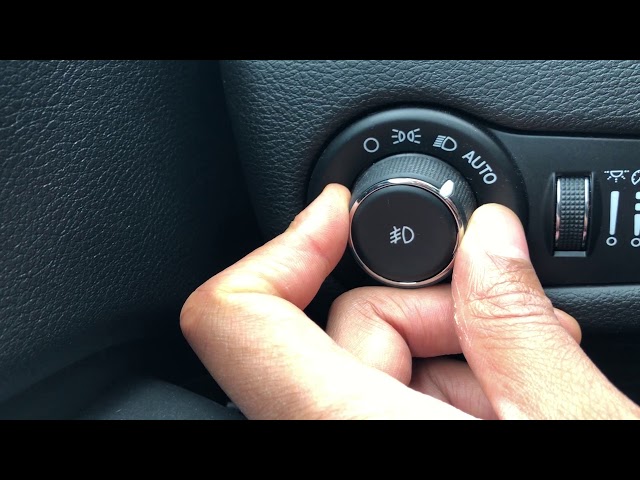
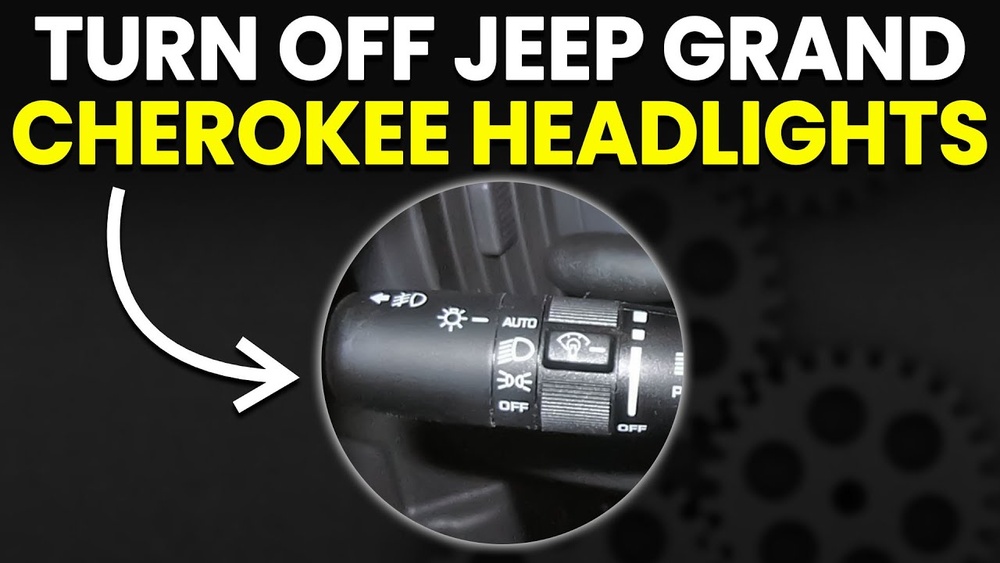
Most 2018 Grand Cherokees have an auto headlight feature. The headlight switch has several positions:
- AUTO: Lights turn on/off automatically based on outside light.
- OFF: Headlights are off, but in some markets, DRLs may stay on.
- PARK: Only parking lights are on.
- ON: Headlights stay on, no matter the light outside.
How To Turn Off Headlights Completely
- Locate the headlight control knob on the left side of the steering wheel.
- Turn the knob to the OFF position.
- If your Jeep is in “auto” mode, you may need to manually select OFF; otherwise, the system will override you when it gets dark.
- In some trims, DRLs may stay on even if you switch off the headlights. This is due to safety laws.
Non-obvious insight: If you are in “AUTO” mode and open the door, the headlights can stay on for a few seconds. Wait until the lights-off delay finishes or manually switch to “OFF”.
Daytime Running Lights (drls)
DRLs are designed to stay on while the vehicle is running. In the 2018 Grand Cherokee, you cannot easily turn them off from the switch. However, there are workarounds:
- Use the vehicle settings menu: On some trims, you can disable DRLs via the Uconnect touchscreen under “Settings” > “Lights” > “Daytime Running Lights.”
- Parking brake trick: Engaging the parking brake before starting the engine can turn off DRLs, but this is temporary and not practical for driving.
- Dealer programming: For complete control, a Jeep dealership can reprogram the system to allow DRLs to be turned off.
Non-obvious insight: Some states require DRLs to stay on for safety, so the option to turn them off may not be available in all vehicles.
Fog Lights
To turn off fog lights:
- Find the fog light button in the center of the headlight knob.
- Press the button to turn off the fog lights. The indicator light on the dashboard will turn off.
Fog lights only work when the headlights are on (not in DRL or parking mode).
Tail Lights
Tail lights usually follow the headlight setting. When headlights are off, tail lights are off.
If you use the parking lights, only the tail lights are on.
Turning Off Interior Lights
Interior lights include dome lights, map lights, and ambient lighting. These can turn on automatically when you open the door or manually with switches.
Dome And Map Lights
- Manual Control: Press the light itself or use the button near the overhead console.
- Door-Activated: Lights turn on when you open a door. To turn them off, close the door or use the “dome override” button.
Tip: If you want to keep interior lights off when opening the doors (for example, while camping), press and hold the dome light button until the lights turn off. This disables the automatic-on feature.
Ambient Lighting
Ambient lighting gives a soft glow at night. To adjust or turn off:
- Go to Uconnect touchscreen.
- Select “Controls” or “Settings.”
- Choose “Lights” and adjust the ambient lighting brightness or turn it off.
Ambient lighting will not drain the battery as much as dome lights but can be distracting at night.
Using The Uconnect System
The Uconnect system is more than just for music and navigation—it also controls many lighting options.
Disabling Automatic Lights
- On the main menu, choose “Settings.”
- Select “Lights.”
- Adjust features like auto high beams, DRLs, and ambient lighting.
- Some settings may be grayed out depending on your trim or legal requirements.
If you cannot find the option to disable a certain light, your Jeep may require dealer assistance.
Auto Lights Delay
The Uconnect menu allows you to set how long the headlights stay on after you exit the vehicle (0, 30, 60, 90 seconds). Setting this to zero ensures your lights turn off immediately.
Battery Saver And Safety Features
The Grand Cherokee has a battery saver system. If you leave lights on accidentally, the system will turn them off after a certain period to prevent battery drain. However, interior dome lights and some accessories may not be covered, so always check before leaving the vehicle.
Troubleshooting: When Lights Won’t Turn Off
Sometimes, lights stay on even after you follow all steps. Common causes include:
- Faulty door switches: The car thinks a door is open, so lights stay on.
- Settings locked by law: DRLs may not be switchable in your region.
- Aftermarket changes: Installing non-standard parts can confuse the lighting system.
- Software glitches: Try restarting the car or resetting the Uconnect system.
If problems persist, contact your Jeep dealer or check the owner’s manual for your specific trim.
Comparison Of Lighting Control Methods
Here’s a quick look at the different ways you can turn off each type of light:
| Light Type | Manual Switch | Uconnect Menu | Dealer Needed |
|---|---|---|---|
| Headlights | Yes | No | No |
| DRLs | No | Sometimes | Yes |
| Fog Lights | Yes | No | No |
| Interior Lights | Yes | Sometimes | No |
Real-world Scenarios
Let’s look at a few examples where turning off the lights is important:
- Drive-in Theater: You want complete darkness. Switch headlights to OFF and set the parking brake to disable DRLs (if possible). Turn off interior lights using the override button.
- Camping: Use the dome light override to keep interior lights off. Set headlights to OFF.
- Battery Preservation: If parked for a long time, double-check all lights are off and set the auto-delay to zero.
Tip: Always lock your Jeep when you leave. The system will double-check lights are off.
Common Mistakes To Avoid
- Forgetting to manually turn off dome lights, leading to a dead battery.
- Assuming DRLs can always be disabled from the switch—some require menu or dealer changes.
- Not checking all doors are closed, which keeps interior lights on.
How Do I Completely Turn Off All The Lights On My 2018 Jeep Grand Cherokee?
Turn the headlight control knob to OFF, make sure all doors are closed, and use the dome light override. For DRLs, check the Uconnect system or consult your dealer if you can’t turn them off.
Why Do My Headlights Stay On After I Turn Off The Car?
This is usually the headlight delay feature. You can adjust or disable it in the Uconnect system under “Settings” > “Lights” > “Headlight Off Delay.”
Can I Turn Off The Daytime Running Lights Permanently?
Sometimes. Some trims allow you to disable DRLs in the Uconnect menu.
Otherwise, a Jeep dealer can reprogram your system. Local laws may prevent this.
My Interior Lights Won’t Turn Off When Doors Are Closed. What Should I Check?
Check that all doors (including rear hatch) are fully closed. If lights stay on, check the dome light override button. If issues persist, a faulty door switch may be the problem.
Are There Any Risks To Disabling Automatic Lighting Features?
Yes. Disabling DRLs or auto headlights can reduce visibility and safety.
Some features are required by law. Always check local rules and consider safety before making changes.
For more about Jeep lighting systems, visit the official Jeep Owners page.
Managing the lighting on your 2018 Jeep Grand Cherokee is simple once you know where the controls are and how the different systems interact. Take a few minutes to try the steps above in your own vehicle. You’ll avoid common mistakes, keep your battery safe, and be ready for any situation where you need the lights off.