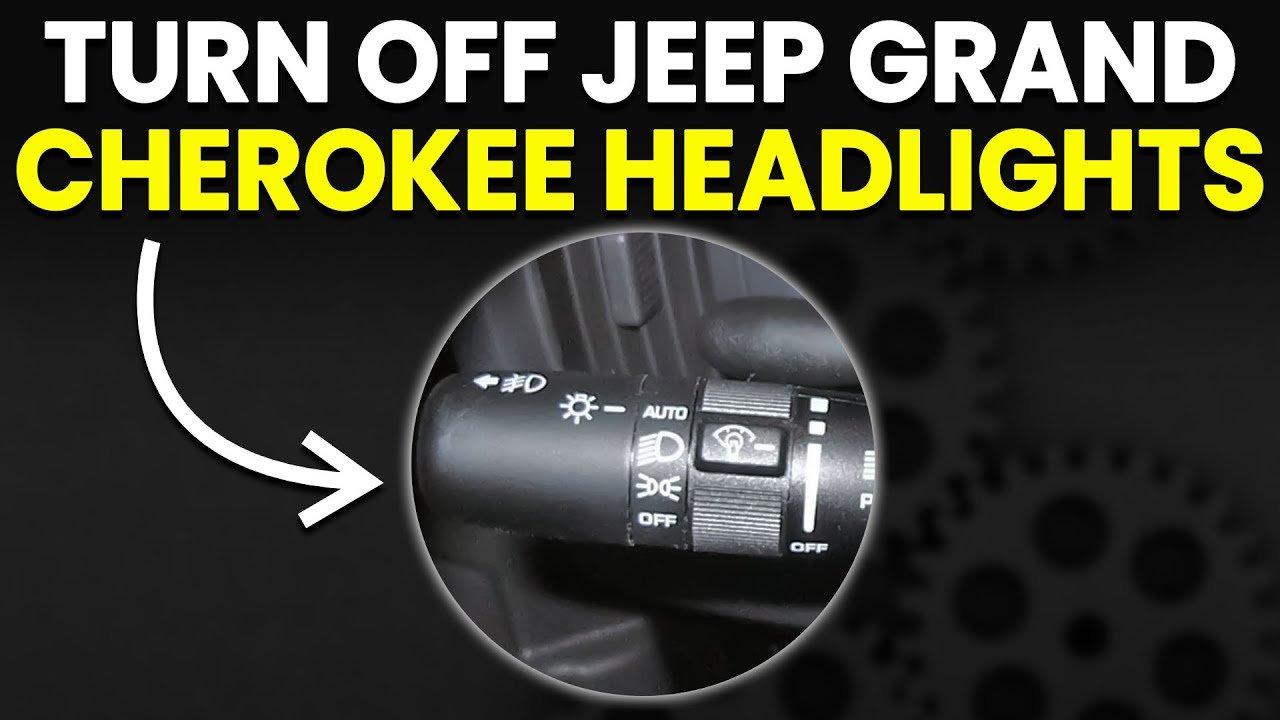
If you own a Jeep Grand Cherokee, you probably enjoy its rugged capability and modern features. But when it comes to the lights—headlights, interior dome lights, and running lights—many drivers find themselves confused. Maybe you want to turn off the headlights in a car wash, stop the dome light from staying on with the door open, or ensure you’re not draining your battery overnight. In this article, you’ll discover exactly how to turn off lights in a Jeep Grand Cherokee, covering all light types, model year differences, and even some hidden settings. Whether you drive an older model or the latest version, you’ll find clear steps and expert tips below.
Understanding Jeep Grand Cherokee Light Systems
Modern Jeep Grand Cherokees use advanced lighting technology. There are several types of lights you might want to turn off:
- Headlights (low and high beams)
- Daytime Running Lights (DRL)
- Fog lights
- Interior dome/cabin lights
- Cargo/trunk lights
- Ambient/mood lighting
Each system works a little differently, and Jeep has changed controls over the years. So, steps for a 2012 model may not work for a 2023 one.

Before adjusting, check your owner’s manual for diagrams and the exact layout. However, the techniques below cover most situations.
How To Turn Off Headlights
Headlights are the most used lights on your Jeep. Depending on the year and trim, your Grand Cherokee may have automatic or manual headlights.
Manual Headlights (older Models)
If your Jeep has a traditional headlight switch (usually a knob on the left dashboard):
- Locate the headlight control knob. It’s often left of the steering wheel.
- Turn the knob to the ‘O’ or ‘Off’ position. This disables the headlights.
- Check for ‘Auto’ mode. If set to ‘Auto,’ headlights may turn on when it’s dark, even if you don’t want them.
Pro tip: Some older models keep parking lights on unless you fully turn the knob to ‘Off.’ Make sure you see the headlight icon on your dashboard disappear.
Automatic Headlights (recent Models)
Newer Grand Cherokees use sensors to control lights. If your Jeep is from 2014 or newer, you likely have automatic headlights.
- Find the headlight knob or stalk.
- Look for the ‘A’ (auto) setting.
- Switch from ‘Auto’ to ‘Off.’
However, many modern Jeeps don’t let you turn off headlights when the engine is running for safety. If you need them off (like during a car wash):
- Engage the parking brake before starting the engine. This sometimes disables the DRL system.
- Open the driver’s door. In some models, this triggers a manual override.
- Check your Uconnect system for light settings.
Key Differences: Manual Vs. Automatic Headlights
To clarify the differences in control, see the comparison below:
| Feature | Manual Headlights (Older Models) | Automatic Headlights (Newer Models) |
|---|---|---|
| Physical ‘Off’ setting | Always present | Sometimes unavailable |
| Headlights stay on with engine | No (can turn off fully) | Yes (for safety) |
| Daytime Running Lights | Usually separate switch | Linked to auto system |
| Override options | Simple | May require extra steps |
Non-obvious insight: Even when set to ‘Off,’ some new Grand Cherokees keep DRLs on by default. This is required by law in many regions.
Turning Off Daytime Running Lights (drl)
Daytime Running Lights help other drivers see you during the day. But some owners want to turn them off to avoid attracting attention or when parked.
Steps For Most Models
- Put the gear in Park and set the parking brake.
- Turn the ignition to ON (don’t start the engine).
- Check your instrument cluster menu or Uconnect system.
- Use steering wheel buttons to navigate to ‘Settings.’
- Look for a ‘Lights’ or ‘DRL’ option.
- Select ‘Off’ if available.
If you can’t find a DRL menu setting:
- Set the parking brake before starting the engine. Many models automatically disable DRLs when the parking brake is engaged.
- Consult your owner’s manual for fuse box location; removing the DRL fuse is possible, but not recommended for most users.
Hidden tip: Disabling DRL may not be legal in all areas. Always check local laws before making changes.
How To Turn Off Interior Lights
The interior dome and map lights can be a source of frustration. Sometimes, they stay on when you close the door or when you want darkness to view the stars.
Manual Dome Light Switch
Most Grand Cherokees have a dome light button near the light itself:
- Press the dome light lens or button to cycle between ‘On,’ ‘Door,’ and ‘Off.’
- Set to ‘Off’ to keep lights off even when doors are open.
Using Dashboard Controls
Some trims feature a dashboard dimmer wheel:
- Find the dimmer wheel next to the headlight controls.
- Roll the wheel down to the lowest setting.
- Click past the detent (a slight ‘click’) to fully turn off all interior lights.
Uconnect System (newer Models)
For the latest Grand Cherokee models:
- Go to the Uconnect touchscreen.
- Navigate to ‘Vehicle Settings.’
- Find ‘Interior Lighting.’
- Adjust brightness or turn off dome/cargo lights.
Preventing Lights From Staying On
If interior lights stay on:
- Check all doors and the liftgate—a door sensor may be stuck.
- Inspect the dome light switch—sometimes it’s left in ‘On’ by mistake.
- Look for the ‘delay’ feature—interior lights may stay on for 30–60 seconds after closing the door.
Non-obvious insight: Rear cargo lights often have a separate switch. If your cargo light stays on, check the light lens inside the trunk area.
Turning Off Fog Lights And Ambient Lighting
Fog lights and ambient/mood lights add style but can be distracting or unnecessary.
Fog Lights
- Find the fog light button (usually on the headlight control stalk or a dashboard button).
- Press to turn off. The indicator on your dashboard should go off.
Some models disable fog lights automatically when you use high beams.
Ambient/mood Lighting
To adjust or turn off:
- Go to your Uconnect system (if equipped).
- Select ‘Settings’ > ‘Lights.’
- Adjust brightness or toggle ambient lighting off.
If your model has a manual wheel, roll it down to reduce or turn off ambient lighting.
Preventing Battery Drain: All Lights Off When Parked
Leaving any lights on can drain your battery. Modern Grand Cherokees often turn off all interior and exterior lights after a set period—even if you forget. But if you notice lights staying on:
- Check each switch (dome, cargo, fog, headlight).
- Use the dimmer wheel to force all interior lights off.
- Lock your vehicle—some lights turn off only when the Jeep is locked.
Example: If you park with a door slightly open, the dome light may stay on and drain the battery overnight.

Special Cases: Car Washes, Campsites, And Security
Sometimes you need all exterior lights off, such as in a car wash or when camping.
Car Wash
- Set the headlight switch to ‘Off.’
- Engage the parking brake before starting the engine to disable DRLs.
- If lights stay on, switch off the engine and use ‘Run’ mode only.
Campsite Or Security
- Use the dimmer wheel to turn off interior lights.
- Disable DRLs using the parking brake trick.
- Lock the Jeep to turn off entry/exit lights.
Common Problems And Troubleshooting
Even after following all steps, you may find lights won’t turn off. Common causes include:
- Faulty door sensors: If the car thinks a door is open, interior lights stay on.
- Light switch stuck: The dome light or headlight switch may be in the wrong position.
- Software glitches: Uconnect system may need a reset.
- Wiring issues: Rare, but possible in older or water-exposed vehicles.
Solution: Start by checking all switches, then consult your dealer if lights still won’t turn off.
Model Year Differences: What To Expect
The process can vary by model year. Here’s a simple comparison for reference:
| Model Year | Headlight Control | Interior Light Control | DRL Disable |
|---|---|---|---|
| 2010–2013 | Manual knob, full ‘Off’ | Physical switch, dimmer wheel | Fuse/pull, parking brake |
| 2014–2020 | Auto/manual, limited ‘Off’ | Dimmer wheel, basic Uconnect | Menu, parking brake |
| 2021–present | Mostly auto, safety override | Advanced Uconnect, dimmer wheel | Menu, not always possible |
Practical Tips For Owners
- Always check for physical switches before searching the menu. Sometimes a simple press disables a light.
- Use the parking brake as a quick way to disable DRLs.
- If in doubt, lock your Jeep. Most lights turn off automatically when the vehicle is locked.
- Don’t remove fuses unless you’re experienced. You may disable other systems accidentally.
- Consult your manual for exact instructions for your model year.
Example: The 2022 Grand Cherokee uses the Uconnect menu for most light settings, while the 2012 model relies on manual knobs and switches.
When To Visit A Mechanic
If your lights won’t turn off after trying these steps, it’s possible you have an electrical issue. Signs you should see a professional:
- Lights stay on for hours, draining your battery
- Dashboard warning lights appear
- Strange behavior after rain (possible water damage)
- Uconnect system won’t respond
A certified Jeep mechanic can run a diagnostic and fix stuck relays, bad switches, or software problems.
Frequently Asked Questions
Why Won’t My Jeep Grand Cherokee Headlights Turn Off?
This can happen if your Jeep has automatic headlights that don’t have a true ‘Off’ position. Newer models keep headlights or DRLs on for safety. Try engaging the parking brake before starting the engine or check your owner’s manual for other override options.
How Do I Turn Off The Interior Dome Light When The Door Is Open?
Most models let you press the dome light lens or nearby switch to set it to ‘Off. ‘ If your Jeep has a dimmer wheel, roll it all the way down past the click.
This should keep the interior light off, even with the door open.
Can I Permanently Disable Daytime Running Lights (drl)?
It’s possible on some older models by removing a fuse or changing a menu setting. However, in newer models, DRL may be required by law and can’t be fully disabled without dealer programming.
Check your local laws and manual before making changes.
Why Do My Lights Stay On After I Lock My Jeep?
Some Grand Cherokees have a 'lights stay on' or 'exit lighting' feature that keeps headlights and interior lights on for 30 90 seconds for safety and convenience. If they stay on longer, check for stuck door switches or a manual light left on.
Where Can I Find Official Jeep Instructions For My Model?
For the most accurate instructions, visit the official Jeep website or your owner’s manual. You can find digital versions and more tips at Jeep Owners Official Site.
Getting familiar with your Jeep Grand Cherokee’s light controls will make driving easier and help prevent battery drain or unwanted attention. With these steps, you’ll feel confident managing your vehicle’s lights in any situation.