Every Jeep owner knows how important a clear screen is while driving. Whether you’re using navigation, changing music, or checking vehicle info, a bright display makes everything easier. But sometimes, the Jeep screen feels too dim, especially in sunlight or after you’ve adjusted settings by mistake. If you’re struggling to see your Jeep’s display, you’re not alone. Let’s explore the steps to turn brightness up on your Jeep screen, understand common issues, and learn some helpful tips for a better driving experience.
Why Jeep Screen Brightness Matters
A bright and clear screen is more than a comfort—it’s a safety feature. Dim screens are hard to read, especially when you’re quickly glancing down while driving. This can distract you or force you to take your eyes off the road longer. Most newer Jeeps have touchscreens for Uconnect or other infotainment systems, which control everything from radio to climate. If the brightness is too low, you might miss important alerts or directions.
How To Increase Brightness On Jeep Screen
Most Jeep vehicles use the Uconnect system, but steps can vary slightly by model and year. Here’s how you can usually adjust brightness:
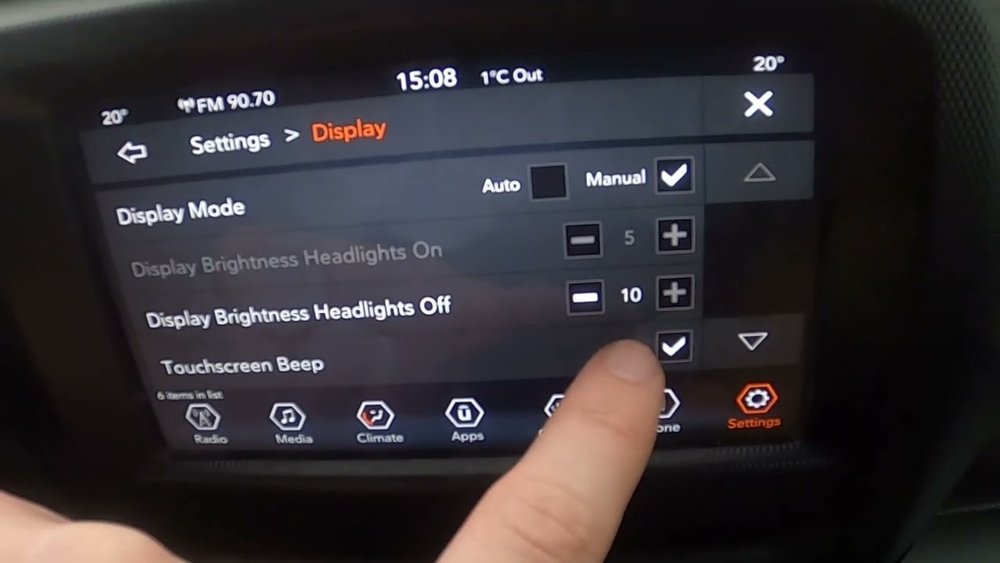
- Turn on your Jeep and make sure the infotainment system is active.
- Tap the Settings icon (usually a gear symbol) on the main menu.
- Find the Display or Brightness option.
- Use the slider or plus (+) and minus (–) buttons to adjust brightness higher.
- Many Jeeps let you adjust Daytime and Nighttime modes separately. Make sure you’re editing the right one.
If your Jeep uses physical buttons, look for a dial or button labeled with a sun or brightness symbol near the screen or dashboard.
Quick Comparison: Brightness Controls By Jeep Model
This table shows where to find brightness settings in popular Jeep models:
| Jeep Model | Screen System | Brightness Control Location |
|---|---|---|
| Wrangler (2018+) | Uconnect 4/5 | Settings > Display |
| Grand Cherokee (2022+) | Uconnect 5 | Settings > Display |
| Renegade (2019+) | Uconnect 4 | Settings > Display |
| Cherokee (2019+) | Uconnect 4 | Settings > Display |
If you don’t see these options, check your manual. Some older models require manual dimmer knobs on the dashboard.

Day And Night Modes Explained
Most modern Jeeps automatically switch between Day Mode and Night Mode. Day Mode is brighter, while Night Mode dims the screen to reduce glare in the dark. But sometimes, the system sets the wrong mode or doesn’t switch as expected.
You can override this in settings:
- Go to Settings > Display > Mode
- Choose Auto, Day, or Night.
If your screen is stuck in Night Mode during the day, switch to Day mode manually. This can instantly solve brightness issues.
Example: Uconnect 5 Brightness Settings
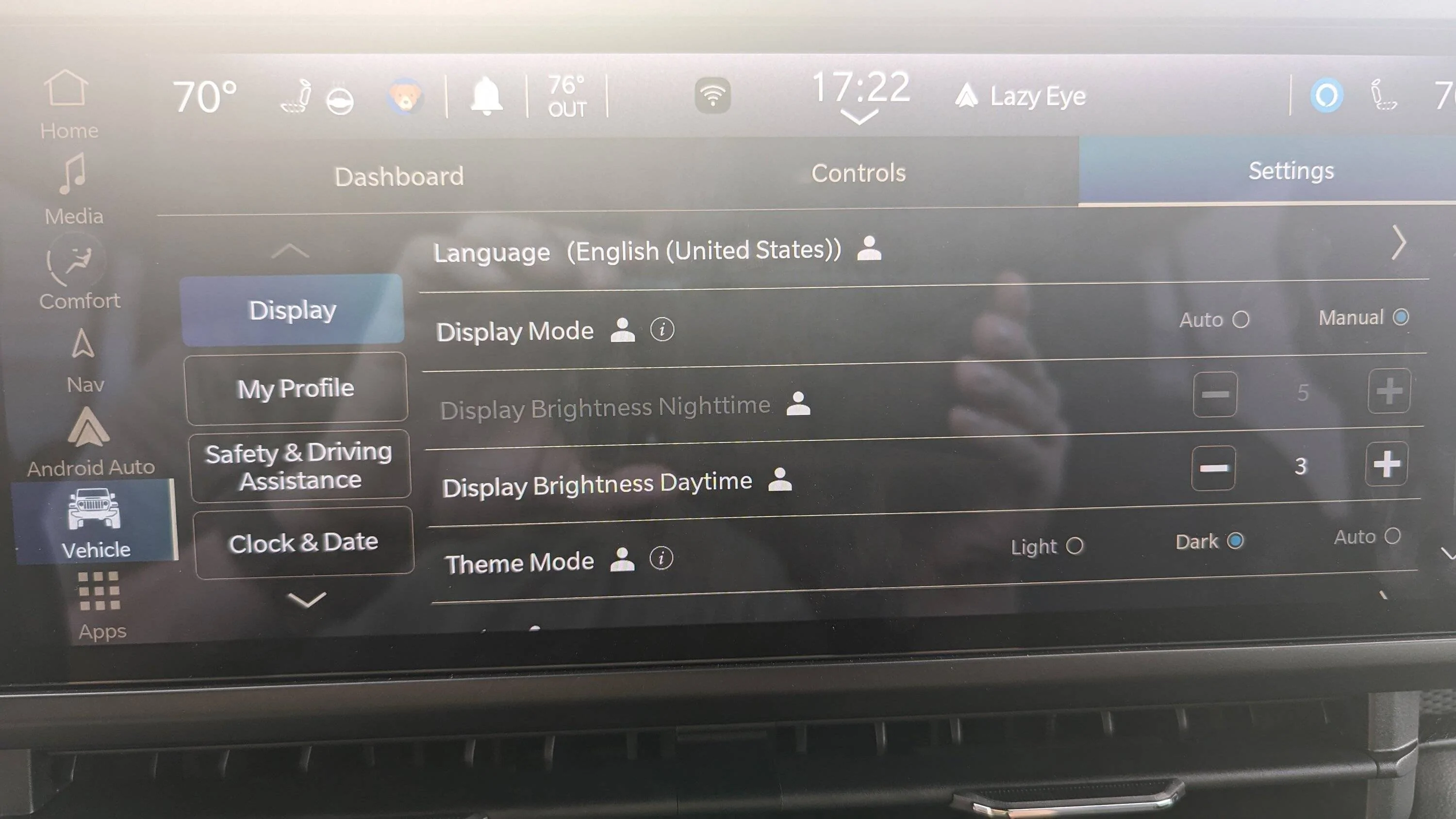
On a 2023 Grand Cherokee with Uconnect 5:
- Touch Vehicle on the home screen.
- Tap Settings.
- Go to Display.
- Adjust Brightness using the slider.
- Set Mode to Auto, Day, or Night as needed.
This gives full control over your display.
Common Problems And Solutions
Sometimes, adjusting brightness isn’t enough. Here are a few common problems and fixes:
- Screen Still Too Dim
- Check if the screen has a protective film or cover blocking light.
- Clean the screen with a soft cloth; fingerprints can reduce brightness.
- Brightness Changes Automatically
- The Auto mode uses light sensors. If blocked by objects or dust, the sensor may not work well.
- Try switching to manual Day/Night mode.
- Dashboard Dimmer Affects Screen
- Some Jeeps link dashboard and screen brightness. Adjust the dimmer wheel near the steering wheel.
- System Glitches
- Restart the infotainment system by turning the car off and on.
- If problems continue, do a factory reset in Settings (but remember, this erases custom settings).
Advanced Tips Most People Miss
Here are two useful tips even many owners overlook:
- Screen Calibration: Some Jeeps let you calibrate the touchscreen in the settings menu. This can improve touch accuracy if brightness controls are hard to use.
- Firmware Updates: Check for system software updates. New versions can fix brightness bugs or add better control. Visit your dealer or the official Jeep site for updates.
How Brightness Affects Visibility
Screen brightness isn’t just about comfort. It changes how you see maps, alerts, and rearview camera images.
In direct sunlight, even a small increase in brightness can make a big difference.
Here’s a quick look at how brightness levels affect visibility:
| Brightness Level | Visibility in Sunlight | Eye Comfort at Night |
|---|---|---|
| Low | Poor | Good |
| Medium | Fair | Fair |
| High | Excellent | Poor (can cause glare) |
Adjust your screen for the time of day. High brightness is best for sunlight, but lower it at night to avoid glare.
Mistakes To Avoid
- Forgetting Day/Night Modes: If you only change one mode, the screen may stay dim at certain times.
- Not Cleaning the Screen: Dirt and fingerprints can cut brightness by up to 20%.
- Ignoring Updates: Outdated software can cause many issues, including stuck brightness controls.
When To Visit The Dealer
If none of these steps work, your Jeep screen may have a hardware problem. Dim screens that don’t respond to settings could mean a backlight or wiring issue. It’s best to let a certified Jeep technician handle advanced repairs to avoid voiding your warranty. For more details, check the official Jeep website.

Frequently Asked Questions
How Do I Change The Jeep Screen Brightness Without Using The Touchscreen?
Look for a dimmer wheel or button near the dashboard. Turning it up usually increases both dash and screen brightness.
Why Does My Jeep Screen Get Dim When I Turn On Headlights?
Most Jeeps dim the screen when headlights are on to reduce glare. You can adjust or override this in the Display settings.
Can I Set Different Brightness For Day And Night?
Yes, go to Settings > Display and adjust Day and Night brightness separately. This helps keep the screen visible in all conditions.
What If The Brightness Setting Is Missing?
Your Jeep may need a software update, or the feature may not be available on older systems. Check your manual or visit your dealer.
Does Cleaning The Jeep Screen Really Make It Brighter?
Yes. Dust and fingerprints can block light.
Cleaning with a soft, dry cloth improves visibility and can make the screen look up to 20% brighter.
A clear, bright Jeep screen makes every drive safer and more enjoyable. Take a few minutes to adjust your settings, and you’ll notice the difference right away.


















