Syncing your Jeep garage door opener can make life much easier. With just one button, you can open or close your garage as you approach or leave home. Many new Jeep models come with a built-in system called HomeLink, designed for this purpose. But, the process to sync it can be confusing for first-timers. If you want step-by-step instructions, practical tips, and real examples, you’re in the right place.
Understanding Your Jeep’s Built-in Garage Door Opener
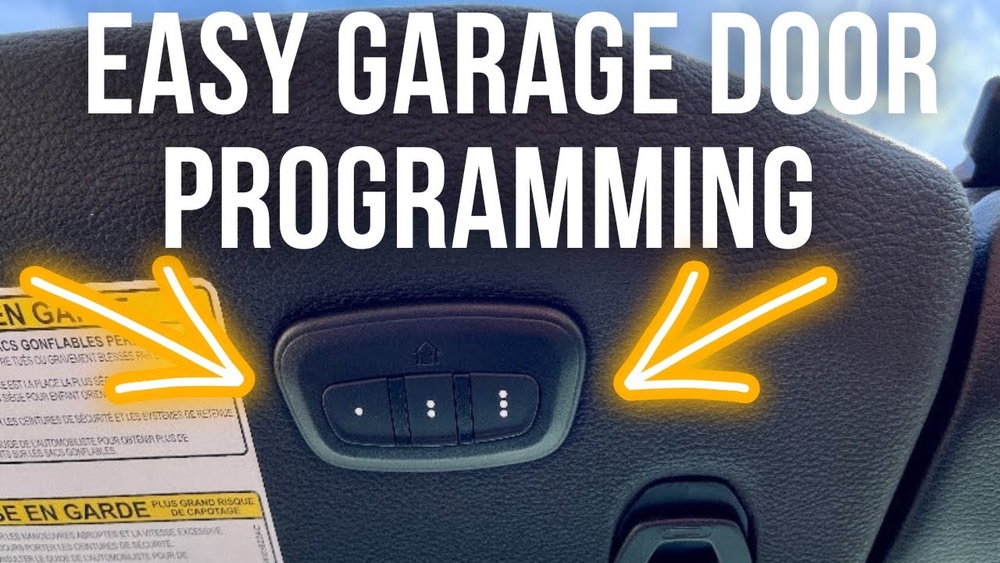
Most Jeep vehicles use the HomeLink system, which is usually located on the overhead console, sun visor, or mirror. This opener can control up to three garage doors or gates. Before you start syncing, it’s important to know:
- Your garage door opener must have a working remote.
- The opener in your Jeep supports both rolling code and fixed code garage systems.
- Some older garage systems may require a compatibility bridge.
Checking your garage opener’s manual can help avoid frustration later.
What You Need Before Syncing
To avoid interruptions, gather these items first:
- Jeep vehicle with HomeLink or similar system.
- Garage door remote (with fresh batteries).
- Access to the garage motor unit (often inside the garage ceiling).
- Another person (optional, but helpful for some steps).
Step-by-step Guide: How To Sync Jeep Garage Door Opener
Follow these steps to sync your Jeep’s garage door opener. The process works for most recent Jeep models like Grand Cherokee, Wrangler, Compass, or Gladiator.
1. Clear Any Previous Codes
It’s best to start fresh:
- Turn on your Jeep (ignition or engine running).
- Hold two outer HomeLink buttons until the indicator light changes from solid to blinking (about 20 seconds).
- Release the buttons. Previous codes are now erased.
- Hold your garage door remote about 1-3 inches from the HomeLink panel.
- Press and hold the button you want to program on HomeLink.
- At the same time, press and hold the button on your remote.
- Keep holding both until the HomeLink light changes from slow to rapid blinking (usually 20-30 seconds).
If the light does not blink rapidly, move the remote slightly or check the battery.
3. Sync With The Garage Door Opener (rolling Code Systems)
Most modern openers use a rolling code for security. This step “teaches” your garage system to trust your Jeep.
- Go to your garage motor unit (usually ceiling-mounted).
- Press the “Learn” or “Smart” button (often colored red, yellow, or purple). You have about 30 seconds to finish the next step.
- Return to your Jeep and press the HomeLink button you just programmed for 2 seconds, then release.
- Repeat the press-and-hold up to 3 times, until the garage door moves.
If your opener is fixed code (rare today), the sync is complete after Step 2.
4. Test The System
- Press the programmed HomeLink button in your Jeep.
- The garage door should move.
- If not, repeat step 3, making sure you press the correct HomeLink button.
5. Program Additional Doors (optional)
Repeat steps 2–4 for each extra door, using a different HomeLink button.
Common Problems And Solutions
Sometimes, syncing doesn’t work the first time. Here’s how to troubleshoot:
| Problem | Possible Cause | Solution |
|---|---|---|
| HomeLink light never blinks rapidly | Weak remote battery or too far | Replace battery, move remote closer |
| Garage door won’t move after sync | Skipped rolling code step | Repeat steps with “Learn” button |
| Only works near garage | Interference or low Jeep battery | Check for Wi-Fi devices, recharge battery |

Key Differences: Jeep Homelink Vs. Garage Remote
Understanding the difference helps you know what to expect:
| Feature | HomeLink (Jeep) | Standard Remote |
|---|---|---|
| Integration | Built-in | Handheld |
| Programming | Multi-step | One button |
| Number of doors | Up to 3 | Usually 1 |
| Battery needed | No (uses car power) | Yes |
Two Insights Most Jeep Owners Miss
- Garage openers with LED bulbs can sometimes block the HomeLink signal. If syncing fails, try replacing the bulb with an older style or a “HomeLink compatible” LED.
- If your Jeep was recently purchased used, the previous owner’s codes may still be stored. Always clear codes before syncing your own remote.

Practical Tips For A Smooth Sync
- Make sure your garage door is closed before starting.
- Some garage openers “lock out” wireless programming for a few minutes after several failed attempts. Wait 5–10 minutes and try again if this happens.
- Write down which HomeLink button controls which door to avoid confusion later.
When To Seek Professional Help
If you’ve tried everything and still can’t sync, consider:
- Your garage opener may be too old for HomeLink (pre-1996 units).
- Some aftermarket openers need a HomeLink compatibility bridge.
- Jeep dealerships or garage door professionals can usually sync systems quickly.
For more details on the HomeLink system, you can visit the official HomeLink site.

Frequently Asked Questions
How Do I Know If My Jeep Has Homelink?
Look for three small buttons on the overhead console, sun visor, or rearview mirror. The HomeLink logo (a house icon) is often nearby.
Can I Sync My Jeep To A Gate Opener?
Yes, most gate openers use similar frequencies. Just follow the same steps with the gate remote.
What If My Garage Door Opener Is Very Old?
Older openers may not work with HomeLink. You can buy a compatibility bridge or use the original remote.
Yes. Press and hold the desired HomeLink button until the light blinks, then release. This removes only that code.
Is Syncing Safe For My Garage Security?
Yes. Rolling code technology changes your code every use, making it very secure.
Syncing your Jeep’s garage door opener takes a few minutes and offers real convenience every day. With the right steps and a little patience, you can enjoy seamless entry and exit from your home—no more lost remotes or last-minute scrambling.