If you drive a 2021 Jeep Grand Cherokee, you know comfort matters, especially on long trips. One feature that stands out is the memory seat system. This system remembers your favorite seat and mirror positions, so you can get back to the perfect setup with just a button press. But if you’ve never set it before—or if you’re worried about making mistakes—you’re not alone. Many owners miss a few important steps or don’t realize what the system can do. This guide walks you through everything, step by step, to help you get the most from your memory seats.
Understanding The Memory Seat System
The 2021 Jeep Grand Cherokee comes with a memory seat feature on many trims, usually when the vehicle has power seats and mirrors. This system can store two unique driver settings. Each setting controls the driver’s seat position, the side mirrors, and, in some models, the steering column. This means you and another driver can always have your own personalized driving position, ready in seconds.
Preparing To Set Your Memory Seats
Before you start, make sure:
- The vehicle is in Park (P)
- The ignition is in the ON/RUN position or with the engine running
- All doors are closed
If you skip any of these, the memory buttons may not work.
Step-by-step: Setting Memory Seats In A 2021 Jeep Grand Cherokee
1. Adjust The Driver’s Seat
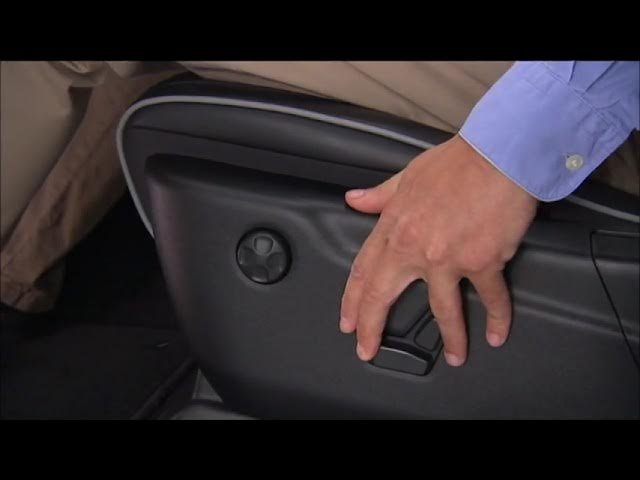
Use the power seat controls on the side of the seat. Move the seat forward or back, tilt the seat cushion, and adjust the seatback angle.
Take your time to find the most comfortable position.
2. Set The Side Mirrors
Use the mirror control switch on the driver’s door panel. Adjust both the left and right mirrors for best visibility.
Make sure you can see a bit of your own car for reference.
3. Adjust The Steering Column (if Equipped)
Some models have a power-adjustable steering wheel. Use the switch under the steering column to move it up, down, in, or out.
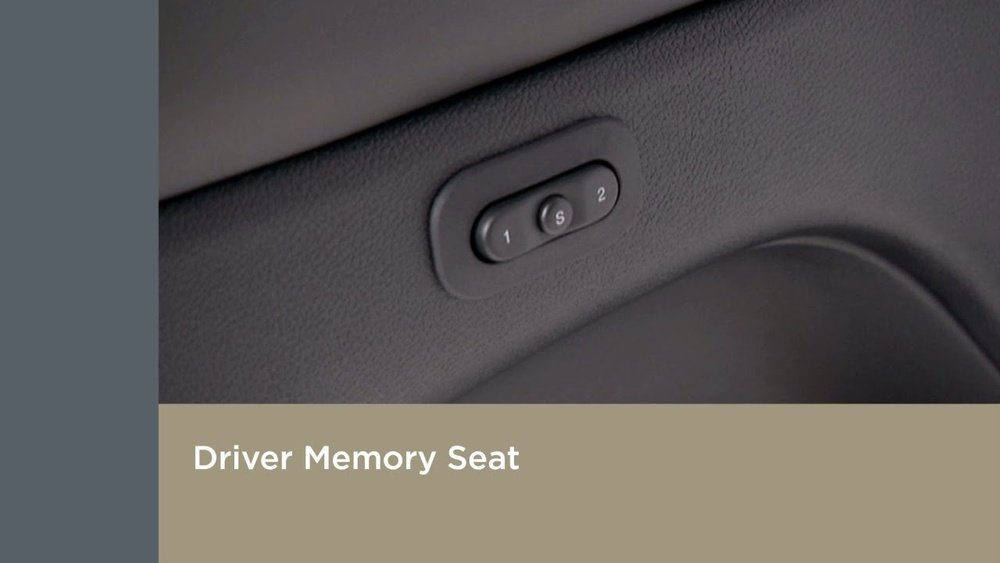
You’ll find the memory seat buttons on the driver’s door panel, marked “SET”, “1”, and “2”. Press and release the SET button. You should hear a chime or see a light flash.
5. Save The Position
Within five seconds of pressing SET, press and hold either memory button “1” or “2” until you hear a second chime. This saves your current seat and mirror position to that number.
6. Repeat For A Second Driver
If another driver wants their own settings, repeat steps 1 5 and use the other button.
Example Scenario
Suppose two people drive the Jeep: Alex and Jordan. Alex prefers the seat higher and closer to the wheel, while Jordan likes it lower and farther back. Alex sets and saves position “1.” Jordan adjusts everything for their comfort and saves it to “2.” Now, each can recall their settings instantly.
How To Recall Your Saved Memory Seat
To use your saved memory position, just press and hold the “1” or “2” button on the door. The seat and mirrors will move automatically.
If your Jeep has key fobs linked to memory, unlocking the car with your fob can also recall your settings.
Linking Memory Seats To Key Fobs
Some 2021 Grand Cherokees let you link memory settings to each key fob. This way, the car recognizes who is driving as soon as you unlock with your fob.
To link:
- Save your seat/mirror position to “1” or “2.”
- Press the “SET” button.
- Press and hold the memory button (“1” or “2”) and the “Unlock” button on your key fob at the same time.
- Wait for a chime or a light flash—this means the fob is now linked.
Now, when you unlock the Jeep with your key fob, your memory position automatically recalls.
Common Mistakes And How To Avoid Them
- Forgetting to be in Park: The memory system only works when the car is in Park.
- Not pressing buttons in the right order: If you wait too long between pressing “SET” and your memory button, the system resets.
- Not linking fobs correctly: Hold both buttons together until you hear a confirmation sound.

Here’s how each button works in your 2021 Jeep Grand Cherokee:
| Button | Function | Chime/Light |
|---|---|---|
| SET | Start saving a new position | Chime or light flash |
| 1 or 2 | Save/recall memory position | Chime on successful save |
| SET + 1/2 + Key Fob | Link memory to key fob | Chime or flash |
Comparing Memory Seat Features: Jeep Vs. Other Brands
Not all SUVs offer the same memory features. Here’s a comparison with other popular models:
| Model | Seats + Mirrors | Steering Column | Key Fob Link |
|---|---|---|---|
| Jeep Grand Cherokee | Yes | Yes (some trims) | Yes |
| Toyota Highlander | Yes | No | Yes |
| Ford Explorer | Yes | No | No |
Extra Tips For Getting The Most From Memory Seats
- Re-save after adjustments: If you change your seat or mirrors, re-save your position. The system does not auto-update.
- Keep keys separate: If drivers swap fobs, memory recall may not match the person driving.
- Use for valet parking: Set a “neutral” position for valet drivers, so they don’t change your settings.
Many drivers don’t realize that memory seat systems can also help with resale value. Buyers appreciate a car that remembers them literally!
Frequently Asked Questions
How Many Memory Positions Can I Save In My 2021 Jeep Grand Cherokee?
You can save two unique memory positions. Each saves your seat, mirrors, and, if equipped, steering column settings.
Does The Memory Seat System Work For The Passenger Seat?
No, the memory seat system only controls the driver’s seat and mirrors. The passenger seat is manual or has power controls but no memory.
Can I Use The Memory Seats While Driving?
No, you must be in Park with the ignition ON. This is for safety, as moving seats while driving can be distracting or dangerous.
Check that the vehicle is in Park and the ignition is ON. Also, make sure doors are closed. If problems continue, your dealer can help.
Where Can I Find More Details About My Jeep’s Memory Seat System?
The official Jeep Grand Cherokee owner’s manual is a great resource. You can also visit Jeep’s official website for guides and troubleshooting.
Setting memory seats in your 2021 Jeep Grand Cherokee is simple once you know the steps. This feature saves time and improves comfort every day.
Try it out, and you’ll wonder how you ever managed without it.