When your Jeep screen stops working, it can feel frustrating. The screen controls many important features, including navigation, audio, and climate. You might see a black screen, frozen display, or glitchy graphics. These issues can happen in popular Jeep models like the Grand Cherokee, Wrangler, or Compass.
Learning how to restart the Jeep screen can help you fix these problems quickly, without a trip to the dealership.
Restarting your Jeep’s screen is not difficult. Most drivers can do it themselves in just a few minutes.
However, some steps are not obvious, and missing them can mean the problem stays unresolved. This article shows you the clear steps for different Jeep screen types, explains what to expect, and shares tips that even many owners overlook.
Jeep Screen Types And Common Issues
Jeep vehicles use several infotainment systems. The most common are Uconnect systems, which come in different versions (Uconnect 4, Uconnect 5). Knowing your screen type helps you choose the right restart method.
| Model | Screen Type | Common Issues |
|---|---|---|
| Grand Cherokee | Uconnect 4/5 | Frozen screen, slow response |
| Wrangler | Uconnect 4 | Black screen, audio failure |
| Compass | Uconnect 5 | Bluetooth glitch, touchscreen lag |
Frozen screens and unresponsive touch are the most reported problems. Sometimes, the screen goes black or keeps rebooting. These issues often happen after software updates, extreme temperatures, or connecting new devices.
How To Restart Jeep Screen
There are a few ways to restart your Jeep screen. The process depends on your model and the Uconnect version.
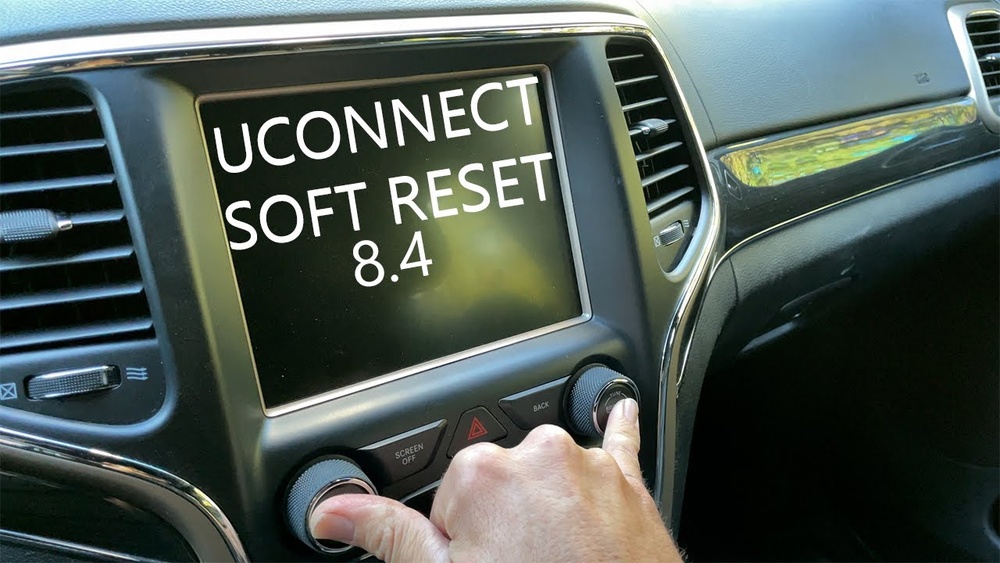
Soft Reset (most Models)
A soft reset is the easiest way to restart the screen. It does not erase your settings or data.
- Make sure your Jeep is in Park and the engine is running.
- Press and hold both the Volume and Tune buttons at the same time.
- Keep holding for about 10 seconds.
- The screen should go dark, then restart with the Jeep logo.
This method works for most Jeep vehicles made after 2017. If it does not help, try a different reset.
Hard Reset (advanced)
A hard reset is more powerful. It can fix problems the soft reset cannot, but you may lose some settings.
- Turn off your Jeep and open the driver’s door.
- Wait until the screen turns off completely (about 60 seconds).
- Close the door and start the engine.
- If the issue continues, disconnect the car battery for 5–10 minutes, then reconnect.
Disconnecting the battery resets the screen and other electronics. Always use caution if unsure, ask a mechanic.
Uconnect 5 Factory Reset
Newer Jeep models with Uconnect 5 have a built-in factory reset option.
- Go to Settings on the screen.
- Select System.
- Tap Factory Reset.
- Confirm the reset.
This will erase personal data, paired devices, and preferences.
| Reset Method | Time Needed | Data Loss |
|---|---|---|
| Soft Reset | 1 min | No |
| Hard Reset | 10 min | Possible |
| Factory Reset | 5 min | Yes |

Important Tips And Common Mistakes
Many Jeep owners make mistakes when trying to restart their screens. Here are some tips to avoid trouble:
- Always check if your vehicle is in Park before restarting.
- Do not use excessive force on the buttons.
- Avoid disconnecting the battery if your Jeep is still under warranty.
- After a reset, check your Bluetooth and navigation settings—they may need re-pairing.
- If your screen fails often, update your Uconnect software from the Jeep website.
A non-obvious insight: Sometimes, screen issues are caused by connected devices (phones, USB drives). Remove them before restarting. Another tip: Extreme cold or heat can affect the screen. Let the cabin reach a normal temperature, then restart.
When To Seek Professional Help
If your Jeep screen does not restart after following these steps, it could be a hardware issue. Signs of deeper problems include:
- Screen stays black with no logo after reset
- Buttons do not respond at all
- Frequent reboots even after resets
In these cases, contact your Jeep dealer or a certified auto electrician. Do not try to open the screen yourself, as this may void your warranty.

Comparing Jeep Screen Restart With Other Brands
Jeep screens are not the only ones that freeze. Here is how Jeep compares to other brands:
| Brand | Restart Method | Success Rate |
|---|---|---|
| Jeep (Uconnect) | Button hold, battery disconnect | 80% |
| Ford (SYNC) | Menu reset, fuse pull | 75% |
| Toyota (Entune) | Manual restart, settings reset | 70% |
Jeep’s restart methods are simple and work most of the time. However, if software updates are pending, issues may return. Always check for updates after a restart.
Preventing Future Screen Problems
Restarting your screen fixes most issues, but prevention is better.
- Keep your Uconnect software updated.
- Avoid using cheap USB cables or devices.
- Clean the screen gently—dust and moisture can cause glitches.
- Do not leave your Jeep in direct sunlight for long periods.
These habits reduce the chance of screen freezes and keep your system running smoothly.
Frequently Asked Questions
How Often Should I Restart My Jeep Screen?
Most drivers only need to restart the screen when problems appear. Regular restarts are not required unless the system is slow or glitchy.
Will Restarting The Screen Erase My Saved Settings?
A soft reset will not erase settings. A hard reset or factory reset may delete personal data, paired devices, and preferences.
What If My Jeep Screen Does Not Respond After Restart?
If your screen stays black or frozen after several restarts, it may have a hardware problem. Contact your Jeep dealer for diagnosis.
Can I Restart The Jeep Screen While Driving?
It is not recommended. Always restart the screen while your vehicle is in Park for safety and best results.
Where Can I Find Updates For My Jeep’s Uconnect System?
Visit the official Uconnect website for updates and support: Uconnect Software Update.
Restarting your Jeep screen is a simple but important skill. It helps you fix common issues and avoid costly trips to the dealer.
By following these steps and tips, you can keep your Jeep’s infotainment system working smoothly and confidently handle any screen problems that arise.


















