If your Jeep Grand Cherokee radio stops working or acts strangely, you’re not alone. Many Jeep owners find themselves searching for ways to reset their radio after glitches, battery changes, or software freezes. A simple reset often solves problems like a frozen display, missing sound, or Bluetooth pairing failures. In this guide, you’ll learn how to reset the radio in your Jeep Grand Cherokee—no technical experience needed.
When Should You Reset Your Radio?
A radio reset can solve many issues, but it’s important to know when it’s the right step. Here are situations where a reset is helpful:
- The radio won’t turn on
- The touchscreen is unresponsive
- Preset stations are missing
- Bluetooth won’t connect
- The display freezes or lags
- After a battery replacement
Sometimes, these problems are caused by simple software bugs. Resetting is a safe first step before seeking costly repairs.
Types Of Radio Systems In Jeep Grand Cherokee
Jeep Grand Cherokees come with different radio systems, depending on the model year and trim. The two most common systems are:
| Radio System | Model Years | Main Features |
|---|---|---|
| Uconnect 4/4C/4C NAV | 2018–2023 | Touchscreen, Bluetooth, Apple CarPlay, Android Auto |
| Uconnect 3 | 2014–2017 | Basic touchscreen, limited connectivity |
| Legacy/Non-Uconnect | Before 2014 | Buttons, simple displays, no touchscreen |
Knowing your radio type helps you choose the right reset method. If you’re unsure, check your owner’s manual or look for the Uconnect label on your radio.

How To Reset Your Jeep Grand Cherokee Radio
Resetting your radio is usually quick and safe. The method depends on the radio model and your Jeep’s year.
Soft Reset (most Common)
This is the easiest way and works for most Uconnect touchscreens:
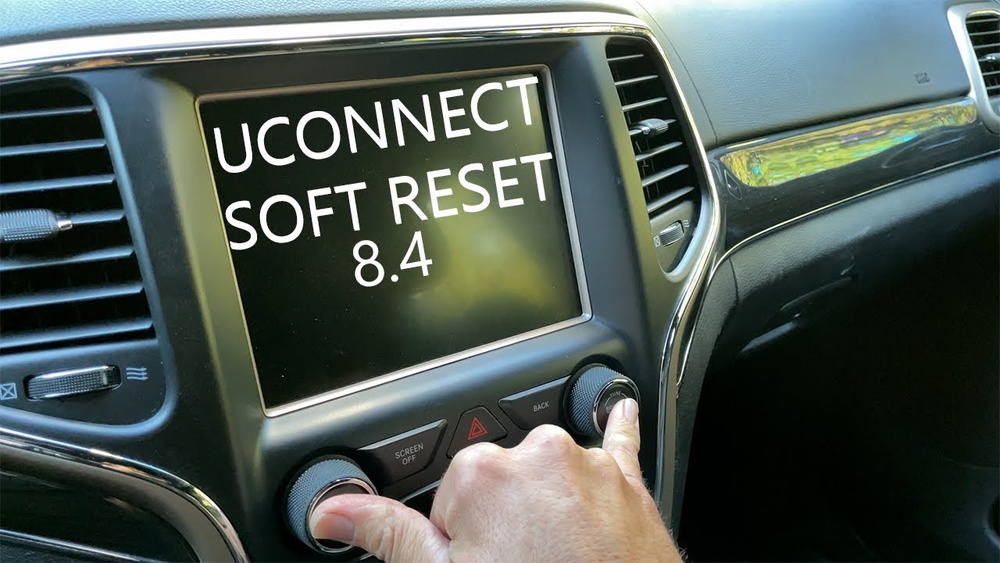
- Turn the ignition to “Run” (engine on or in accessory mode).
- Press and hold both the volume knob and tune/browse knob at the same time.
- Hold for about 10–20 seconds until the screen goes black.
- Release both buttons. The system will reboot and show the Jeep logo.
This soft reset does not erase your presets or personal data.
Hard Reset (factory Reset)
Use this only if the soft reset doesn’t work, or if you want to erase all personal settings:
- Go to the radio’s main menu.
- Tap Settings.
- Scroll to Restore Factory Settings or Reset.
- Follow the on-screen prompts to confirm.
- Wait for the system to reboot.
This will erase all presets, paired devices, and personal data. You’ll need to set up your radio again.
Disconnecting The Battery
If the touchscreen is frozen and won’t respond, you can reset the radio by disconnecting the vehicle’s battery:
- Turn off the Jeep and remove the keys.
- Open the hood and locate the negative battery terminal.
- Use a wrench to loosen and disconnect the negative cable for 10–15 minutes.
- Reconnect the cable tightly.
- Start the vehicle. The radio should reset.
Important: This method can clear other memory settings in your vehicle, such as clock and seat positions.
What To Expect After A Reset
After resetting, you may notice:
- The Jeep logo appears on startup
- System asks you to set language and preferences
- Bluetooth devices need to be paired again (after factory reset)
- Radio presets may be lost (factory reset or battery disconnect)
Here’s a quick look at what different resets do:
| Reset Method | Data Lost? | Best For |
|---|---|---|
| Soft Reset | No | Frozen screen, minor bugs |
| Factory Reset | Yes (all user data) | Major errors, selling vehicle |
| Battery Disconnect | Possible (clock, settings) | Total freeze, no touchscreen |

Common Issues And Troubleshooting
Most radio problems are solved with a reset, but sometimes, deeper issues are at play. Here’s how to spot them:
- No power at all: Check radio fuse and battery connections.
- Sound but no display: Screen may be faulty; consider professional help.
- Frequent freezing: Software update may be needed—Jeep dealers can help.
- Stuck on Jeep logo: Try a hard reset or battery disconnect. If it persists, the radio may need service.
A good tip: Always try the soft reset first. It’s safe and often solves common bugs.
Extra Tips For A Smooth Reset
- Update your Uconnect system if possible. Updates fix many bugs.
- Keep a list of your radio presets and Bluetooth devices. You’ll need them after a factory reset.
- If your radio is still under warranty, avoid disconnecting the battery without checking with your dealer.
- If you experience repeated problems, ask your dealer about potential recalls or technical service bulletins.
Many Jeep owners miss that a simple software update or even a low car battery can cause radio glitches. Keeping your battery and infotainment system updated can prevent many headaches.
Frequently Asked Questions
Why Does My Jeep Grand Cherokee Radio Freeze?
A frozen radio is often caused by software bugs, outdated firmware, or low battery voltage. Try a soft reset first. If freezing happens often, consider checking for updates or contacting your dealer.
Will Resetting My Radio Erase My Settings?
A soft reset does not erase settings or presets. A factory reset will erase all personal data, including Bluetooth pairings and saved stations.
What Should I Do If My Radio Still Doesn’t Work After A Reset?
If your radio is still unresponsive, check the fuse and battery connections. If both are fine, the radio hardware may be faulty. Visit a Jeep service center for diagnosis.
Can I Update My Radio Software Myself?
Some Uconnect updates are available for download from Jeep’s official website. For detailed steps, check your owner’s manual or visit Jeep’s official update page.
Is It Safe To Disconnect The Battery For A Reset?
It’s generally safe, but disconnecting the battery can reset other vehicle systems like clocks and seats. Always follow safety steps and reconnect cables securely.
Resetting your radio can quickly solve many Jeep Grand Cherokee audio and display problems. By following these steps, you’ll spend less time at the dealership and more time enjoying your drive. If all else fails, professional help is just a call away.



















