If your 2023 Jeep Grand Cherokee’s screen starts glitching, freezing, or going blank, it can be frustrating. The Uconnect infotainment system controls everything from navigation to music, so problems can interrupt your drive. Luckily, you don’t always need a trip to the dealership.
Resetting the screen often solves minor bugs and gets you back on the road quickly. In this article, you’ll learn step-by-step how to reset your Jeep Grand Cherokee’s screen, why issues happen, and what to do if a reset doesn’t work.
Why Reset The Jeep Grand Cherokee Screen?
Modern Jeeps use the Uconnect system—a powerful touchscreen that’s like a computer for your car. It manages climate, Bluetooth, apps, and more. Like any tech, it can sometimes freeze, lag, or stop responding to touch.
Common reasons you might need a reset:
- The screen is frozen or stuck on one menu.
- Audio or navigation doesn’t work.
- The screen goes blank or black.
- Bluetooth won’t connect.
- The system restarts randomly.
Resetting often fixes these problems quickly, much like rebooting your smartphone or laptop.
Quick Soft Reset: The Fastest Method
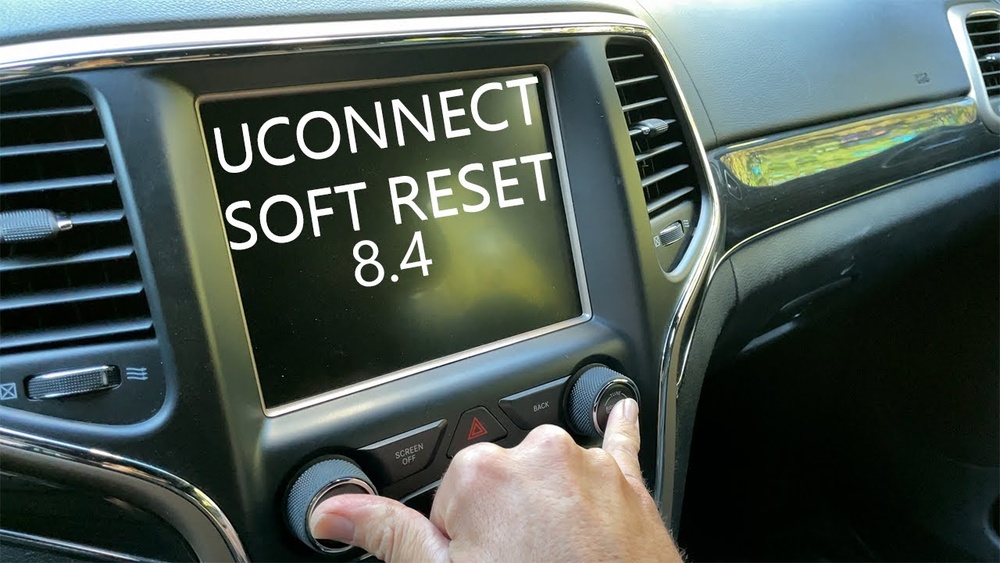
For most screen issues, a soft reset is all you need. This won’t erase your saved data, like radio presets or paired phones.
- Turn the ignition ON (engine running or in ACC mode).
- Find the volume and tune knobs on the screen.
- Press and hold both knobs at the same time.
- Keep holding for about 10-20 seconds.
- When the screen goes black, release both knobs.
- The Jeep logo will appear as the system restarts.
This process is safe and works for minor glitches. You’ll often see the system work normally once it powers back up.
Full Factory Reset: When To Use It
Sometimes, problems are more serious. If your screen has ongoing issues, a factory reset (also called a hard reset) might be needed. This will erase personal settings, so use it only as a last resort.
Steps for a factory reset:
- Tap the Settings icon on your Uconnect screen.
- Scroll down to System Information or System.
- Select Reset.
- Tap Restore Settings to Default or Factory Reset.
- Confirm your choice and wait as the system reboots.
All customizations will be lost. Your system returns to the way it was when new.
Common Problems And Reset Outcomes
Here’s a comparison of issues and which reset is most likely to help:
| Problem | Soft Reset | Factory Reset |
|---|---|---|
| Frozen/Unresponsive Screen | ✔️ | ✔️ |
| Bluetooth Pairing Issues | ✔️ | ✔️ |
| Navigation Crashes | ✔️ | ✔️ |
| System Restarts Itself | ❌ | ✔️ |
| Screen is Totally Black | ✔️ | ❌ |
A soft reset fixes most everyday bugs. Only use a factory reset if you’re dealing with deeper system failures.

When The Screen Won’t Reset
If your Jeep Grand Cherokee screen stays black or won’t respond even after trying both resets, the problem might be hardware-related. This can include a loose cable, a blown fuse, or an issue with the display itself.
- Check your owner’s manual for fuse box location and instructions.
- Try turning the car off, waiting 10 minutes, and restarting.
- If the screen is still dead, contact your Jeep dealer for professional help.
Uconnect Updates And Why They Matter
Jeep regularly releases Uconnect updates to fix bugs and add features. Sometimes, a screen problem means your software is outdated. You can check for updates in your Settings menu or by visiting the official Jeep website.
Here’s how Uconnect update methods compare:
| Update Method | How It Works | Time Needed |
|---|---|---|
| Over-the-Air (OTA) | Automatic via cellular/Wi-Fi | Few minutes to 1 hour |
| USB Drive | Download update, install via USB | 30–60 minutes |
| Dealer Visit | Technician updates system | 1–2 hours |
Always ensure your system is up to date to avoid recurring issues.
Two Key Insights Most Jeep Owners Miss
- Updates can prevent problems: Many owners don’t realize that regular Uconnect updates can stop issues before they start. If you reset often, check for updates—you may fix things permanently.
- Accessory electronics can cause glitches: Devices like aftermarket chargers or dash cams sometimes interfere with the Uconnect system. If you notice problems, unplug these accessories and see if the issue improves.
Practical Tips For A Smooth Reset
- Always park safely before resetting the screen.
- Write down important radio stations or settings before a factory reset.
- After a reset, wait a minute for all features (like Bluetooth) to reconnect.
- If you see warning messages after a reset, don’t ignore them—sometimes, they signal a bigger problem.
When To Call A Professional
Not every screen problem can be fixed by a reset. If you notice burning smells, flickering lights, or other electrical issues, get expert help. Persistent problems after resets may mean you need a hardware repair or replacement.
For deeper technical details, the official Jeep Uconnect support page is a trusted resource.
Frequently Asked Questions
How Often Can I Reset The Jeep Grand Cherokee Screen?
You can perform a soft reset as often as needed. It’s safe and does not harm the system. Only use a factory reset if problems keep coming back.
Will A Reset Erase My Maps, Apps, Or Phone Contacts?
A soft reset does not erase your data. A factory reset returns the system to original settings and will erase saved Bluetooth devices, radio stations, and customizations, but not built-in maps.
What If The Screen Freezes During Driving?
If the screen freezes, it won’t affect driving safety features. Pull over safely before attempting a reset. Never try to reset the system while driving.
Can I Reset The Screen Without The Car Key?
No, you need the ignition in ACC or ON mode to reset the Uconnect screen. The system requires power to reboot.
In most 2023 Grand Cherokees, the reset uses the volume and tune knobs below the screen. Steering wheel buttons do not reset the main display.
Resetting your Jeep Grand Cherokee screen is usually quick and easy. With these steps, you’ll solve common problems and keep your Uconnect system running smoothly. If issues continue, don’t hesitate to seek help from a Jeep specialist.