Losing power in your Jeep key fob can be frustrating. When your remote stops working, unlocking doors or starting your vehicle may become impossible.
Luckily, replacing the Jeep key battery is a quick and simple process you can do at home. No special skills or expensive equipment are needed.
This guide walks you through every step, explains the different Jeep key fob types, and highlights common mistakes to avoid.

Understanding Your Jeep Key Fob
Jeep vehicles come with different types of key fobs, depending on the model and year. Knowing your key fob type helps you buy the correct battery and follow the right steps.
Most Jeep models use one of these key fob types:
- Standard Key Fob (no push start)
- Smart Key Fob (with push start)
- Flip Key Fob
Here’s a quick comparison of common Jeep key fobs and their typical battery types:
| Jeep Model/Year | Key Fob Type | Battery Type |
|---|---|---|
| Jeep Wrangler (2018+) | Smart Key Fob | CR2450 |
| Jeep Grand Cherokee (2015+) | Smart Key Fob | CR2032 |
| Jeep Cherokee (2014+) | Standard Key Fob | CR2032 |
| Jeep Renegade (2015+) | Flip Key Fob | CR2032 |
Tip: Check your owner’s manual or open your fob to confirm the battery type before buying.
Tools And Supplies Needed
You won’t need many tools to replace your Jeep key battery. Prepare the following:
- New coin cell battery (usually CR2032 or CR2450)
- Small flathead screwdriver or a coin
- Clean cloth (optional)
Avoid using knives or sharp tools, as they can damage the plastic housing.
Step-by-step Guide To Replacing The Battery
Follow these steps to change your Jeep key fob battery. The process is similar for most models but may vary slightly.
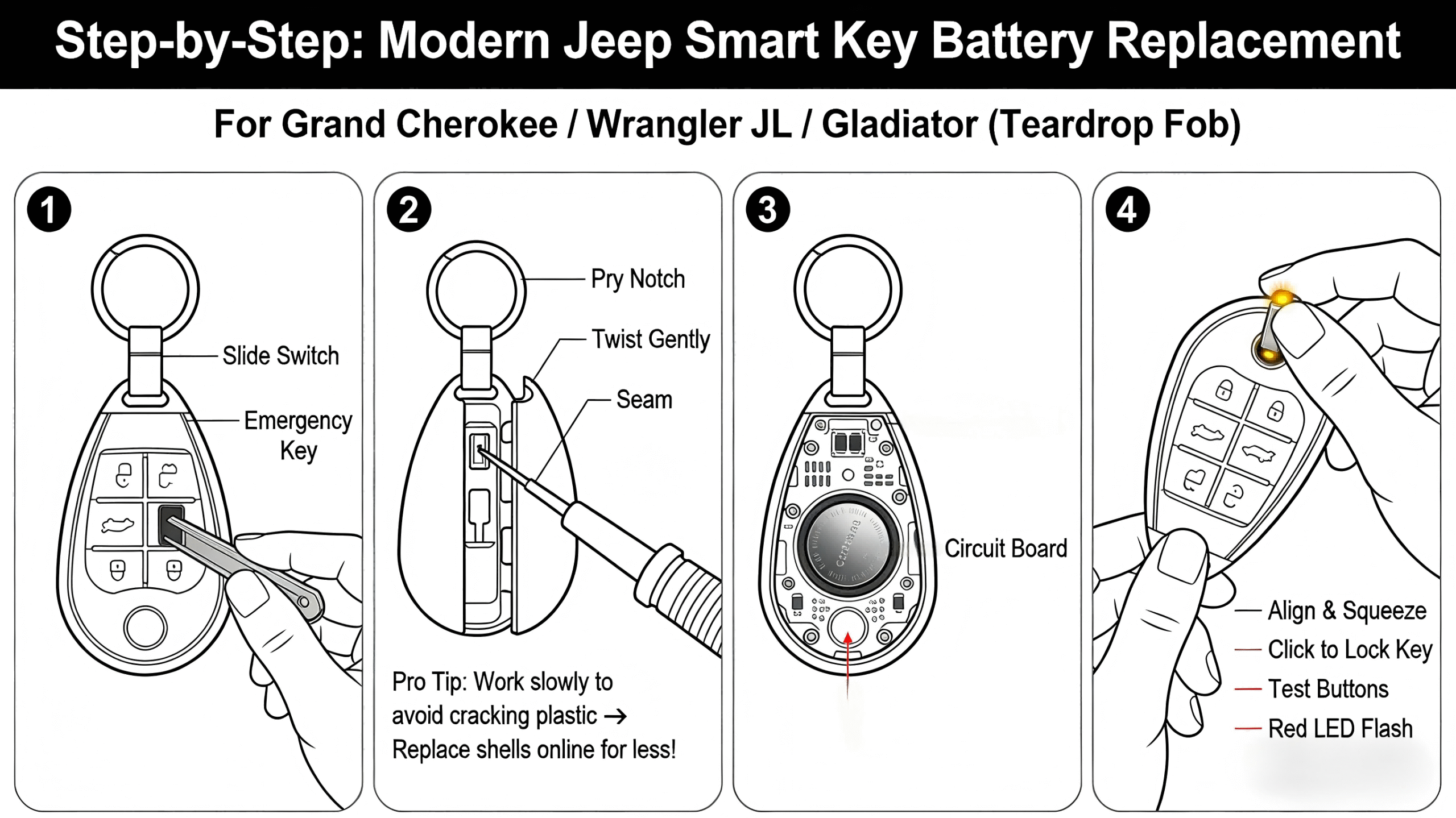
1. Open The Key Fob
Locate the seam where the two halves of the fob meet. Insert the flathead screwdriver or coin into the slot and gently twist.
The fob should pop open. For flip keys, you may need to remove a small screw first.
2. Remove The Old Battery
Carefully lift the old battery out using your tool or fingernail. Note the battery’s orientation—usually, the positive (+) side faces up.
3. Insert The New Battery
Place the new battery in the same position as the old one. Press it down until it sits firmly. Ensure the contacts touch the battery surface.
4. Reassemble The Fob
Align the two halves and press them together until you hear a click. If your fob has a screw, replace it securely.
5. Test The Key Fob
Stand near your Jeep and press any button. The lights should flash or the doors should unlock.
If not, check if the battery is seated correctly.
Here’s a side-by-side look at the estimated time required for different Jeep key fobs:
| Key Fob Type | Difficulty | Estimated Time |
|---|---|---|
| Standard Key Fob | Easy | 2-3 minutes |
| Smart Key Fob | Easy | 3-4 minutes |
| Flip Key Fob | Moderate | 4-5 minutes |
Common Problems And Solutions
Sometimes, even after changing the battery, the key fob does not work. Here are some troubleshooting tips:
- Battery not installed correctly: Double-check the orientation.
- Contacts are dirty or bent: Clean with a cloth and gently adjust.
- Wrong battery type: Confirm the model and battery size.
- Key fob is damaged: If the fob was dropped in water or is cracked, it may need replacement.
One mistake many owners make is forcing the fob open. Excessive force can break the plastic or damage internal parts. Always use gentle pressure.

Tips For Success
- Use a quality battery (well-known brands last longer).
- Keep the spare battery in your glove box if you travel a lot.
- If the buttons are sticky or slow, clean around them with a dry cloth before reassembly.
- Avoid touching the new battery with bare hands. Oils from your skin can reduce battery life.
When To Seek Professional Help
If your key fob still doesn’t work after replacing the battery, visit your Jeep dealer or a trusted locksmith. Sometimes, fobs lose programming or suffer from internal faults.
Professionals can diagnose and fix these problems. Replacing the battery yourself does not affect your car’s warranty.
Here’s a comparison of DIY vs professional replacement:
| Method | Cost | Time | Best For |
|---|---|---|---|
| DIY Battery Change | $2–$10 | 2–5 min | Most owners |
| Professional Service | $20–$50 | 15–30 min | Damaged fobs, lost programming |
Frequently Asked Questions
What Battery Does My Jeep Key Fob Use?
Most Jeep key fobs use a CR2032 or CR2450 coin cell battery. Always check your owner’s manual or the battery itself to confirm.
How Do I Know If My Jeep Key Fob Battery Is Low?
If your fob works only at close range, responds slowly, or stops working, the battery is likely low. Some Jeeps display a key fob battery low warning on the dashboard.
Will I Lose Programming If I Replace The Battery?
No, changing the battery does not erase your fob’s programming. Your Jeep will still recognize the key after battery replacement.
Can I Use Any Brand Of Battery?
It’s best to use a trusted battery brand like Energizer, Duracell, or Panasonic for longer life and better reliability. Cheap batteries may fail sooner.
Where Can I Find More Information?
For detailed information about Jeep key fobs, visit the official Remote Keyless System page on Wikipedia.
Replacing your Jeep key battery is a simple and cost-effective task. With the right tools and a few minutes of your time, you can restore your remote’s full function and avoid dealership costs.
Taking care of your key fob ensures easy access to your vehicle and peace of mind on the road.


















