Getting the most from your Jeep Commander’s 4-wheel drive system can be the difference between smooth driving and getting stuck off-road. Many drivers feel unsure about using all the modes correctly—especially since the Commander has a few options, each designed for a specific type of terrain or driving situation.
If you want to protect your vehicle and enjoy more confident adventures, understanding how to engage and use the 4WD system is essential. This guide explains exactly how to put your Jeep Commander into 4-wheel drive, what each mode does, and how to avoid common mistakes.
Understanding Jeep Commander’s 4wd System
The Jeep Commander usually comes with one of two 4WD systems: Quadra-Trac II or Quadra-Drive II. Both are advanced, but the main controls and options are similar. These systems offer different 4WD modes, allowing you to switch depending on road conditions. Knowing which mode to use—and how to engage it—protects your drivetrain and keeps you safe.

Many beginners think 4WD should be used all the time. That’s not true.
Use 4WD only when needed, as using it on dry pavement can cause wear or damage. Also, never switch between certain modes while moving, unless your manual says it’s safe.
Always check your vehicle’s manual for the exact procedure, but the steps below cover the standard process for most Jeep Commander models.
The Four Main 4wd Modes
The Jeep Commander offers four main 4WD modes:
- 2WD (Two-Wheel Drive)
- 4WD AUTO (Automatic Four-Wheel Drive)
- 4WD LOW (Low Range Four-Wheel Drive)
- 4WD LOCK (Locked Four-Wheel Drive)
Each mode serves a specific purpose. Let’s look at each one, how to activate it, and when to use it.
1. 2wd (two-wheel Drive)
2WD sends power only to the rear wheels. This mode is best for dry, paved roads and everyday driving. It improves fuel economy and reduces wear on your 4WD components.
How to use 2WD:
- Make sure the 4WD mode selector is set to “2WD.”
- Usually, this means the lever or switch is in the default position.
When to use 2WD:
- Dry highways
- City streets
- Any situation where extra traction isn’t needed
Tip: Only switch to 4WD when you feel wheel slip or when the road conditions change.
2. 4wd Auto (automatic Four-wheel Drive)
4WD AUTO is the most flexible mode. The system automatically decides when to send power to all four wheels. If the rear wheels start to slip, the front wheels engage. This is perfect for changing weather or mixed road surfaces.
How to engage 4WD AUTO:
- Turn the mode selector to “4WD AUTO.” On many Commanders, this can be done while moving, as long as you’re driving straight and below 55 mph.
- Watch for the 4WD indicator light to confirm the mode change.
When to use 4WD AUTO:
- Wet or icy roads
- Loose gravel or dirt
- Rainy or unpredictable weather
Example: If you start on dry pavement but see snow ahead, 4WD AUTO will automatically adjust as needed.
Non-obvious insight: Some drivers think 4WD AUTO uses more gas. In most situations, the system stays in 2WD until it senses slip, so the fuel impact is often small.
3. 4wd Low (low Range Four-wheel Drive)
4WD LOW is for serious off-road conditions. It multiplies engine torque to help you crawl over rocks, deep mud, or steep hills at low speeds. Never use 4WD LOW for normal driving or at high speeds.
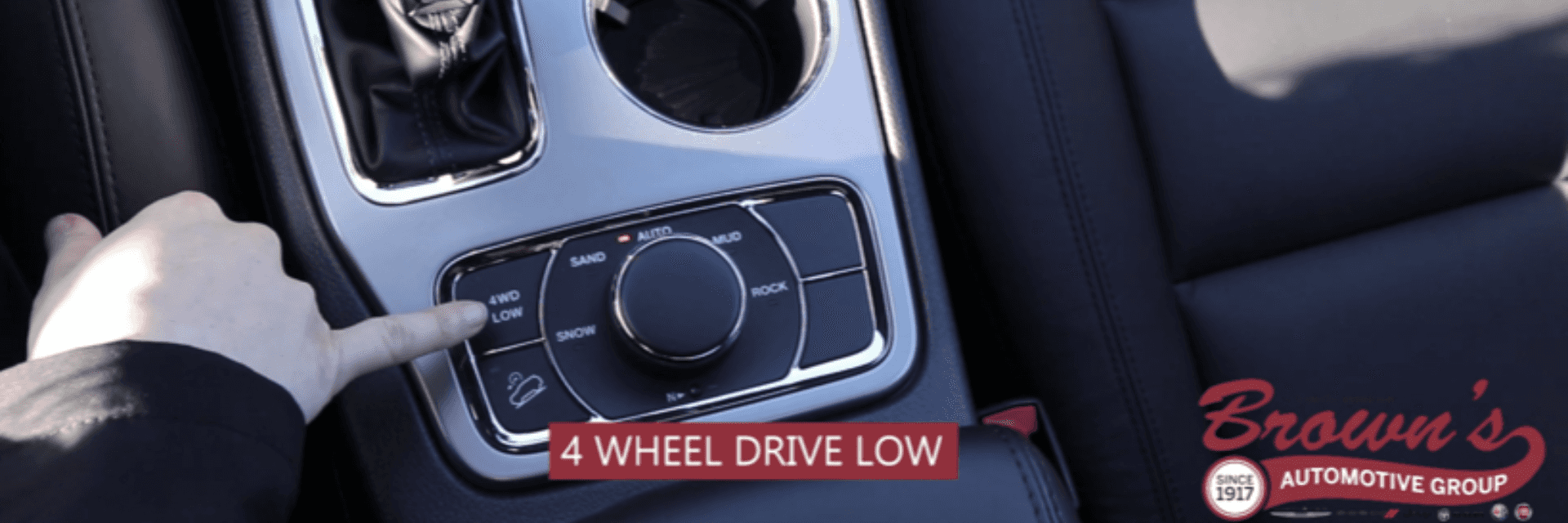
How to engage 4WD LOW:
- Bring the vehicle to a complete stop.
- Shift the transmission into Neutral (N).
- Push down and move the 4WD lever or turn the knob to “4WD LOW.”
- Wait for the 4WD LOW indicator light to appear.
- Shift back to Drive (D) or Reverse (R).
When to use 4WD LOW:
- Deep sand or snow
- Climbing or descending steep hills
- Rock crawling
- Getting out of deep mud
Important: Never shift into or out of 4WD LOW while moving. This can damage the transfer case.
Non-obvious insight: 4WD LOW is not just for more power—it also gives you better control at slow speeds. It’s great for tricky maneuvers, like backing up a trailer on rough ground.
4. 4wd Lock (locked Four-wheel Drive)
4WD LOCK splits power equally between the front and rear wheels. This mode is for tough traction situations where you need extra grip on all wheels, but not as much as 4WD LOW.
How to engage 4WD LOCK:
- Slow down to under 40 mph.
- Turn the dial or move the lever to “4WD LOCK.” In many models, you can do this while moving slowly.
- The 4WD LOCK light will appear on your dashboard.
When to use 4WD LOCK:
- Deep snow
- Muddy roads
- Off-road trails with loose surfaces
Tip: Once you return to better traction, switch back to 2WD or 4WD AUTO to prevent drivetrain strain.
Common mistake: Some drivers forget to disengage 4WD LOCK after leaving slippery conditions. This can cause “driveline binding,” making turning hard and possibly damaging your Jeep.
Step-by-step: How To Switch Between 4wd Modes
Switching between these modes is simple, but you must follow the steps carefully to avoid damage. Here’s a quick guide for the Jeep Commander.
Switching From 2wd To 4wd Auto Or 4wd Lock
- Slow Down: Reduce speed below 55 mph (for AUTO) or 40 mph (for LOCK).
- Turn Selector: Move the switch or lever to your chosen mode.
- Check Indicator: Wait for the dashboard light to confirm the change.
- Drive Normally: The system will adjust power as needed.
Switching To 4wd Low
- Stop Completely: Vehicle must not be moving.
- Shift to Neutral: Put the transmission in N.
- Select 4WD LOW: Push and move the lever, or turn the dial, to “4WD LOW.”
- Confirm Engagement: Wait for the 4WD LOW light.
- Return to Drive or Reverse: Now you can move the vehicle.
Going Back To 2wd
- For AUTO and LOCK, just switch back at low speed.
- For 4WD LOW, stop, shift to Neutral, and move the selector back to AUTO or 2WD.
Extra tip: If the light blinks and won’t stop, shift back to Neutral and try again. Don’t force the shifter.
Comparing The 4wd Modes
Here’s a quick way to see the differences between each mode:
| Mode | Best For | Speed Limit | How to Engage |
|---|---|---|---|
| 2WD | Normal roads | No limit | Switch lever to 2WD |
| 4WD AUTO | Changing conditions | Up to 55 mph | Switch lever to AUTO (can be moving) |
| 4WD LOCK | Slippery off-road | Up to 40 mph | Switch lever to LOCK (slow speed) |
| 4WD LOW | Serious off-road | Very low speeds | Stop, shift to Neutral, then engage LOW |
Common Mistakes To Avoid
Many new Jeep Commander owners make the same errors. Here’s what to watch out for:
- Using 4WD on dry pavement: This can cause drivetrain damage and make turning hard.
- Shifting into 4WD LOW while moving: Always stop first and shift to Neutral.
- Not disengaging 4WD LOCK or LOW: Leaving these on after leaving tough terrain can wear out your vehicle quickly.
- Ignoring warning lights: If the 4WD indicator flashes or stays on, check your manual or get help.
Pro tip: Practice switching modes in a safe area before you need them. This helps you act quickly and safely if you get stuck.
Real-world Scenarios
Let’s look at examples to help you choose the right mode.
- Driving on a wet highway: Use 4WD AUTO. It will send power to all wheels only if you slip.
- Trail with rocks and steep climbs: Shift to 4WD LOW. You’ll have more control and torque.
- Parking in deep snow: 4WD LOCK helps you get moving without spinning the wheels.
Jeep Commander 4wd System Maintenance
Keeping your 4WD system working well is just as important as knowing how to use it. Here’s what you need to do:
- Check transfer case fluid every 30,000 miles or as recommended.
- Listen for unusual noises when switching modes.
- Inspect tires regularly. Uneven wear can affect 4WD performance.
- Use the system occasionally. Even if you don’t need 4WD often, engaging it sometimes keeps parts lubricated.
Quick Comparison: Jeep Commander Vs. Other Jeep 4wd Systems
How does the Commander’s system compare to others in the Jeep family? See below:
| Model | 4WD System | Low Range | Auto Mode |
|---|---|---|---|
| Commander | Quadra-Trac II/Quadra-Drive II | Yes | Yes |
| Grand Cherokee | Quadra-Drive II | Yes | Yes |
| Wrangler | Command-Trac/Rock-Trac | Yes | No (manual select) |
| Cherokee | Active Drive I/II | Optional | Yes |
Extra Tips For Off-roading
- Lower tire pressure slightly for deep sand or snow. This increases grip.
- Carry a recovery kit (tow strap, shovel, gloves) when going off-road.
- Know your limits: Even with 4WD, avoid deep water or soft mud if unsure.
Advanced insight: If you have Quadra-Drive II, the system uses electronic limited-slip differentials. This means power can go to just one wheel if the others slip—giving you even more traction.
Where To Learn More
For more details about your specific model and transfer case, check your owner’s manual or visit the official Jeep website. You’ll find up-to-date guides and videos, plus maintenance schedules.

Frequently Asked Questions
How Do I Know If My Jeep Commander Is In 4wd?
Check the dashboard indicator lights. When you switch modes, the correct 4WD light (AUTO, LOCK, or LOW) should appear. If it blinks, wait until it stays solid. If no light appears, the mode may not have engaged correctly.
Can I Switch To 4wd While Driving?
Yes, you can switch between 2WD, 4WD AUTO, and 4WD LOCK while driving at low speeds (usually under 55 mph for AUTO and 40 mph for LOCK). For 4WD LOW, always stop and shift the transmission to Neutral before switching.
Is It Okay To Use 4wd All The Time?
No. Using 4WD on dry pavement can cause extra wear and “binding” in your drivetrain. Use 4WD only when you need extra traction—like on snow, ice, mud, or rocks.
What Should I Do If My 4wd System Is Not Working?
First, check if you followed the correct steps. If the indicator light keeps blinking or you hear grinding noises, stop and consult your manual. Sometimes, a simple reset (like shifting to Neutral and trying again) works. If not, have a mechanic inspect your transfer case and 4WD components.
How Often Should I Service My 4wd System?
Follow your owner’s manual—most recommend checking the transfer case fluid every 30,000 miles. Also, use the system a few times each year, even if you don’t need it, to keep everything working smoothly.
Getting the most from your Jeep Commander’s 4WD is about using the right mode at the right time. With the right knowledge, you’ll get better performance, avoid costly damage, and enjoy your driving adventures—whether you’re on the highway or far from the beaten path.