Pairing your phone with your Jeep Grand Cherokee unlocks hands-free calling, music streaming, and navigation right from your dashboard. Today’s vehicles make this process simple, but the steps can still be confusing especially if you’re new to the Jeep Uconnect system.
Whether you have a brand-new model or a slightly older one, this guide will help you connect your device quickly and avoid common mistakes.
Why Pair Your Phone?
Pairing your smartphone is more than just convenience. It boosts safety by allowing you to keep your hands on the wheel. With Bluetooth connectivity, you can answer calls, use voice assistants, and stream music without distraction. Many Jeep owners don’t realize that a paired phone can also update emergency contacts and provide real-time traffic data.

Preparing Your Jeep And Phone
Before you start, make sure your Jeep Grand Cherokee is parked safely. Turn on the ignition and your infotainment system. On your phone, check that Bluetooth is enabled. If you have multiple previously paired devices, disconnect them to avoid confusion.
Quick Device Compatibility Table
Some features depend on your Jeep’s model year and the Uconnect version. Here’s a simple overview:
| Model Year | Uconnect Version | Supports Apple CarPlay/Android Auto |
|---|---|---|
| 2014-2016 | Uconnect 8.4 | No |
| 2017-2020 | Uconnect 4/4C | Yes |
| 2021-Present | Uconnect 5 | Yes (Wireless) |
Knowing your system helps you understand which features will work with your device.
Step-by-step: How To Pair Your Phone
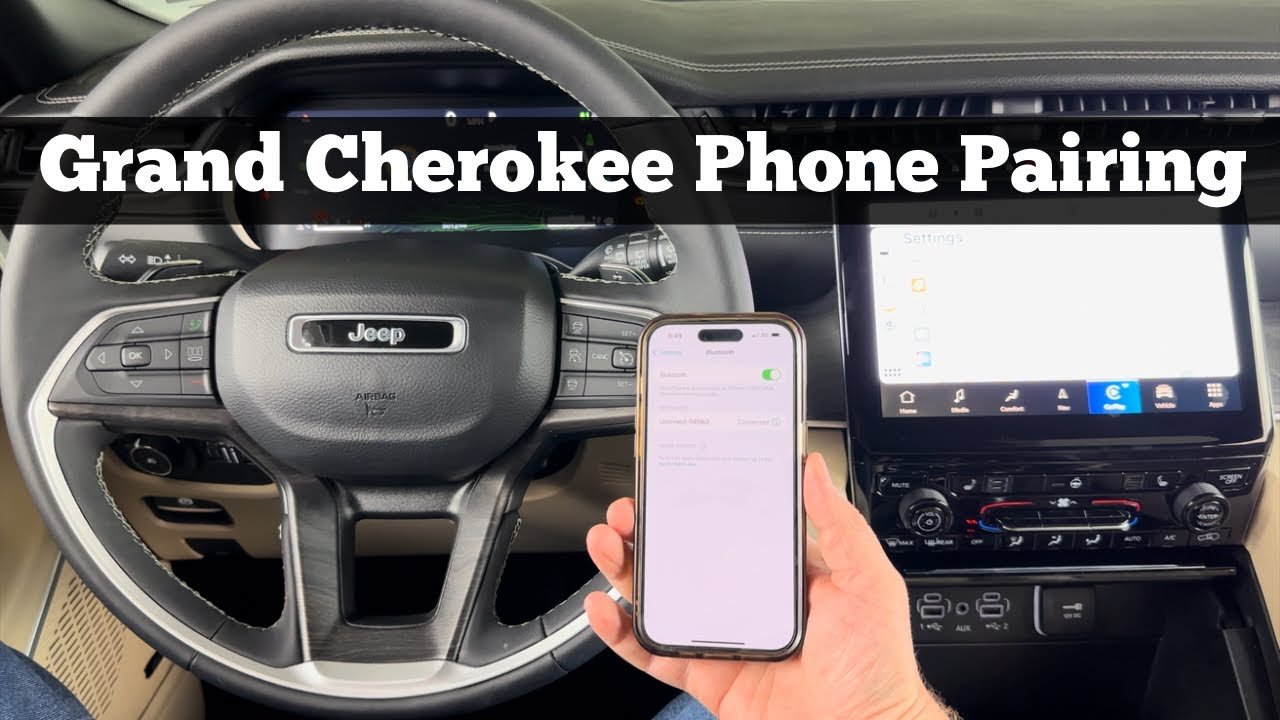
Let’s walk through the pairing process. These steps work for most Jeep Grand Cherokees from 2014 onward.
1. Activate Bluetooth On Your Phone
Go to your phone’s settings and toggle Bluetooth on. Make your phone visible to other devices.
On your Jeep’s touchscreen, tap the “Phone” or “Media” button. If this is your first device, the system will prompt you to add a phone.
3. Begin Pairing
Select “Add Device” or “Pair a Phone. ” Uconnect will start searching for nearby devices.
4. Select Your Jeep On Your Phone
Your phone will show a list of available devices. Look for “Uconnect” or your Jeep’s name, then tap it.
5. Confirm The Passkey
Both your phone and the car display a code. Make sure they match, then confirm on both screens.
6. Allow Permissions
Grant access for contacts and messages if you want full hands-free features.
7. Finish And Test
The system will confirm the pairing. Try making a call or playing music to check the connection.
Common Pairing Problems Table
Sometimes, things don’t work the first time. Here’s a quick reference for common issues:
| Problem | Possible Cause | Solution |
|---|---|---|
| Device not found | Bluetooth off, too many devices | Enable Bluetooth, remove old devices |
| Pairing fails | Incorrect passkey, outdated software | Confirm passkey, update Uconnect/phone |
| No audio | Media not selected, volume low | Select audio source, adjust volume |
Helpful Tips For A Smooth Connection
- Restart both your phone and the Uconnect system if pairing doesn’t work right away.
- Remove old devices from the Uconnect menu if you reach the maximum device limit (usually 5-7).
- For wireless CarPlay or Android Auto, make sure your phone supports these features and follow prompts after pairing.
- Keep your phone’s software updated. Jeep releases Uconnect updates regularly, which can solve connection bugs.
- If you switch phones often, name your device clearly (e.g., “John’s iPhone”) to avoid mix-ups.
Many owners miss that a poor-quality charging cable can also cause problems with wired connections. Use the original or a certified cable for best results.
Advanced Features After Pairing
Once you’re connected, you can use voice commands, stream music, and get text message alerts. Newer Grand Cherokees support wireless Apple CarPlay and Android Auto, so you don’t need to plug in your phone every time.
You can also set your Jeep to automatically connect to your preferred device every time you start the car. This is especially helpful if more than one person drives the vehicle.
To change the default device, go to the Uconnect Bluetooth menu and select “Make Favorite.
”
Some advanced Jeep models offer a “Do Not Disturb” mode, which silences notifications while driving. This keeps you focused and reduces distractions on the road.
Troubleshooting Tips
If things aren’t working, try these steps:
- Delete and re-pair: Remove the Jeep from your phone’s Bluetooth list and vice versa, then try again.
- Update software: Check for updates for both your phone and Uconnect system.
- Clear paired devices: If you’ve reached the device limit, remove unused devices.
- Check compatibility: Some older phones or Uconnect versions may not support all features.
If you still have issues, visit your Jeep dealer or check the official Jeep Uconnect support page.
Frequently Asked Questions
How Many Phones Can I Pair With My Jeep Grand Cherokee?
Most Jeep Grand Cherokees allow up to 7 paired devices. However, only one can be active at a time for calls and audio. If you reach the limit, remove old devices from the Uconnect menu.
Why Won’t My Phone Connect Even After Pairing?
Try restarting both your phone and the Uconnect system. Check for software updates and make sure Bluetooth is enabled.
Sometimes, interference from other devices can cause issues.
Does My Jeep Support Wireless Carplay Or Android Auto?
If you have a 2021 or newer Grand Cherokee with Uconnect 5, you likely have wireless CarPlay and Android Auto. Older models may require a USB connection.
With CarPlay or Android Auto, you can display apps like Google Maps or Apple Maps right on your Jeep’s screen. Make sure your phone is connected and the feature is enabled.
Is It Safe To Pair My Phone While Driving?
No. Always pair your phone while parked. Interacting with screens while driving is dangerous and may be illegal in some places.
Pairing your phone to your Jeep Grand Cherokee opens a world of convenience and safety. With the right steps and a little patience, you’ll be connected and ready to enjoy hands-free driving and entertainment in minutes.


















