Pairing your phone with a Jeep Wrangler can make driving safer and more enjoyable. You can answer calls hands-free, stream music, or use navigation apps—all through your Wrangler’s audio system. Many drivers find the process confusing, especially with different Jeep models and infotainment systems. This article gives you clear steps, practical tips, and important details to help you connect your phone quickly and avoid common mistakes.
Understanding Jeep Wrangler Bluetooth Systems
Jeep Wranglers from 2018 onward usually come with the Uconnect system. This system lets you pair your phone using Bluetooth. Older Wranglers may have slightly different menus, but the basic process is similar. The most common Uconnect versions are Uconnect 3, 4, and 4C NAV. Always check your Wrangler’s manual if you’re unsure which version you have.
Uconnect System Comparison
Here’s a quick comparison of the main Uconnect versions found in Jeep Wranglers:

| Uconnect Version | Screen Size | Key Features |
|---|---|---|
| Uconnect 3 | 5-inch | Basic Bluetooth, Voice Command |
| Uconnect 4 | 7-inch | Apple CarPlay, Android Auto |
| Uconnect 4C NAV | 8.4-inch | Navigation, Advanced Connectivity |
Most new Wranglers come with either Uconnect 4 or Uconnect 4C NAV, which support more phone features.
Step-by-step: How To Pair Your Phone
Connecting your phone to your Jeep Wrangler is straightforward if you follow these steps:
1. Turn On Your Jeep
Start your Wrangler and keep it in park. Make sure your infotainment screen is on.
2. Activate Bluetooth On Your Phone
Open Bluetooth settings on your smartphone and make sure Bluetooth is set to “discoverable” or “visible. ”
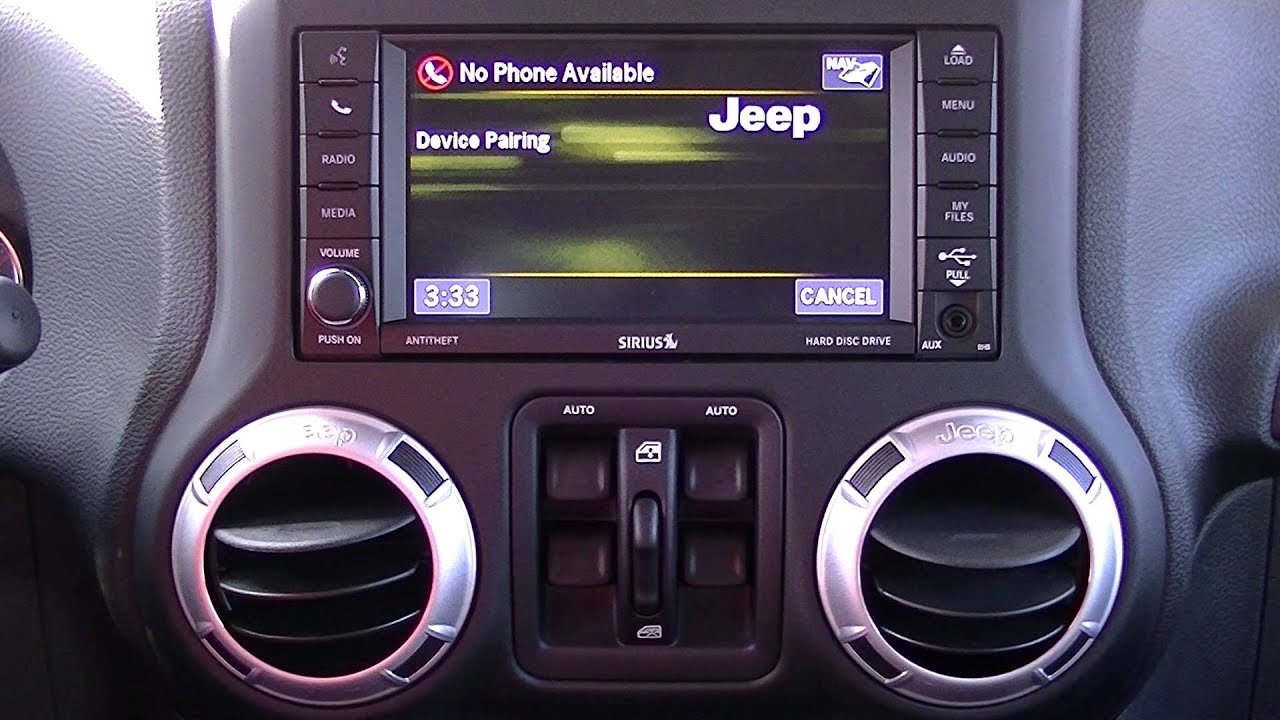
Tap the Phone icon on your Wrangler’s touchscreen. If no phone is connected, you’ll see a prompt to add a device.
4. Start The Pairing Process
Select “Add Device” or “Pair Device” on the Uconnect screen. The system will begin searching for nearby devices.
5. Choose Your Vehicle On Your Phone
On your smartphone’s Bluetooth menu, look for a device named “Uconnect” or “Jeep Wrangler. ” Tap to connect.
6. Confirm The Passkey
A passkey (a series of numbers) will appear on both your phone and the Uconnect screen. Make sure the numbers match, then confirm on both devices.
7. Allow Permissions
Your phone may ask for permission to access contacts and messages. Approve these if you want full hands-free features.
8. Complete Pairing
The Uconnect screen will show a confirmation when pairing is successful. Your phone is now connected.
Example: Pairing An Iphone
- Go to Settings > Bluetooth on your iPhone.
- Select “Uconnect” from the list of devices.
- Confirm the passkey and allow sync for contacts.
Example: Pairing An Android Phone
- Go to Settings > Connections > Bluetooth.
- Tap “Uconnect.”
- Accept all permissions for calls and contacts.
Troubleshooting Common Problems
Even with clear steps, some users hit roadblocks. Here’s how to handle the most frequent issues:
Bluetooth Not Showing Up
- Make sure your phone’s Bluetooth is enabled and visible.
- Restart your phone and the Jeep’s Uconnect system.
- If your phone still doesn’t appear, try deleting old paired devices from Uconnect.
Pairing Fails Or Disconnects
- Check if your phone’s software is up to date.
- Remove other connected devices from Uconnect—many systems allow only a few active pairings.
- If problems persist, try resetting your phone’s network settings.
Audio Or Call Problems
- If you can’t hear audio, check the Wrangler’s volume and your phone’s media settings.
- For call issues, try unpairing and pairing again, or update your phone’s OS.
When To Seek Help
If your system keeps failing, visit your Jeep dealer. Sometimes, a software update or a hardware check is needed.
Tips For A Better Pairing Experience
Here are a few insights that can make the process smoother:
- Pair with the Engine Running: Uconnect sometimes fails to pair if the vehicle is only in accessory mode.
- Name Your Device Clearly: If you have multiple phones, rename each device in your phone’s Bluetooth settings. It helps avoid confusion, especially if you switch drivers often.
- Keep the System Updated: Uconnect offers over-the-air updates. Check Jeep’s official website for instructions or updates that improve Bluetooth performance.
- Limit Paired Devices: Uconnect can store several devices, but it works best with only a few active pairings. Remove unused devices for more reliable connections.
- Avoid USB Cables During Pairing: Some users plug in their phones while pairing. This can confuse the system, especially if Apple CarPlay or Android Auto tries to start.
Handy Reference: What Each Symbol Means
Understanding the symbols on your Uconnect screen can prevent confusion:
| Icon | Meaning |
|---|---|
| ???? | Audio is working |
| ???? | Phone is connected |
| ???? | Phone battery level |
| ???? | Call in progress |
Knowing these icons can help you troubleshoot at a glance.
When You Should Re-pair Your Phone
Sometimes, you need to disconnect and pair your phone again:
- After a major phone update
- If you change phones
- When you sell or lend your Jeep
- If voice commands stop working
Deleting the device and starting fresh often solves stubborn problems.
Practical Mistakes To Avoid
Many drivers make these common errors:
- Trying to pair while driving (the system blocks this for safety)
- Ignoring the passkey confirmation (always check it matches)
- Forgetting to grant permissions for contacts and calls
- Pairing too many devices, which can confuse Uconnect
Avoid these mistakes for a smoother setup.
Safety And Privacy Considerations
Sharing your contacts and messages lets you use hands-free features, but it also means your Wrangler stores some data. If you’re in a rental or borrowed Jeep, skip the contact sync.
Always remove your device from Uconnect before selling your car or returning a rental.
You can learn more about Uconnect and Jeep’s privacy policy at the official Jeep Uconnect site.
Frequently Asked Questions
How Many Phones Can I Pair With My Jeep Wrangler?
Most Uconnect systems let you pair up to eight phones, but only one can be active for calls at a time. You can switch active devices from the Uconnect menu.
Does Pairing My Phone Use Mobile Data?
Bluetooth pairing itself does not use mobile data. However, using apps like streaming music or navigation may use data from your phone plan.
Can I Use Apple Carplay Or Android Auto Wirelessly?
Some newer Uconnect systems support wireless Apple CarPlay and Android Auto. Check your Wrangler’s manual or settings; older systems require a USB cable.
Why Won’t My Phone Auto-connect After Pairing?
This can happen if you have too many paired devices or if your phone’s Bluetooth is off. Try setting your Wrangler as a trusted device in your phone’s Bluetooth settings.
Is My Personal Data Safe In The Uconnect System?
Uconnect stores some call logs and contacts for convenience. Always remove your device and clear data before selling or returning your vehicle for privacy.
Pairing your phone with your Jeep Wrangler isn’t just a tech upgrade—it makes driving safer and more convenient. With the right steps and a bit of patience, you can enjoy hands-free calls, music, and more. Remember these tips, and you’ll be connected in no time.



















