If your Jeep Cherokee won’t start, it can feel stressful—especially if you’re in a hurry or far from home. The good news is, jump starting a Jeep Cherokee is straightforward and safe if you follow the right steps.
With the correct tools and careful attention, you can get your vehicle running again quickly. This guide explains exactly how to jump start a Jeep Cherokee, highlights common mistakes, and shares practical tips many beginners miss.
Preparing To Jump Start Your Jeep Cherokee
Before you begin, gather the tools you need:
- Jumper cables (preferably heavy-duty)
- Another vehicle with a fully charged 12-volt battery
- Safety gloves and glasses (optional but recommended)
Check both vehicles:
- Turn off all electrical accessories (lights, radio, AC)
- Make sure neither battery is leaking or damaged
- Place both vehicles in park (automatic) or neutral (manual)
- Engage the parking brake on both cars
Battery Location And Terminal Comparison
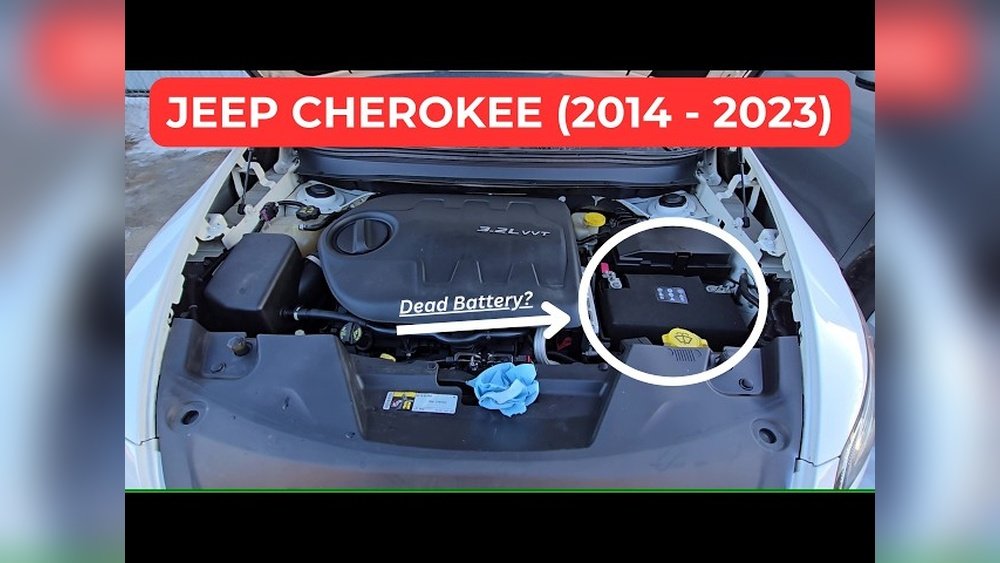
Finding the battery is your first step. Most Jeep Cherokees (especially post-2014 models) have the battery under the hood. Earlier models may differ. Use this table to compare battery locations:
| Model Year | Battery Location | Terminal Type |
|---|---|---|
| 1997–2001 | Under Hood (Driver Side) | Top Post |
| 2014–2024 | Under Hood (Passenger Side) | Side Post |
Always check your owner’s manual if you’re unsure about battery location or terminal type.
Step-by-step: Jump Starting A Jeep Cherokee
Follow these steps carefully to avoid damage or injury:
- Position both vehicles close enough for the cables to reach, but do not let them touch.
- Open the hoods and locate the batteries.
- Identify positive (+) and negative (–) terminals. They’re usually marked with red (positive) and black (negative).
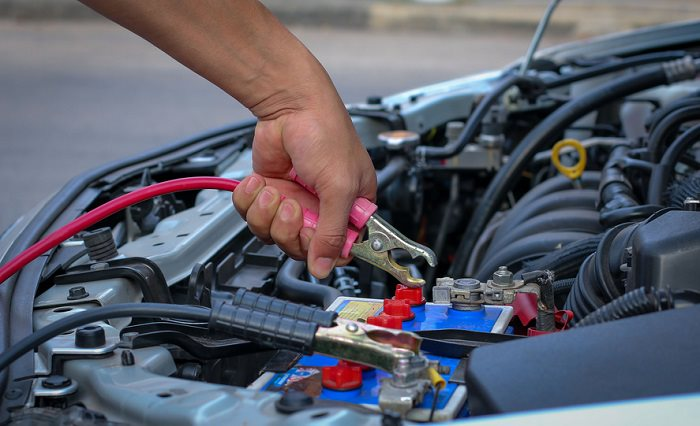
- Connect the jumper cables in this order:
- Red cable to dead battery’s positive (+) terminal.
- Red cable to donor battery’s positive (+) terminal.
- Black cable to donor battery’s negative (–) terminal.
- Black cable to a bare metal part on the dead vehicle (not the negative terminal). This grounds the system and reduces spark risk.
- Start the donor vehicle. Let it run for 2–5 minutes. This charges the dead battery.
- Try to start your Jeep Cherokee. If it doesn’t start immediately, wait another minute and try again.
- Once your Jeep starts, remove cables in reverse order:
- Black cable from grounded metal on dead vehicle
- Black cable from donor battery
- Red cable from donor battery
- Red cable from dead battery
Let your Jeep run for at least 15–20 minutes to recharge the battery.

Common Mistakes And How To Avoid Them
Jump starting sounds simple, but mistakes can cause serious problems. Here are key errors to avoid:
- Wrong cable order: Connecting cables in the wrong sequence can cause sparks or damage electronics.
- Poor ground connection: Always connect the black cable to a bare metal part, not the negative terminal. This reduces risk.
- Leaving accessories on: Turn off all electronics before jump starting. This prevents battery drain and protects sensitive systems.
- Old or corroded cables: Damaged cables don’t transfer power well and can even melt. Inspect cables before use.
Many beginners forget to let the donor vehicle run long enough. If your Jeep doesn’t start after one minute, give it more time.
Modern batteries sometimes need a few extra minutes.
Jeep Cherokee Battery Specs And Jumper Cable Lengths
Choosing the right jumper cables makes a big difference. Longer cables are more flexible but lose a little power. Here’s a comparison for Cherokee models:
| Model Year | Battery Voltage | Recommended Cable Length | Cable Gauge |
|---|---|---|---|
| 1997–2001 | 12V | 12 ft | 4–6 AWG |
| 2014–2024 | 12V | 16 ft | 4 AWG |
Tip: Heavier gauge cables (lower AWG number) transfer power faster and are safer for larger SUVs.

After The Jump: What To Do Next
After your Jeep starts, keep these points in mind:
- Let the engine run for at least 15–20 minutes. This gives the battery time to recharge.
- Drive normally for the next hour. Avoid short trips or turning off the engine too soon.
- If your battery dies again within a day, it may be time for a replacement.
Check for signs of battery failure:
- Dim headlights
- Slow cranking
- Dashboard warning lights
A battery usually lasts 3–5 years in a Jeep Cherokee. If yours is older, consider testing or replacing it soon.
Safety Tips And Expert Advice
- Wear safety gloves and glasses if possible.
- Never smoke or use open flames near the battery.
- Inspect cables for damage before connecting.
- Always connect to a clean, unpainted metal surface for grounding.
Many people overlook the importance of cleaning battery terminals. Dirty or corroded terminals reduce power flow, making jump starting harder.
Non-obvious insight: If your Jeep Cherokee has a “Stop/Start” system (common in newer models), jump starting may be slightly different. Check your manual for special instructions.
Frequently Asked Questions
What If My Jeep Cherokee Doesn’t Start After Jump Starting?
If your Jeep doesn’t start after several tries, check the cable connections, battery terminals, and let the donor car run longer. If this fails, your battery may be dead or your starter could be faulty.
Can I Jump Start My Jeep Cherokee Alone?
No. You need another vehicle with a healthy battery to supply power.
Alternatively, use a portable jump starter for emergencies.
Is It Safe To Jump Start A Jeep Cherokee In The Rain?
Yes, but be careful. Avoid standing water and keep the jumper cables dry. Water can conduct electricity and increase risk.
How Often Should I Replace My Jeep Cherokee Battery?
Most batteries last 3–5 years. Replace your battery if it shows signs of weakness or fails more than once.
Where Can I Find Official Jeep Cherokee Battery Specs?
You can find detailed battery specifications on the official Jeep website or your owner’s manual. For more in-depth info, visit Jeep Cherokee Official Site.
Jump starting a Jeep Cherokee is easy if you follow these steps carefully and avoid common mistakes. With the right tools and patience, you’ll be back on the road quickly and safely.
Always check your battery health and cables regularly to prevent future issues.


















