Getting a backup camera for your Jeep Wrangler is one of the best upgrades you can make. A backup camera makes reversing safer, especially with the Wrangler’s high rear window and spare tire blocking the view.
Many Jeep owners install cameras themselves to save money and get the exact setup they want.
If you’re new to car DIY projects, don’t worry this guide will help you install a backup camera on your Jeep Wrangler step by step.
Choosing The Right Backup Camera For Your Jeep Wrangler
Before you start, pick a camera that fits your Jeep and your needs. There are a few types of backup cameras available:
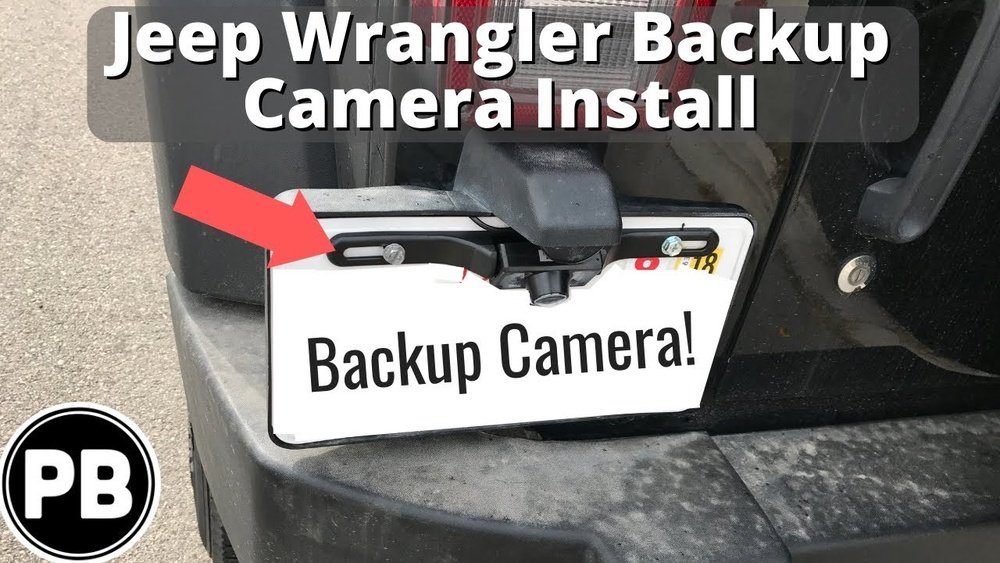
- License plate cameras mount over your license plate.
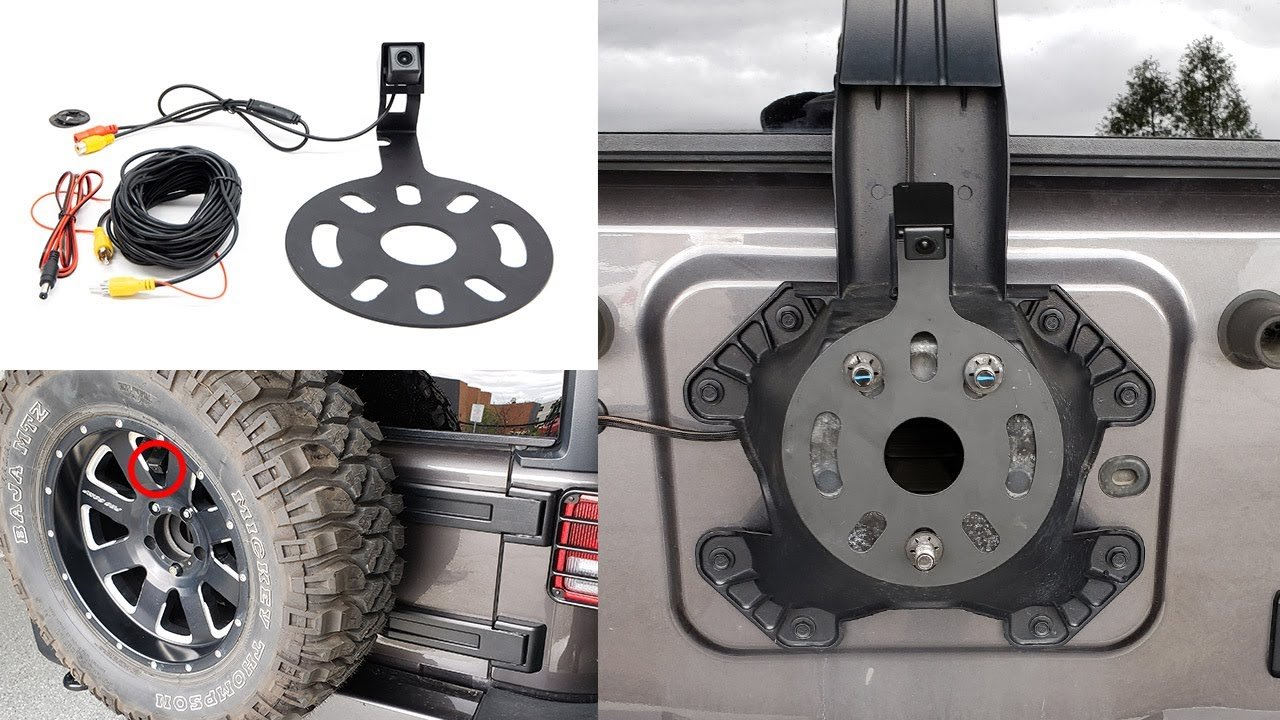
- Spare tire cameras fit into the center of your spare tire.
- Universal cameras can be mounted almost anywhere on the rear.
Most Jeep Wrangler owners choose the spare tire camera. It gives a clear view and looks clean. Make sure the camera is waterproof (look for an IP67 or IP68 rating) and works in low light for night driving.
Here’s a quick comparison of common camera types:
| Camera Type | Mounting Location | Visibility | Ease of Install |
|---|---|---|---|
| License Plate | Above Plate | Good | Easy |
| Spare Tire | Wheel Center | Best | Medium |
| Universal | Custom | Varies | Medium/Hard |
Some camera kits come with a screen, while others connect to your Jeep’s original display (if it’s a newer model). Check compatibility before buying.
Tools And Materials You’ll Need
- Backup camera kit
- Power drill (may not be needed for spare tire kits)
- Screwdrivers (Philips and flathead)
- Electrical tape
- Wire strippers/crimpers
- Zip ties
- Trim removal tool (optional but helpful)
- Multimeter (for checking power wires)
- Microfiber cloth
A few extra zip ties and electrical connectors can make the job neater and more reliable.
Step-by-step Installation Guide
1. Remove The Spare Tire
Most Wrangler camera kits need you to remove the spare tire first. Use the correct socket size (usually 19mm) to loosen the lug nuts and take off the tire. Place it somewhere safe.
2. Install The Camera Bracket
Position the camera bracket in the center hole of your spare tire mount. Secure it tightly with the provided screws.
Make sure the camera lens is centered and level for the best view.
3. Route The Camera Cable
Run the camera cable through the rear door grommet to keep it protected from weather. Open the Wrangler’s tailgate and look for the rubber grommet near the bottom.
Carefully push the cable through with a wire puller or a straightened coat hanger.
Tip: Always avoid pinching or stretching the cable as you route it, especially around moving parts.
4. Connect The Camera To Power And Display
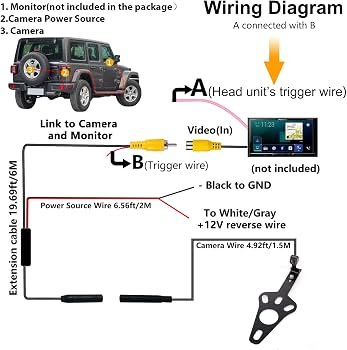
Most backup cameras get power from the reverse light wiring. This way, the camera only turns on when you shift into reverse.
- Find the reverse light wires inside the tailgate by removing the plastic trim.
- Use a multimeter to confirm the wire color (usually white with a gray stripe, but check your manual).
- Strip a small section of the wire and connect the camera’s power wire using a crimp connector or solder and wrap with electrical tape.
Next, run the video cable from the camera to your display. For aftermarket screens, you may need to run this cable under the carpet or along the Jeep’s trim panels up to the dashboard.
If you’re connecting to a factory Jeep display, you’ll need a camera integration module. These are available for most 2011+ Wranglers and plug into the infotainment system.
5. Test The Camera
Before putting everything back together, turn on your Jeep and shift into reverse. Make sure the camera image appears on your screen and the view is clear. Adjust the camera angle if needed.
6. Secure The Wires And Reassemble
Use zip ties to secure any loose cables. Replace all trim panels and reinstall the spare tire.
Wipe away fingerprints from the camera lens with a microfiber cloth.
Here’s a quick look at the installation steps and estimated time:
| Step | Tools Needed | Approx. Time |
|---|---|---|
| Remove Spare Tire | Socket Wrench | 10 min |
| Mount Camera | Screwdriver | 10 min |
| Route Cables | Trim Tool | 20 min |
| Wire Power/Video | Wire Stripper | 30 min |
| Test & Reassemble | — | 20 min |
Total estimated installation time: 1.5–2 hours for most beginners.
Useful Tips For A Successful Installation
- Test the camera before final wiring. This avoids extra work if something doesn’t work.
- Seal all connections with electrical tape or heat shrink to prevent water damage.
- If you’re unsure about wiring, consult your Jeep’s manual or an electrician.
- Use a fuse tap if you want your camera to have power only when the ignition is on.
- Consider running extra video/power lines for future upgrades like a dash cam.

Common Mistakes To Avoid
- Choosing a camera not rated for outdoor use—always check for waterproof ratings.
- Forgetting to check the image before reassembling everything.
- Running wires across sharp metal edges without protection, which can cut cables over time.
- Not grounding the camera properly, leading to flickering or no video.
- Over-tightening screws on the camera bracket, which can crack plastic parts.
When To Seek Professional Help
If your Jeep has a complex infotainment system or you’re not comfortable with car wiring, it’s smart to get help. Professional installation usually costs $100 $250, but it ensures a clean, safe job.
Some Jeep models with advanced features (like blind spot monitoring) may need special kits or programming.
Frequently Asked Questions
How Long Does It Take To Install A Backup Camera On A Jeep Wrangler?
Most people finish in 1. 5 to 2 hours, even with basic tools.
If you’re new to car projects, set aside extra time to go slowly.
Will Installing A Backup Camera Void My Jeep Warranty?
No, installing a camera usually won’t void your warranty if you don’t cut or damage factory wires. Use plug-and-play kits when possible.
Can I Use My Factory Jeep Display For The Camera?
Yes, most 2011 and newer Wranglers can use the original display with a camera integration module. Double-check your model’s compatibility first.
What Should I Do If The Camera Image Is Blurry Or Flickers?
Check all wiring connections, especially the ground wire. Also, make sure the camera lens is clean.
If flickering continues, your power source may be unstable.
Where Can I Find Reliable Camera Kits For Jeep Wrangler?
Look for well-reviewed kits on major auto parts retailers or the official Jeep accessories site. For detailed camera info, see this Backup camera overview.
A backup camera adds real safety and convenience to your Jeep Wrangler. With careful planning and a few tools, you can complete the job yourself and enjoy better visibility every time you back up.


















