When driving at night or on dark roads, a bright dashboard can be distracting. Many drivers of the 2023 Jeep Grand Cherokee want to make their screens dimmer for comfort and safety. But with new technology and digital displays, the process is not always obvious. If you recently bought this SUV or are still learning the features, you might wonder how to dim the screen without messing up other settings. Here’s a clear, step-by-step guide to help you adjust your Jeep’s screen brightness quickly and safely.
Understanding The 2023 Jeep Grand Cherokee Display
The 2023 Grand Cherokee comes with an advanced Uconnect 5 system and a large touchscreen. This system controls navigation, music, climate, and car settings. There’s also a digital gauge cluster behind the steering wheel. Both screens are bright by default, especially at night.
Many drivers notice that the screen’s brightness doesn’t always change automatically when headlights turn on. This can create glare and eye strain.
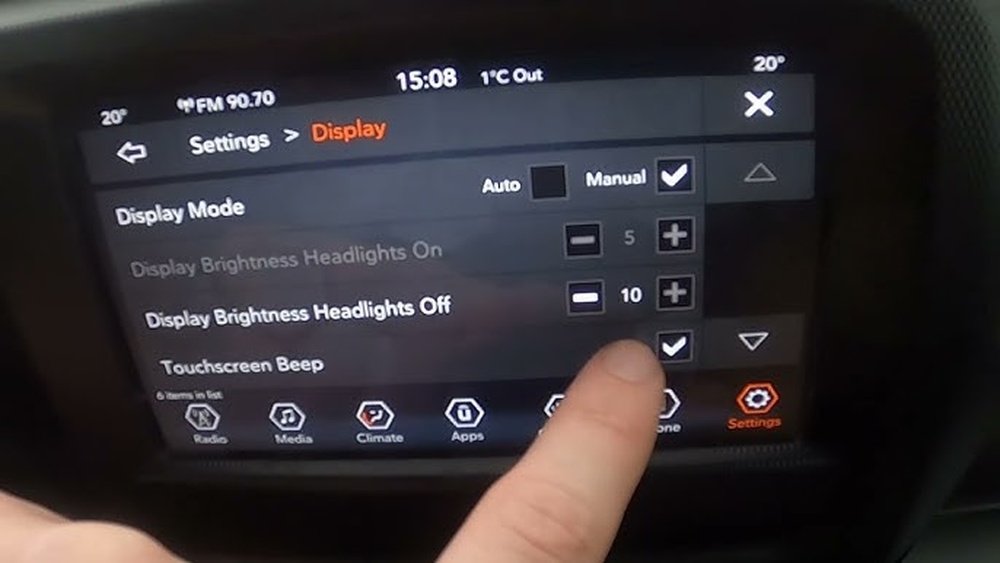
Learning to control the brightness can make driving at night easier and improve your focus.
Ways To Dim The Screen In Your Grand Cherokee
There are several ways to adjust the screen brightness, depending on your needs and the time of day. Here’s what you should know:
1. Using The Physical Dimmer Knob
Most 2023 Grand Cherokees have a physical dimmer wheel located to the left of the steering wheel, near the headlight controls.
- Turn the wheel up to make the interior lights and screens brighter.
- Turn the wheel down to dim the lights and screens.
- If you turn the wheel all the way down, the interior lights will turn off, but the main screen will stay on at a low brightness.
This control is the fastest way to adjust brightness while driving. If your vehicle has the digital gauge cluster, this wheel also dims that screen.
For more control, use the Uconnect touchscreen:
- Tap the Vehicle icon at the bottom of the screen.
- Choose Settings from the on-screen menu.
- Select Display.
- Adjust the Brightness slider to your liking.
This menu lets you set day and night brightness levels separately. For example, you can make the screen dimmer at night but keep it bright during the day.
3. Automatic Brightness Adjustment
The Grand Cherokee offers automatic brightness. This uses a light sensor to adjust the screen based on outside light.
- Go to Settings > Display.
- Toggle Auto Brightness on.
With this feature, the screen will dim automatically when it gets dark. However, some users find it doesn’t always match their preference, so manual adjustment is sometimes needed.
4. Night Mode Vs. Day Mode
Switching between Night Mode and Day Mode changes the color scheme and brightness.
- In the Display settings, select Mode.
- Choose Night for a darker background and dimmer display.
- Choose Day for a brighter look.
The system usually switches modes when the headlights turn on or off, but you can set it manually if needed.
5. Dimming The Passenger Display
Some Grand Cherokees have a passenger screen. To dim it:
- Tap the settings icon on the passenger screen.
- Adjust the Brightness slider.
This works separately from the main screen, so the driver and passenger can set their own levels.

Data: Comparing Screen Dimming Methods
To help you decide which method to use, here’s a comparison of the main options:
| Method | Speed | Control Level | Works While Driving? |
|---|---|---|---|
| Dimmer Knob | Very Fast | Basic | Yes |
| Uconnect Menu | Medium | Precise | Yes (but best when parked) |
| Auto Brightness | Instant | Limited | Yes |
Examples Of When To Dim The Screen
- Night driving: Reduce glare to avoid eye fatigue.
- Rainy or foggy weather: Lower brightness to see the road better.
- City driving: Dim the screen to blend with street lights.
Some drivers forget to adjust their screens after sunset. Automatic settings help, but personal adjustment gives the most comfort.

Common Mistakes When Dimming The Screen
- Forgetting separate settings: The driver and passenger displays may need different adjustments.
- Relying only on auto-brightness: Sometimes, sensors do not react fast enough to sudden changes, like entering a tunnel.
- Turning off the screen completely: This can limit access to navigation or music controls.
- Adjusting while driving: Making changes in motion can distract you. Try to set your brightness before starting your trip.
Data: User Satisfaction With Screen Dimming Features
A survey by Jeep forums in 2023 found:
| Feature | User Satisfaction (%) | Most Common Issue |
|---|---|---|
| Dimmer Knob | 80 | Not dimming enough at night |
| Uconnect Settings | 70 | Confusing menu |
| Auto Brightness | 60 | Inconsistent performance |
This shows that while most drivers use the dimmer knob, some wish for lower brightness at night.
Practical Tips For Best Results
- Always test your settings in a safe place before driving at night.
- If you share the vehicle, check the brightness each time you start.
- Use Night Mode for long highway drives to reduce eye strain.
- Clean your screen regularly; dust can make the display look brighter.
- If brightness seems stuck, try restarting the Uconnect system.
Some Grand Cherokee models may receive software updates. Check the official Jeep website or your dealer for the latest features and fixes.
Frequently Asked Questions
Turn the dimmer wheel near the headlight controls. This lowers the brightness of both the instrument cluster and the touchscreen instantly.
Can I Turn Off The Screen Completely While Driving?
Yes, you can press and hold the power button on the Uconnect screen. The display will turn off, but music and navigation instructions will continue.
Why Doesn’t My Screen Dim When Headlights Turn On?
Check if Auto Brightness is enabled in your Display settings. If the problem continues, the light sensor could be blocked or there may be a software issue.
Is There A Way To Set Different Brightness Levels For Day And Night?
Yes. Go to Settings > Display in the Uconnect menu. Set separate brightness levels for Day and Night modes.
Where Can I Find More Details About My Jeep’s Display Settings?
You can visit the official Jeep website for manuals and support.
Adjusting the screen brightness in your 2023 Jeep Grand Cherokee is simple once you know the steps. With the right settings, you can drive more comfortably at any time of day. Always make changes safely and refer to your owner’s manual if you need more details.