Connecting your phone to your Jeep Cherokee Bluetooth can make life easier. You can take calls hands-free, stream music, and use navigation. Many drivers struggle with pairing their devices, but the process is simple if you know the right steps. This guide will help you connect your smartphone to your Jeep Cherokee, understand common issues, and use Bluetooth features confidently.
Understanding Jeep Cherokee Bluetooth
Most Jeep Cherokee models from 2014 onward come with Uconnect, Jeep’s infotainment system. Uconnect supports Bluetooth pairing for smartphones and other devices. The system works with Android and iOS phones, but some older models may have limited features. If your Jeep Cherokee is from before 2014, check your owner’s manual to see if Bluetooth is available.
Bluetooth lets your phone and car talk to each other wirelessly. This means you don’t need cables for basic tasks like making calls or playing music. If you drive often, using Bluetooth can help you stay safe and focused.
Step-by-step Guide To Pairing Your Phone
Connecting your phone to the Jeep Cherokee Bluetooth system usually takes less than five minutes. Here are the main steps:
- Start your vehicle and make sure the Uconnect system is powered on.
- Enable Bluetooth on your phone. Go to Settings > Bluetooth, then turn it on.
- On the Uconnect touchscreen, tap the Phone or Media icon.
- Select Add Device or Pair New Device.
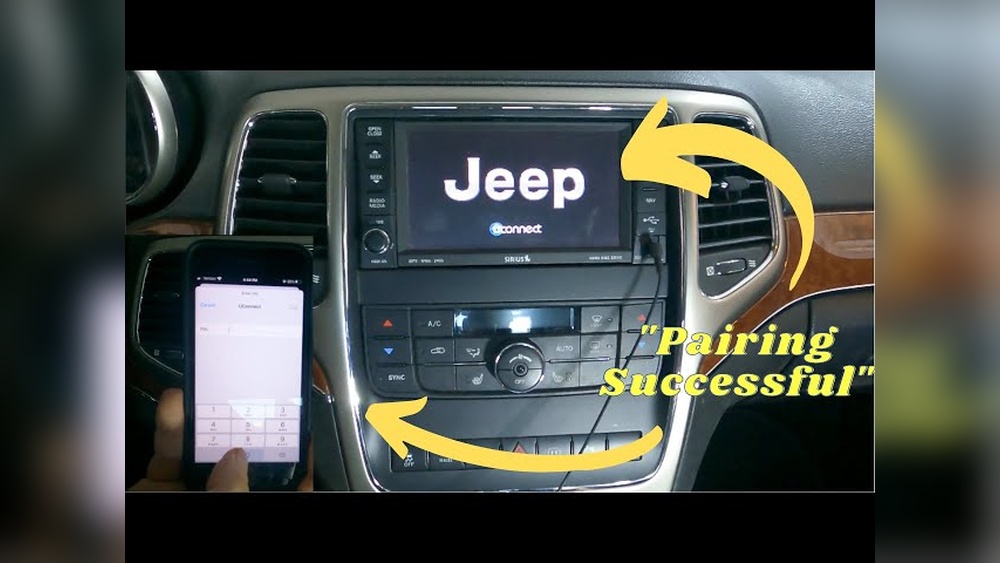
- Your Uconnect system will display a list of nearby devices. Find your phone’s name and select it.
- A pairing request will pop up on your phone. Confirm the code matches the one shown on the Uconnect screen.
- Tap Pair on your phone and Yes on Uconnect.
- Wait a few seconds. The system will confirm the connection.
After pairing, your phone may ask for permission to sync contacts and messages. Allow this for full features. Some users forget this step, which limits hands-free calling.
Common Pairing Mistakes
- Trying to pair while driving. Always pair when parked for safety.
- Not enabling Bluetooth on the phone.
- Ignoring the pairing confirmation code.
- Forgetting to allow contact syncing.
Example: Pairing An Iphone
- Open Settings on your iPhone.
- Tap Bluetooth and switch it on.
- On Uconnect, tap Phone, then Add Device.
- Select your iPhone from the list.
- Confirm the code and tap Pair.
- Allow access to contacts.
Most Android phones follow similar steps, though menu names may vary.

Troubleshooting Bluetooth Connection Issues
Sometimes, pairing doesn’t work right away. Here are solutions for common problems:
- Device not found: Restart your phone and the Uconnect system.
- Connection drops: Move your phone closer to the console and remove other Bluetooth devices.
- Audio not playing: Check if your phone’s media volume is up and select Bluetooth audio on Uconnect.
If problems continue, try deleting the device from Uconnect and re-pairing. Here’s a quick comparison of common issues and solutions:
| Problem | Solution |
|---|---|
| Phone not detected | Restart both devices, turn Bluetooth off/on |
| Audio issues | Check volume, select correct source |
| Connection drops | Move phone closer, remove other paired devices |
Using Bluetooth Features In Jeep Cherokee
Once connected, you can use Bluetooth for:
- Hands-free calling: Answer or make calls from the steering wheel or Uconnect screen.
- Streaming music: Play songs, podcasts, or audiobooks from your phone.
- Voice commands: Use Siri or Google Assistant through Uconnect.
- Navigation: Hear directions from your phone’s map apps.
Here’s a quick look at Bluetooth features across different Jeep Cherokee models:
| Model Year | Bluetooth Calling | Audio Streaming | Voice Commands |
|---|---|---|---|
| 2014–2016 | Yes | Yes | Limited |
| 2017–2020 | Yes | Yes | Advanced |
| 2021+ | Yes | Yes | Advanced, Wireless CarPlay |
Practical Tips For Better Bluetooth Experience
- Update your phone software regularly. Old software can cause pairing issues.
- Keep only one device paired at a time. Multiple devices may confuse Uconnect.
- If you change phones, delete the old device from Uconnect before pairing the new one.
- Use the Do Not Disturb mode while driving to avoid distractions.
- For clearer calls, close windows and reduce background noise.
Many drivers overlook the importance of software updates. Both your phone and Uconnect may need updates to fix bugs and improve compatibility. Check Jeep’s official site for Uconnect updates.
Data: Jeep Cherokee Bluetooth Compatibility
Bluetooth compatibility can vary. Here’s a quick table showing which phones work best with recent Jeep Cherokees:
| Phone Model | Pairing Success Rate | Features Supported |
|---|---|---|
| iPhone 12–15 | 98% | Calling, audio, CarPlay |
| Samsung Galaxy S21–S24 | 96% | Calling, audio, Android Auto |
| Google Pixel 6–8 | 94% | Calling, audio |
If you use an older phone, you may see lower pairing rates. Checking compatibility before buying a phone can save time.

Frequently Asked Questions
How Many Devices Can I Pair With Jeep Cherokee Bluetooth?
You can pair up to eight devices. However, only one device can be connected for calls and audio at a time.
Why Does My Phone Disconnect From Bluetooth During Calls?
This happens if your phone’s battery is low or if another device tries to connect. Keep your phone charged and remove extra paired devices.
Yes, you can hear directions from apps like Google Maps or Waze through the car speakers. Make sure the audio source is set to Bluetooth.
Is Bluetooth Available On All Jeep Cherokee Models?
Bluetooth is standard on most models from 2014 onward. Some older models may need an upgrade or aftermarket kit.
How Do I Update The Uconnect System?
Visit the official Jeep Uconnect site and follow their instructions for software updates. You may need a USB drive or dealer assistance. For more details, check Jeep Uconnect.
Connecting your phone to your Jeep Cherokee Bluetooth unlocks safer driving and more fun on the road. With the right steps and a bit of troubleshooting, you can enjoy hands-free calls, music, and navigation every day. Take a few minutes to pair your device, and you’ll see how much easier driving can be.