Connecting your phone to your Jeep Wrangler can change the way you drive. You can play music, use GPS navigation, make hands-free calls, and send messages safely. But with different Wrangler models and phone types, the process can feel confusing. This guide will show you clear steps, tips, and answers so you can enjoy the full power of your Jeep’s tech features.
Understanding Jeep Wrangler Connectivity Options
Jeep Wranglers offer several ways to link your phone:
- Bluetooth
- Apple CarPlay
- Android Auto
- USB cable
Your options depend on the Wrangler’s year and trim. Most models since 2018 support both Apple CarPlay and Android Auto. Older models may only offer Bluetooth and USB.
Here’s a quick comparison of connectivity features by model year:
| Model Year | Bluetooth | Apple CarPlay | Android Auto | USB |
|---|---|---|---|---|
| 2012–2017 | Yes | No | No | Yes |
| 2018–2024 | Yes | Yes | Yes | Yes |
Before starting, check your Wrangler’s system in the owner’s manual or the Uconnect display menu.
How To Connect Your Phone Using Bluetooth
Bluetooth is the most common way to link your phone for calls and music.
- Turn on your Jeep’s ignition and keep the vehicle in PARK.
- Enable Bluetooth on your phone. You’ll find this in your phone’s settings.
- On the Uconnect screen, tap Phone.
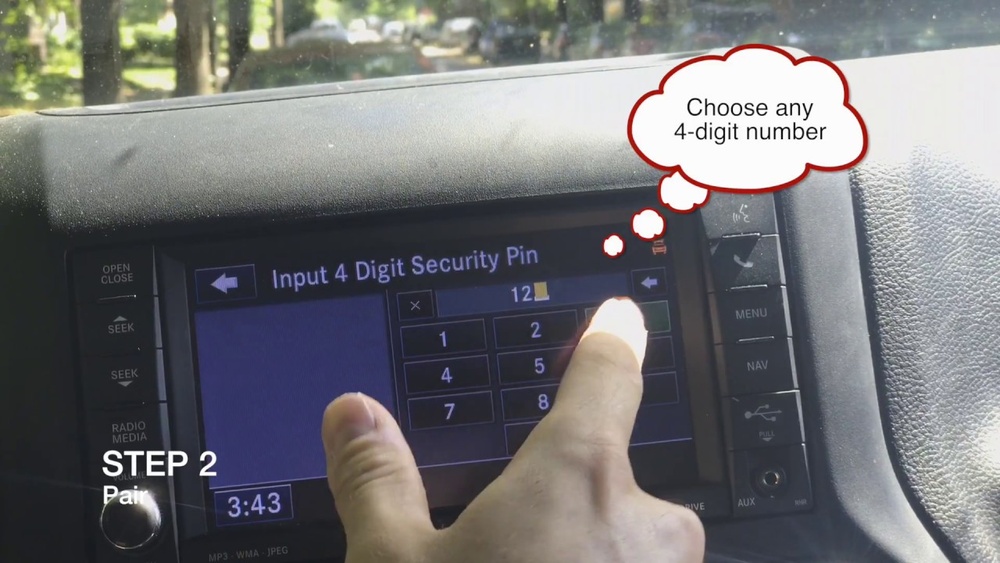
- Select Add Device or Pair Device.
- On your phone, look for your Jeep (e.g., “Uconnect” or “Jeep”) under available devices.
- Tap to pair. Confirm the PIN matches on both devices.
- Allow access to contacts and messages if asked.
You’ll hear a sound or see a message once the connection is successful.
Tip: If your phone won’t connect, delete the pairing on both your phone and the Jeep, then try again.
Connecting With Apple Carplay And Android Auto
These systems offer a smarter, safer way to use your phone’s apps on the Wrangler’s screen.
Apple Carplay
- Use a certified Lightning cable to plug your iPhone into the Jeep’s USB port.
- On the Uconnect screen, tap the Apple CarPlay icon.
- Your iPhone may ask if you trust this vehicle—select Yes.
- Follow prompts to allow access.
Now you’ll see your iPhone’s apps like Maps, Music, and Messages on the touch display.
Android Auto
- Use a USB cable to connect your Android phone to the Jeep’s USB port.
- If prompted, download or update the Android Auto app.
- Grant permissions as requested.
- Tap the Android Auto icon on the Uconnect screen.
You can now access Google Maps, Spotify, and more.
Note: Some new Wranglers offer wireless CarPlay/Android Auto. If available, pair your phone over Bluetooth, and the system may prompt you to set up wireless mode.
How To Connect Using A Usb Cable
If you just want to play music or charge your phone, a USB cable works on all modern Wranglers.
- Plug your phone into the USB port (usually in the center console).
- Select Media on the Uconnect screen to play music from your device.
USB connections are stable and charge your phone faster than Bluetooth.

Troubleshooting Common Problems
Sometimes, connections don’t work as expected. Here’s a look at the most frequent issues and solutions:
| Problem | Possible Cause | Solution |
|---|---|---|
| Bluetooth won’t pair | Old devices saved | Remove old pairings and try again |
| No sound from phone | Audio source not selected | Choose correct input (e.g., Bluetooth, USB) |
| Apps not showing | Outdated software | Update phone and Uconnect |
| CarPlay/Android Auto won’t connect | Bad cable or settings | Use a different cable, check permissions |
Pro insight: Some phone cases can block the connection if the cable doesn’t fit well. Try removing your case if you have problems.
Tips For The Best Experience
- Use genuine cables for Apple CarPlay and Android Auto—cheap cables often fail.
- Update your Uconnect system and phone’s OS regularly.
- Limit how many phones are paired at the same time.
- If you have a weak connection, restart both your phone and the Jeep’s system.
- Set your phone to connect automatically for future drives.
Many users overlook software updates. These often fix bugs and improve compatibility.

Safety First: Hands-free Rules
Using your phone while driving is risky and can lead to fines. The Jeep Wrangler’s systems help you stay safe:
- Use voice commands (“Hey Siri” or “OK Google”) to make calls or send texts.
- Use steering wheel controls to answer calls.
- Keep your focus on the road—let your passenger handle music or navigation if possible.
Frequently Asked Questions
How Do I Reset The Uconnect System If My Phone Won’t Connect?
To reset, hold the volume and tune knobs at the same time for about 10 seconds. The screen will turn off and restart. Try pairing again after the system restarts.
Can I Connect More Than One Phone At A Time?
Yes. You can pair multiple phones with your Wrangler, but only one can be set as the active device for calls and audio. Switch between devices in the Uconnect menu.
Does My Phone Need A Special App To Connect?
For Bluetooth, no extra app is needed. For Android Auto, you may need to download the app from the Play Store. Apple CarPlay works automatically with iPhones running iOS 7.1 or later.
Why Is My Carplay/android Auto Connection Unstable?
Unstable connections are often caused by low-quality cables or outdated software. Always use manufacturer-approved cables and check for system updates. Avoid using long or damaged cables.
Where Can I Learn More About Uconnect Features?
Visit the official Jeep Uconnect page for detailed guides, videos, and support.
Connecting your phone to your Jeep Wrangler is quick once you know the right steps. With the right setup, you’ll enjoy music, maps, and hands-free calls every drive. Take a few minutes to set things up properly, and you’ll get more from your Wrangler’s tech—safely and easily.