Getting a new phone is exciting, but connecting it to your Jeep Wrangler can feel confusing, especially if you’re not a tech expert.
Whether you want to play music, use hands-free calling, or access navigation, pairing your device to the Jeep’s system is essential.
This guide will help you connect your phone quickly, avoid common mistakes, and understand extra features you might miss. The process is straightforward, but there are small details that can make a big difference.
Preparing Your Jeep Wrangler And Phone
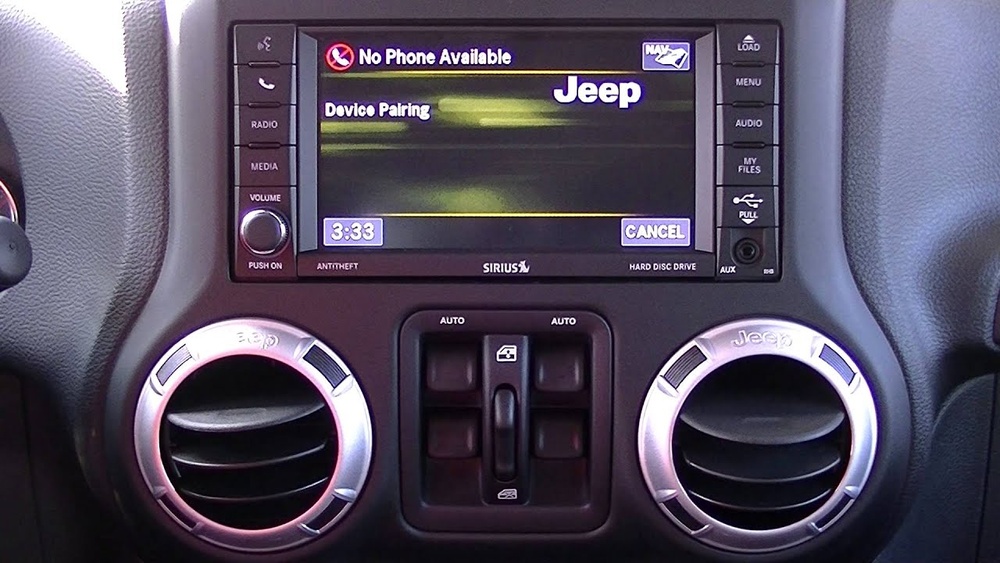
Before starting, check a few things to make the connection smooth. First, confirm your Jeep Wrangler model year, as the system can differ between older and newer models. Most recent Wranglers use Uconnect, a touchscreen system that supports Bluetooth and sometimes Apple CarPlay/Android Auto.
- Turn on your Jeep and let the system boot up.
- Make sure your phone’s Bluetooth is enabled.
- Remove old paired devices in the Jeep’s system if you had a previous phone. This prevents confusion during pairing.
Here’s a quick comparison of Uconnect versions and features:
| Uconnect Version | Bluetooth | CarPlay/Android Auto | Voice Commands |
|---|---|---|---|
| Uconnect 3 | Yes | No | Basic |
| Uconnect 4 | Yes | Yes | Advanced |
| Uconnect 5 | Yes | Yes (Wireless) | Enhanced AI |
If you have an older Wrangler without Uconnect, pairing still works, but instructions may vary.
Step-by-step: Connecting Your Phone Via Bluetooth
Most users want Bluetooth pairing for calls and audio. Here’s how to connect:
- On the Jeep’s touchscreen, tap Phone.
- Select Add Device or Pair New Device.
- On your phone, open Settings > Bluetooth.
- Find your Jeep (often called “Uconnect” or “Wrangler”) in the device list.
- Tap to connect. A code will appear on both screens.
- Confirm the code matches, then tap “Pair” on your phone and the Jeep’s screen.
- Wait for the pairing process to finish. You may be asked to allow contacts and messages. Allow if you want hands-free features.
Here’s a comparison of common connection errors:
| Error | Possible Cause | Solution |
|---|---|---|
| Device Not Found | Bluetooth Off or Hidden | Enable Bluetooth, make phone visible |
| Pairing Failed | Wrong code, interference | Retry pairing, move away from other devices |
| No Audio | Volume low, wrong output | Check volume, switch to Bluetooth audio |
If you face issues, restarting both your phone and Jeep system often solves problems.
Using Apple CarPlay and Android Auto
For advanced features, newer Wranglers support Apple CarPlay and Android Auto. These let you use navigation, music, and messaging apps from your phone directly on the Jeep’s screen.
- Plug your phone into the Jeep’s USB port with a quality cable.
- Follow on-screen prompts to enable CarPlay or Android Auto.
- Grant permissions on your phone if asked.
- Use the touchscreen to access compatible apps.
Wireless CarPlay and Android Auto are available in some newer models. To use these, follow the same pairing steps as Bluetooth, but select CarPlay/Android Auto in the system settings.
Many drivers forget to use these features, missing out on safer, hands-free experiences. If your Wrangler supports them, always use them for navigation; it’s clearer and updates in real-time.
Essential Tips for a Smooth Connection
- Update your phone’s software before pairing; old versions may cause issues.
- Use official USB cables for CarPlay/Android Auto; cheap cables can fail.
- Remove old paired devices from your Jeep. Too many connections confuse the system.
- Don’t forget to adjust audio settings in the Jeep after connecting. Sometimes, music plays but isn’t audible because of low volume or the wrong source.
- If you switch phones often (for example, work and personal), set one as the primary device in Uconnect. This avoids conflicts.
One insight many miss: if you have trouble with call audio, check if your phone is using Bluetooth for calls and not just media. Go to Bluetooth settings and toggle the “Call Audio” option.
Common Mistakes To Avoid
- Pairing while driving. Always connect when parked for safety.
- Ignoring permissions. If you decline contacts/messages access, hands-free features won’t work.
- Not checking compatibility. Some older phones or Jeep systems need software updates.
- Using low-quality cables for CarPlay/Android Auto.
- Forgetting to remove your old phone from the Jeep’s paired device list. This can cause random disconnects.
Here’s a quick comparison of wired vs wireless connections:
| Connection Type | Speed | Reliability | Features |
|---|---|---|---|
| Wired USB | Fast | High | CarPlay/Android Auto, Charging |
| Wireless Bluetooth | Moderate | Medium | Audio, Calls |
| Wireless CarPlay/Auto | Fast | High (if supported) | Full features, no cable |
Troubleshooting And Advanced Features
If your phone won’t connect, try these steps:
- Restart both your phone and the Jeep’s system.
- Delete the pairing and retry.
- Check for software updates on both devices.
- Try a different USB cable for wired connections.
A non-obvious tip: Some Jeep Wranglers allow you to update Uconnect software via USB. Visit the official Jeep website and download updates if your system feels slow or buggy.
For more details on Uconnect and compatible devices, see Jeep Official Uconnect.
Frequently Asked Questions
How Many Phones Can I Connect To My Jeep Wrangler?
You can pair up to eight devices in most Jeep Wranglers, but only one can be active at a time for calls and audio.
Is Bluetooth Pairing Possible While The Jeep Is Off?
No, the Jeep must be in accessory or on mode for Bluetooth pairing. The system needs power to communicate.
What If My Phone’s Contacts Don’t Show Up In The Jeep?
Ensure you allowed contacts access during pairing. If not, go to your phone’s Bluetooth settings, tap the Jeep connection, and enable contact sharing.
Does Connecting My Phone Drain The Jeep’s Battery?
Bluetooth and USB connections use minimal power. Unless you leave the system on for hours without starting the Jeep, battery drain is not a concern.
Yes, if your Wrangler supports Apple CarPlay or Android Auto, you can use apps like Google Maps or Waze directly on the screen.
Connecting a new phone to your Jeep Wrangler opens up easy communication and entertainment while you drive. With the right steps, you’ll be up and running in minutes.
Remember to check compatibility, use quality cables, and keep your software updated.
This makes your driving experience safer and more enjoyable.