Changing the time in your Jeep Grand Cherokee may sound simple, but many owners struggle to find the right method, especially with different models and dashboard layouts. Getting the time right helps with navigation, trip planning, and keeps your dashboard information accurate. Whether you drive an older Grand Cherokee or a newer model with advanced tech, this guide walks you through the process step-by-step. You’ll also find practical tips, common mistakes, and answers to frequent questions so you can set your clock confidently.
Understanding Your Jeep Grand Cherokee Dashboard
Before you begin, it’s important to know what kind of dashboard your Jeep Grand Cherokee has. Most models fall into one of two categories:
- Analog clock with buttons
- Digital touchscreen display (Uconnect system)
Here’s a quick comparison to help you identify your dashboard:
| Model Year | Clock Type | Main Controls |
|---|---|---|
| 2010 and earlier | Analog with buttons | Physical buttons/knobs |
| 2011–2021 | Digital (Uconnect) | Touchscreen display |
| 2022 and newer | Advanced Uconnect | Touchscreen + voice |
If you’re not sure, check your owner’s manual or look for a touchscreen in the center console.
How To Change Time In Older Jeep Grand Cherokee Models
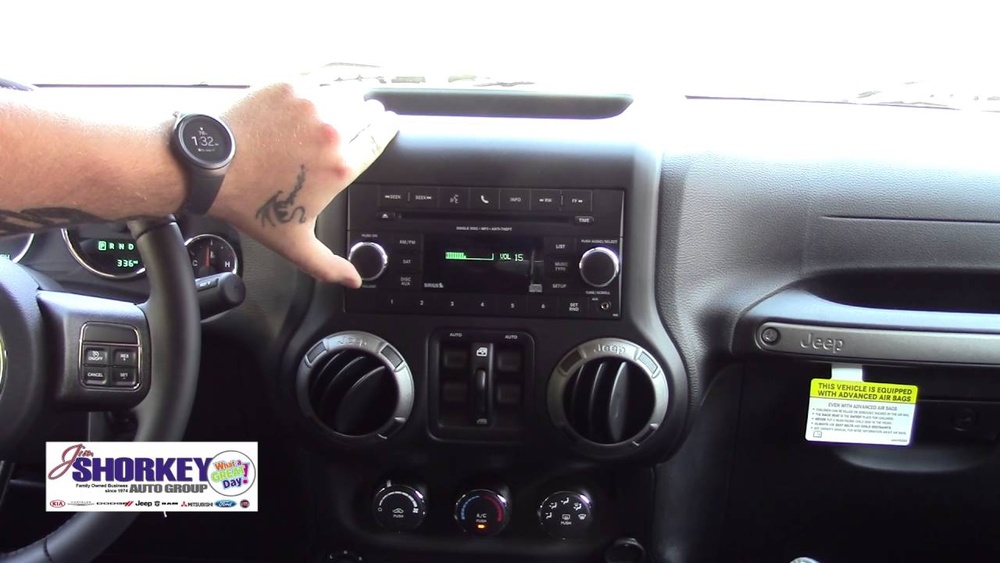
Older Grand Cherokees (usually before 2011) use physical buttons or knobs next to the clock display.
1. Locate The Clock Controls
Look for small buttons labeled “H” (Hour) and “M” (Minute) near the radio or climate controls.
2. Turn The Ignition Key To On
The car does not need to be running, but the dashboard should be powered.
The hour digit will advance. Release when you reach the correct hour.
The minute digit will advance. Stop when you have the right time.
5. Check Am/pm Setting
Some models do not have AM/PM, so double-check if it’s 12-hour or 24-hour format.
6. Save And Exit
The time usually saves automatically once you stop pressing the buttons.
Many owners forget to turn the ignition to “ON,” which prevents the clock from changing. Make sure the dashboard is active!

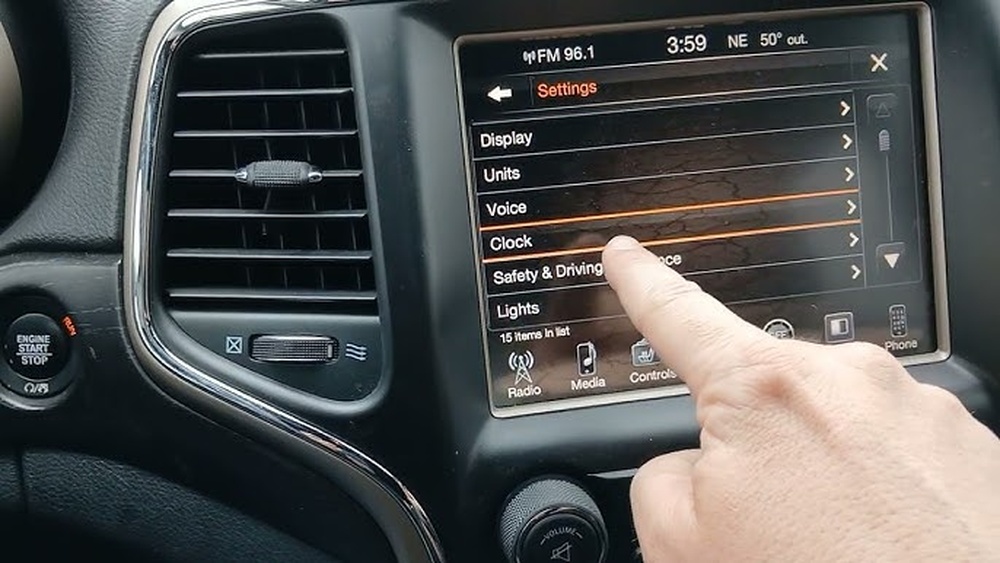
Changing Time Using The Uconnect Touchscreen (2011–2021 Models)
Newer Grand Cherokees use the Uconnect touchscreen system, making time adjustment easier but sometimes confusing for first-timers.
1. Turn On The Ignition
The touchscreen will light up. You don’t need to start the engine.
2. Press The “settings” Icon
Usually found on the main screen or in the “Apps” section.
3. Select “clock & Date”
This menu lets you change both time and date. Look for “Time Settings. ”
- Choose manual or automatic time
- Manual: You set the time yourself.
- Automatic: Syncs with GPS or your phone.
- Adjust the hour and minute
Use the “+” and “–” buttons or drag sliders. Confirm changes.
6. Check Time Zone And Daylight Saving
If using automatic mode, make sure your time zone is correct.
7. Save And Exit
Press “Done” or “Save” to finish.
Here’s a comparison of manual vs. automatic time setting:
| Setting Type | Benefits | Drawbacks |
|---|---|---|
| Manual | Full control, works anywhere | Must update for DST and time zone changes |
| Automatic | Updates with GPS, always accurate | May need GPS signal; incorrect zone causes wrong time |
A non-obvious tip: If you travel across time zones often, automatic setting is more reliable. Manual mode is best if your vehicle stays in one location.
Setting The Time On 2022 And Newer Models
The latest Grand Cherokee models have advanced Uconnect systems with voice commands and more touchscreen options.
1. Activate The Uconnect Display
Touch the screen or say “Hey Jeep” to wake the system.
2. Say Or Select “settings”
Use Voice Command Or Tap “settings.”
3. Find “clock & Date”
Scroll Or Speak “clock & Date.”
4. Adjust Time Manually Or Automatically
Use voice: “Set time to 3:45 PM” or tap the screen to set time.
5. Review Time Zone And Daylight Saving
Advanced systems often detect your zone automatically.
6. Confirm The Changes
Voice or touchscreen will ask for confirmation.
One insight many miss: If your Jeep connects to your phone, it can sync time automatically. Check your phone’s settings if the time is wrong on the display.

Common Mistakes And How To Avoid Them
Most mistakes happen because of confusion between manual and automatic settings, or forgetting to save changes. Here’s what to watch for:
- Not turning on the ignition before setting the time
- Selecting the wrong time zone, leading to incorrect clock display
- Using manual mode but not updating for daylight saving time
- Forgetting to press “Save” or “Done” after adjusting
- Assuming the time changes automatically, when manual mode is selected
If your time keeps reverting or won’t update, check for software updates in your Uconnect system. Outdated software can cause syncing problems.
Practical Tips For Accurate Time Setting
- Set the time when your Jeep is parked for safety.
- If you use automatic mode, make sure GPS is enabled.
- Update software regularly for bug fixes.
- For manual settings, set your clock 1–2 minutes ahead to help with punctuality.
- If you drive in areas with weak GPS, use manual mode for reliability.
Many drivers overlook the “Daylight Saving” toggle in the settings. Always double-check this option after seasonal time changes.
Frequently Asked Questions
How Do I Change The Time If My Uconnect Screen Is Frozen?
If your Uconnect screen is frozen, try restarting your Jeep. If the issue continues, disconnect the battery for a few minutes or visit a dealer. A software reset can solve most touchscreen problems.
Can I Change The Time Without Starting The Engine?
Yes, you can change the time with the ignition in the “ON” position. The engine does not need to be running, but the dashboard and display must be powered.
Why Does My Jeep Grand Cherokee Clock Keep Resetting?
Frequent resets often happen because of battery issues or outdated software. Check your battery health and update your Uconnect system. If the problem persists, a dealer can help diagnose deeper electrical issues.
Does The Clock Update Automatically With Gps?
If you select automatic time setting in Uconnect, the clock should update with GPS. However, this depends on your location, GPS signal, and correct time zone selection. Manual settings will not auto-update.
Where Can I Find Official Jeep Grand Cherokee Instructions?
Official instructions are available in your owner’s manual or on the Jeep website. For more details, visit Jeep Owners Official Site.
Getting the time right in your Jeep Grand Cherokee is easy once you know where to look and how to use your dashboard. With these steps, you can avoid common errors and make your driving experience smoother. Remember to check your settings after software updates or battery changes.
If you run into persistent problems, don’t hesitate to get help from a Jeep dealer or authorized service center.