Changing the time in a Jeep Wrangler may seem simple, but the process can vary depending on the year and the type of infotainment system your Jeep uses. If you’re new to Jeeps or have just switched models, it’s easy to get confused by the different buttons, menus, or touchscreens. Knowing how to set the clock correctly can help you avoid being late and keep your dashboard looking tidy. This guide breaks down the process for all major Wrangler generations, explains common problems, and shares extra tips most owners miss.
Why Setting The Correct Time Matters
A clock does more than show hours and minutes. For many Jeep owners, the right time on the dash is important for scheduled maintenance reminders, navigation accuracy, and safety. For example, if you rely on the Wrangler’s navigation or trip scheduling, an incorrect clock can cause confusion. In some newer models, time settings also impact features like automatic daylight saving time adjustment and smartphone sync.
Identifying Your Jeep Wrangler Model And System
Before changing the time, you need to know your Wrangler’s model year and the type of infotainment system it has. The method is different for older models with manual radios versus new models with touchscreens.
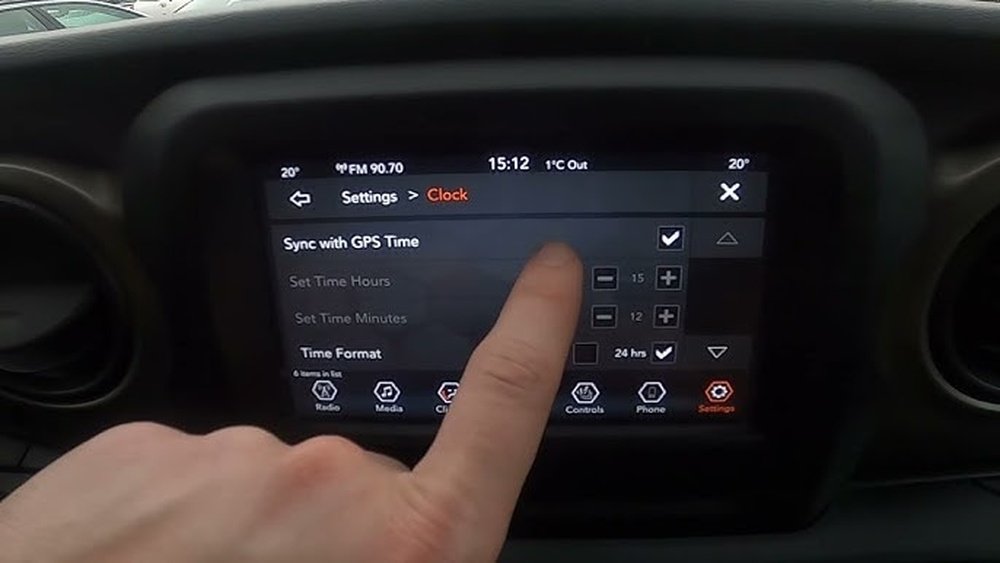
Here’s a quick comparison of the most common Wrangler generations and their clock systems:
| Model Year | System Type | Clock Adjustment Method |
|---|---|---|
| 2007-2017 (JK) | Manual/Basic Radio | Physical buttons/knobs |
| 2018-2024 (JL, 4xe) | Uconnect Touchscreen | Touchscreen menu |
| Older than 2007 (TJ/YJ) | Very basic radio | Simple button combo |
If you’re not sure which system you have, look at your center console. Touchscreens are found in most 2018 and newer Wranglers, while older models use knobs and small digital displays.
How To Change The Time: Step-by-step For Each Generation
Let’s break down the steps based on your Jeep Wrangler’s generation and system.
For 2007–2017 Wrangler Jk (manual Radio)
- Turn on the ignition but do not start the engine.
- Locate the clock button or “Time” on your radio faceplate.
- Press and hold the clock button until the time display starts blinking.
- Use the seek (or tune) buttons to adjust the hours.
- Press the clock button again to switch to minutes.
- Adjust the minutes using the same seek/tune buttons.
- Press the clock button one more time to confirm.
Extra tip: Some radios use the preset 1 and 2 buttons for hours and minutes instead of seek/tune. If your time won’t change, try this alternative method.
For 2018–present Wrangler Jl And 4xe (uconnect Touchscreen)
- With the vehicle in ACC or ON, tap the “Settings” icon on the Uconnect screen.
- Find and select “Clock & Date” or just “Clock.”
- Tap on “Set Time” or “Adjust Time.”
- Use the + / – buttons or on-screen arrows to set the hour and minute.
- Confirm by tapping “Save” or simply exit the menu.
Hidden feature: If your Wrangler is equipped with GPS, you can set the time to auto-sync with satellite data. Toggle “Sync with GPS” to let your Jeep update the clock automatically during trips, which is especially useful when changing time zones.
For Pre-2007 Wrangler (tj, Yj)
- Turn the ignition to ACC.
- Find the small H (hour) and M (minute) buttons near the radio display.
- Press and hold H to change the hour, and M for the minute.
- Release when you reach the correct time.
Pro insight: The buttons are often very small and require a pen tip or fingernail to press.
For Aftermarket Stereos
If you’ve replaced your factory radio, refer to the manual for your stereo brand. Most aftermarket radios like Pioneer, Kenwood, or Sony have a “Menu” button, then a “Clock” setting. The logic is similar: enter clock mode, adjust with arrow keys, then save.
Troubleshooting: When The Clock Won’t Set
Sometimes, setting the time doesn’t work as expected. Here are the most common issues and how to fix them:
- Buttons not responding: Check if the radio is locked or in a different mode (like Bluetooth or AUX). Switch back to radio mode and try again.
- Clock resets after turning off: This often means a problem with the radio fuse or wiring. If your battery was recently replaced or disconnected, double-check all connections.
- Time keeps changing: In newer models, this can happen if “Sync with GPS” is enabled but the Jeep isn’t getting a good GPS signal. Try disabling the auto-sync and setting the time manually.
- Daylight Saving not updating: Some Uconnect systems have a separate setting for automatic DST. Make sure it’s toggled on if you want the clock to adjust automatically.
If these don’t help, consult your owner’s manual or visit a dealership.
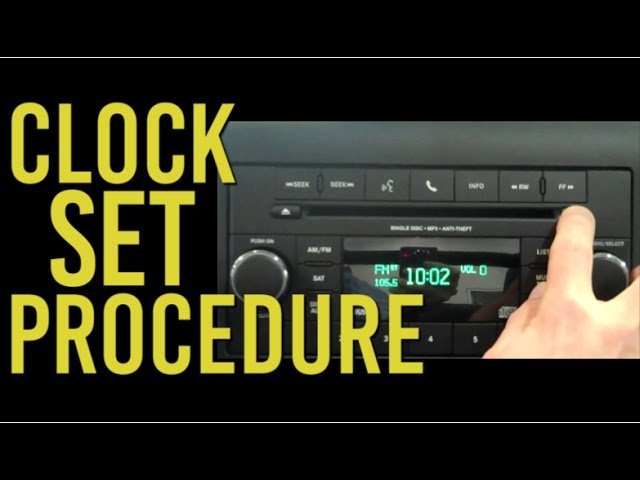
Comparison: Manual Vs. Touchscreen Clock Setting
Understanding the differences between manual and touchscreen methods can help you avoid mistakes. Here’s a side-by-side look:
| Feature | Manual Radio (JK/TJ) | Touchscreen (JL/4xe) |
|---|---|---|
| Adjust Method | Physical buttons/knobs | On-screen menus |
| Speed | Quick (few seconds) | Usually fast, but more steps |
| Auto-Sync | No | Yes (if equipped with GPS) |
| Common Issues | Button wear, fuse issues | Software glitches, GPS sync errors |
Insight: Manual radios are faster for setting the time but lack features like auto-update and daylight saving adjustment.
Common Mistakes When Setting The Clock
Many Jeep owners make the same errors when adjusting the clock. Avoid these to save time and frustration:
- Not using ACC mode: Always set the time with the ignition in ACC or ON. If the radio is off, you can’t access clock settings.
- Forgetting to confirm: On touchscreens, you must tap “Save” or “OK.” Exiting the menu too soon cancels your changes.
- Overlooking auto-sync: If your time keeps changing, check if GPS sync is enabled. Disable it to set the time manually.
- Ignoring daylight saving settings: In spring and fall, check if your Jeep’s auto DST setting is on. Manual radios won’t adjust for DST, so you need to change the time yourself.
- Wrong manual for your system: Make sure you’re using instructions for your specific radio. JK and JL models have very different systems.
Extra Tips And Best Practices
Changing the time is just the start. Here are some advanced tips and details that even experienced owners sometimes miss:
- Set the clock while parked: Adjusting settings while driving can be distracting and dangerous. Do it before you hit the road.
- Keep your software updated: For Uconnect systems, check for updates at least once a year. Updates can fix time-sync bugs and add new features.
- Battery swaps reset the clock: If you change or disconnect your battery, you’ll likely have to set the time again—even in new models.
- Back up your settings: Some Uconnect systems let you save preferences to a USB drive. If you ever reset the system, you can reload your custom time and other options.
- Check owner’s manual for your year: Jeep sometimes changes radio designs even mid-generation. If the above steps don’t match your system, your manual or the official Jeep website will have the latest instructions.
When To Visit A Dealer
In rare cases, you might not be able to set the clock at all. If your clock is always wrong, doesn’t display, or resets every time you start your Jeep, it’s time for professional help. Common reasons include:
- Defective head unit: The radio itself may be faulty.
- Bad wiring: Especially after battery replacement or electrical work.
- Software bugs: Newer Uconnect systems sometimes need a dealer reset.
Dealers have diagnostic tools to fix these issues quickly.
How Accurate Are Jeep Wrangler Clocks?
Most Jeep clocks, especially in newer models, are accurate to within one minute per month when set manually. With GPS sync, the accuracy is even higher usually within a few seconds.
However, older manual radios may drift more, so check your clock every few months.
Saving Time Across Time Zones
If you travel often, enable GPS auto-sync (if available) to update your clock automatically as you cross time zones. For manual radios, you’ll need to adjust the clock each time.
Keeping Track Of Updates
Jeep releases updates for their Uconnect systems regularly. Check the official Jeep support site or your dealer for the latest info. Keeping your system current means fewer bugs and more accurate clock settings. For details, see the official Jeep Software Update Page.
Frequently Asked Questions
How Do I Set The Clock In A 2021 Jeep Wrangler?
For the 2021 Wrangler, use the Uconnect touchscreen. Tap “Settings,” then “Clock & Date,” then “Set Time.” Adjust using the arrows and confirm. If you have GPS, you can enable auto-sync.
Why Does My Jeep Wrangler Clock Keep Resetting?
This usually means a battery, fuse, or wiring issue. Check your battery terminals and the radio fuse under the hood. In newer models, a software bug can also cause resets.
Can I Set The Clock Without Turning On The Engine?
Yes. Turn the ignition to ACC or ON (without starting the engine). This powers the radio and lets you access clock settings safely.
Does Daylight Saving Time Adjust Automatically In All Wranglers?
No. Only newer models with Uconnect and GPS offer auto DST. Manual radios (JK, TJ, YJ) require you to change the time by hand in spring and fall.
First, make sure you’re in radio mode, not AUX or Bluetooth. If the problem continues, check the radio fuse and connections, or visit a Jeep dealer for diagnosis.
Keeping your Jeep Wrangler’s clock accurate is easy once you know the right steps. Whether your dash has simple buttons or a full touchscreen, these tips will help you set the time quickly and avoid common mistakes. With a little attention, you’ll keep your Jeep’s dashboard—and your schedule—running on time.