Changing the time in your Jeep Compass may look simple, but many drivers find it confusing—especially with different models and tech updates. Having the right time on your dashboard is more than comfort; it helps you stay on schedule and can be important for features like scheduled maintenance reminders. Luckily, once you know the steps for your Jeep Compass model year, you can set the time in just a few minutes. This guide will walk you through everything, whether you have a basic display or the latest Uconnect touchscreen. You’ll also learn common mistakes, time zone tips, and what to do if your clock keeps resetting.
Why Correct Time Matters In Your Jeep Compass
Most people set the clock and forget about it. But an incorrect clock can cause more trouble than you think. Many Jeep Compass features connect with your vehicle’s time system:
- Scheduled reminders for oil changes or services
- Automatic lights or climate control settings
- GPS navigation timing
- Bluetooth or smartphone integrations
If your clock is off, you might miss maintenance, get confused by navigation prompts, or have trouble syncing your phone. For drivers who cross time zones, a wrong clock can make things worse, especially on road trips.
Identifying Your Jeep Compass Model And Display
Before you start, it’s important to know which display system your Jeep Compass uses. There are two main types:
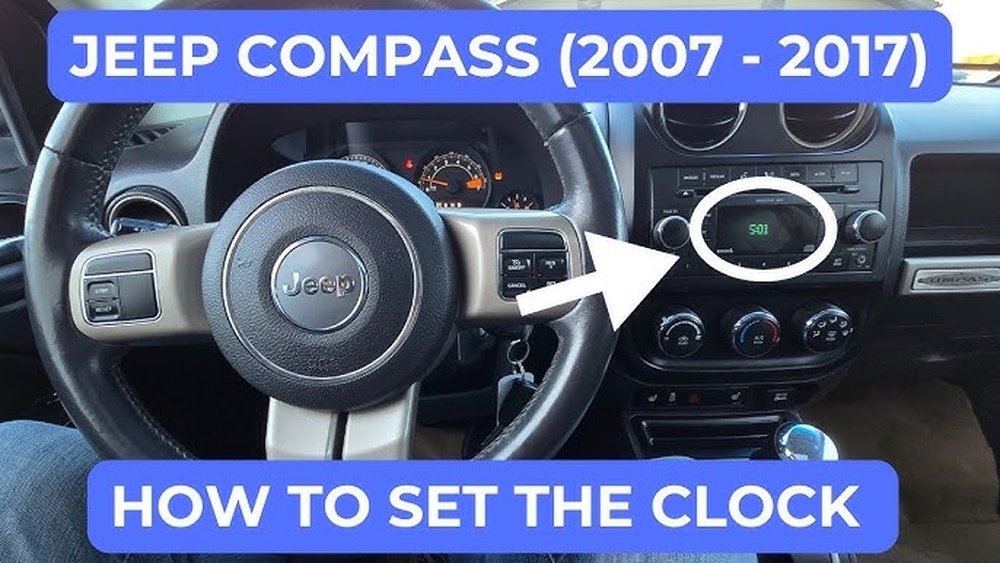
- Analog/Digital Clock (older models, usually before 2017)
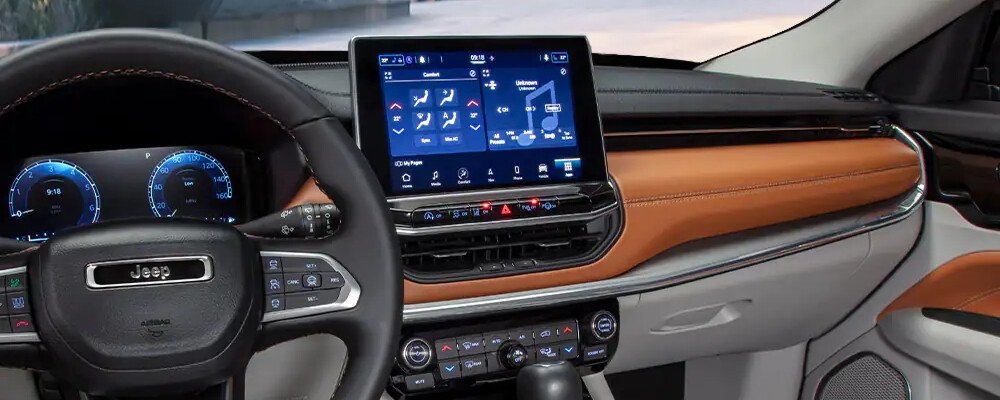
- Uconnect Touchscreen (newer models, usually 2017 and after)
Check your owner’s manual or look at your dashboard. If you have a touchscreen with a “Uconnect” logo, follow the Uconnect steps.
If you only have buttons and a small digital display, use the manual clock steps.
Quick Comparison Of Display Types
| Model Year | Clock System | Interface |
|---|---|---|
| 2011-2016 | Analog/Digital | Buttons (Set, Seek, Clock) |
| 2017-Present | Uconnect | Touchscreen |
If you’re not sure, a quick look at your dash or a Google search with your model year will help.
How To Change The Time In A Jeep Compass (step-by-step)
For Older Models (2011–2016): Manual Clock Setting
1. Turn On The Ignition
Put your key in “Run” or press the start button once (don’t start the engine).
Find the button labeled Clock or with a small clock icon. It’s usually near the radio display.
3. Enter Clock Setting Mode
Press and hold the clock button until the time display blinks.
- Adjust Hours and Minutes
- Use the Seek/Tune or Up/Down buttons to set the hour.
- Press the clock button again to move to minutes.
- Adjust minutes using the same buttons.
- Confirm and Exit
Press the clock button one last time or wait a few seconds. The display will stop blinking, saving your new time.
Tip: If your radio is on, you may need to turn it off to see the clock clearly.
For Newer Models (2017–present): Uconnect Touchscreen
1. Power On The Touchscreen
Push the start button (or turn the key to “Run”) to activate Uconnect.
2. Go To Settings
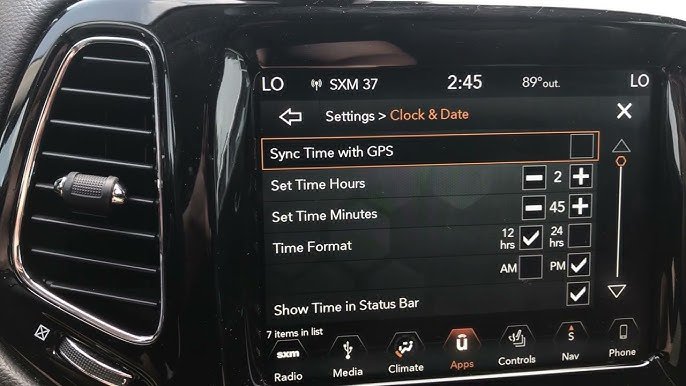
Tap the Apps icon, then select Settings.
3. Find Clock & Date
Scroll until you see Clock or Time & Date.
- Set Time
- Tap Set Time.
- Use the plus (+) or minus (–) icons to adjust hours and minutes.
- Select AM/PM if needed.
- Save and Exit
Tap Save or just exit—Uconnect usually saves changes automatically.
6. Sync With Gps (optional)
If your system supports it, you can enable Sync Time With GPS. This will set the time automatically based on your location.
Pro Insight: Sometimes, the system asks if you want to use 24-hour time. Pick whichever you prefer.
Uconnect System Version Differences
Not all Uconnect versions look the same. Here’s a quick overview:
| Uconnect Version | How to Set Time | Unique Features |
|---|---|---|
| Uconnect 4 | Settings > Clock | Basic time setting, 12/24-hour mode |
| Uconnect 5 | Settings > Display > Time | GPS sync, automatic DST |
If you see extra options like Daylight Saving Time or Time Zone, use them for the most accurate clock.
Common Issues And Fixes
Many Jeep Compass owners run into the same problems when trying to change the time. Here’s how to solve the most common ones:
Clock Resets Automatically
If your clock resets every time you start the car, it could be:
- Battery problem: A weak battery can’t hold the clock memory.
- Software update needed: Some Uconnect systems need updates to fix bugs.
- Fuse issue: A blown fuse can cut power to the clock.
What to do: Have your battery checked. For software, visit a Jeep dealer or use the Uconnect website for update instructions. Check the fuse box (see your manual for location).
Touchscreen Not Responding
If you can’t access the time settings because the touchscreen is frozen:
- Try a soft reset: Hold the power and volume buttons together for 10 seconds.
- If that fails, turn off the vehicle, wait 2 minutes, and restart.
If the problem continues, you may need a dealer diagnostic.
Am/pm Or 24-hour Format Wrong
Some drivers get confused by AM/PM or 24-hour format. Always double-check your setting—especially if your clock shows 13:00 instead of 1:00 PM.
Non-obvious tip: The 24-hour clock is sometimes set as default after a software update.

Tips For Keeping Your Jeep Compass Clock Accurate
- Sync with GPS if possible—this is the most accurate.
- Update your Uconnect software every year or when prompted.
- Change your clock when crossing time zones; GPS sync may lag in remote areas.
- Check after battery changes—your clock might reset to factory time.
Changing Time For Daylight Saving
In most modern Jeep Compass models, the Uconnect system can adjust for Daylight Saving Time (DST) automatically. But, older models or basic Uconnect versions may not.
- If your system has “Auto Daylight Saving Time,” make sure it’s ON.
- If not, you’ll need to manually move the clock forward or back in spring and fall.
Non-obvious insight: Some navigation systems only update time zone after you start driving, not when you first turn on the car.
When To Ask For Help
If you follow the steps and your clock still won’t save or shows the wrong time, it could be a sign of a deeper issue:
- Electrical problems (wiring, fuses)
- Software bugs (especially after updates)
- Faulty Uconnect module
Don’t ignore these. Your dealer can check things quickly and prevent bigger problems later.
Also, if your car is under warranty, these repairs may be free.
If your Jeep Compass has built-in navigation, the process is similar but sometimes includes extra steps:
- Go to Settings on the navigation home screen.
- Tap Clock or Time & Date.
- Look for an option like Sync with Navigation or Sync with GPS.
- If you want manual control, turn off GPS sync first, then set the time yourself.
Note: If your navigation is from a third party (like TomTom), instructions may differ.
Jeep Compass Time Settings: What Each Option Means
You might see several options under time settings. Here’s what they do:
- Set Time Automatically: Uses GPS to adjust the clock.
- Set Time Manually: Lets you pick the time yourself.
- Time Zone: Sets your local time zone (important for GPS sync).
- Daylight Saving Time: Adds or subtracts one hour as needed.
- 12/24-Hour Format: Chooses between standard and military time.
Understanding these helps you avoid confusion and keep your time accurate.
Comparison: Manual Vs. Uconnect Clock Setting
Not sure which system you have? Here’s a side-by-side look:
| Feature | Manual/Analog | Uconnect Touchscreen |
|---|---|---|
| Set Time | Physical buttons | Touchscreen menu |
| GPS Sync | No | Yes (if equipped) |
| Daylight Saving | Manual | Auto/manual |
| 24-Hour Format | No | Yes |
How To Avoid Common Mistakes
Even experienced drivers can make errors when setting the clock. Here’s how to avoid the most common ones:
- Not saving changes: Always confirm after setting time. If you just exit, your changes might not stick.
- Misreading AM/PM: Double-check if your system uses 24-hour time.
- Skipping daylight saving: In spring and fall, remember to adjust your time.
- Ignoring software updates: Keeping your Uconnect current prevents bugs.
- Forgetting time zone adjustments: Especially if you drive across state lines.
Pro tip: Snap a photo of your clock settings screen after you set it. If something goes wrong, you’ll remember your steps.
When You Might Need A Dealer
Most time changes are easy. But if you see error messages, a blank clock, or your time resets often, a dealer visit is best.
They have tools to diagnose deeper electrical or software problems. If your Compass is still under warranty, repairs might be free or discounted.
Additional Resources
If you want the most accurate, up-to-date information, check your official Jeep Compass owner’s manual. Jeep also provides helpful guides on the Uconnect system at their official website. For more advanced troubleshooting, visiting Jeep Uconnect is recommended.
Frequently Asked Questions
How Often Should I Check Or Reset The Time In My Jeep Compass?
Most drivers only need to check the time when Daylight Saving Time changes or after a battery replacement. If you travel across time zones, check it more often.
Why Does My Jeep Compass Clock Keep Resetting?
This often happens because of a weak battery, blown fuse, or software glitch. If it happens after every engine start, have your battery and fuses checked.
Can I Set The Clock While Driving?
For safety, most Uconnect systems block clock changes while driving. Pull over and put the car in Park before changing the time.
Does Gps Always Set The Correct Time?
GPS sync is very accurate, but it may lag in tunnels, parking garages, or remote areas with poor signal. Always double-check after long drives.
Is There A Way To Switch Between 12-hour And 24-hour Formats?
Yes, most Uconnect systems let you pick between 12-hour and 24-hour formats. Look for the option under Clock or Time settings.
Having the right time on your Jeep Compass makes every drive smoother. With these steps and tips, you’ll never have to worry about being late or confused by a wrong dashboard clock again.
If you run into unusual problems, don’t hesitate to ask your dealer for help or check the official Jeep resources.
Safe travels!


















