Changing the clock on your Jeep Wrangler might seem simple, but many owners struggle with the process—especially after daylight saving time or battery replacement. The Wrangler’s dashboard controls can look confusing if you’re not used to them. In this guide, you’ll learn how to set the clock on most Wrangler models, why accurate time matters, and discover a few tips that make the task easier. Whether you own a classic TJ, a modern JK, or the latest JL, setting your clock right helps you stay punctual and avoid those awkward late arrivals.
Why Setting Your Jeep Wrangler Clock Matters
A properly set clock is more than convenience. It helps you:
- Track trip durations and service reminders
- Avoid confusion with navigation or Bluetooth appointments
- Stay compliant with work schedules and school runs
Some newer Wranglers even sync time with GPS, but most require manual adjustment. Incorrect time can cause confusion, especially if you rely on your Jeep’s clock for daily routines.
Identifying Your Jeep Wrangler Model
The clock adjustment steps depend on your model year. Here’s a quick comparison:
| Model | Year Range | Main Clock Location |
|---|---|---|
| TJ | 1997–2006 | Radio unit |
| JK | 2007–2018 | Radio unit |
| JL | 2018–Present | Touchscreen display |
If you’re unsure of your model, check the owner’s manual or VIN lookup. Most US Wranglers use the radio or touchscreen for clock settings.

How To Change Clock On Jeep Wrangler
Let’s break down the process by model. The steps vary, so follow the section for your Jeep.
Setting The Clock: Tj (1997–2006)
- Turn on the ignition but keep the engine off.
- Find the “Clock” button or “Set” button on your radio unit.
- Press and hold the “Clock” button until the numbers blink.
- Use the tuning knob or seek buttons to adjust the hour and minute. Usually, turning the knob right or left changes the numbers.
- Press the “Clock” button again to confirm.
Tip: If your radio doesn’t have a clock button, check for a small “H” and “M” (hour and minute) button combo.
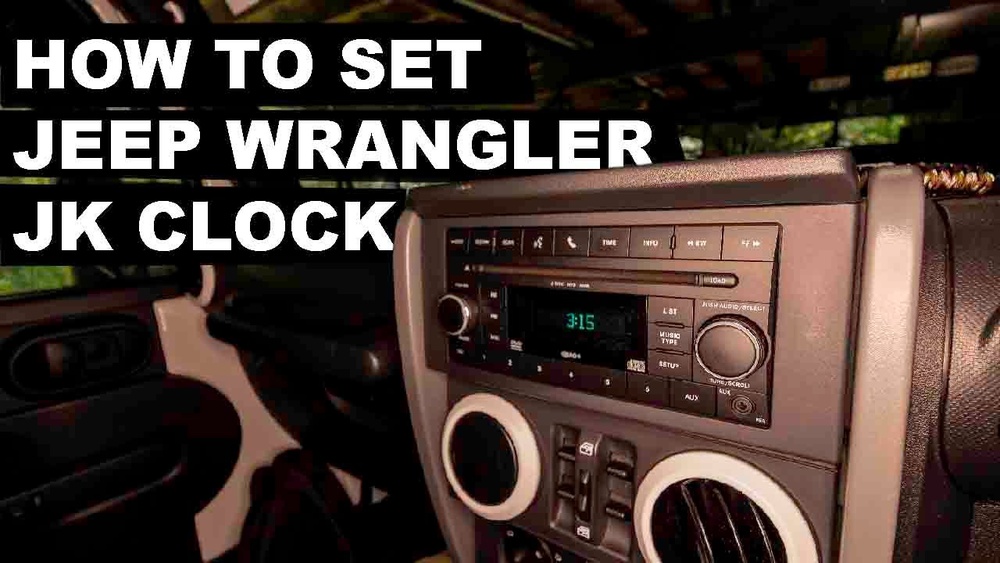
Setting The Clock: Jk (2007–2018)
- Turn the ignition on.
- Locate the radio unit and press the “Menu” button.
- Select “Clock Settings” or “Set Clock”.
- Use the arrow buttons to change the hour and minute.
- Press “OK” or “Menu” to save changes.
Non-obvious insight: Some aftermarket radios in JK models need a different process. Look for “Setup” or “Settings” instead of “Menu”.
Setting The Clock: Jl (2018–present)
- Start your Jeep and turn on the Uconnect touchscreen.
- Tap “Settings” on the display.
- Select “Clock & Date”.
- Tap “Set Time” and adjust hour/minute using the on-screen arrows.
- Hit “Save” to confirm.
JL models often sync with GPS if enabled. If manual adjustment fails, check for “Sync Time with GPS” and turn it off.
Common Problems And Solutions
Sometimes, the clock won’t change or resets after battery disconnect. Here’s a quick troubleshooting table:
| Problem | Possible Cause | Solution |
|---|---|---|
| Clock resets after battery change | Weak battery or loose connection | Check terminals, recharge battery |
| Clock won’t adjust | Faulty radio unit | Replace radio or check fuse |
| No clock button/menu | Aftermarket radio installed | Read radio’s manual for steps |
Extra tip: If your Wrangler’s clock drifts over time, it could be a sign of electrical issues. Consider checking the alternator or battery voltage.

Quick Tips For Accurate Clock Setting
- Set the clock while parked to avoid distraction.
- Double-check AM/PM if your radio supports 12-hour format.
- For older radios, press buttons gently. Too much force can damage the unit.
- After setting, monitor for a week. If the time changes, your radio or battery may need attention.
Many owners overlook time zone settings in JL models. If your Jeep travels across states, update the time zone for accuracy.
Real-world Examples
Owners often report missing appointments because their Jeep’s clock was off by 30 minutes after a battery swap. Others found their touchscreen had “Sync Time with GPS” enabled, but GPS was slow to update. These small issues can lead to big headaches if not fixed.
A 2016 JK owner shared online that his aftermarket radio required holding both “H” and “M” buttons together for five seconds. Always check your radio’s manual or look up your specific model if you’re stuck.
If you need more detailed steps for your particular Wrangler, the official Jeep website offers guidance at Jeep Owners.

Frequently Asked Questions
How Often Should I Check The Clock On My Jeep Wrangler?
Check your clock every few months, and after any battery or radio work. Daylight saving changes are a good reminder.
Can I Set The Clock While Driving?
It’s best to set the clock while parked. Adjusting settings on the move can distract you and isn’t safe.
Why Does My Jeep Wrangler Clock Keep Losing Time?
This can be due to a weak battery, electrical issues, or a faulty radio unit. If you see repeated errors, have your Jeep’s electrical system checked.
Is There A Way To Set The Clock Automatically?
Some JL models have GPS sync. Check your settings for “Sync Time with GPS”. Older models need manual adjustment.
What If My Radio Doesn’t Match These Instructions?
If your radio unit is aftermarket or different, consult its manual. Many radios have unique button combinations for clock settings.
Keeping your Jeep Wrangler’s clock accurate is easy once you know where to look. With these steps and tips, you’ll always be on time—no matter where your Wrangler takes you.