If you drive a Jeep Grand Cherokee, you know how important dashboard lights are for nighttime driving. These lights show you your speed, gas level, and warnings.
But sometimes, they can be too bright, distracting, or even hurt your eyes during long drives at night. The good news is, you can adjust the brightness easily—if you know where to look.
Whether you have an older Grand Cherokee or the newest model, understanding how to dim dashboard lights helps you drive more comfortably and safely.
Why Dashboard Light Brightness Matters
Adjusting your dashboard lights is more than just a comfort feature. Bright dashboard lights can make it harder to see outside the car, especially on dark roads. Your eyes need time to adjust between the bright dashboard and the dark road ahead. If your dashboard is too bright, you might miss road signs or react slower to hazards. On the other hand, if the lights are too dim, you might not see important alerts or your speed. Finding the right balance keeps you safe and makes your drive smoother.
Standard Method: Using The Dash Dimmer Switch
Most Jeep Grand Cherokees come with a built-in way to adjust dashboard brightness. The dimmer switch is usually found on the left side of your steering wheel, near the headlight controls.
How To Use The Dimmer Switch
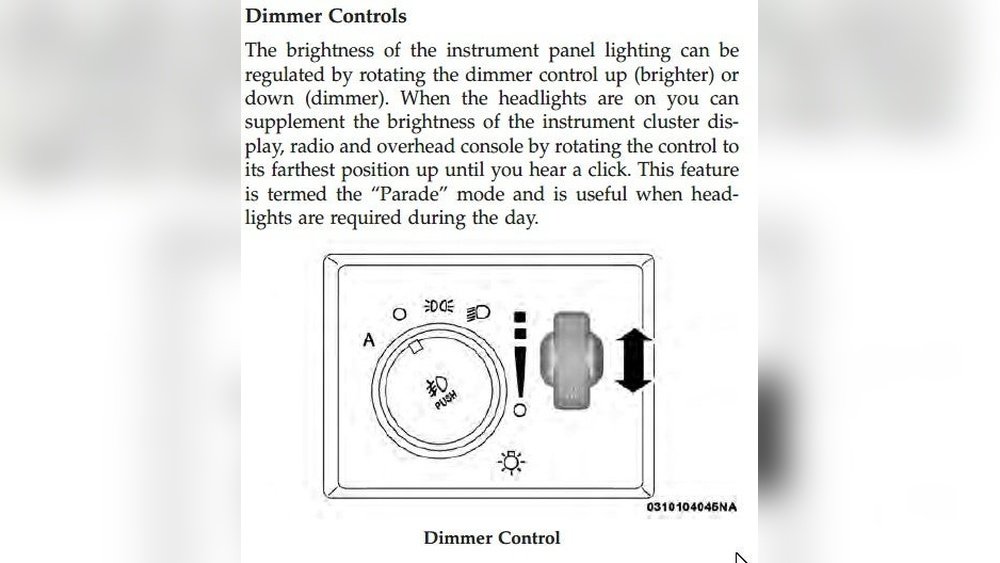
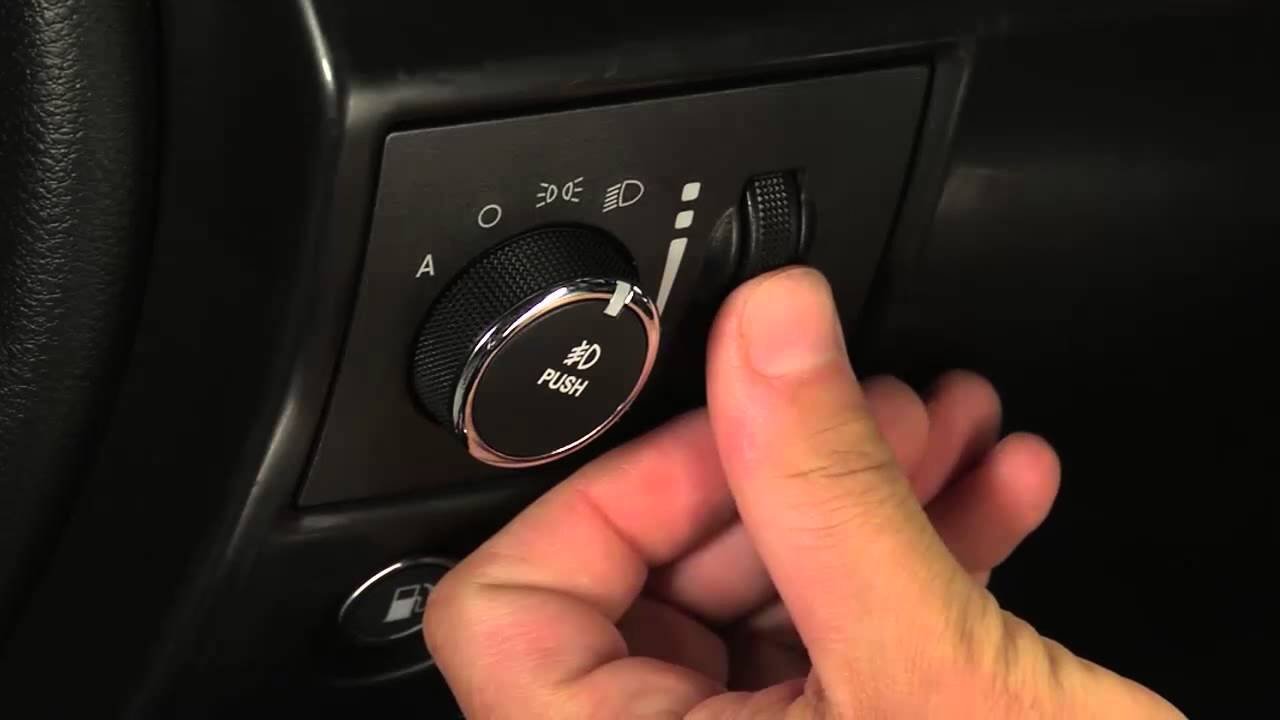
- Locate the dimmer wheel or knob on the dashboard, left of the steering wheel. In most models, it’s next to the headlight switch.
- Turn on your car’s headlights. The dashboard lights become adjustable when the headlights are on.
- Rotate the dimmer wheel up or down. Rolling it up makes the lights brighter, rolling down dims them.
- Stop when you find the right brightness. You’ll notice the dashboard, instrument cluster, and sometimes the center display adjusting at the same time.
This simple process works for most model years, from the 1990s up to recent releases. Newer models might have a button instead of a wheel, but the idea stays the same.
Differences By Model Year
Jeep has changed the dashboard controls over time. Here’s a look at how the dimming process differs depending on which Grand Cherokee you have.
| Model Year | Dimmer Type | Adjustment Method |
|---|---|---|
| 1993-2010 | Manual Wheel/Slider | Rotate or slide to adjust |
| 2011-2020 | Push-button or Electronic Wheel | Press or roll to adjust |
| 2021 and newer | Touchscreen or Advanced Wheel | Screen or wheel adjustment |
Older Grand Cherokees use a basic wheel or slider. Newer ones often add electronic controls, and the newest models sometimes let you adjust brightness through the Uconnect touchscreen.
Adjusting Through The Uconnect Touchscreen
If you own a 2021 or newer Grand Cherokee, you might be able to change dashboard light brightness using your infotainment system.
Steps For Uconnect Adjustment
- Start your Jeep and turn on the headlights.
- Tap the Uconnect screen and find the “Settings” menu.
- Look for “Display” or “Lights.”
- Adjust the brightness using the on-screen slider for “Instrument Cluster Brightness” or similar.
- Confirm your setting—most systems save the brightness automatically.
Tip: The touchscreen usually controls more than just the dashboard. Be careful not to dim the screen too much, or it might be hard to see at night.

Automatic Vs. Manual Dimming
Many Grand Cherokees come with an automatic dimming feature for the dashboard and the center display. This means the car senses outside light and adjusts brightness for you. But, you can usually override this with the manual dimmer.
| Feature | How It Works | Can You Override? |
|---|---|---|
| Automatic Dimming | Uses sensors to adjust light | Yes, with manual control |
| Manual Dimming | User sets brightness | N/A |
If you notice your dashboard brightness changing by itself, this is likely the automatic feature working. When you use the manual dimmer, it should take priority until you restart the car or reset the settings.
Common Problems And Fixes
Sometimes, you might find that dashboard lights won’t dim as expected. Here are a few common causes and what you can do:
- Dimmer switch failure: The wheel or button can wear out, especially in older Jeeps. If turning the dimmer does nothing, the part might need replacing.
- Blown fuse: If all your dashboard lights are out, check your fuse box. The “Instrument Cluster” or “Illumination” fuse may be blown.
- Settings reset: On new models, software updates can reset your Uconnect settings. You may need to adjust brightness again after service.
- Ambient light sensor issue: If the automatic dimming isn’t working, the sensor by the windshield could be dirty or faulty.
- Wiring issues: Aftermarket installations (like new stereos) can sometimes disconnect the dimmer circuit.
Pro tip: If you replace bulbs in the dashboard, make sure you use the correct type and voltage. Wrong bulbs can cause uneven brightness or no light at all.
Practical Tips For Best Results
Dimming your dashboard is simple, but a few best practices can make your driving experience much better:
- Adjust before driving: Set your brightness before you hit the road, especially at night.
- Don’t dim too much: If you dim the dashboard all the way, you might miss warning lights.
- Clean the dashboard: Dust and fingerprints can make even a dim light seem brighter or cause glare.
- Combine with night mode: If your Grand Cherokee has “night mode” for the center screen, use it for less distraction.
- Check the settings after service: Sometimes, battery changes or dealership updates reset your preferences.
Real-world Example: 2018 Grand Cherokee
Let’s say you have a 2018 Jeep Grand Cherokee. You notice the dashboard is too bright at night. Here’s what you do:
- Find the dimmer wheel to the left of the steering wheel.
- Turn on your headlights.
- Roll the dimmer wheel downward. As you do, the dashboard lights and center display dim together.
- If you want the center display even dimmer, go into the Uconnect system, tap “Settings,” then “Display,” and lower the brightness slider.
Many drivers forget that both the wheel and the screen can control brightness. If you only adjust one, you might not get the result you want. Try using both for the perfect setting.
Comparison: Jeep Grand Cherokee Vs. Other Suvs
How does the Jeep Grand Cherokee compare with other popular SUVs when it comes to dashboard light adjustment? Here’s a quick look:
| Vehicle | Dashboard Dimming Method | Advanced Features |
|---|---|---|
| Jeep Grand Cherokee | Wheel/Button/Touchscreen | Night Mode, Auto-Dimming |
| Toyota Highlander | Manual Wheel | Limited Auto-Dimming |
| Ford Explorer | Touchscreen & Manual | Ambient Light Control |
| Honda Pilot | Manual Wheel | Basic Dimming Only |
The Grand Cherokee stands out because it offers both manual and digital controls, plus automatic adjustment in newer models. Some competitors only use a basic wheel, which limits fine-tuning.
Insights Most Owners Miss
Many drivers don’t realize a few things about Jeep dashboard dimming:
- The dimmer wheel often controls not just the dashboard, but also backlighting for window switches, gear shifters, and sometimes cup holders. If these are too bright, dimming the dashboard helps all around.
- In some models, if you roll the dimmer wheel to the lowest point and click, it turns off interior dome lights completely. This is useful for stargazing or camping.
Understanding these small details can make your Jeep feel more tailored to you.
When To Seek Professional Help
If you’ve tried everything and your dashboard lights still won’t dim, it’s time to get help. A trusted mechanic or Jeep dealer can:
- Check your dimmer switch and wiring.
- Replace blown fuses or faulty bulbs.
- Diagnose sensor or computer issues.
Do not try to open up your dashboard or mess with wiring unless you know what you’re doing modern cars have sensitive electronics that can be expensive to fix if damaged.
Saving Your Settings
On some new Grand Cherokees, you can save your dashboard brightness preferences to a driver profile. This means your settings load automatically when you start the car with your key or press your driver memory button. If your Jeep supports this, set your brightness how you like it, then save your profile. This is especially helpful if more than one person drives the car.
Frequently Asked Questions
How Do I Make My Dashboard Lights Brighter In A Jeep Grand Cherokee?
Turn the dimmer wheel or press the brightness button near the steering wheel upward. In models with Uconnect, you can also increase brightness in the “Display” settings.
Why Won’t My Dashboard Lights Dim Even After Adjusting The Switch?
This can happen if the dimmer switch is faulty, a fuse is blown, or the automatic sensor is not working. Check all three, and if needed, have a mechanic inspect the system.
Can I Change Dashboard Light Color In My Jeep Grand Cherokee?
Most Grand Cherokees do not support changing the dashboard light color. Some premium trims may let you change ambient lighting, but not the main dashboard color.
Are Dashboard Lights Connected To The Headlights?
Yes, in most Grand Cherokees, the dashboard lights are linked to the headlights. They dim automatically when headlights are on, and you can adjust further using the dimmer.
Is There A Way To Reset Dashboard Light Settings?
For most models, simply turning the car off and on resets temporary adjustments. For deeper settings, check your Uconnect system or consult your owner’s manual. Some advanced settings may require a dealership reset.
For more details on Jeep Grand Cherokee features, visit the Wikipedia page.
Driving at night should be comfortable, not distracting. Adjusting your Jeep Grand Cherokee’s dashboard lights is a small step that makes a big difference.
With the right settings, you’ll enjoy safer, more relaxed trips no matter where the road takes you.


















