If you drive a Jeep Cherokee, you probably enjoy the comfort it offers, especially on cold mornings. One feature many drivers appreciate is the heated steering wheel. It keeps your hands warm during winter. But sometimes, you may want to turn off this feature—maybe the cabin is getting too hot, or you simply don’t need it. Turning off the heated steering wheel in a Jeep Cherokee should be simple, but the exact method can vary by model year and trim. In this guide, you’ll learn clear steps for every scenario, common mistakes to avoid, and smart tips to make the most of your Jeep’s climate controls.
Why Turn Off The Heated Steering Wheel?
Some drivers leave the heated steering wheel on all the time. However, there are good reasons to turn it off:
- Comfort: Too much heat can make your hands sweat or feel uncomfortable.
- Battery conservation: Heated features use extra energy, which can matter if your car is idling or in cold conditions.
- Avoiding wear: Using the heater only when needed can extend the life of the heating element.
Understanding when and how to switch off this feature gives you better control over your Jeep’s comfort and efficiency.
Where Is The Heated Steering Wheel Control?
Depending on your Jeep Cherokee’s model year and trim, the control might be in different places. Usually, you’ll find it in one of these three locations:
- Touchscreen display (most common in models 2014 and later)
- Physical button on the steering wheel or dashboard (rare)
- Climate control menu in the infotainment system
Let’s break down each option so you can find it quickly.
Touchscreen Display
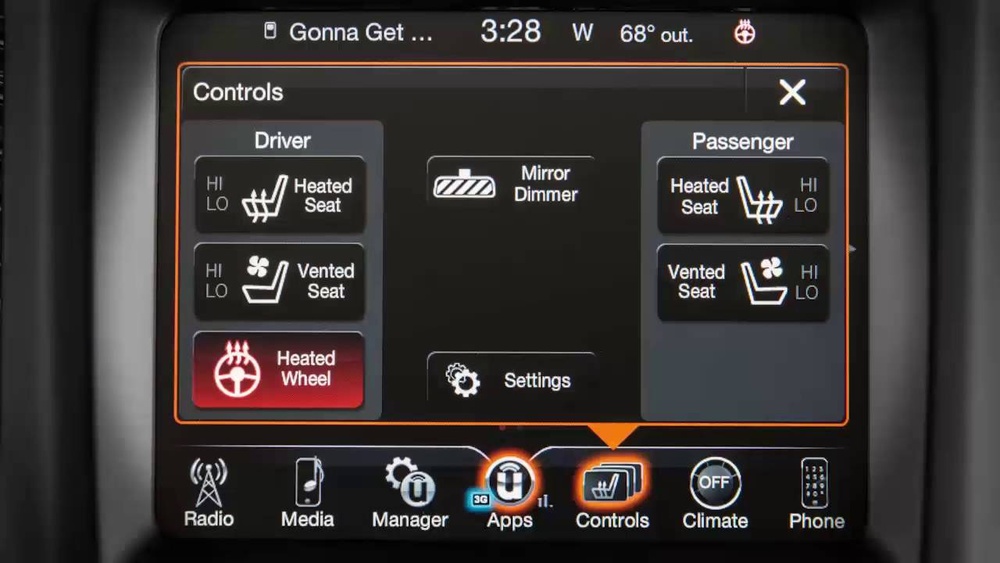
Most newer Jeep Cherokees (2014 and up) use the Uconnect system a touchscreen interface that manages many car features. You’ll often find the heated steering wheel control here.
Some older trims or certain packages might offer a physical button. This is less common but still possible, especially in base or sport models.
On some models, you need to go deeper into the climate menu on the touchscreen. It might not be visible on the home screen.
How To Turn Off Heated Steering Wheel: Step-by-step
The method depends on your model. Here are clear steps for the most common Jeep Cherokee configurations.
For Uconnect Touchscreen (2014–present)
- Start your Jeep Cherokee. The touchscreen system needs the ignition on.
- Locate the climate controls on the touchscreen. This might be a button labeled “Climate,” or a fan icon.
- Tap “Controls” or “Climate.” Look for a menu with seat and steering wheel icons.
- Find the heated steering wheel icon. It usually looks like a small steering wheel with heat waves.
- Tap the icon. If the heater is on, tapping it will turn it off. The icon should change color or lose its highlight.
- Look on the dashboard or steering wheel. The button often shows a steering wheel with heat lines.
- Press the button once. The heater will turn off, often with a small light indicator.
- Go to the main menu on the Uconnect screen.
- Select “Climate.”
- Find the heated steering wheel setting. Toggle it off.
Example: 2019 Jeep Cherokee Latitude
In the 2019 Latitude, there’s no physical button. All controls are managed through the touchscreen:
- Tap the “Climate” button on the bottom row of the display.
- Tap the heated steering wheel icon. It will turn gray when off.
Model Year Differences: Key Details
Jeep makes small changes each year. Here’s a quick comparison to help you understand how the heated steering wheel control changes over time.
| Model Year | Control Location | Notes |
|---|---|---|
| 2014–2018 | Uconnect Touchscreen | Usually under “Controls” menu |
| 2019–2021 | Uconnect Touchscreen | Some trims add heated steering wheel to “Climate” menu |
| 2022–Present | Uconnect Touchscreen | More customizable, may show on home screen |
| Older models | Physical Button (rare) | Check near dashboard vents or steering wheel |
Not sure about your year? Check your owner’s manual, or look around the touchscreen menus.

Practical Tips For Using The Heated Steering Wheel
Turning off the heated steering wheel is easy, but there are smart ways to use this feature. Here’s what experienced Jeep owners do:
- Use with remote start: Many Cherokees turn on the heated steering wheel automatically in cold weather if you use remote start. If you don’t want this, go to your vehicle settings and disable “Auto Heated Steering Wheel.”
- Adjust with seat heaters: The climate control system often links seat and wheel heaters. If you turn off the seat heater, check if the wheel heater stays on.
- Monitor energy use: In very cold weather, using all heated features can drain the battery faster, especially if you idle for long periods.
- Set your preferences: The Uconnect system lets you choose default settings for heated features. Customize these in the “Settings” menu so the steering wheel doesn’t turn on automatically.
- Don’t forget after parking: If you leave the heater on, it may stay active during your next drive. Always check before you start a long trip in warmer weather.
Troubleshooting: If The Heated Steering Wheel Won’t Turn Off
Sometimes, you tap the icon or press the button, but the heater stays on. Here’s what to do:
- Restart the car: Turn off the ignition and wait a minute. Restart and try again.
- Check for software updates: Jeep occasionally releases Uconnect updates that fix glitches. Visit your dealer if you suspect a bug.
- Inspect for stuck controls: If the button is physically stuck, it may need cleaning or repair.
- Look for error messages: The system may display a warning if there’s a problem with climate controls.
- Contact a dealer: If you can’t turn off the heated steering wheel, there could be a wiring issue. Don’t try to fix it yourself—modern cars are complex.

Common Mistakes To Avoid
Even experienced drivers can make simple errors. Here are mistakes to watch for:
- Assuming the feature is off by default: Many Jeep Cherokees remember your last setting. Always double-check.
- Looking only for a physical button: Most controls are digital now. Explore the touchscreen menus before getting frustrated.
- Ignoring system updates: Uconnect updates improve reliability and fix bugs.
- Not reading the manual: Jeep’s manuals often have pictures showing exactly where the control is.
- Missing automatic activation: Remote start can turn on the steering wheel heater without you realizing.
Table: Quick Reference For Turning Off Heated Steering Wheel
This table helps you quickly find the right method for your Jeep Cherokee model year.
| Model Year | Steps to Turn Off | Notes |
|---|---|---|
| 2014–2018 | Touchscreen: Controls → Tap Heated Wheel Icon | Icon turns gray or unlit when off |
| 2019–2021 | Touchscreen: Climate → Tap Heated Wheel Icon | Some trims may differ |
| 2022+ | Touchscreen: Home/Climate → Tap Heated Wheel Icon | Customizable menu locations |
| Older/rare trims | Press Physical Button | Look near steering wheel or dash |
Non-obvious Insights: What Most Owners Miss
Many articles cover the basics, but here are two things most Jeep Cherokee owners don’t realize:
1. Automatic Climate Sync Can Override Your Choice
If your Jeep is set to “Auto” climate mode, it may turn the heated steering wheel back on when the temperature drops even if you just turned it off. To stop this, switch to manual mode in your climate settings.
2. Heated Steering Wheel May Shut Off Automatically
The system can turn off the heater to protect itself if it senses overheating or if the battery is running low. This is a built-in safety feature.
If your wheel stops heating by itself, check battery health and avoid running too many heated features at once.
How The Heated Steering Wheel Works
Understanding how the heated steering wheel functions gives you better control. The system uses a thin heating element inside the steering wheel rim. When activated, it quickly warms the wheel’s surface. Sensors inside the system monitor temperature and power use.
The system will shut off after a set period (usually 30 45 minutes) to avoid overheating.
This technology is designed for convenience and safety. If it ever fails to turn off, it’s usually a software or sensor issue not something you can fix at home.
When Should You Turn Off The Heated Steering Wheel?
While comfort is personal, there are some smart guidelines:
- After the cabin warms up: Once the main heater has done its job, turn off the heated wheel to save energy.
- On longer drives: Prolonged use can make your hands sweaty. Turn it off every hour or so.
- If you feel numbness or tingling: This can happen if the wheel gets too warm.
- Before parking: Don’t leave it on if you won’t need it next time.
Safety And Maintenance Advice
A heated steering wheel is safe, but here’s how to keep it working for years:
- Avoid sharp objects: Don’t use rings or keys that could cut the leather or surface.
- Clean with mild products: Harsh chemicals can damage the heating element.
- Check for recalls: Very rarely, Jeep issues recalls for heated features. Register your VIN on the Jeep website to get notifications.
- Don’t cover with aftermarket wraps: Thick covers can trap heat and stress the system.
Are All Jeep Cherokee Models Equipped With Heated Steering Wheels?
No, the heated steering wheel is usually available only on higher trims or as part of an option package. If you have a base model or an older Cherokee, you might not have this feature.
Check your window sticker, owner’s manual, or look for the icon in the climate menu.
Comparison: Heated Steering Wheel Vs. Heated Seats
Some people wonder if they need both features. Here’s a side-by-side look.
| Feature | Comfort Level | Energy Use | Best For |
|---|---|---|---|
| Heated Steering Wheel | Warms hands quickly | Low to moderate | Short drives, instant comfort |
| Heated Seats | Warms body and back | Moderate | Long drives, cold weather |
For most drivers, using both together offers the fastest way to warm up. But you can save energy by using only one at a time, especially once the cabin is warm.
How Do I Know If My Jeep Cherokee Has A Heated Steering Wheel?
Check your climate controls on the touchscreen or look for a steering wheel icon with heat waves. Your owner’s manual also lists all available features.
Can I Turn Off The Heated Steering Wheel Through The Jeep App?
Some newer Cherokees with Uconnect 4C or higher let you control climate features through the Uconnect app. You can turn off the heated steering wheel from your phone, but only if your model supports remote commands. Check your app and vehicle compatibility.
Why Does My Heated Steering Wheel Turn On Automatically?
If you use remote start during cold weather, the system may activate the heated steering wheel automatically. This is a comfort feature. You can change this default in the vehicle’s “Settings” menu.
My Heated Steering Wheel Won’t Turn Off—what Should I Do?
First, restart your car and try again. If it’s still stuck, check for Uconnect updates or contact your dealer. Avoid trying to repair it yourself, as modern climate systems are complex.
Where Can I Find More Information Or Get Updates?
The best place for official information is the Jeep Owners Site. You’ll find manuals, recalls, and update instructions there.
Getting comfortable with your Jeep Cherokee’s features helps you enjoy every drive. Knowing how to turn off the heated steering wheel is a small but useful skill. With these steps and tips, you’ll stay in control no matter the season.