If you drive a Jeep Grand Cherokee 2019, you know it’s packed with modern features, including a complex lighting system. Sometimes, you want to turn off the lights—maybe you’re waiting in the car at night, want to avoid draining your battery, or simply need privacy. But with automatic controls, settings, and multiple light types, turning off all the lights isn’t always as easy as flipping a switch. In this guide, you’ll learn the exact steps to turn off every light in your Jeep Grand Cherokee 2019, including headlights, interior lights, and those tricky DRLs. You’ll also discover helpful tips, common mistakes, and answers to the most frequent questions. Even if you’re not a car expert, you’ll feel confident about managing your Jeep’s lights after reading this article.
Understanding The Lighting System In Jeep Grand Cherokee 2019
The Jeep Grand Cherokee 2019 has several types of lights, each with its own control:
- Headlights (low and high beam)
- Daytime Running Lights (DRLs)
- Fog lights
- Parking lights
- Interior dome and map lights
- Cargo area and glove box lights
Each light has a different purpose. For example, DRLs increase your visibility during the day, while interior lights help you see at night. Many of these lights turn on and off automatically, which is convenient, but it can make manual control confusing.
A common issue: Some owners think all lights will turn off with the engine, but interior or parking lights can stay on and drain the battery. Understanding which light is active and how to control it is the first step.
Turning Off Exterior Lights
Exterior lights include the headlights, DRLs, fog lights, and parking lights. Here’s how to turn each off:
Headlights
Your Jeep uses an automatic system, but you can control it manually if needed.
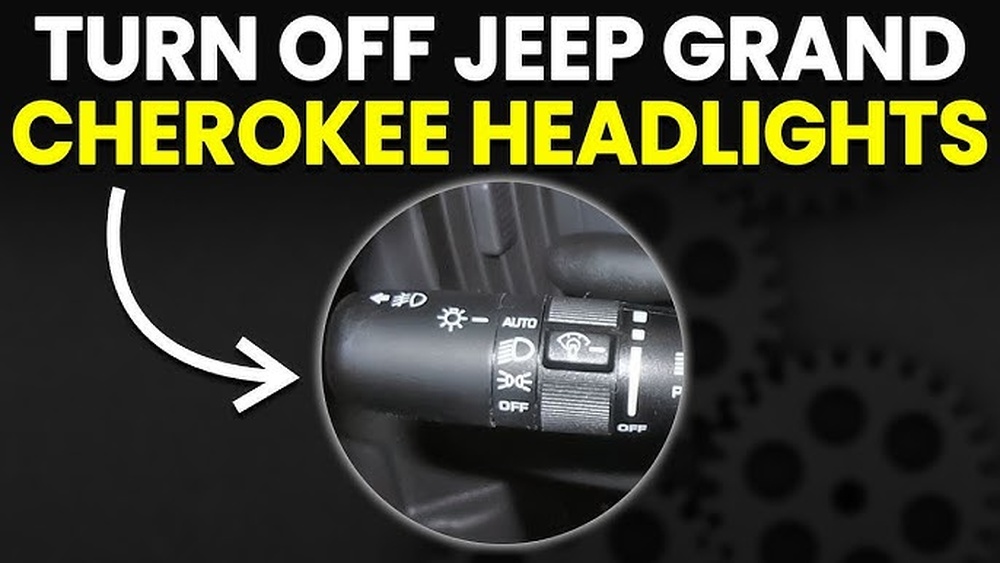
- Locate the headlight switch on the left side of your dashboard.
- The switch has several positions: AUTO, parking lights, headlights ON, and OFF.
- To turn headlights off, rotate the switch to the OFF position. In some models, there is no complete “off,” but you can turn to “parking lights” to reduce brightness.
Important: If the headlights stay on after you turn the knob to OFF, check if the “delayed exit” feature is active. This feature keeps headlights on for 30–90 seconds after you exit the car for safety.
Disabling Headlight Delay
- Go to Settings on your Uconnect touchscreen.
- Find Lights or Convenience settings.
- Turn off “Headlight Off Delay” or set it to the minimum.
Daytime Running Lights (drls)
DRLs turn on automatically when the engine runs. In most US vehicles, including the Jeep Grand Cherokee 2019, you can’t turn off DRLs with a simple switch. However, you have options:
- Parking Brake Method: DRLs turn off when the parking brake is engaged (before starting the engine). This is useful if you need the lights off briefly.
- Uconnect Settings: Some trims allow disabling DRLs via the touchscreen:
- Tap Settings > Lights > Daytime Running Lights > Uncheck/disable.
- Fuse Removal: As a last resort, you can remove the DRL fuse, but this is not recommended for everyday use.
Fog Lights
Fog lights only work with low-beam headlights. To turn off:
- Push the fog light button (usually a pull or push on the headlight control stalk) to the OFF position.
- If the fog icon on your dash disappears, they are off.
Parking Lights
Parking lights can be turned off by rotating the headlight switch past the “parking light” position to “OFF. “
Quick Comparison Of Exterior Light Controls
Here’s a quick look at which lights can be turned off manually and which need settings or extra steps:
| Light Type | Manual Switch | Uconnect Control | Other Method |
|---|---|---|---|
| Headlights | Yes | No | Delay Setting |
| DRLs | No | Sometimes | Parking Brake/Fuse |
| Fog Lights | Yes | No | — |
| Parking Lights | Yes | No | — |
Turning Off Interior Lights
Interior lighting adds comfort and safety, but can be distracting or drain your battery if left on.
Dome And Map Lights
- Manual Switch: Each light has a physical button. Press it once to turn off.
- All Interior Lights: Use the main dome light switch (usually near the center overhead console). Press or slide to the “off” position.
Automatic Interior Lights
Opening doors or the liftgate often triggers interior lights. To stop this:
- Find the dome override button (sometimes labeled as “DOOR” or a lightbulb symbol).
- Press or slide to the “off” or “override” position. Now, opening doors won’t trigger lights.
Non-obvious tip: If interior lights stay on after closing all doors, check if one door is slightly open or if the dimmer wheel is rolled up to the max (it clicks to turn lights on manually).
Glove Box And Cargo Area Lights
These usually turn off when the compartment is closed. If you notice they stay on:
- Check the latch. Sometimes, not closing the glove box or liftgate fully leaves the light on.
- For stubborn cases, inspect for a faulty switch.
Interior Light Controls At A Glance
| Light Location | Manual Switch | Automatic Trigger | Override Possible? |
|---|---|---|---|
| Front Dome/Map | Yes | Door Open | Yes |
| Rear Dome | Yes | Door Open | Yes |
| Glove Box | No | Box Open | No |
| Cargo Area | No | Gate Open | No |
Special Scenarios: When Lights Won’t Turn Off
Sometimes, lights stay on even after you think you’ve turned them off. Here are a few reasons:
1. Door Not Fully Closed
A door that’s almost closed but not latched will keep interior lights on. Always check every door, including the liftgate.
2. Dimmer Wheel Set To Max
The dash light dimmer (left of the steering wheel) can be rolled up until it clicks. This keeps the interior lights on, no matter what. Roll it down to turn them off.
3. Headlight Delay Feature
As mentioned earlier, your Jeep may keep headlights on for a short time after you leave. Change this in Uconnect if you want them off immediately.
4. Faulty Switch Or Sensor
Occasionally, a bad door sensor or light switch will cause lights to stay on. If you’ve checked all the steps above, and lights won’t turn off, a technician may need to check the system.

How To Turn Off All Lights Completely
If you want total darkness inside and out, follow these steps:
- Put the vehicle in PARK and turn off the ignition.
- Engage the parking brake before turning off the engine to disable DRLs.
- Make sure the headlight switch is set to OFF.
- Check that the dimmer wheel is not clicked to the max position.
- Press all interior light buttons to off; slide or press the dome override switch.
- Confirm all doors, glove box, and liftgate are fully closed.
- Wait a moment; sometimes, lights have a short delay before turning off.
Real-world tip: On some Grand Cherokees, the ambient lighting (like cup holder or footwell lights) stays on for a minute after locking. This is normal and will turn off automatically.
Saving Battery: Why Turning Off Lights Matters
Leaving lights on, especially interior or parking lights, can drain your battery. The average car battery can lose enough charge to prevent starting in just a few hours if several bulbs are left on. According to the Car Care Council, about 20% of no-start issues are caused by battery drain, often from lights left on by accident.
In cold weather, battery drain happens faster. Always double-check all lights are off before leaving your vehicle, especially if you park for long periods.
Common Mistakes When Turning Off Lights
- Forgetting the dimmer wheel: Many owners overlook the dash light dimmer, accidentally leaving interior lights on.
- Assuming DRLs can be turned off with a switch: DRLs are designed to stay on for safety and often need a workaround.
- Not closing all doors: Even a slightly open liftgate or door will keep interior lights on.
- Ignoring Uconnect settings: Some lighting features (like headlight delay or DRLs) can only be changed through the touchscreen.
- Not checking for delay: Expecting lights to turn off instantly, when some have a 30–90 second delay.
Practical Tips For Light Control
- Customize your settings: Use the Uconnect system to adjust headlight delay and DRLs if your trim allows.
- Use the parking brake trick: Need DRLs off when parked but running the engine? Engage the parking brake before starting.
- Routine check: Make it a habit to glance at your interior and exterior lights before leaving your Jeep.
- Consider LED upgrades: If you’re worried about battery drain, replacing bulbs with LEDs can reduce power use.
- Stay updated: For detailed system updates or recalls, check the official Jeep Owners Site.

To show how important it is to turn off your lights, here’s a look at battery drain incidents caused by lights (data from US AAA surveys):
| Type of Light Left On | % of Battery Service Calls |
|---|---|
| Interior Dome/Map Lights | 39% |
| Headlights | 32% |
| Parking Lights | 13% |
| Other (Trunk/Glove Box/Cargo) | 16% |
As you can see, dome/map lights are the most common cause of battery-related service calls, followed by headlights. This highlights why it’s critical to check all your Jeep’s lights before leaving it parked.
How Do I Disable The Automatic Headlights On My Jeep Grand Cherokee 2019?
To disable automatic headlights, turn the headlight control switch from “AUTO” to the “OFF” or “parking lights” position. Some models may not allow a true “off” while driving for safety, but you can set the lights to off when parked.
Why Won’t My Interior Lights Turn Off After Closing All Doors?
If your interior lights stay on, check if any door (including the liftgate) is not fully closed. Also, make sure the dimmer wheel left of the steering wheel is not rolled up to the max, as this keeps the lights on.
Can I Turn Off Daytime Running Lights Permanently?
On some trims, you can disable DRLs using the Uconnect touchscreen by navigating to Settings > Lights > Daytime Running Lights. If this option is missing, DRLs cannot be fully disabled without using the parking brake or modifying the fuse, which is not recommended for daily use.
Are There Any Settings In The Uconnect System For Lights?
Yes, you can adjust several lighting features in Uconnect. These include headlight off delay, DRL settings (on some trims), and ambient light brightness. Access these by tapping Settings > Lights.
What Should I Do If The Lights Still Won’t Turn Off After Trying Everything?
If all switches are off, doors are closed, and settings are correct, but lights remain on, there could be a faulty door sensor, switch, or an electrical issue. It’s best to have your Jeep checked by a certified technician.
Knowing how to control your Jeep Grand Cherokee 2019’s lights can prevent battery drain, improve privacy, and make your driving experience smoother. With these steps, you’ll never be left in the dark—or accidentally left with your lights on—again.