Getting into your 2022 Jeep Grand Cherokee after sunset feels exciting until you want to turn off the lights and aren’t sure how. This SUV comes with advanced lighting features for safety and style, but that also means more ways to control your lights.
If you’ve ever wondered how to turn off the headlights, interior lights, or even those lingering puddle lights, you’re not alone. Many owners struggle with the different settings, auto features, and small details that aren’t always clear in the manual.
This guide breaks down everything you need to know, step by step, so you can confidently turn off every light in your Jeep Grand Cherokee 2022.
Understanding Jeep Grand Cherokee 2022 Lighting Systems
The 2022 Jeep Grand Cherokee uses LED headlights, taillights, and interior ambient lighting. These systems are controlled by both manual switches and automatic sensors. The vehicle is designed for convenience and safety—meaning, sometimes, the lights stay on to help you see or be seen.
Key lighting features in this model:
- Automatic headlights with dusk sensors
- Daytime running lights (DRLs)
- Dome and map lights for the cabin
- Puddle lights under the side mirrors
- Cargo and trunk lights
- Ambient lighting in some trims
Knowing what type of lights you want to turn off is the first step. Each system may require a different method or setting.
How To Turn Off Headlights
Turning off the headlights can be confusing due to the automatic feature. Here’s how you can control them:
Manual Headlight Control
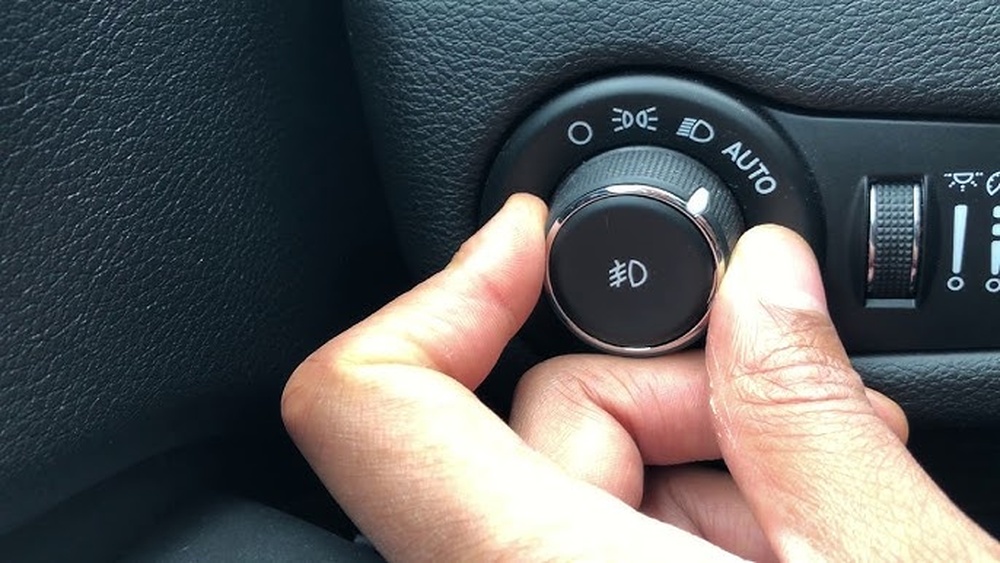
- Locate the headlight control dial to the left of the steering wheel.
- The dial usually has these positions:
- Auto (A symbol, usually the default)
- Off (circle or “O” symbol)
- Parking lights (small light symbol)
- On (headlight symbol)
- To turn off the headlights manually:
- Rotate the dial to the Off position. In some trims, the dial may spring back to Auto, but the system will remember your preference until you restart the car.
- If you’re in a dark area, the system may override and keep the lights on for safety. This is a built-in feature.
Turning Off Headlights When Exiting
When you turn off the engine and remove the key (or press the Stop/Start button), the headlights might stay on for a few seconds. This is called Headlight Delay or “Follow Me Home” lighting. To disable this:
- With the ignition ON, use the vehicle settings menu on your dashboard screen.
- Go to Settings > Lights > Headlight Off Delay.
- Set the delay to 0 or Off.
This ensures the headlights turn off immediately when you exit.
Daytime Running Lights (drls)
DRLs are on whenever the engine is running for visibility. To disable DRLs:
- Use the Uconnect infotainment screen.
- Navigate to Settings > Lights > Daytime Running Lights.
- Toggle the switch Off.
In some markets, DRLs cannot be disabled due to legal requirements.
How To Turn Off Interior Lights
The interior lights include dome lights, map lights, ambient lighting, and cargo lights. Here’s how to control them:
Dome And Map Lights
- Press the dome light button (usually on the overhead console).
- Many Grand Cherokees use touch-sensitive buttons—tap to turn on/off.
If your doors are open, the dome lights may stay on. To turn off all interior lights:
- Close all doors firmly.
- Use the “Dome Override” button if available. This switch is often on the dashboard near the headlight dial.
Ambient Lighting
Some trims have adjustable ambient lighting:
- Use the Uconnect system to dim or turn off ambient lights.
- Go to Settings > Lights > Interior Ambient Light and adjust to your preference.
Cargo And Trunk Lights
- These lights usually turn on when the trunk or rear hatch is open.
- Make sure the hatch is closed properly to turn off the light.
- If the light stays on, check for a stuck latch or faulty switch.
How To Turn Off Puddle Lights
The puddle lights under the mirrors come on when you unlock or open the doors. To turn them off:
- Lock the car using the key fob—the lights should turn off after a short delay.
- If they remain on, check your Uconnect settings under Lights > Approach Lighting and set it to Off.
Turning Off All Lights When Parking
Sometimes, you want every light off—no headlights, no DRLs, no interior or exterior lights. Here’s a checklist:
- Turn the headlight dial to Off.
- Make sure all doors and the trunk are closed.
- Check your Uconnect settings for any light delay or welcome lighting features and turn them off.
- Use the key fob to lock the vehicle—this usually shuts off any remaining lights.
Common Mistakes And How To Avoid Them
Many Jeep Grand Cherokee owners make small errors that cause lights to stay on. Here are some frequent mistakes and how to avoid them:
- Forgetting to turn off “Auto” mode: The car may keep lights on if the sensor detects darkness.
- Leaving a door or trunk slightly open: Even a small gap can keep interior lights on.
- Not disabling the headlight delay: Lights can remain on after exiting if the delay feature is active.
- Touch-sensitive lights: Accidentally touching overhead lights can turn them on, even if the door is closed.
If you notice any lights staying on, double-check these points before assuming there’s a fault.
Data Table: Lighting Control Features By Trim
Here’s a comparison of lighting features across the main 2022 Grand Cherokee trims:
| Feature | Laredo | Limited | Overland | Summit |
|---|---|---|---|---|
| Auto Headlights | Yes | Yes | Yes | Yes |
| Ambient Lighting | No | Basic | Advanced | Advanced |
| Puddle Lights | No | Yes | Yes | Yes |
| DRL On/Off Setting | Yes | Yes | Yes | Yes |
| Headlight Delay | Yes | Yes | Yes | Yes |
Different trims may have different levels of customization. Higher trims like Overland and Summit offer more advanced ambient lighting options.
Troubleshooting Lights That Won’t Turn Off
Sometimes, even after following the steps, a light stays on. This can be frustrating, but there are logical reasons and simple fixes.
Check For Stuck Switches
If a dome light or map light won’t turn off:
- Try pressing the light itself (many are push-button).
- Look for a small switch on the light fixture; toggle it off.
Inspect Door Ajar Sensors
The car’s lights stay on if a door isn’t closed completely. Gently push each door and the trunk to make sure they’re shut.
Uconnect System Reset
In rare cases, the Uconnect system may freeze or not register your changes. Try this:
- Turn off the car.
- Open and close the driver’s door.
- Wait 30 seconds and restart the car.
If the problem continues, a software update at your dealer may be needed.
Battery Saver Feature
The Grand Cherokee has a battery saver system that will turn off interior lights after about 10 minutes, even if something is left on. However, don’t rely on this—always turn off lights manually to avoid battery drain.
Table: Time Until Automatic Light Shutoff
See how long various lights stay on after you exit the vehicle if not turned off manually:
| Light Type | Shutoff Time | Manual Control? |
|---|---|---|
| Headlights (Auto Delay) | 0–90 sec (user set) | Yes |
| Interior Dome Lights | 10 min (battery saver) | Yes |
| Puddle Lights | 20–30 sec | Indirect (lock car) |
| Ambient Lighting | Immediate (on lock) | Yes |
Two Key Insights Beginners Often Miss
- Auto Mode Doesn’t Always Mean Off: Many drivers believe putting the headlight dial in Auto means the lights will turn off when leaving the car. In reality, the sensors may keep lights on longer in low light or bad weather—even during the day if it’s cloudy or raining.
- Software Updates Can Change Light Behavior: Jeep sometimes updates the Uconnect system, which can add or remove lighting options. If you can’t find a setting described in your manual or this guide, check for a software update or ask your dealer. Sometimes, a feature like DRL off or headlight delay customization appears after an update.
Table: Manual Vs. Automatic Lighting Control
Understanding which lights you can control directly helps you avoid surprises.
| Light | Manual Switch | Automatic Only |
|---|---|---|
| Headlights | Yes | Yes (Auto mode) |
| DRLs | Yes (if option present) | Yes (if option locked) |
| Interior Dome/Map | Yes | No |
| Puddle Lights | No | Yes |
| Ambient Lighting | Yes | Yes (on/off with door) |
Additional Tips For Managing Jeep Grand Cherokee Lights
- Use the dimmer wheel: To quickly dim or brighten the dash and ambient lights, use the small wheel near the headlight dial.
- Set your preferences in Uconnect: Most lighting features, like DRLs and headlight delay, are in the Settings > Lights menu.
- Lock the car to turn off all exterior lights: This is a quick way to make sure nothing stays on accidentally.
- Consult your manual for trim-specific features: Not every trim has the same controls or settings.
For more technical information or the latest updates, visit the official Jeep Owner’s Manuals page.
How Do I Turn Off The Headlights Completely At Night?
Rotate the headlight control dial to the Off position. If the system keeps the lights on, check for Headlight Delay settings in the Uconnect system and disable them. In some trims, the car will keep the lights on for safety until you exit and lock the vehicle.
Why Do My Interior Lights Stay On After Closing All Doors?
Usually, a door or trunk is not fully closed. Double-check all latches.
If all doors are secure, look for a stuck dome or map light switch. Also, check for battery saver mode, which will turn off the lights after about 10 minutes.
Can I Disable The Daytime Running Lights?
Yes, in most US models, you can turn off Daytime Running Lights in the Uconnect settings under Lights. However, in some areas, DRLs are required by law and cannot be switched off.
Are There Any Lights I Can’t Control Manually?
Puddle lights and some welcome/approach lights are automatic and can only be adjusted through settings in the Uconnect system—not directly by a switch.
What Should I Do If A Light Won’t Turn Off And Drains My Battery?
First, check all doors, trunk, and switches. If the light stays on, try resetting the Uconnect system or check for a blown fuse.
If the problem continues, contact your Jeep dealer there may be a faulty sensor or software issue.
Turning off lights in your 2022 Jeep Grand Cherokee is simple once you know where to look and what to adjust. With these steps, you can take control of every lighting feature and avoid unwanted battery drain or confusion.
Enjoy your drive, day or night, knowing your lights are working exactly as you want.