If you drive a Jeep, you probably use the navigation system to find new places, avoid traffic, or plan road trips. But what happens when your Jeep navigation stops working? This can be frustrating, especially if you depend on it for daily driving. Understanding the reasons and solutions can help you get back on track quickly. In this article, you’ll learn the most common causes, how to troubleshoot, and what to do if you can’t fix it yourself.
Many Jeep owners notice their navigation system fails in different ways. Sometimes, the screen freezes. Other times, maps don’t load or the GPS can’t find your location. Here are the main causes:
1. Gps Signal Issues
Buildings, tunnels, or heavy trees can block the GPS signal. If you drive in areas with poor satellite coverage, your navigation may lose accuracy or stop.
2. Outdated Maps Or Software
Jeep navigation systems need regular updates. If your maps or software are old, you might see errors or missing roads.
3. Faulty Gps Antenna
The antenna picks up satellite signals. If it’s damaged or disconnected, the navigation won’t work.
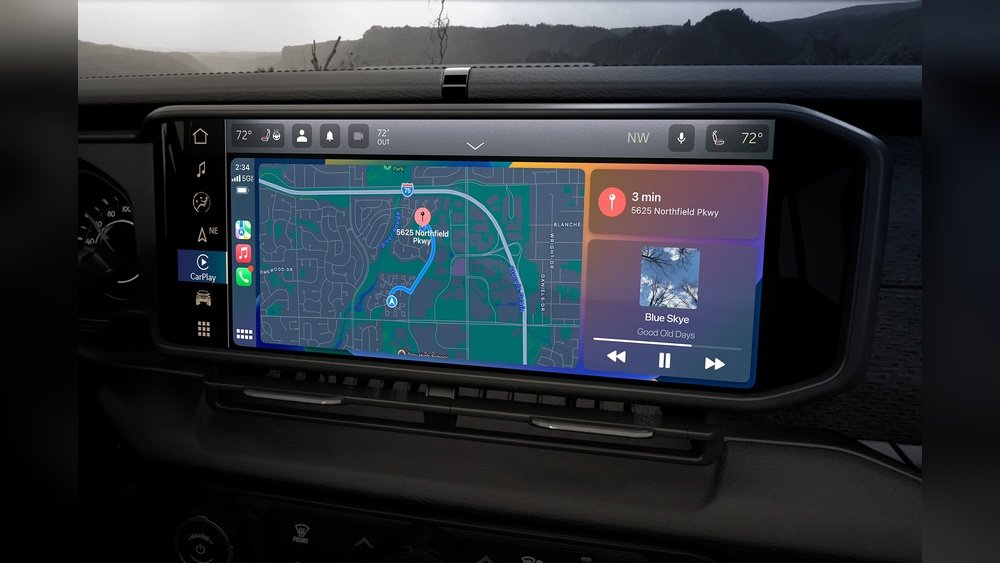
4. Uconnect System Glitches
Most modern Jeeps use the Uconnect system. Like any computer, it can freeze or crash, especially after updates or power loss.
5. Blown Fuse Or Wiring Problem
Power issues can shut down the navigation screen. A blown fuse, loose wire, or connector problem is sometimes the cause.
6. Corrupted Sd Card Or Hard Drive
Some Jeep systems store maps on an SD card or hard drive. If the data gets corrupted, navigation can fail.
7. Subscription Or License Expired
Some features or maps need a paid subscription. If it expires, you might lose navigation access.
Quick Troubleshooting Steps
You don’t always need a mechanic to fix navigation problems. Try these steps first:
1. Restart The Uconnect System
Turn off your Jeep, open the driver’s door, and wait for the screen to go black. Restart the vehicle after a few minutes.
2. Check Gps Reception
Move to an open area. Wait for a few minutes to see if the signal returns.
3. Update Maps And Software
Go to the Uconnect menu and check for updates. Download and install them if available.
4. Inspect The Sd Card Or Usb Drive
Remove and reinsert the card or drive. Try it in another device to test for errors.
5. Check Fuses
Locate the fuse box (see your Jeep’s manual). Find the fuse for the navigation or radio and inspect it. Replace if broken.
6. Reset To Factory Settings
Only do this if other steps fail. It erases personal settings, but can fix software glitches.
Many drivers wonder if built-in Jeep navigation is better than using a phone. Here’s a quick comparison:
| Feature | Jeep Navigation | Smartphone GPS |
|---|---|---|
| Works Without Cell Signal | Yes | Only with offline maps |
| Real-Time Traffic | Subscription needed | Usually included |
| Screen Size | Large (built-in) | Small (depends on phone) |
| Updates | Manual, sometimes paid | Automatic, free |
| Integration with Car | Full (audio, controls) | Partial (Bluetooth, CarPlay/Android Auto) |
When To See A Professional
Sometimes, navigation issues are too complex for DIY fixes. Consider visiting a Jeep dealer or trusted mechanic if:
- The system won’t power on at all
- You see error messages about “No Map Data” or “Navigation Not Available”
- Updates fail or cause new problems
- The GPS antenna needs replacement
Repairs can be costly, so ask for an estimate before starting work.

A 2022 survey by Consumer Reports found that about 8% of Jeep owners reported navigation problems within the first 3 years. Most issues were minor, but about 2% needed major repairs. Problems are more common in older models and after major software updates.
Here’s a breakdown by Jeep model:
| Jeep Model | Reported Navigation Issues (%) |
|---|---|
| Wrangler | 10% |
| Grand Cherokee | 8% |
| Cherokee | 7% |
| Compass | 6% |
You can avoid many problems by following these tips:
- Update regularly: Keep maps and software current.
- Protect the screen: Use a sunshade to avoid overheating.
- Keep SD cards safe: Don’t remove or insert them while the system is on.
- Check for recalls: Sometimes Jeep issues free fixes for known problems.
- Use official sources: Download updates from Jeep’s website, not third parties.
Two Insights Most Owners Miss
First, many Jeep owners don’t realize that Uconnect navigation updates can be done at home using a USB drive or SD card—no dealer visit needed. Second, if you use Apple CarPlay or Android Auto, you can run phone-based navigation on the Jeep screen even if the built-in system fails. This is a quick workaround while you arrange repairs.
Frequently Asked Questions
This message usually means the system can’t find map data or the GPS antenna isn’t working. Try restarting the system and checking the SD card if used.
Yes. Most Jeeps let you download updates from the official Jeep website and install them with a USB drive or SD card. Follow instructions carefully to avoid errors.
Basic navigation usually works without a subscription, but traffic updates or advanced features may require a paid service. Check your owner’s manual for details.
Costs vary. A software update is often free.
Replacing a GPS antenna or screen can cost $100 $800. Always get a quote before repair.
Go to the official Jeep Uconnect website or contact your dealer. Avoid third-party sites, as they might offer unsafe files. For more details, visit the Jeep Uconnect site.
If your Jeep navigation is not working, don’t panic. Many problems have simple fixes.
Try the steps above and keep your system updated. If you need help, a trusted Jeep technician can get you back on the road with full navigation confidence.