When you’re inside your Jeep Grand Cherokee, a little light can make a big difference. Whether you’re fumbling for keys in the dark, trying to read a map, or just need a bit of visibility, the dome light is your friend.
But sometimes, finding the control for that dome light can feel like a treasure hunt. Jeep designers, while brilliant in many ways, can sometimes place controls in less-than-obvious spots.
This guide will help you pinpoint exactly where the dome light controls are located on your Jeep Grand Cherokee, covering various model years and common locations so you can get the light you need, when you need it, without the fuss.
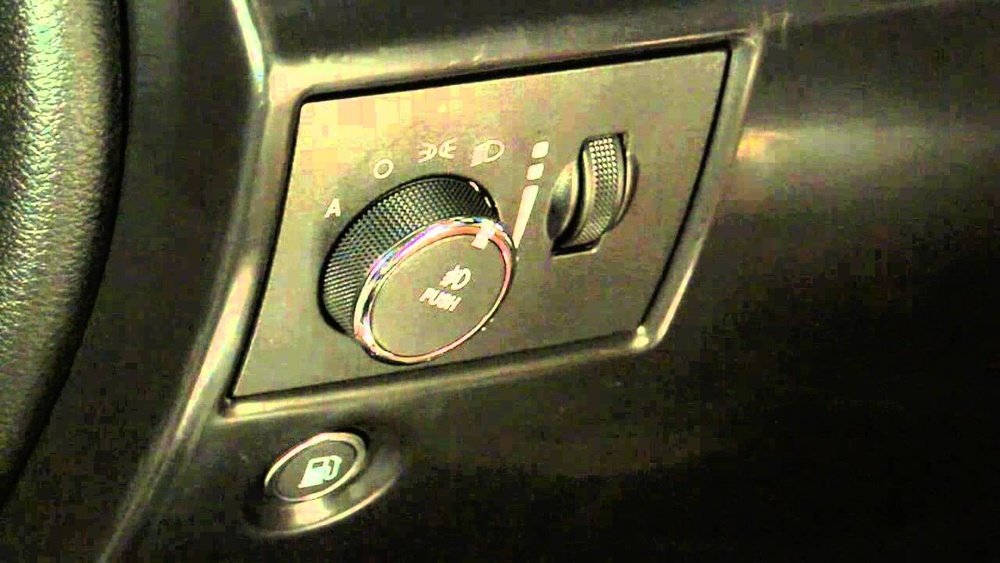
Understanding these controls will not only help you operate your interior lighting but also potentially troubleshoot issues if your dome light isn’t working as expected.
Locating The Dome Light Controls
The primary controls for your Jeep Grand Cherokee’s dome light system are typically found in a few key areas. These locations can vary slightly depending on the specific trim level and model year of your vehicle, but the general principles remain consistent.
Most often, you’ll find switches or buttons integrated into the overhead console, near the rearview mirror, or sometimes on the dashboard itself.
Overhead Console Switches
The most common place to find your dome light controls is in the overhead console, which is the unit mounted on the ceiling between the front seats, usually near the rearview mirror. This area often houses a variety of buttons and switches for interior lighting, sunroof operation, and sometimes even communication systems.
On many Jeep Grand Cherokee models, you’ll see a row of buttons or a single multi-function switch in this console. One of these will control the dome light. The typical operation involves a three-position switch:
- ON ( a door icon with a light): In this position, the dome light will illuminate whenever a door is opened and stay on until all doors are closed. It may also stay on for a short period after the doors are closed before automatically turning off.
- OFF (a light with a line through it): This setting keeps the dome light off, regardless of whether doors are opened or closed.
- DOOR (a door icon): This is often the default or automatic setting. The dome light will turn on when any door is opened and turn off automatically when all doors are closed. This is the most common and convenient setting for everyday use.
Look closely at the symbols on these buttons. The symbol for the dome light often depicts a simple light bulb or a door with a light shining from it.
In some newer models, these might be touch-sensitive buttons rather than physical switches.
Dashboard And Steering Column Controls
While less common for the *main* dome light, some secondary interior lighting controls or dimmer switches might be located on the dashboard or steering column.
- Dimmer Switch: Often, you’ll find a rotary dial or a slider located on the dashboard to the left of the steering wheel, or sometimes on the instrument cluster itself. This control doesn’t typically turn the dome light on or off, but it adjusts the brightness of the dashboard lights, instrument panel, and sometimes the dome light when it’s on. Rotating it one way will dim the lights, and rotating it the other will brighten them. If your dome light seems too dim or too bright, this is the first place to check.
- Secondary Interior Lights: Some trims might have individual map lights or reading lights that are controlled by separate buttons, often located directly above the visors or integrated into the overhead console near the main dome light switch.
Rear Cargo Area Lighting
Jeep Grand Cherokees often include lighting in the rear cargo area. The controls for these lights are usually located directly on the light fixture itself or integrated into the tailgate or rear hatch.
- On Fixture: You might find a small push button or a slide switch on the light housing in the cargo area.
- Tailgate Integrated: In some models, the cargo light might be activated automatically when the tailgate is opened. There may not be a manual control for this specific light, or it might be linked to the main dome light system.
Understanding Different Model Year Variations
Jeep has produced the Grand Cherokee for many years, and the interior control layout has evolved. While the general principles remain, specific button placements and designs can differ.
Wk Generation (2005-2010)
During the WK generation, the overhead console was a prominent location for dome light controls. You'd typically find a cluster of buttons for the dome light (often with the ON/DOOR/OFF settings) and possibly individual map light buttons.
The dimmer switch for the instrument panel illumination was usually found on the dashboard to the left of the steering wheel.
Wk2 Generation (2011-2026)
The WK2 generation saw significant updates, including more sophisticated electronic controls. The overhead console remained the primary location for the main dome light switch.
However, some models might have integrated these controls more seamlessly, perhaps using touch-sensitive areas or fewer distinct buttons.
The Uconnect system and touchscreen displays in later WK2 models also began to incorporate some lighting controls, though the primary dome light function usually remained with physical buttons for ease of use. The dimmer control typically stayed in its familiar dashboard location.
Wl Generation (2026-present)
The latest WL generation continues the trend of refined interior controls. The overhead console still houses the main dome light switch, often with a clean, modern design.
Some advanced features, like ambient lighting, might be controlled through the infotainment system's settings menu, offering a wider range of customization.
However, the core function of turning the dome light on, off, or to automatic (door-activated) is almost always managed by a physical button or switch in the overhead console for quick and intuitive access.
Troubleshooting Common Dome Light Issues
If your dome light isn’t working correctly, there are several common issues and troubleshooting steps you can take.
Bulb Replacement
The most frequent reason a dome light doesn’t work is a burnt-out bulb.
- Identify the bulb type: Consult your owner’s manual to determine the correct bulb size and type for your dome light.
- Access the bulb: Carefully pry off the lens cover. This is usually done with a small, flathead screwdriver or a plastic trim tool. Be gentle to avoid cracking the plastic.
- Remove the old bulb: Most dome light bulbs are plug-and-play. Gently pull the old bulb straight out of its socket. For wedge-base bulbs, you might need to twist them slightly.
- Install the new bulb: Insert the new bulb firmly into the socket.
- Replace the lens: Snap the lens cover back into place.
Fuse Issues
If replacing the bulb doesn’t solve the problem, the next step is to check the relevant fuse.
- Locate the fuse box: Your Grand Cherokee will have at least one fuse box, typically located under the dashboard on the driver’s side or in the engine compartment. Your owner’s manual will specify the exact location and which fuse corresponds to the interior lights or dome light.
- Identify the fuse: Look for a fuse labeled “Interior Lights,” “Dome Light,” “Courtesy Lights,” or something similar.
- Inspect the fuse: Pull the fuse out using a fuse puller (often included in the fuse box or sold separately). Hold it up to the light and check if the metal filament inside is broken.
- Replace if blown: If the fuse is blown, replace it with a new fuse of the exact same amperage rating. Using a fuse with a higher rating can damage the electrical system.
Door Switch Malfunction
The dome light is often triggered by door latch switches. When you open a door, a small switch is released, signaling the car’s computer to turn on the interior lights. If one of these switches fails, the dome light might not come on when a door is opened, or it might stay on constantly.
- Testing: You can sometimes test these switches by listening for a click when the door is opened and closed, or by visually inspecting them for damage or corrosion. They are usually located in the door jamb area.
- Cleaning or Replacement: Sometimes, cleaning the contacts of the switch can resolve issues. If the switch is faulty, it will need to be replaced by a mechanic.
Wiring Problems
Less commonly, there might be a break or short in the wiring harness connecting the switches, fuse box, and the dome light itself. This is a more complex issue that usually requires professional diagnosis.
Advanced Lighting Features And Controls
Modern Jeep Grand Cherokees often come with more than just a basic dome light. These advanced features can add comfort and utility but also have their own control methods.
Ambient Lighting
Many higher trim levels offer ambient lighting, which provides subtle illumination in the cabin at night. This lighting is often integrated into door panels, the dashboard, or footwells.
- Control via Infotainment: The color and intensity of ambient lighting are typically adjusted through the vehicle’s Uconnect touchscreen system. You’ll usually find these options under a “Vehicle Settings” or “Lighting” menu.
- Customization: This allows for a personalized cabin atmosphere, with options to choose from various colors or even have the lighting change dynamically.
Reading Lights / Map Lights
Separate from the main dome light, individual reading lights or map lights are often found in the overhead console.
- Individual Switches: These are usually controlled by small, individual buttons located adjacent to the lights themselves. Each button typically toggles its respective light on or off.
- Focus and Utility: They are designed to provide focused light for reading or navigating without illuminating the entire cabin.
Welcome/exit Lighting
Some Grand Cherokee models feature welcome lighting or exit lighting. This system automatically turns on the interior lights (including the dome light) and sometimes exterior lights (like headlights or puddle lights) when you approach the vehicle with the key fob or when you unlock the doors. The interior lights will then fade out after a set time once the engine starts or the doors are locked.
- Configuration: Settings for this feature, if available, might be controlled through the infotainment system or sometimes through a sequence of actions involving the key fob and door locks. Consult your owner’s manual for specifics.

Pro Tip: Using Your Owner’s Manual
While this guide covers the most common locations and functions, the most accurate source of information for your specific Jeep Grand Cherokee is its owner’s manual. Every vehicle, even within the same model line, can have slight variations based on trim level, optional packages, and model year.
Your owner’s manual will:
- Show exact diagrams of the overhead console and dashboard, labeling each control.
- Specify the type and location of fuses for interior lighting.
- Detail the operation of all lighting features, including ambient and welcome lighting.
- Provide step-by-step instructions for bulb replacement.
If you don’t have a physical copy, you can usually download a PDF version from the official Jeep website by entering your vehicle’s VIN or model year. Keeping this manual handy is invaluable for understanding all the features and controls of your vehicle.
Frequently Asked Questions
What Is The Difference Between The Door And On Settings For The Dome Light?
The DOOR setting means the dome light will turn on automatically when any of the vehicle’s doors are opened and will turn off after a short delay once all doors are closed. The ON setting keeps the dome light illuminated continuously, regardless of whether the doors are open or closed, until you manually switch it back to OFF or DOOR.
Can I Control The Dome Light Color On My Jeep Grand Cherokee?
Only models equipped with ambient lighting allow for color control. The main dome light typically uses a standard white or yellowish bulb. If your vehicle has ambient lighting, you can usually change its color and intensity through the Uconnect touchscreen system, often found under vehicle settings or lighting menus.
My Dome Light Is Stuck On. What Should I Do?
If your dome light is stuck on, the most likely culprits are a faulty door switch that isn’t signaling that the door is closed, or a problem with the interior light control module. First, try cycling through the dome light switch settings (ON, OFF, DOOR) to see if that resets it. If not, check the relevant interior light fuse and consider if a door switch might be stuck or damaged. If the problem persists, it may require professional diagnosis.
How Do I Replace The Dome Light Bulb In A 2018 Jeep Grand Cherokee?
For a 2018 Jeep Grand Cherokee, the dome light bulb is typically accessed by carefully prying off the clear or frosted plastic lens cover from the overhead console. Use a small flathead screwdriver or a plastic trim tool to gently work around the edges of the lens until it pops off.
The bulb can then be pulled straight out of its socket and replaced with a new one of the correct type (check your owner’s manual for the exact bulb number). Once the new bulb is in, snap the lens cover back into place.
Where Is The Dimmer Switch For The Interior Lights Located?
The dimmer switch for the instrument panel and interior illumination is usually found on the dashboard to the left of the steering wheel. It’s often a rotary dial or a slider. While it primarily controls the brightness of the dashboard lights, it can sometimes affect the dome light’s intensity as well. Ensure this switch is not turned all the way down, as that could make the dome light appear off or very dim.
Finding the right control for your Jeep Grand Cherokee's dome light is usually straightforward once you know where to look. The overhead console is the most common location, housing switches for automatic (door-activated) or manual ON/OFF operation.
Understanding the variations across different model years ensures you can locate the controls regardless of how new or old your Grand Cherokee is.
Don’t forget the dimmer switch for brightness adjustments and the owner’s manual as your ultimate guide. With this knowledge, you can easily manage your interior lighting for a more comfortable and functional driving experience.