If you drive a Jeep Grand Cherokee, you may have heard about something called Valet Mode. This feature is designed to protect your vehicle when someone else, like a valet or mechanic, needs to move it. But what exactly does Valet Mode do, how do you use it, and why is it important? Let’s break down everything you need to know, in simple and clear language.
What Is Valet Mode In The Jeep Grand Cherokee?
Valet Mode is a security feature available in many modern Jeep Grand Cherokee models. When you activate Valet Mode, it limits some functions of your vehicle. This means that when you hand over your keys—at a hotel, restaurant, or repair shop—the person driving cannot access certain features or drive your SUV the same way you can.
Here’s what typically happens in Valet Mode:
- Limits engine power: The SUV can’t go as fast or accelerate as quickly.
- Locks glove box and trunk: Prevents access to your personal items.
- Restricts infotainment system: Stops others from changing system settings or connecting devices.
- Disables advanced drive modes: High-performance options, like “Sport” or “Track,” are locked.
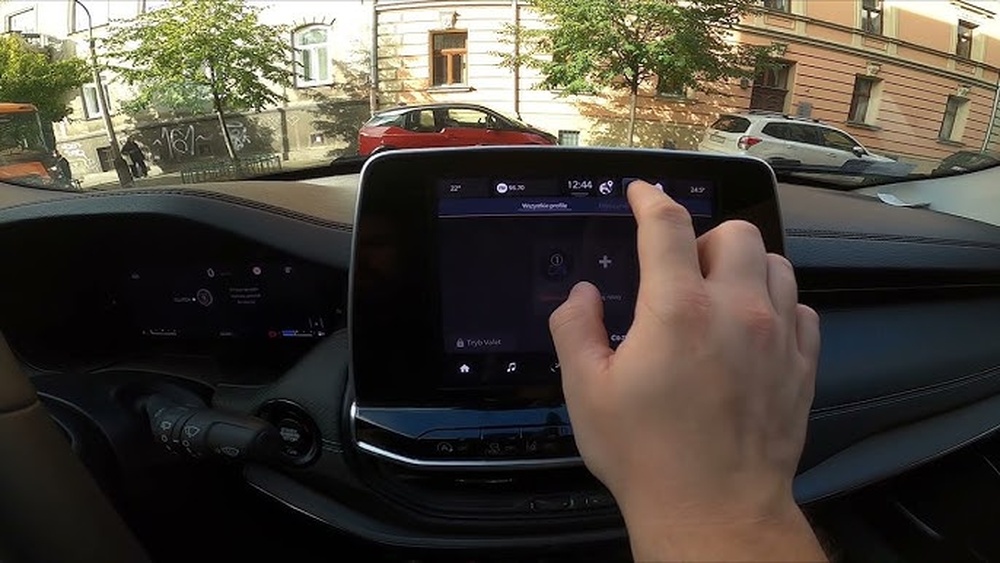
Valet Mode is easy to turn on using the Uconnect touchscreen or your Jeep app. When activated, the system usually asks for a PIN code to exit Valet Mode, so only you can return your vehicle to normal.
How Does Valet Mode Work?
When you enable Valet Mode, the Jeep’s computer system automatically changes the way the vehicle behaves. For example, in models with powerful engines like the Grand Cherokee SRT or Trackhawk, Valet Mode reduces horsepower—sometimes from over 700 horsepower to less than 300. This makes the car much slower and less fun to drive.
Also, Valet Mode often blocks the ability to open the glove box or cargo area. This means that items such as wallets, electronics, or important documents are safer from prying eyes or hands.
Here is a quick look at what Valet Mode controls:
| Feature | Normal Mode | Valet Mode |
|---|---|---|
| Engine Power | Full horsepower | Reduced horsepower |
| Top Speed | Up to 155 mph (SRT/Trackhawk) | Often limited to 65 mph |
| Trunk/Glove Box Access | Unlocked | Locked |
| Drive Modes | All modes available | Only “Normal” or “Eco” |
Many drivers don’t realize that Valet Mode protects both vehicle performance and personal privacy. It’s not just about speed—it’s also about your data and belongings.

Why Should You Use Valet Mode?
Using Valet Mode is smart any time you give your keys to someone you don’t fully trust. Here’s why:
- Security for belongings: Valuables in the glove box or trunk are off-limits.
- Protect your car: No one can test the full power of your Jeep or change performance settings.
- Privacy: Infotainment data, like phone contacts or navigation history, is hidden.
- Peace of mind: You know your SUV is safe, even if you’re not watching.
Many owners skip Valet Mode because they think it’s complicated. In reality, it takes less than a minute to set up.
If you own a high-powered Grand Cherokee, it’s especially important valets and mechanics can be tempted to “test drive” your car.
With Valet Mode, that’s no longer a worry.
How To Activate And Deactivate Valet Mode
Turning on Valet Mode is simple, but the exact steps can vary by model year and trim. For most recent Jeep Grand Cherokees:
- Go to Uconnect touchscreen.
- Press the “Apps” button.
- Select “Valet Mode.”
- Enter a four-digit PIN.
The car will now limit power and lock certain features. To turn off Valet Mode, just enter your PIN again.
Some newer Grand Cherokees also let you use a smartphone app. This means you can activate Valet Mode before you even leave your house.
Here’s a quick comparison of activation methods:
| Method | Steps | Availability |
|---|---|---|
| Uconnect Touchscreen | 4 steps, PIN required | All recent models |
| Jeep App | 2-3 taps, PIN required | Some 2020+ models |
Common Problems And Tips
Valet Mode is reliable, but sometimes owners run into issues. Here are a few common problems, and how to solve them:
- Forgotten PIN: If you forget your code, you’ll need to visit a Jeep dealer to reset it. Always choose a PIN you’ll remember, but not something obvious like “1234.”
- Valet Mode won’t activate: Make sure your vehicle is in “Park” and the engine is running. Some settings can only be changed when stopped.
- Infotainment system glitches: Occasionally, the Uconnect system may freeze. Try restarting the car or updating the software.
A practical tip: Test Valet Mode yourself before you need it. Activate it and check what’s locked or limited. This helps you understand exactly what’s protected.
Real-world Example
Imagine you’re at a hotel and hand your keys to a valet. With Valet Mode, even if the valet tries, they can’t speed, open your glove box, or change your radio presets.
This keeps both your Jeep and your privacy safe.
Some owners also use Valet Mode when letting a family member borrow the car especially teenagers or new drivers. It’s a simple way to limit risk without arguments.
Valet Mode Vs. Other Security Features
Valet Mode is just one part of your Jeep’s overall security system. Here’s how it compares with other features:
| Feature | Main Focus | When to Use |
|---|---|---|
| Valet Mode | Limits power, protects items | Handing keys to someone else |
| Alarm System | Deters theft | Everyday parking |
| Keyless Entry PIN | Prevents unauthorized entry | All situations |
| Tracking/Recovery System | Finds stolen vehicles | Theft or loss |
Valet Mode is unique because it changes how your car drives, not just how it locks.
Extra Insights Most Owners Miss
Many drivers don’t realize Valet Mode can also protect digital privacy. The infotainment system can hold your home address, favorite destinations, and phone numbers. Valet Mode often hides or locks this information.
Another missed point: If you use after-market tuning or performance upgrades, Valet Mode can bypass or limit those changes. Always test your settings if you’ve modified your Jeep.
For more information about Valet Mode and related Jeep features, you can check the official Jeep website: Jeep Grand Cherokee.
Frequently Asked Questions
What Happens If I Forget My Valet Mode Pin?
If you forget your code, you’ll have to visit a certified Jeep dealer. They can reset the system for you, but you’ll need to show proof of ownership.
Does Valet Mode Affect Fuel Economy?
Yes, usually in a positive way. Since Valet Mode limits engine power and acceleration, your Jeep will use less fuel while it’s active.
Can Valet Mode Be Hacked Or Bypassed?
It’s very difficult. Valet Mode is built into the Jeep’s main computer.
Only a dealer or someone with advanced tools could bypass it and it’s illegal to try.
Is Valet Mode Available On All Grand Cherokee Models?
Valet Mode is standard on higher trims like the SRT and Trackhawk, but not always on base models. Check your owner’s manual or ask your dealer to be sure.
Does Valet Mode Protect Against Theft?
Valet Mode doesn’t stop someone from stealing your car, but it does make it harder to drive fast or access valuables. Always lock your doors and use other security features for full protection.
Valet Mode is a smart, simple tool that gives you more control over your Jeep Grand Cherokee.
With just a few taps, you keep both your vehicle and your information safer whether you’re at a hotel, a repair shop, or anywhere else you need to trust someone with your keys.