The Power Wheels Barbie Jeep radio is a fun feature for many kids, bringing music and sounds to their playtime adventures. However, like any electronic component, it can sometimes stop working.
This can be a frustrating experience for both parents and children, as it takes away a beloved part of the toy.
Don’t worry, though. Many common issues with a Power Wheels Barbie Jeep radio not working can be fixed with a little troubleshooting. This guide will walk you through the most frequent problems and offer practical solutions. We’ll cover everything from simple battery checks to more complex wiring issues. By the end, you’ll have a better understanding of what might be going wrong and how to get that Barbie Jeep radio playing again.
Understanding Your Power Wheels Barbie Jeep Radio
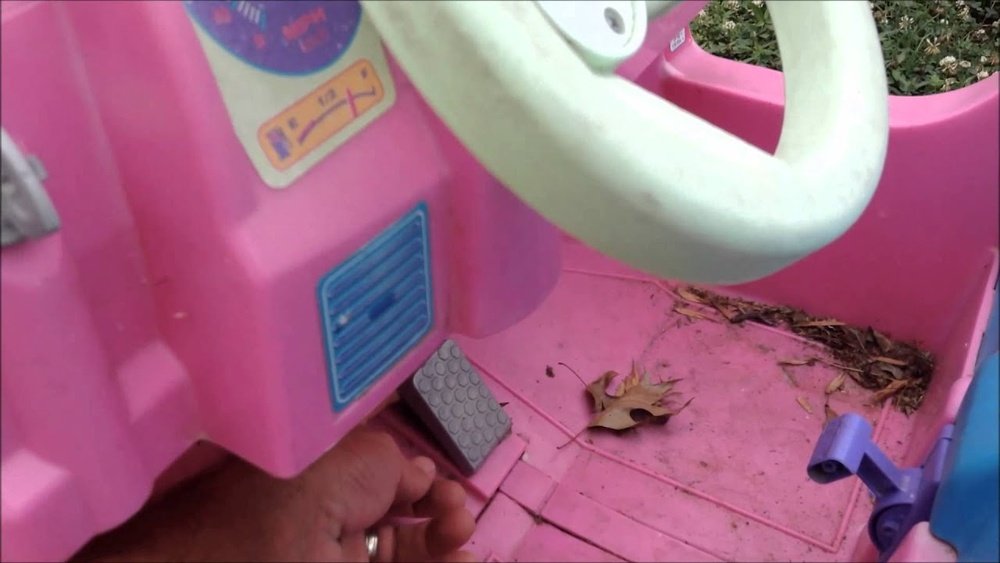
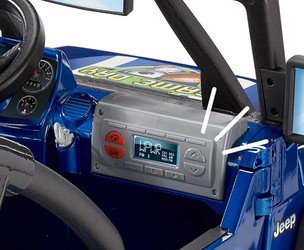
Before diving into troubleshooting, it’s helpful to understand how the radio typically works. Most Power Wheels Barbie Jeep radios are designed as simple, integrated units. They usually run on the same battery system as the Jeep itself, or sometimes have a separate battery compartment. The core components include a speaker, an amplifier, and a control board that processes the audio input.
Common Radio Features
Many Barbie Jeep radios come with a few standard features:
- AM/FM Radio Tuner: Allows kids to listen to local radio stations.
- Auxiliary Input (AUX): A port where you can plug in an MP3 player or smartphone to play custom music.
- Volume Control: A knob or buttons to adjust the sound level.
- Power Button: To turn the radio on and off.
- Sound Effects: Some models might have pre-programmed sound effects.
Knowing these features helps you identify which part of the radio might be failing. For example, if the radio tuner isn’t working but the AUX input does, the problem is likely with the tuner circuitry.
Initial Checks: The Easiest Fixes First
Many problems can be solved with very simple steps. Before you start taking things apart, go through these basic checks.
This will save you a lot of time and effort.
1. Battery Power And Connections
This is the most common culprit. If the Jeep isn’t moving or other electric parts aren’t working, the radio likely won’t either.
- Check the Main Battery: Ensure the Power Wheels Barbie Jeep’s main battery is fully charged and properly connected. Loose or corroded battery terminals can prevent power from reaching all components, including the radio. Clean the terminals with a wire brush if you see any white or greenish buildup.
- Separate Radio Batteries: Some older or specific models might have a separate battery compartment for the radio itself, often using AA or D batteries. Check your user manual to see if this applies to your Jeep. If it does, replace these batteries with fresh ones. Even if the Jeep’s main motor works, weak batteries in the radio unit can cause it to malfunction or produce distorted sound.
- Inspect Power Wires: Look for any wires that have come loose from the radio unit or the main wiring harness of the Jeep. These are usually small, spade-type connectors. Make sure they are securely pushed onto the terminals.
2. Volume And Mute Settings
It sounds simple, but sometimes the Barbie Jeep radio is just turned down too low or accidentally muted.
- Volume Knob/Buttons: Turn the volume knob all the way up or press the volume-up button multiple times. Sometimes, the knob can get stuck or the buttons might be dirty.
- Mute Function: Check if there’s a dedicated mute button or if a specific button combination acts as a mute. Consult your Power Wheels Barbie Jeep manual for details.
3. Radio Station Tuning
If the radio isn’t picking up any stations, it might not be a broken radio, but rather a poor signal.
- Antenna Check: Ensure the antenna is fully extended and not damaged. A bent or broken antenna will significantly reduce signal reception. Try positioning the Jeep in a different location, perhaps outdoors or closer to an open window, to see if the signal improves.
- Tuning Dial: If it’s an older model with a manual tuning dial, make sure it’s properly aligned and not stuck between stations.
Troubleshooting Specific Radio Problems
If the basic checks don’t solve the issue, let’s look at more specific problems and their potential causes.
Problem: No Sound At All (radio And Aux)
If you get absolutely no sound, whether you try the radio or plug in an AUX device, the problem is likely with the power supply to the radio unit or the main speaker.
Possible Causes And Solutions
- Blown Fuse: Some Power Wheels models have a fuse that protects the electronic components, including the radio. Check your user manual to locate the fuse box. If you find a blown fuse (the metal wire inside will be broken), replace it with a new one of the exact same amperage. Using a higher amperage fuse can damage the radio.
- Loose Speaker Wire: The speaker is the component that produces the sound. Check the wires connecting the speaker to the radio unit. They can sometimes come loose due to vibrations during play. Ensure these connections are secure.
- Damaged Speaker: The speaker itself might be damaged. You can test this by carefully disconnecting the speaker wires from the radio and connecting them to a known working speaker (like a small portable speaker with compatible input, if possible) or by using a multimeter to check for continuity. If the speaker is damaged, it will need to be replaced.
- Faulty Amplifier or Circuit Board: If power is reaching the unit, the speaker is fine, and there’s still no sound, the issue could be with the internal amplifier or the main circuit board of the radio. This is a more complex repair and might require replacing the entire radio unit.
Problem: Radio Tuner Not Working, But Aux Input Works
This indicates that the basic power and amplification systems are functional, but the part responsible for receiving radio signals is faulty.
Possible Causes And Solutions
- Antenna Connection: The antenna is crucial for receiving radio signals. Double-check that the antenna wire is firmly connected to the radio’s circuit board. Sometimes, the wire can break internally or detach from its solder point.
- Tuner Module Failure: The radio tuner is a specific electronic component. If the antenna connection is good, but no stations can be picked up, this module might have failed. Repairing or replacing a specific tuner module can be difficult for a DIYer.
- Interference: While less common for a complete failure, strong local radio interference could theoretically block reception. However, this usually results in static or weak signals, not complete silence from the tuner.
Problem: Aux Input Not Working
If the radio works fine, but plugging in a device via the AUX port produces no sound, the issue lies specifically with the AUX input circuitry.
Possible Causes And Solutions
- Damaged AUX Port: The 3.5mm AUX jack itself can get damaged from physical stress. Look for bent pins inside the jack or loose connections where the jack is mounted to the radio housing.
- Faulty Audio Cable: Always try a different AUX cable. Cables can break internally, even if they look fine on the outside. Test your cable with another device (like headphones and a phone) to confirm it works.
- Internal Wiring: The wires connecting the AUX jack to the radio’s circuit board might be loose or broken. This requires opening the radio unit to inspect.
- Software/Hardware Glitch: Though rare in simple toy radios, a minor glitch could occur. Sometimes, simply unplugging and replugging the device, or even turning the radio off and on, can resolve temporary issues.
Problem: Distorted Or Low-volume Sound
If the radio or AUX input produces sound, but it’s scratchy, muffled, or very quiet, several factors could be at play.
Possible Causes And Solutions
- Weak Battery: As mentioned earlier, a low main battery charge can cause electronics to behave erratically, leading to distorted sound. Charge the Jeep’s battery fully.
- Speaker Damage: A torn speaker cone or a damaged voice coil can cause distortion. You might hear buzzing or rattling sounds, especially at higher volumes.
- Loose Connections: Vibrations can cause internal wires or speaker connections to become slightly loose, leading to intermittent static or poor sound quality.
- Volume Limiter: Some models might have a built-in volume limiter to protect children’s hearing. If the volume seems permanently low, check if this is a feature of your model.
- Water Damage: If the Jeep has been exposed to moisture, it can corrode internal components and affect sound quality.
Step-by-step Repair Guide
Here’s a general guide to repairing the Power Wheels Barbie Jeep radio. Remember to always consult your specific model’s manual if available, as designs can vary.
Safety First!
- Disconnect Power: Before opening any part of the Power Wheels, always disconnect the main battery. This prevents electrical shorts and potential injury.
- Use Proper Tools: Have a set of Phillips head screwdrivers of various sizes. Small electronic screwdrivers might also be needed. A plastic trim removal tool can be helpful to avoid scratching the plastic housing when prying parts apart.
- Work Area: Find a clean, well-lit area to work. A tray or container can help keep small screws organized.
Accessing The Radio Unit
- Locate the Radio: The radio unit is typically located in the dashboard area of the Barbie Jeep.
- Remove Dashboard Components: You may need to remove the steering wheel, seats, or other dashboard panels to gain access. Look for screws holding these parts in place. Some parts might snap together and require careful prying.
- Unscrew the Radio Housing: Once you can see the radio, it will likely be held in place by screws. Remove these screws and carefully detach the radio unit from the dashboard.
- Open the Radio Casing: The radio itself will have a plastic casing. Look for screws on the back or sides. Gently pry the casing open.
Internal Inspection And Repair
Once the radio is open, you can inspect the internal components.
- Visual Inspection: Look for any obvious signs of damage:
- Burned components: Small black marks on circuit boards or resistors.
- Corrosion: Greenish or white powdery buildup, especially around battery contacts if it uses separate batteries.
- Loose wires: Check all wires connecting to the speaker, power input, AUX jack, and circuit board.
- Physical damage: Cracked circuit board, bent pins, or damaged speaker cone.
- Checking Connections:
- Speaker Wires: Gently tug on the wires connected to the speaker. If they feel loose, try to re-secure them. If they are soldered, you might need to re-solder them (this requires basic soldering skills).
- Power Wires: Ensure the wires providing power to the radio are securely attached.
- AUX Jack: If the AUX input is the issue, check the solder points where the jack connects to the circuit board.
- Testing Components (Advanced):
- Speaker Test: With the battery disconnected from the Jeep, you can carefully remove the speaker. Connect it to a known working audio source (like a portable music player with an appropriate adapter) to see if it produces sound.
- Multimeter Use: If you have a multimeter, you can test for voltage at the power input terminals of the radio (with the Jeep’s battery connected and radio switched on). You can also check for continuity in speaker wires and the speaker coil itself.
Replacing Parts
- Speaker: If the speaker is found to be faulty, you can often find replacement speakers online by searching for “Power Wheels replacement speaker” or by looking for speakers with similar impedance (ohms) and size. You may need to adapt the wiring.
- Fuse: If a fuse is blown, replace it with one of the exact same rating.
- Entire Radio Unit: If the internal circuit board or amplifier is damaged, the most practical solution is often to replace the entire radio unit. You can search for replacement Power Wheels Barbie Jeep radio modules online, often sold by third-party parts suppliers. Ensure the part number or model compatibility matches your Jeep.
Tips For Maintaining Your Power Wheels Radio
Preventing problems is always better than fixing them. Here are some tips to keep your Barbie Jeep radio in good working order:
1. Protect From The Elements
- Avoid Water: Power Wheels are generally not waterproof. Keep the Jeep away from sprinklers, puddles, and heavy rain. Water damage is a common cause of electronic failure.
- Sun Exposure: While durable, prolonged exposure to intense sunlight can degrade plastic components and potentially affect electronic parts over time. Storing the Jeep in a shaded area or indoors is beneficial.
2. Gentle Use
- Avoid Impacts: While built for play, excessive bumping into walls or hard objects can shake loose internal connections or damage the speaker.
- AUX Cable Care: When using the AUX input, insert and remove the cable gently. Avoid yanking on the cable, as this can damage the jack.
3. Regular Checks
- Battery Health: Keep the main battery charged and clean the terminals periodically. A healthy power source is vital for all electronic components.
- Visual Inspection: Occasionally, when cleaning the Jeep, give the radio area a quick visual check for any obvious loose wires or damage.
When To Seek Professional Help Or Consider Replacement
If you’ve gone through all the troubleshooting steps and the radio still isn’t working, or if you’re uncomfortable opening the unit, it might be time to consider other options.
Professional Repair Services
- Toy Repair Shops: In some areas, specialized toy repair shops exist. However, these can be rare and potentially expensive for a simple toy radio.
- Electronics Repair: General electronics repair shops might be able to help, but they may charge a diagnostic fee that could be close to the cost of a replacement unit.
Replacing The Radio Unit
- Online Retailers: You can often find replacement Power Wheels radio modules on sites like eBay, Amazon, or specialized Power Wheels parts websites. Make sure to buy a unit compatible with your specific Barbie Jeep model.
- DIY Upgrade: Some parents choose to replace the stock radio with a more robust aftermarket car stereo or a simple Bluetooth speaker system for better sound quality and features. This requires more advanced electrical knowledge for wiring but can be a fun project.