If your Jeep Cherokee USB port suddenly stops working, it can be frustrating, especially if you rely on it for charging devices or playing music. Many drivers face this issue, but the reasons are often simple and fixable. Let’s explore the common causes, practical solutions, and ways to avoid this problem in the future.
Common Reasons Your Jeep Cherokee Usb Port Stops Working
The USB port in your Jeep Cherokee connects your car’s infotainment system to smartphones, music players, or flash drives. When it fails, several possible reasons could be behind it:
- Blown fuse: The USB port gets power through a fuse. If it blows, your port won’t work at all.
- Loose connection: Regular use or bumps can loosen the wiring behind the port.
- Damaged USB cable or device: Sometimes, the problem is with your charging cable or device, not the port itself.
- Software glitch: Updates or bugs in the Uconnect system may cause the USB to stop responding.
- Physical damage: Dust, debris, or water can damage the USB port.
- Overloaded port: Using high-power devices may trip a safety shutoff.
Quick Diagnostic Steps
Before heading to a mechanic, you can try a few simple checks:
- Try a different cable and device. This helps you rule out cable or device issues.
- Restart the Uconnect system. Turn your car off, open and close the driver’s door, and restart the car after a minute.
- Inspect the port. Shine a flashlight into the port. Look for dust, bent pins, or corrosion.
- Test another USB port. Some Cherokees have multiple USB ports—see if others work.

How To Fix A Non-working Usb Port
If your quick checks point to the car’s USB port, here’s what you can do:
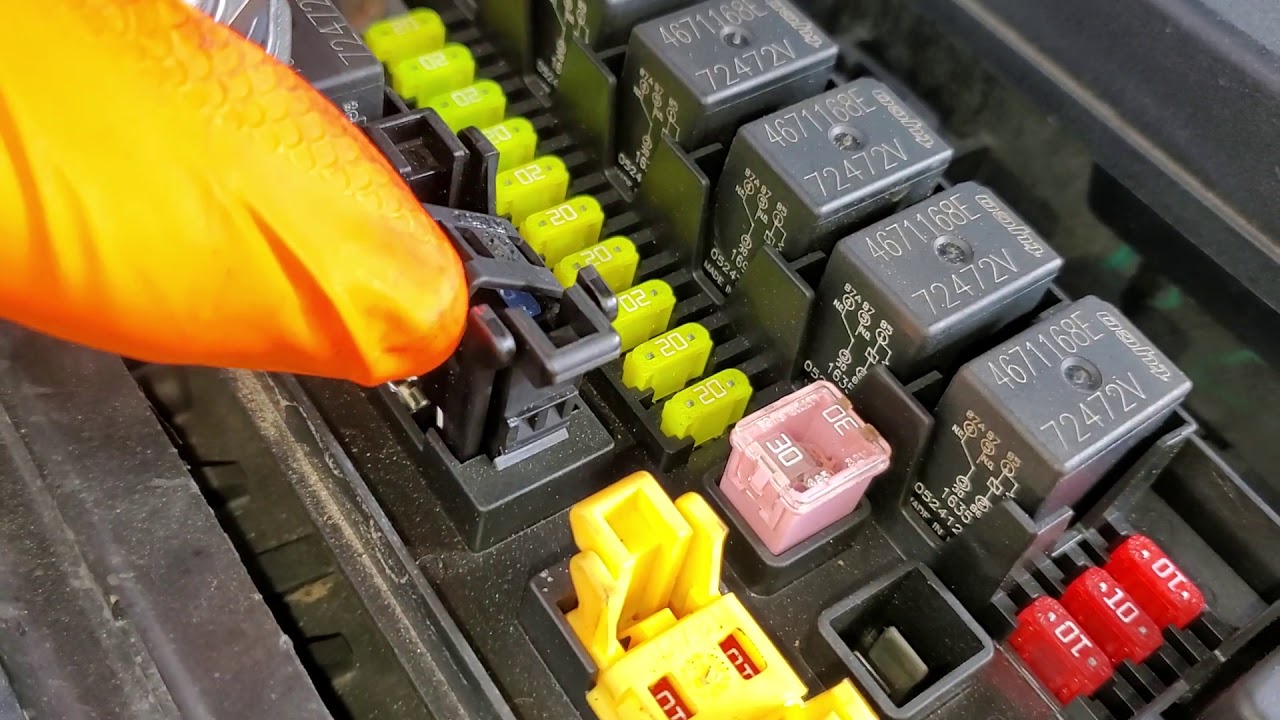
1. Replace The Fuse
The most common fix is replacing a blown fuse. Your Cherokee’s owner’s manual shows the fuse box location (often under the dashboard or hood) and which fuse controls the USB port.
| Cherokee Year | Fuse Box Location | Fuse Number for USB |
|---|---|---|
| 2014-2018 | Under hood | F36 or F97 |
| 2019-2026 | Cabin (side panel) | F29 or F67 |
Turn off the vehicle before replacing the fuse. Use a fuse puller and swap for one of the same amperage.
2. Clean The Usb Port
A blocked port can stop connections. Use a can of compressed air to blow out dust, or a toothpick to gently remove debris. Avoid liquids, which can cause further damage.
3. Update The Uconnect Software
Outdated software can cause USB issues. Visit the official Jeep website or your dealership to download and install the latest Uconnect update.
Always follow the update instructions carefully to avoid system errors.
4. Check For Loose Wiring
If you’re comfortable, remove the center console trim to inspect the USB port wiring. Look for disconnected or frayed wires.
If unsure, have a professional handle this to avoid damaging other components.
5. Reset The Infotainment System
Sometimes, a simple reset can restore USB functions. For most Cherokees, press and hold the volume and tuner knobs together for 10-15 seconds. The screen will turn off and restart.
When To See A Mechanic
If you’ve tried the above and your USB port still does not work, professional help is your best bet. A certified Jeep technician can:
- Test for deeper electrical issues
- Replace the USB module or infotainment system
- Check for warranty coverage on repairs
Repairs at a dealership can cost between $100 and $400, depending on the problem. If your Cherokee is still under warranty, these fixes may be free.
How To Prevent Usb Port Problems
A few simple habits can keep your USB port working longer:
- Use quality cables. Cheap cables can damage the port or cause errors.
- Don’t force connections. Insert and remove cables gently.
- Keep ports clean. Use dust caps when not in use.
- Avoid overloading. Only connect devices that draw less than 2A of current.
Here’s a quick look at some do’s and don’ts:
| Do | Don’t |
|---|---|
| Use original charging cables | Force oversized USB plugs |
| Clean ports yearly | Use wet objects to clean ports |
| Update Uconnect system | Plug in damaged devices |
Key Insights Most Owners Miss
Many Jeep Cherokee owners do not realize that a blown fuse can affect not just the USB port but also other connected systems, like the cigarette lighter or aux input. Checking these can give more clues about the root cause.
Another overlooked tip: After a Uconnect update, the system sometimes takes up to 10 minutes to fully reboot and reconnect all features. Patience can save you from unnecessary repairs.
Example: Real-world Scenario
Anna drives a 2020 Jeep Cherokee. One morning, her phone stopped charging when plugged into the USB port.
She switched cables, but nothing changed. The nearby dealership quoted $200 for diagnostics.
Instead, Anna checked her manual, found the fuse box, and discovered a blown F29 fuse.
After replacing it for just $5, her port worked again.
Should You Try Aftermarket Solutions?
Some owners choose to install aftermarket USB adapters or wireless chargers. While these can add convenience, they often bypass the built-in system and may not integrate with Uconnect features like Apple CarPlay or Android Auto.
If you want full integration, always choose Jeep-approved accessories. For more details about Uconnect system compatibility, see the official Jeep Uconnect page.
Frequently Asked Questions
Why Does My Jeep Cherokee’s Usb Port Stop Charging But Still Plays Music?
This usually means the port supplies data but not enough power. Check the cable, try a different port, and inspect the fuse. Some ports are designed for data only.
How Do I Know If The Usb Port Is Physically Damaged?
A port with bent pins, cracks, or that feels loose may be damaged. Visually inspect with a flashlight.
If you see metal out of place, avoid using it until repaired.
Can A Software Update Fix My Non-working Usb Port?
Yes, if the issue is caused by a Uconnect glitch or outdated firmware. Always back up your settings before updating.
What Devices Are Compatible With Jeep Cherokee Usb Ports?
Most smartphones, flash drives (FAT32 formatted), and MP3 players are supported. Large external hard drives or NTFS drives may not work.
Is It Safe To Fix A Jeep Usb Port Myself?
Replacing fuses or cleaning the port is safe for most owners. For wiring or software issues, seek professional help to avoid damaging the vehicle.
When your Jeep Cherokee USB port fails, start with simple checks before heading to the mechanic. Most problems have easy fixes that save time and money. With regular care and a little know-how, you can keep your USB ports running smoothly for years.