Innova 5610 Review time, and this scanner is for drivers who want more than a tiny code reader that says “P0420” and walks away like it did enough work.
The Innova 5610 OBD2 Bidirectional Scan Tool helps you read trouble codes, view live data, test supported components, and handle select reset functions. It targets serious DIY users, home mechanics, and small garage owners who want deeper diagnostics without dealer-level bills.
If your check engine, ABS, SRS, or transmission warning light keeps ruining your day, this review will help you decide whether the Innova 5610 is worth the money.
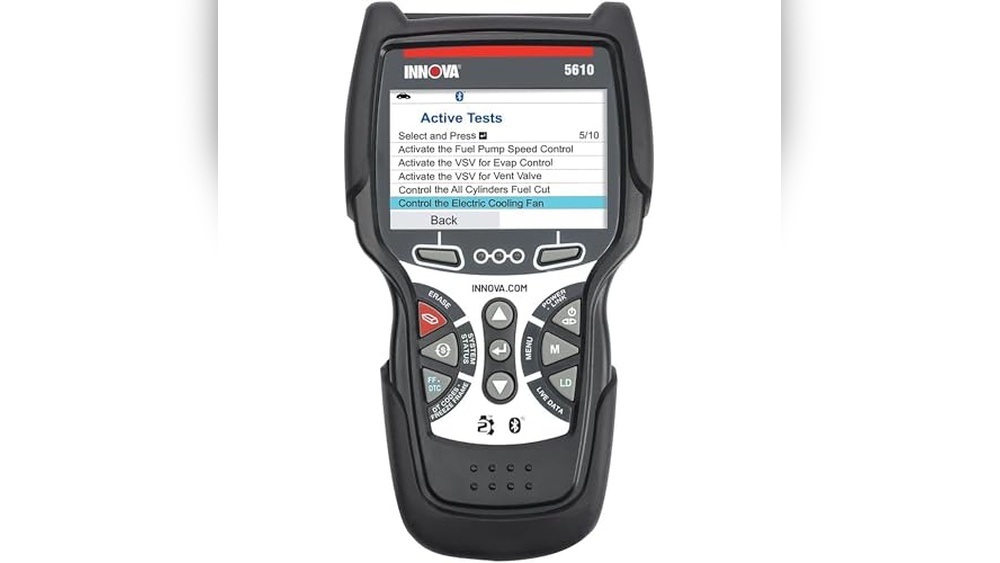
The Innova 5610 sits above basic code readers. It gives you more access to vehicle systems, more live data, and more control over supported tests.
The main selling point is bidirectional control. Instead of only reading codes, the scanner may command supported parts to run tests.
That helps you check if a part responds before you start replacing things like a parts-store lottery winner.
Innova 5610 OBD2 Bidirectional Scan Tool
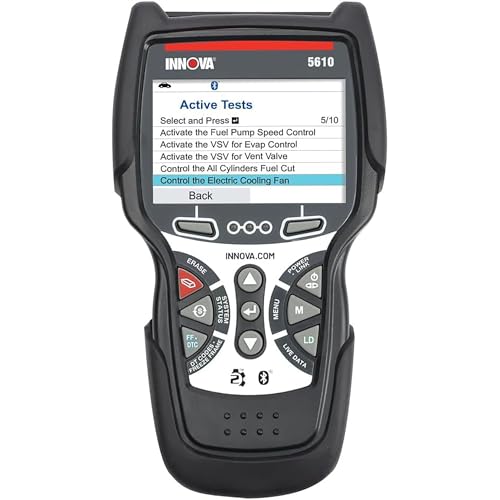
- Compatibility: Most 1996 and newer OBD2 vehicles, confirm newer model support before buying
- Main Functions: Engine, ABS, SRS, transmission, and live data diagnostics
- Bidirectional Controls: Test supported components like the fuel pump and the electronic parking brake
- Special Features: Reset functions, relearn procedures, battery and charging tests
- Updates: Software updates included
- Support: US-based technical support
- Best For: DIY mechanics, serious car owners, and small garage users
It also supports enhanced diagnostics for systems like ABS, SRS, transmission, and engine. That makes it more useful than a simple check engine light scanner.
Specs and Features Breakdown
The Innova 5610 reads and clears diagnostic trouble codes from supported systems. It helps you identify engine, ABS, SRS, and transmission problems before you visit a repair shop.
The bidirectional controls are the feature I like most. On supported vehicles, the tool may activate parts like fuel pumps, fans, relays, and electronic parking brake components.
That gives you a stronger way to test parts.
The live data function shows real-time system information. You may view engine readings, sensor data, ABS information, and other supported values while the vehicle runs.
Live data helps you avoid blind guessing. A fault code tells you where to look.
Live data helps you understand what the system is doing right now.
The Innova 5610 also supports special reset functions and relearn procedures on supported vehicles. These may help after repairs, battery service, brake work, or maintenance jobs.
The battery and charging system tests add more value. They help you check battery health and charging behavior before blaming random parts under the hood.
The tool also includes software updates and US-based technical support. That matters if you want a scanner with long-term usefulness and help when something feels confusing.
The interface is not as flashy as some touchscreen scanners. Still, the buttons are simple, the screen is readable, and the tool feels practical for garage use.
| Pros | Cons |
|---|---|
| Bidirectional controls for supported components | Not every feature works on every vehicle |
| Reads engine, ABS, SRS, and transmission data | Advanced functions need some learning |
| Live data helps with real diagnostics | Interface feels less modern than some rivals |
| Battery and charging system tests included | Not ideal for users who only need basic code reading |
| Software updates included | Vehicle compatibility needs checking before purchase |
| US-based technical support | Higher price than entry-level code readers |
All in all, the Innova 5610 is a strong choice for users who want deeper diagnostics without moving to a full shop-level tablet scanner.
It costs more than basic OBD2 readers, but the extra features make sense if you do your own repairs. The biggest limit is compatibility, so check your exact vehicle before buying.
Who Should Buy the Innova 5610?
The Innova 5610 is best for drivers who want more control over diagnostics. It fits people who do repair work at home and want to understand problems before paying a shop.
- DIY mechanics who want bidirectional controls
- Car owners with ABS, SRS, or transmission warning lights
- Small garage users needing a reliable scan tool
- Used car buyers who want deeper system checks
- Drivers who want live data and reset functions
- Users who value US-based technical support
Who Should Skip It?
This scanner is not the best fit for every buyer. If you only need to clear a check engine light once in a while, a cheaper scanner may suit you better.
- Skip it if you only need basic engine codes
- Skip it if you want the cheapest OBD2 scanner
- Skip it if you dislike learning advanced functions
- Skip it if your vehicle does not support the needed features
- Skip it if you need full professional shop-level programming
Technical Specifications
| Brand | Innova |
| Model | 5610 |
| Scanner Type | OBD2 bidirectional scan tool |
| Supported Systems | Engine, ABS, SRS, transmission, and other supported data streams |
| Key Functions | Code reading, code clearing, live data, bidirectional controls, reset functions, battery and charging tests |
| Vehicle Support | Most 1996 and newer OBD2 vehicles feature support that varies by vehicle |
| Updates | Software updates included |
| Support | US-based technical support |
| Color | Black with red accents |
| Material | Durable plastic housing |
Real-World Use
The Innova 5610 feels useful right away if you already know basic scan tool functions. Plug it into the OBD2 port, choose the system, and start reading codes or live data.
For check engine light issues, it gives you code information and live readings. That helps you move from “something is wrong” to “this system needs attention.”
The stronger value appears when you use enhanced functions. ABS, SRS, transmission data, and bidirectional controls make it more helpful during repair work.
The bidirectional control feature helps test supported parts. For example, testing an electronic parking brake or fuel pump helps confirm if a part responds.
That beats throwing parts at a problem and hoping for mercy.
The live data stream also helps during deeper diagnostics. You may watch sensor behavior, compare readings, and track how values change while the engine runs.
Alternatives to the Innova 5610
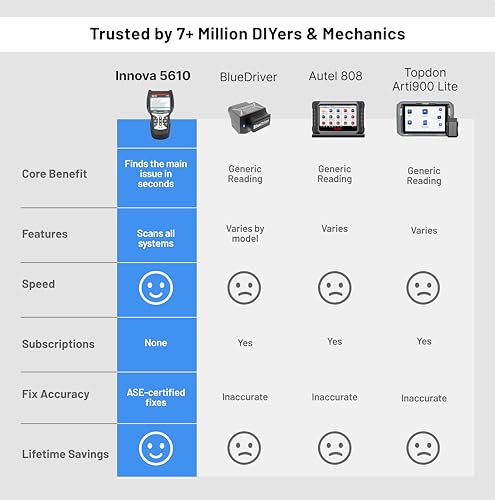
The Innova 5610 is a strong scan tool, but it is not the only option. Your best pick depends on how deep you want to go with diagnostics.
Product 1: Autel MaxiScan MS509 OBD2 Scanner
The Autel MaxiScan MS509 is a simpler scanner for basic OBD2 diagnostics. It reads and clears engine codes and offers limited live data.
Choose it if you only need simple check engine diagnostics. It does not match the Innova 5610 for bidirectional controls, enhanced data, or advanced reset functions.
Product 2: BlueDriver Bluetooth Pro OBDII Scan Tool
The BlueDriver scan tool is a good pick for users who prefer smartphone-based diagnostics. It offers wireless Bluetooth operation and detailed repair reports through the app.
Choose BlueDriver if you want app-based reports and a compact wireless tool. Choose the Innova 5610 if you prefer a handheld scanner with bidirectional testing on supported vehicles.
Product 3: Basic OBD2 Code Reader
A basic OBD2 reader works for simple check engine light problems. It costs less and feels easier for total beginners.
The tradeoff is clear. You lose bidirectional controls, enhanced system data, reset functions, battery tests, and deeper diagnostic power.
Comparison Table
| Feature | Innova 5610 | Autel MaxiScan MS509 | BlueDriver Bluetooth OBDII Tool |
|---|---|---|---|
| Best For | DIY users needing advanced diagnostics | Basic engine code reading | App-based diagnostics and repair reports |
| Bidirectional Controls | Yes, vehicle dependent | No | No |
| ABS Support | Yes, vehicle dependent | Limited or no enhanced support | Yes, vehicle dependent |
| SRS Support | Yes, vehicle dependent | Limited or no enhanced support | Yes, vehicle dependent |
| Transmission Data | Yes, vehicle dependent | Limited | Vehicle dependent |
| Live Data | Yes | Basic live data | Yes, through app |
| Reset Functions | Yes, vehicle dependent | No advanced reset focus | Limited |
| Support | US-based technical support | Standard support | App-based support resources |
| Best Buyer | Serious DIYer or small garage user | Casual driver | Smartphone-first user |
The Innova 5610 stands out for users who want hands-on diagnostics. It gives you more control than basic scanners and less phone dependency than Bluetooth-only tools.
If you want a simple code reader, save money and go basic. If you want a stronger repair tool, the Innova 5610 makes more sense.
Buying Guide: How to Choose the Right OBD2 Scanner
Bidirectional Controls
Bidirectional controls let the scanner command supported vehicle parts. This helps test parts instead of only reading stored trouble codes.
Winner: Innova 5610, because it supports bidirectional testing on compatible vehicles.
System Coverage
System coverage matters if you want more than engine codes. ABS, SRS, and transmission data help with warning lights outside the check engine system.
Winner: Innova 5610, because it supports enhanced diagnostics across key systems on supported vehicles.
Live Data
Live data helps you watch real-time values. This is useful for sensor checks, charging tests, engine behavior, and troubleshooting before replacing parts.
Winner: Innova 5610 for handheld live data. BlueDriver works well if you prefer a phone app.
Reset Functions
Reset functions help after service or repairs. These may include maintenance resets and relearn procedures, depending on your vehicle.
Winner: Innova 5610, because it offers more repair-focused functions than basic readers.
Vehicle Compatibility
Compatibility decides how useful any scanner will be. Basic OBD2 functions work across many vehicles, but advanced features vary by year, make, model, and system.
Winner: The scanner that supports your exact vehicle. Always check the compatibility list first.
Ease of Use
A scanner should help you diagnose problems, not make you feel like you need a second scanner to understand the first one.
Winner: Basic code readers for beginners. Innova 5610 for users ready to learn advanced features.
Support and Updates
Updates help keep a scanner useful as vehicle coverage changes. Good support also matters when a function does not work as expected.
Winner: Innova 5610, because updates and US-based support add long-term value.
Customer Feedback
Customer feedback for the Innova 5610 is mostly positive. Buyers often like its deeper diagnostics, bidirectional controls, live data, and support resources.
The main complaints focus on compatibility and interface style. Some buyers expect every function to work on every vehicle, but advanced scan tools rarely work that way.
Most Praised Features
- Accurate diagnostic readings
- Useful live data streams
- Bidirectional controls on supported vehicles
- Helpful ABS, SRS, and transmission data
- Battery and charging system tests
- Software updates included
- US-based technical support
Common Concerns
- Advanced functions vary by vehicle
- Not the cheapest scanner
- Interface feels less modern than app-based tools
- Some functions need technical knowledge
- Compatibility checks are important before buying
Is the Innova 5610 Worth the Price?
Yes, the Innova 5610 is worth the price if you want more than basic code reading. It gives serious DIY users a useful mix of enhanced diagnostics, live data, reset functions, and bidirectional controls.
It is not worth it if you only need to clear the check engine codes. A cheaper OBD2 reader will handle that job for less money.
The best value comes from regular use. If you work on your own car or help family members diagnose vehicles, the Innova 5610 may save time, guesswork, and repair shop visits.
Innova 5610 OBD2 Bidirectional Scan Tool – Understand Your Vehicle…FAQs
<!– wp:rank-math/faq-block {"questions":[{"id":"faq-question-9c3e43a42f99","title":"Q1: Does the Innova 5610 have bidirectional controls?","content":"Yes. The Innova 5610 supports bidirectional controls on compatible vehicles. Function support depends on the vehicle make, model, year, and system.
“,”visible”:true},{“id”:”faq-question-84b1102525eb”,”title”:”Q2: Does the Innova 5610 read ABS codes?”,”content”:”Yes. It supports ABS diagnostics on supported vehicles. Always check compatibility before buying if ABS diagnostics matter most to you.
“,”visible”:true},{“id”:”faq-question-cb436b0a0d16″,”title”:”Q3: Does the Innova 5610 read airbag codes?”,”content”:”Yes. It supports SRS airbag diagnostics on compatible vehicles. It helps read and clear supported SRS trouble codes after repairs.
“,”visible”:true},{“id”:”faq-question-9442042db76f”,”title”:”Q4: Is the Innova 5610 good for beginners?”,”content”:”It is beginner-friendly for basic code reading, but advanced functions take time to learn. Total beginners may prefer a simpler scanner first.
“,”visible”:true},{“id”:”faq-question-6b031e05305b”,”title”:”Q5: Does it work on every vehicle?”,”content”:”No scanner works with every vehicle and every feature. The Innova 5610 supports many OBD2 vehicles, but advanced coverage varies by vehicle.
“,”visible”:true},{“id”:”faq-question-ed2ed8be65cc”,”title”:”Q6: Does the Innova 5610 include updates?”,”content”:”Yes. The listing mentions updates included. This helps keep the tool more useful over time.
“,”visible”:true},{“id”:”faq-question-a180cce1611e”,”title”:”Q7: Is the Innova 5610 better than BlueDriver?”,”content”:”It depends on your needs. The Innova 5610 is better for handheld bidirectional testing. BlueDriver is better if you prefer app-based wireless diagnostics and repair reports.
“,”visible”:true},{“id”:”faq-question-2058010bded6″,”title”:”Q8: Is the Innova 5610 worth buying?”,”content”:”Yes, if you need bidirectional controls, enhanced live data, and deeper diagnostics. No, if you only need a simple check engine code reader.
“,”visible”:true}]} –>Q1: Does the Innova 5610 have bidirectional controls?
Yes. The Innova 5610 supports bidirectional controls on compatible vehicles. Function support depends on the vehicle make, model, year, and system.
Q2: Does the Innova 5610 read ABS codes?
Yes. It supports ABS diagnostics on supported vehicles. Always check compatibility before buying if ABS diagnostics matter most to you.
Q3: Does the Innova 5610 read airbag codes?
Yes. It supports SRS airbag diagnostics on compatible vehicles. It helps read and clear supported SRS trouble codes after repairs.
Q4: Is the Innova 5610 good for beginners?
It is beginner-friendly for basic code reading, but advanced functions take time to learn. Total beginners may prefer a simpler scanner first.
Q5: Does it work on every vehicle?
No scanner works with every vehicle and every feature. The Innova 5610 supports many OBD2 vehicles, but advanced coverage varies by vehicle.
Q6: Does the Innova 5610 include updates?
Yes. The listing mentions updates included. This helps keep the tool more useful over time.
Q7: Is the Innova 5610 better than BlueDriver?
It depends on your needs. The Innova 5610 is better for handheld bidirectional testing. BlueDriver is better if you prefer app-based wireless diagnostics and repair reports.
Q8: Is the Innova 5610 worth buying?
Yes, if you need bidirectional controls, enhanced live data, and deeper diagnostics. No, if you only need a simple check engine code reader.
Conclusion
This Innova 5610 Review shows one clear point. This scanner is built for people who want real diagnostic help, not a tiny tool that only reads codes and leaves the hard thinking to you.
The Innova 5610 stands out with bidirectional controls, live data, ABS and SRS support, transmission data, reset functions, battery tests, updates, and US-based support.
It costs more than basic code readers, and advanced functions depend on vehicle support. Still, for serious DIY users and small garage owners, it offers strong value.
If you want a handheld scan tool with more repair power, the Innova 5610 deserves a close look. What feature matters most to you: bidirectional controls, live data, or reset functions?
Last update on 2026-11-05 / Affiliate links / Images from Amazon Product Advertising API