Starting your car from your phone might sound futuristic, but for many Jeep owners, it’s a daily convenience. The Jeep app, also called Jeep Connect or Uconnect, lets you control your car in new ways. If you want to warm up your car in winter or cool it down before you drive, learning to use the app can make life easier. This guide explains how to use the Jeep app to start your car, common problems, and practical tips to get the most out of remote start features.
What Is The Jeep App And Why Use It?
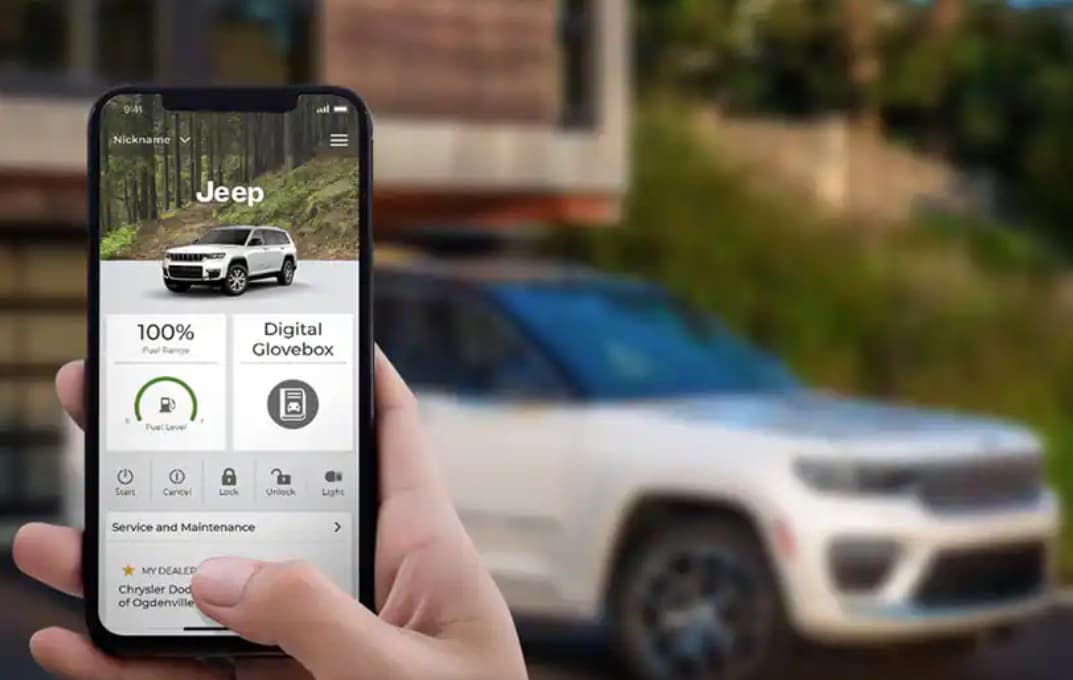
The Jeep app connects your smartphone to your vehicle using the internet. With it, you can:
- Remotely start your car
- Lock/unlock doors
- Check fuel levels
- Find your car in a crowded parking lot
Remote start is one of the most popular features. On cold or hot days, it saves time and makes driving more comfortable.

Setting Up The Jeep App For Remote Start
Getting started with the Jeep app takes a few steps. Before you can start your car remotely, your Jeep must have a compatible Uconnect system and an active Jeep Connect subscription.
| Requirement | Details |
|---|---|
| Vehicle Model Year | 2018 or newer (most models) |
| Uconnect System | Uconnect 4C NAV, 5, or higher |
| Subscription | Active Jeep Connect/Uconnect Access |
| Smartphone | iOS (12.0+) or Android (7.0+) |
Pro tip: If you’re not sure your Jeep supports remote start, ask your dealer or check the owner’s manual.
Steps To Set Up The App
- Download the Jeep app from the Apple App Store or Google Play Store.
- Create an account using your email. You’ll need your vehicle’s VIN (Vehicle Identification Number).
- Activate Jeep Connect. If you bought a new Jeep, you may get a free trial. Otherwise, activate the service through the app or Jeep’s official website.
- Link your vehicle by entering the VIN. The app will guide you.
- Verify your identity. You may get a code by email or SMS for security.
Once set up, you’ll see your Jeep’s dashboard on your phone.

How To Use Jeep App To Start Car
Starting your Jeep with the app is simple, but there are a few steps and safety features to know.
Step-by-step Guide
- Open the Jeep app and log in.
- Tap the Remote Start button on the main screen.
- The app will ask you to confirm. Tap Start.
- Wait a few seconds. You’ll see a message when your Jeep starts successfully.
- The engine will run for about 10-15 minutes (varies by model).
The car stays locked while running. If you open the door, the engine may shut off for safety.
Example: Cold Morning Start
Imagine it’s 20°F outside. You’re getting ready for work.
From your kitchen, you open the Jeep app, tap Remote Start, and your car starts heating up. By the time you leave, your Jeep is warm, and you don’t need to scrape ice off the windshield.
Features And Limitations Of Jeep Remote Start
The Jeep app’s remote start is handy, but there are limits to keep in mind.
| Feature | Available with Jeep App | Not Available with Jeep App |
|---|---|---|
| Start Engine | Yes | No manual key needed |
| Climate Control | Yes, uses last settings | Cannot adjust from app |
| Drive Away | Must use key to drive | Cannot drive remotely |
| Multiple Starts | Usually 2 per session | Unlimited starts not allowed |
Non-obvious insight: The app uses your Jeep’s last climate control settings. Set your heat or AC before turning off the car if you want it ready at the next remote start.

Troubleshooting: Common Problems And Solutions
Sometimes, the remote start feature may not work as expected. Here’s how to solve common issues:
- Weak Signal: The app needs a good cellular connection. Move your phone to a window or outside if needed.
- Inactive Subscription: Remote start won’t work if your Jeep Connect plan is expired. Check your account in the app.
- Vehicle Not in Park: The car must be in Park with all doors closed and the hood shut.
- Battery Issues: A weak car battery can block remote start. If your car is slow to start normally, have the battery checked.
Beginner mistake: Forgetting to update your app or phone can cause login problems. Keep both updated for best results.
Security And Privacy Considerations
Starting your Jeep remotely is safe. The app uses encrypted connections and requires a PIN or fingerprint to confirm actions. Only users with access to your Jeep app account can start your vehicle.
Tip: If you sell your Jeep, remove the car from your app and reset the Uconnect system to protect your privacy.
Real-world Benefits And User Experiences
Many Jeep owners say remote start has changed their daily routine. In surveys, over 60% of Jeep app users report using remote start at least twice a week in winter or summer. Parents find it useful for starting the car while managing children, and commuters like getting into a comfortable car after work.
Comparing Jeep App To Other Brands
How does the Jeep app compare to similar services from other automakers?
| Brand | Remote Start App | Free Trial | Yearly Cost |
|---|---|---|---|
| Jeep | Jeep Connect/Uconnect | 6-12 months | $150-250 |
| Ford | FordPass | 1 year | $200 |
| Toyota | Remote Connect | 1 year | $80 |
| Chevrolet | myChevrolet | 1 month | $240 |
Jeep’s app offers a long trial and competitive features, but the annual cost can be higher than some rivals.
For more details about connected car services, visit the official Jeep Connect page.
Frequently Asked Questions
How Much Does Jeep Connect Remote Start Cost?
The price varies. Most new Jeeps include a free trial (6-12 months). After that, expect to pay $150–$250 per year, depending on features and location.
Will Remote Start Work If My Phone Is Far From The Car?
Yes. The Jeep app uses the internet, not Bluetooth.
As long as your car and phone are online, you can start your Jeep from anywhere.
Can I Use Jeep App Remote Start With More Than One Jeep?
Yes. You can add multiple vehicles in the app, as long as each has an active Jeep Connect subscription.
What Should I Do If The App Says “start Failed”?
Check that your Jeep is in Park, all doors are closed, and your subscription is active. Also, make sure your phone and car both have a strong signal.
Is Remote Start Safe For The Engine?
Yes. Jeep designed remote start to be safe, with automatic shutoff after 10-15 minutes to prevent engine problems.
Always follow your owner’s manual for best results.
Using the Jeep app to start your car can save time, add comfort, and make daily life smoother. With a little setup and some smart habits, you’ll get the most from your Jeep Connect experience.


















