Keeping your Jeep Grand Cherokee’s software up-to-date is essential for performance, safety, and access to the latest features. Modern vehicles are more than just engines and wheels—they rely on complex software to manage everything from navigation to engine tuning.
Updates can fix bugs, improve fuel efficiency, and even add new functions to your infotainment system. If you’ve never updated your Jeep’s software, or it’s been a while, this guide will walk you through every step with confidence.
Why Update Your Jeep Grand Cherokee Software?
Software updates are not just for computers and phones. Your Jeep Grand Cherokee uses software to control key systems like the transmission, brakes, and multimedia. Updating can:
- Fix security vulnerabilities that hackers might exploit
- Improve GPS accuracy and navigation maps
- Enhance system stability and responsiveness
- Add new features, such as support for Apple CarPlay or Android Auto
- Address recalls or technical service bulletins
Ignoring updates can lead to missed features, glitches, or even safety risks. For example, a 2022 Jeep software update fixed a rare bug where the backup camera would freeze small, but important for safety.
Types Of Software Updates
Not all updates are the same. Some are quick and simple, while others need a professional touch. Here’s a breakdown:
| Update Type | Description | Who Can Do It |
|---|---|---|
| Over-the-Air (OTA) | Wireless updates sent directly to your vehicle | Owner |
| USB Update | Update downloaded to a USB drive, then installed in the car | Owner |
| Dealer Update | Special updates or recalls done by a Jeep dealer | Dealer |
Most 2018 and newer Grand Cherokees support OTA updates for the Uconnect system. Older models often require a dealer visit or a manual USB update.
Preparing For An Update
Before you begin, make sure you’re ready:
- Check your VIN (Vehicle Identification Number). Use Jeep’s official website to see if your car needs an update.
- Have a reliable internet connection if doing OTA.
- For USB updates, use a clean, empty USB flash drive (8–32GB).
- Keep the engine running during the update to avoid battery drain.
- Never disconnect the battery or turn off the infotainment system until the update is complete.
Many owners forget to keep the car running during a long update, risking a failed installation.
How To Update Over-the-air (ota)
If your Grand Cherokee supports OTA updates, this is the simplest method.
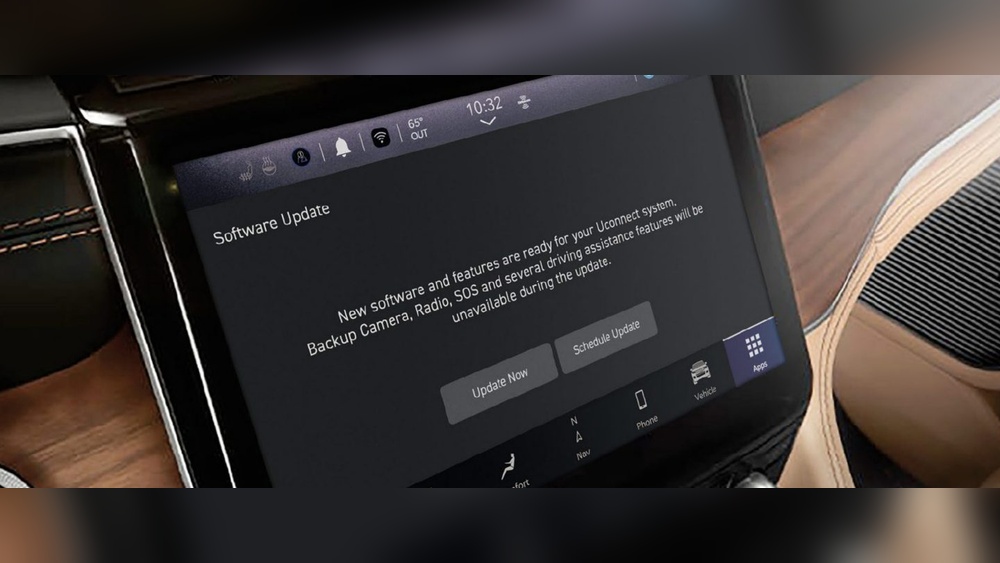
- Notifications: Your Uconnect display will show a message when an update is available.
- Wi-Fi Connection: Connect your Jeep to a trusted Wi-Fi network. Go to Settings > Wi-Fi and follow the prompts.
- Start Update: Tap the notification and follow on-screen instructions. Updates may take 20–45 minutes.
- Wait: The system will restart automatically. Don’t use the infotainment system during this time.
- Confirmation: Once complete, you’ll see a success message.
If the update fails, try reconnecting to Wi-Fi or move to an area with better signal.
How To Update Via Usb
Some updates, like major navigation changes, require a USB drive.
- Download Update: Visit the official Jeep or Uconnect website. Enter your VIN and download the correct file.
- Prepare USB Drive: Format to FAT32 or exFAT. Copy the update file to the root (main) folder.
- Insert USB: Plug into your Jeep’s USB port (usually in the center console).
- Follow Prompts: The display will ask to begin the update. Confirm and wait 30–60 minutes.
- Do Not Remove USB: Until the process is 100% finished and you see an all-clear message.
Many users accidentally interrupt the process by removing the USB early, which can corrupt the system.
When To Visit A Dealer
Some updates require dealer tools or are part of official recalls. If you see messages like “Service Required” or the update fails repeatedly, book an appointment.
Dealers can also update firmware related to safety systems, which is not available for home users.
Here’s a simple comparison of home vs. dealer updates:
| Update Method | DIY? | Time Needed | Typical Cost |
|---|---|---|---|
| Over-the-Air | Yes | 30–45 min | Free |
| USB Drive | Yes | 40–90 min | Free |
| Dealer Visit | No | 1–2 hrs | $50–$200 |

Common Mistakes To Avoid
- Skipping backup: Always back up your settings or contacts if possible.
- Ignoring error messages: Don’t keep retrying a failed update without checking the issue.
- Using the wrong file: Double-check your VIN and update version.
- Disconnecting power: Never turn off the engine or battery during an update.
Real-world Example
In 2023, Jeep rolled out a Uconnect update that improved Bluetooth connectivity. Owners who updated reported fewer dropped calls and faster phone pairing.
Those who skipped the update continued to face connection issues. Keeping your software current helps avoid these frustrations and keeps your vehicle safe.

What If Something Goes Wrong?
If your Jeep’s system freezes or you see error codes, don’t panic. Try restarting the vehicle or repeating the update after checking your steps.
If the problem continues, contact your dealer. Most software issues can be fixed without replacing hardware.
Extra Tips For Smooth Updates
- Schedule updates during non-peak hours, like late evenings, to avoid Wi-Fi slowdowns.
- Keep your USB drive just for updates—don’t store music or other files on it.
- Join Jeep owner forums for advice and update alerts. Sometimes, other owners spot bugs before official channels do.
Frequently Asked Questions
How Often Should I Update My Jeep Grand Cherokee Software?
Check for updates every 6 12 months, or whenever you see a notification. Major updates might only release once a year, but security patches can come more often.
Can I Update My Jeep Grand Cherokee Software Without Wi-fi?
Yes. If you can’t use Wi-Fi, download the update to a USB drive using a computer, then install it in your Jeep.
For some updates, a dealer visit is the only option.
Will Updating Software Delete My Settings?
Most updates do not delete personal settings, but it’s wise to back up contacts or navigation favorites if your system allows.
Is There Any Risk In Updating Jeep Software At Home?
The risk is low if you follow instructions carefully. Avoid disconnecting power or removing the USB drive too soon.
For major system updates, a dealer visit is safest.
Where Can I Find The Latest Official Jeep Software Updates?
Always use the official Mopar Jeep website for software downloads and instructions.
Staying current with your Jeep Grand Cherokee’s software ensures your vehicle runs smoothly and safely. Whether you choose OTA, USB, or dealer updates, following the right steps helps you get the most from your Jeep for years to come.