Driving a modern SUV like the Jeep Grand Cherokee brings not just power and comfort, but also advanced safety features designed to keep you and your passengers safe. One important system is Forward Collision Warning (FCW)—a technology that can make a real difference in avoiding accidents. But for many Jeep Grand Cherokee owners, figuring out how to turn on this feature, customize it, or even understand what it does can be confusing. If you want to ensure your FCW is active and protecting you, this guide will walk you through every step with clear explanations and practical tips.
What Is Forward Collision Warning?
Forward Collision Warning is an advanced driver assistance system (ADAS) built into many new vehicles, including the Jeep Grand Cherokee. Its main job is to alert you if there’s a risk of crashing into a vehicle or object in front of you. The system uses sensors—usually radar and cameras—placed in the front of your vehicle. When you approach another car too quickly, it gives a visual and/or audible warning so you can react in time.
Some Grand Cherokee models even add Automatic Emergency Braking (AEB), which can apply the brakes automatically if you don’t react quickly enough. While FCW doesn’t drive for you, it acts as an extra set of eyes and a safety net, especially in heavy traffic or if you’re momentarily distracted.
Which Jeep Grand Cherokee Models Have Fcw?
Not all Grand Cherokees come with the same features. FCW is standard or available on many recent models, but there are differences by year and trim.
| Model Year | Base Trim | FCW Standard? |
|---|---|---|
| 2014-2016 | Laredo | No |
| 2017-2019 | Laredo | Optional |
| 2020-2023 | Laredo | Yes (most) |
| All Years | Limited, Overland, Summit, Trailhawk | Yes |
Tip: If you’re not sure whether your Jeep Grand Cherokee has FCW, check your owner’s manual or look for the system in your infotainment menu.
Why Forward Collision Warning Matters
Statistics from the Insurance Institute for Highway Safety (IIHS) show that vehicles with FCW and AEB have 27% fewer rear-end crashes compared to those without. In the US, rear-end collisions cause thousands of injuries and fatalities each year, so this system can be a life-saver.
But FCW only helps if it’s turned on and set up correctly. Many drivers don’t realize their system is off, set to minimal sensitivity, or muted.
Let’s learn how to make sure yours is active.
How To Turn On Forward Collision Warning
Turning on FCW in your Jeep Grand Cherokee depends on your model year and infotainment system. Below are the main steps, with slight variations for older and newer models.
Step 1: Start The Vehicle
Make sure your Jeep Grand Cherokee is in Park. Start the engine so the infotainment system and dashboard are fully powered.
Step 2: Access The Uconnect Infotainment Screen
Most recent Grand Cherokees use the Uconnect touchscreen. This is the control center for most vehicle settings.
- For 2014-2021 models, the screen is usually 7-inch or 8.4-inch.
- For 2022 and newer, the screen may be larger, and the interface is updated.
- On the Uconnect screen, tap the Settings or Apps button.
- Scroll down or swipe to find Safety & Driving Assistance.
- Tap to open this menu. You’ll see several options related to driver aids.
Step 4: Enable Forward Collision Warning
- Locate the Forward Collision Warning or FCW setting.
- Make sure the toggle or checkbox is turned ON.
- Some models let you pick sensitivity: Near, Medium, or Far. Higher sensitivity gives earlier warnings.
Note: If you see Forward Collision Warning Plus, this means your Jeep also has automatic emergency braking.
Step 5: Confirm Activation
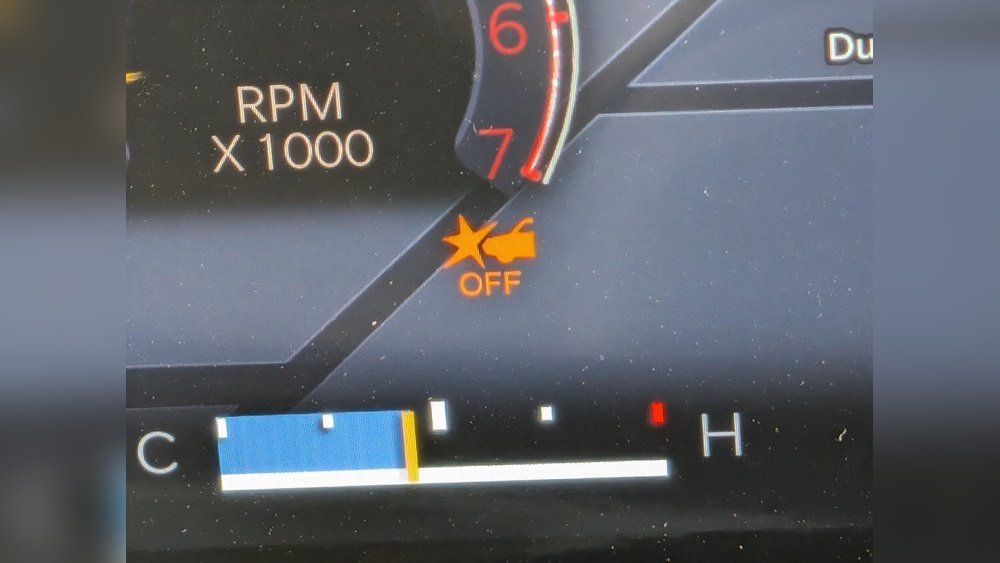
You may see a confirmation message or a green indicator on your instrument cluster. If you turn the system off, an amber light or warning may show.
Pro Tip: The FCW will not work if you have adaptive cruise control in “off” mode or if certain safety systems are disabled.
- Check your owner’s manual. Some trims may use a steering wheel button or require a different menu.
- If the system is missing, your vehicle may not have FCW, or there could be a software/hardware problem.
Customizing Forward Collision Warning Settings
Your Jeep allows you to adjust how and when FCW warns you. This is important because everyone has a different comfort level.
Sensitivity Levels
There are usually three sensitivity options:
- Near: Warnings come later, closer to the obstacle. Good for confident drivers, but less reaction time.
- Medium: Balanced setting for most situations.
- Far: Warnings come earlier. Best for city traffic or if you want more time to react.
You can change sensitivity in the same menu where you turn FCW on. Some models let you do this with the steering wheel controls too.
Audible And Visual Alerts
FCW usually gives both visual (dashboard light or message) and audible (beeping or chime) warnings. Make sure your audio alerts are not muted. If they are, you might miss a critical warning.
Automatic Emergency Braking (aeb)
If your Jeep has Forward Collision Warning Plus, you’ll also have AEB. You can usually toggle AEB on or off in the same settings menu. For maximum safety, keep both features enabled.
Non-obvious Insight: If you tow a trailer, some Jeep models automatically adjust or limit FCW to avoid false alarms. Always check your manual before towing.
Common Problems And How To Fix Them
Sometimes, FCW doesn’t work as expected. Here’s what to look out for:
1. Warning Light Is On
If you see an amber or red FCW warning on your dash even when the system is enabled, try these steps:
- Park the car and restart. Sometimes the system resets.
- Check if the sensors (usually in the front grille or bumper) are clean and not blocked by mud, snow, or ice.
- If the warning stays, schedule a dealer service. Sensor or software faults are common causes.
2. No Alerts From Fcw
If you think FCW isn’t warning you:
- Double-check that the system is enabled in the menu.
- Make sure alert volume is up.
- Test at low speed in a safe, empty parking lot by approaching a large, harmless obstacle (like a cardboard box).
- If still no alerts, it could be a sensor or calibration issue.
3. System Turns Off In Bad Weather
Heavy rain, snow, or fog can block the sensors. If this happens:
- Clean the front sensors and camera.
- Wait for weather to improve. This is normal for all camera/radar-based systems.
4. False Alarms
Sometimes, FCW may warn you when there’s no real danger, especially in city driving with lots of parked cars or on tight curves. You can try lowering sensitivity, but don’t turn the system off unless necessary.
Experience-based Tip: Many drivers forget that a windshield replacement can affect the camera calibration for FCW. Always use a qualified technician for windshield work.

Comparing Fcw To Other Jeep Safety Features
The Jeep Grand Cherokee offers a range of safety systems. Here’s a quick comparison to see where FCW fits in:
| Feature | Main Function | Automatic Action? |
|---|---|---|
| Forward Collision Warning (FCW) | Warns of a possible frontal collision | No (alert only) |
| Automatic Emergency Braking (AEB) | Applies brakes to avoid/reduce crash | Yes |
| Adaptive Cruise Control (ACC) | Maintains set distance from car ahead | Yes |
| Lane Departure Warning | Alerts if you drift out of lane | No (alert only) |
| Lane Keep Assist | Steers car back in lane | Yes |
FCW gives you a warning, but does not apply the brakes (unless you have the Plus version). It’s best used with other features for the safest drive.
When Fcw Might Not Work Correctly
Even with the system turned on, there are situations where FCW may not alert you in time:
- Very High Speeds: FCW is less effective above 80 mph.
- Sharp Turns: The sensors look mostly forward, so tight corners may not trigger warnings.
- Stopped Objects: Some systems are less sensitive to stationary objects (like a stopped car at a red light).
- Obstructed Sensors: Dirt, stickers, or aftermarket accessories on your bumper/grille can block the sensors.
Non-obvious Insight: Aftermarket bull bars, grille guards, or large bumper stickers can block FCW sensors. Always check for sensor location before adding accessories.

Safety Tips For Using Forward Collision Warning
- Don’t Rely Only on FCW: It’s a backup, not a replacement for paying attention.
- Keep Sensors Clean: Wash your Jeep’s front regularly, especially in winter.
- Regular Software Updates: Ask your dealer about updates for your Uconnect or safety systems.
- Towing: Check owner’s manual for towing mode, as FCW may behave differently or be disabled.
How To Test That Fcw Is Working
You may want to make sure your system is actually functioning. Here’s a safe approach:
- In an empty parking lot, place a large cardboard box a short distance in front of your Jeep.
- Drive towards it at 10–15 mph (very slowly).
- The system should alert you before you reach the box.
- Never test with a real car or person.
If you get no alert, double-check settings or visit your dealer.

When Should You Turn Off Fcw?
In most cases, you should keep FCW on. However, consider turning it off if:
- You’re driving off-road or in deep snow/mud, where false alarms are likely.
- You’re towing something large that may block the sensors (check manual).
Always remember to turn it back on for regular driving.
How Fcw Contributes To Lower Insurance Costs
Some insurance companies offer discounts if your vehicle has advanced safety features like FCW. While not all insurers provide this, it’s worth asking your agent.
Safer vehicles get into fewer accidents, so you may save money over time.
For more details on how FCW works and its benefits, check out this resource from the National Highway Traffic Safety Administration.
Frequently Asked Questions
Does Every Jeep Grand Cherokee Come With Forward Collision Warning?
No, not every model has it. Most 2017 and newer Grand Cherokee trims include FCW, but some base models or older years may not. Always check your vehicle’s specific features.
Can I Add Forward Collision Warning To My Older Grand Cherokee?
Adding factory FCW to an older Grand Cherokee is usually not possible due to the need for integrated sensors and software. Some aftermarket systems exist, but they may not work as smoothly as factory-installed FCW.
Will Forward Collision Warning Stop My Car Automatically?
FCW alone gives warnings but does not brake your vehicle. If your Jeep has Forward Collision Warning Plus or Automatic Emergency Braking, the system can automatically apply the brakes if needed.
Why Did My Fcw Warning Light Turn On After A Windshield Replacement?
The camera for FCW is often mounted near the windshield. After a replacement, it may need recalibration to work correctly.
Always use a certified technician for windshield work.
Is It Safe To Drive With Fcw Turned Off?
Yes, but you lose an important safety backup. Only turn off FCW in special situations (like off-roading or towing with sensor blockage), and remember to turn it back on for normal driving.
Turning on and using Forward Collision Warning in your Jeep Grand Cherokee is simple once you know where to look. With the system active, you can drive with more confidence, knowing you have an extra set of eyes on the road. Remember, technology is there to help, but nothing replaces alert, responsible driving. Stay safe and enjoy your Jeep’s many smart features!