Owning a Jeep Renegade comes with many modern features, but figuring out how to turn off the lights can be confusing for new drivers. Automatic headlights, interior ambient lighting, and daytime running lights can leave you wondering which switches to use and what settings to choose. If you want to avoid draining your battery or simply wish for a darker cabin, knowing how to control your Renegade’s lights is essential. This guide will show you exactly how to turn off each light type, highlight common mistakes, and provide practical tips many owners miss.
Understanding Jeep Renegade Lighting Systems
The Jeep Renegade has several lighting systems:
- Headlights: Includes low beam, high beam, and automatic mode.
- Daytime Running Lights (DRLs): Stay on for safety.
- Fog Lights: Used in poor weather.
- Interior Lights: Dome, map, and ambient lights.
- Tail Lights: Activated with headlights or brakes.
Each light serves a specific purpose, but turning them off is not always straightforward. Some lights are controlled by sensors or the vehicle’s computer, making manual operation tricky.
Types Of Lighting Controls
Your Renegade’s lights are managed by:
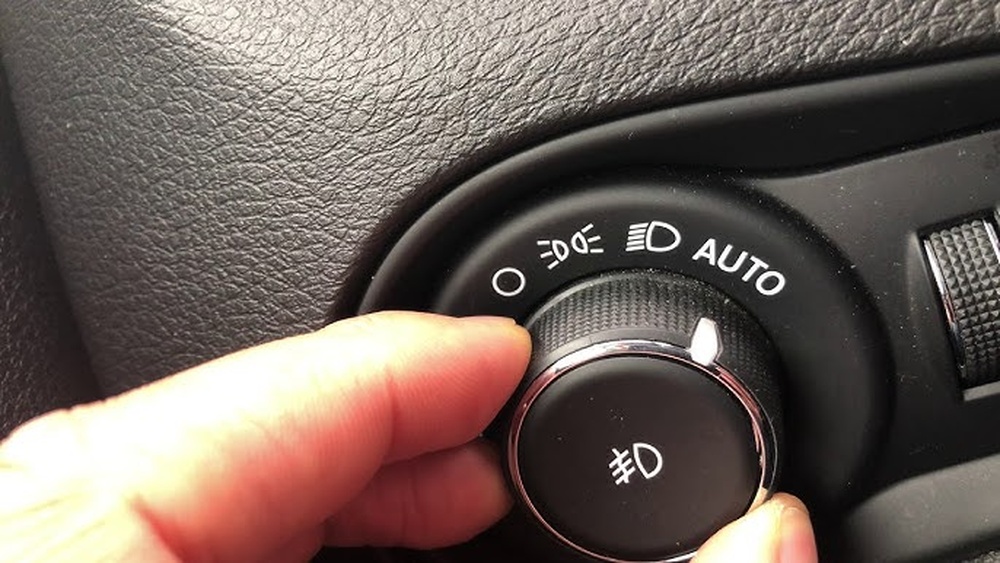
- Light Control Dial: Located left of the steering wheel.
- Multi-Function Stalk: Controls high beams and some interior lights.
- Central Console Buttons: For ambient or dome lights.
Here’s a quick comparison of lighting controls:
| Light Type | Control Location | Automatic Option |
|---|---|---|
| Headlights | Dashboard Dial | Yes |
| DRLs | Dashboard Dial | No |
| Fog Lights | Dashboard Dial | No |
| Interior/Dome Lights | Overhead Console | Yes |
Turning Off Headlights
Most Renegade models have automatic headlights. If you want to turn them off:
- Locate the headlight control dial.
- Rotate the dial to the “Off” position (usually marked with an “O”).
- If your Renegade has no “Off” position, switch to “parking lights” and then turn the engine off.
Some trims don’t allow full manual control due to safety rules. In these cases, headlights may stay on until the car powers down.
Avoiding Common Mistakes
- Don’t leave headlights in “Auto” if you want them fully off.
- If you exit the vehicle with lights on, your battery can drain.
- Certain models will not let you turn off headlights while driving for safety.
Disabling Daytime Running Lights
Daytime Running Lights (DRLs) are designed for visibility. They usually turn on when the engine starts. Here’s how to turn them off:
- Turn the headlight dial to “Off” (if your model allows).
- For some models, you must use the vehicle settings menu:
- Go to the dashboard menu.
- Find “Lights.”
- Select “DRLs.”
- Choose “Off.”
Not all Renegades allow you to turn off DRLs completely. If your model doesn’t, covering the DRL sensor (located near the windshield) can sometimes trick the system, but this is not recommended for safety.
Turning Off Interior Lights
Interior lights can stay on after parking, causing battery drain. To turn them off:
- Press the overhead dome light button.
- Set the light switch to the “Off” position.
- If doors are open, close them fully.
Some Renegades have ambient lighting controlled by the central console. Adjust brightness or turn off using the menu.
Interior Light Control Comparison
| Light | Manual Control | Automatic Control |
|---|---|---|
| Dome Light | Yes (button) | Yes (door sensors) |
| Ambient Light | Yes (console) | No |
| Map Light | Yes (button) | No |

Disabling Fog Lights And Tail Lights
Fog lights are easy to turn off:
- Use the dashboard dial.
- Push or pull to activate or deactivate.
Tail lights turn off automatically when headlights are off. No manual control is needed.
Tips For Avoiding Battery Drain
Many Renegade owners don’t realize that interior lights can stay on after closing doors. Always check:
- All doors are shut.
- Dome light is switched off.
- Headlights are not left in “On” position.
If you regularly park in dark areas, use the “Auto” setting for headlights. The system will turn them off when the engine is off, reducing battery risk.
Quick Troubleshooting Table
| Problem | Likely Cause | Solution |
|---|---|---|
| Lights won’t turn off | Door not closed | Check all doors |
| Headlights stay on | Dial in “Auto” | Turn dial to “Off” |
| Interior lights drain battery | Manual switch left on | Press button to “Off” |

Some Renegade models allow custom light settings through the Uconnect system. If your car has this feature:
- Tap the Uconnect screen.
- Select “Settings.”
- Choose “Lights.”
- Adjust DRLs, interior brightness, or automatic shutoff.
A non-obvious tip: many owners don’t realize the interior lights can be dimmed rather than turned off, which helps in night driving. Also, the “coming home” feature keeps headlights on for a few seconds after parking; this can be disabled in settings.
Frequently Asked Questions
Can I Turn Off All Lights While Driving?
No, for safety, most Renegades require at least DRLs or headlights to stay on while driving.
Why Do My Headlights Stay On After I Turn Off The Engine?
This is usually the “coming home” feature. Lights shut off automatically after a short delay.
Is It Possible To Disable Drls Permanently?
Some models allow this through the vehicle menu. Others require dealer assistance.
How Do I Turn Off Ambient Interior Lights?
Use the central console menu or press the ambient light button. Some trims allow brightness adjustment instead of full off.
Will Leaving Interior Lights On Drain My Battery?
Yes. Even small lights can drain the battery if left on for hours. Always double-check before leaving your vehicle.
Learning to control your Jeep Renegade’s lights takes a little practice, but following these steps will keep your battery safe and your cabin comfortable. If you need more details on model-specific features, check your owner’s manual or visit the official Jeep website. For deeper technical info, you can also consult Jeep Renegade Official Site. By understanding your lighting controls, you’ll avoid common mistakes and enjoy a safer, smarter driving experience.



















