If you drive a 2024 Jeep Grand Cherokee, you know its lighting system is modern and powerful. The SUV uses advanced LED technology, smart sensors, and automatic controls to make nighttime driving safer and easier. But sometimes, you may want to turn off certain lights—inside or outside—for privacy, comfort, or special situations. Many Jeep owners find the lighting controls confusing at first. This guide gives you clear, practical steps to turn off the lights in your 2024 Grand Cherokee, including tips for each type of light, common mistakes, and solutions if something doesn’t work as expected.
Main Types Of Lights In The 2024 Jeep Grand Cherokee
Before learning how to turn off the lights, it’s important to know the main types. Each has its own switch or menu option.
- Headlights: These include low beams, high beams, and automatic mode.
- Daytime Running Lights (DRLs): Lights that come on automatically during the day.
- Fog Lights: Extra lights for bad weather or low visibility.
- Taillights: Rear lights for visibility at night.
- Interior Lights: Dome, map, and cargo area lights.
- Ambient Lighting: Soft colored lights in the cabin.
- Instrument Cluster Lights: Dashboard display brightness.
- License Plate Lights: Small lights above the plate.
- Turn Signal and Hazard Lights: For signaling and emergencies.
Understanding these helps you find the right switch or menu in your Grand Cherokee.

How To Turn Off Exterior Lights
Headlights
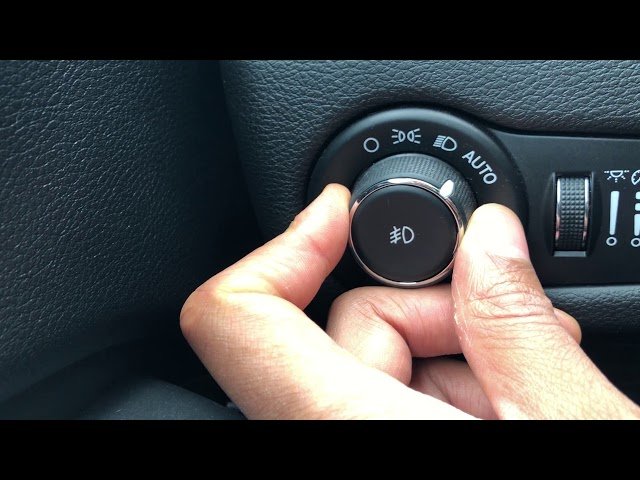
The headlights are controlled by a rotary switch on the left side of the dashboard. Here’s how you turn them off:
- Locate the headlight control knob near the steering wheel.
- Rotate the knob to the “OFF” position. In the 2024 model, you’ll see options like “Auto,” “Parking,” “Headlights,” and “Off.”
- If your Jeep has automatic headlights, you may need to press and hold the knob for two seconds to fully disable them.
Tip: Some states require headlights or DRLs to stay on for safety. If you cannot turn them off, check your owner’s manual or local law.
Daytime Running Lights (drls)
DRLs are often automatic and cannot be disabled with a simple switch. To turn off DRLs:
- Go to the Uconnect touchscreen menu.
- Tap “Settings,” then “Lights.”
- Find DRL and toggle it to “Off.”
Not all markets allow DRLs to be disabled. If the option is missing, your Jeep may not support it.
Fog Lights
Fog lights are controlled by a separate button:
- Press the fog light button next to the headlight knob.
- The indicator light will turn off, showing fog lights are off.
Taillights
Taillights turn off when headlights are off. Simply follow the steps for headlights above.
License Plate Lights
These only work when headlights or parking lights are on. Turning off headlights disables them.
Turn Signal And Hazard Lights
Use the stalk on the steering column:
- Push up or down for turn signals.
- Press the hazard button (triangle symbol) to turn hazards on or off.
How To Turn Off Interior Lights
Dome And Map Lights
There are several ways to control dome and map lights:
- Press the light button near each lamp.
- Use the master switch (often near the overhead console) to turn all interior lights off.
- For automatic operation, open doors will trigger lights. Close all doors to turn them off.
Common mistake: Leaving a door partially open will keep the lights on.
Ambient Lighting
Ambient lighting is controlled through the Uconnect system:
- Open the Uconnect touchscreen.
- Go to “Settings” > “Lights” > “Ambient.”
- Set ambient lighting to “Off” or adjust brightness.
Cargo Area Lights
These are activated by opening the rear hatch. To turn them off:
- Close the hatch fully.
- If the light stays on, check for stuck sensors or switches.
Instrument Cluster Lights
You can dim or turn off dashboard brightness:
- Use the small dial next to the headlight switch.
- Turn the dial down to minimum. Some models allow you to turn the display off by holding the dial for a few seconds.
Using Uconnect Touchscreen Controls
The Uconnect system in the 2024 Jeep Grand Cherokee is central for controlling advanced lighting features. It lets you customize settings not possible with physical switches.
Accessing Lighting Settings
- Start the vehicle and tap the Uconnect screen.
- Go to “Settings.”
- Select “Lights.”
Options You Can Adjust
- Headlight timeout (delay after locking car)
- Ambient lighting brightness/color
- DRL on/off
- Automatic high-beam enable/disable
Non-obvious insight: Many owners don’t realize you can set how long lights stay on after you exit the vehicle. This prevents battery drain.
Common Problems And Solutions
Lights Won’t Turn Off
If lights stay on even after following steps:
- Check all doors and hatches—one may be slightly open.
- Confirm headlight knob is in “Off” position.
- Go to Uconnect and check for timer settings.
Battery Drain
Leaving lights on can drain your battery. The 2024 Grand Cherokee has protection, but if you notice dimming:
- Turn off all lights before exiting.
- Set headlight timeout to the shortest option.
Automatic Lights
Some lights, like DRLs or headlights, may come on automatically. To disable:
- Use Uconnect to set “Auto” to “Off.”
- For persistent issues, consult your dealer.
Keyless Entry And Lighting
Unlocking with the remote may turn on welcome lights. To turn off this feature:
- Open Uconnect, go to “Settings.”
- Find “Approach lighting” and set to “Off.”
Practical Tips For Jeep Owners
- Always check lighting controls before leaving your Jeep—especially in unfamiliar settings.
- Customize light settings in Uconnect for your routine. For example, set ambient lighting to low at night for better sleep during camping.
- Don’t rely on default settings. Adjust timeout and brightness to suit your needs.
- If unsure, consult the owner’s manual or your Jeep dealer for advice.
Experienced owners often set their lights to turn off quickly after parking to avoid battery issues. This is an overlooked feature in newer models.
Comparison Of Lighting Controls In Jeep Grand Cherokee Vs Competitors
To help you understand how the 2024 Grand Cherokee compares to other SUVs, here’s a simple table.
| Feature | 2024 Jeep Grand Cherokee | Ford Explorer | Toyota Highlander |
|---|---|---|---|
| Headlight Control | Rotary switch + Uconnect | Rotary switch + SYNC | Rotary switch + Touchscreen |
| Ambient Lighting | Customizable via Uconnect | Limited color options | Basic brightness control |
| DRL Disable | Possible via Uconnect | Not available | Not available |
| Headlight Timeout | Adjustable (10-90 sec) | Fixed (30 sec) | Fixed (20 sec) |
Data On Battery Drain From Lights
Leaving lights on is a common mistake. Here’s a table showing typical battery drain rates.
| Type of Light | Current Draw (amps) | Time to Drain Standard Battery |
|---|---|---|
| Headlights (LED) | 2.0 | ~25 hours |
| Interior Dome Light | 0.5 | ~100 hours |
| Ambient Lighting | 0.2 | ~250 hours |
Insight: Even small lights, if left on, can drain your battery over several days. This is especially important when camping or parking for extended periods.
Advanced Lighting Features Unique To The 2024 Grand Cherokee
The 2024 model includes some features not found in older Jeeps or competitor vehicles.
- Automatic high-beam adjustment: Senses traffic and turns off high beams when needed.
- Smart ambient lighting: Changes color based on drive mode or time of day.
- Customizable light timers: Set exactly how long lights stay on after parking.
These features add convenience but may require new steps to turn off lights completely.
Mistakes Beginners Make
- Assuming lights are off when set to “Auto”: “Auto” may leave some lights on, especially DRLs.
- Ignoring Uconnect controls: Many settings are hidden in the touchscreen menus.
- Leaving doors or hatches slightly open: Interior and cargo lights stay on if not fully closed.
- Not checking headlight timeout: Long timeout settings drain battery after parking.
- Trying to disable DRLs via physical switch: Only possible through Uconnect, not the knob.

Real Owner Experiences
Many new Jeep Grand Cherokee owners report confusion with the lighting controls. One driver said, “I thought turning the knob to ‘Off’ would shut all lights, but my DRLs stayed on.
” Another found the ambient lighting stayed on overnight because the timeout was set too long.
Non-obvious tip: After turning off all lights, wait outside your Jeep for a minute to confirm everything is dark.
How To Turn Off All Lights Quickly
If you need to turn off all lights in your Jeep Grand Cherokee at once:
- Set the headlight knob to “Off.”
- Close all doors and hatches.
- Go to Uconnect and set all light timeouts to minimum.
- Turn off ambient lighting in the touchscreen.
- Confirm by checking inside and outside the vehicle.
This process takes less than two minutes once you know where each control is.
Frequently Asked Questions
How Do I Turn Off The Headlights Completely In The 2024 Jeep Grand Cherokee?
Rotate the headlight control knob to the “Off” position and hold for two seconds if needed. Automatic lights may require changing settings in the Uconnect touchscreen.
Can I Turn Off Daytime Running Lights (drls) In My Grand Cherokee?
Yes, most models allow you to disable DRLs through the Uconnect menu. Go to “Settings” > “Lights” > “DRL” and toggle off. Some markets may not allow this.
Why Do My Interior Lights Stay On After Closing The Door?
Check that all doors and the rear hatch are fully closed. If lights still stay on, check the master interior light switch and set it to “Off. ”
How Can I Prevent Battery Drain From Lights?
Turn off all lights before exiting, set timeouts to the shortest option in Uconnect, and avoid leaving doors slightly open. If unsure, monitor battery voltage with a tester.
Where Can I Find More Information On Lighting Controls For The Jeep Grand Cherokee?
Visit the official Jeep website or consult your owner’s manual. For expert advice, see Jeep Grand Cherokee Official Site.
Turning off the lights in your 2024 Jeep Grand Cherokee is easy once you know the controls and settings. Take time to learn your vehicle’s features, use the Uconnect system for advanced options, and avoid common mistakes. With these tips, you’ll stay safe and comfortable, while protecting your battery and privacy.