Driving a Jeep brings confidence, especially when you know that modern safety features are working for you. One of the most important is Forward Collision Warning (FCW). This system helps prevent crashes by alerting you if a vehicle or obstacle is detected ahead. Many Jeep owners want to make sure FCW is active, but the setup can feel confusing. Here’s a clear, practical guide for turning forward collision on your Jeep and making sure it works as it should.
What Is Forward Collision Warning?
Forward Collision Warning uses sensors to monitor the road ahead. If it detects a possible collision, it warns you with sounds or lights. Some Jeep models also have Automatic Emergency Braking (AEB), which can stop the car if you don’t react in time. According to the Insurance Institute for Highway Safety, vehicles with FCW are involved in 27% fewer rear-end collisions.
Which Jeep Models Have Forward Collision?
Most newer Jeep vehicles include FCW, but older ones might not. Here’s a quick overview:
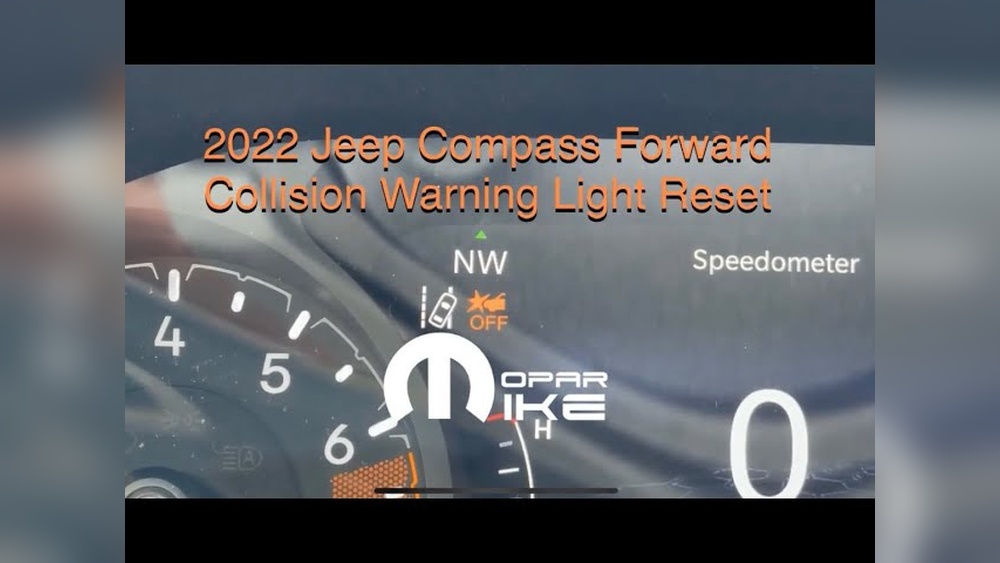
| Model | Year Available | FCW Standard? |
|---|---|---|
| Jeep Grand Cherokee | 2017+ | Yes |
| Jeep Compass | 2018+ | Yes |
| Jeep Wrangler | 2019+ | Optional |
| Jeep Renegade | 2020+ | Yes |
If your Jeep is older or a base model, check your owner’s manual or ask your dealer if FCW is available.

How To Turn Forward Collision On Jeep
Turning on FCW is easy, but the steps can vary a bit. Most Jeeps use the Uconnect system, which lets you control many vehicle settings from the touchscreen.
Step-by-step Instructions
- Start the vehicle. Make sure your Jeep is in Park.
- Access the Uconnect touchscreen in the center of the dashboard.
- Press “Settings”. This icon usually looks like a gear.
- Choose “Safety & Driving Assistance” from the menu.
- Find “Forward Collision Warning”. You may see options like “On,” “Off,” or “Sensitivity.”
- Select “On” to activate the system.
- Adjust sensitivity if available. Many Jeeps let you choose between “Near,” “Medium,” or “Far.” Setting “Far” means the system alerts you earlier.
Some older Jeeps have physical buttons for safety features. If you don’t see FCW in Uconnect, check below the climate controls for a button with a car and a star symbol.
Example: Jeep Grand Cherokee
For the Jeep Grand Cherokee (2022), the FCW setup follows these steps:
- Tap “Settings.”
- Open “Safety & Driving Assistance.”
- Choose “Forward Collision Warning.”
- Select “On.”
- Set alert sensitivity.
Example: Jeep Wrangler
Jeep Wrangler (2021) owners can turn FCW on through Uconnect or by pressing the physical button labeled “FCW” on the dash.
Why Forward Collision Might Not Work
Sometimes FCW does not activate, even if you turn it on. Here are possible reasons:
| Reason | What To Check |
|---|---|
| Dirty sensor | Clean the front grille area |
| System disabled | Double-check settings |
| Low battery | Charge the battery |
| Software bug | Restart Uconnect; update software |
| Aftermarket accessories | Remove items blocking sensors |
Many beginners forget to clean the sensors. Even a thin layer of dust or snow can prevent FCW from working.

Adjusting Forward Collision Sensitivity
You can change how early FCW warns you. This is useful for drivers who prefer more or less warning time.
- Far: Alerts you sooner, good for highway driving.
- Medium: Balanced setting for city and highway.
- Near: Alerts you late, useful in slow traffic.
Some drivers set FCW to “Near” to avoid false alarms in heavy traffic, but this reduces reaction time. For most, “Medium” or “Far” is safer.
Practical Tips For Using Forward Collision
- Keep sensors clean. Check the front grille before driving.
- Update Uconnect. New software can fix bugs and improve FCW.
- Test the system. Drive toward a cardboard box or soft object at low speed. FCW should alert you.
- Avoid blocking the sensor. Don’t put stickers or accessories near the sensor area.
- Don’t rely only on FCW. Always pay attention to the road.
It’s common for new Jeep owners to overlook the importance of software updates. These often improve FCW’s accuracy and reliability.
Comparing Forward Collision Features
Different Jeep models offer extra collision features. Here’s a quick comparison:
| Model | Forward Collision Warning | Automatic Emergency Braking | Pedestrian Detection |
|---|---|---|---|
| Grand Cherokee | Yes | Yes | Yes |
| Compass | Yes | Yes | No |
| Wrangler | Optional | Optional | No |
| Renegade | Yes | Yes | No |
The Grand Cherokee has the most advanced collision system. If you want extra safety, check for pedestrian detection and automatic braking.
Common Mistakes To Avoid
- Ignoring settings: Some drivers leave FCW off by accident.
- Not updating software: Old software may have bugs.
- Blocking sensors: Accessories or dirt can disable FCW.
- Misunderstanding alerts: FCW does not always brake for you; it may only warn.
Remember, FCW is a warning tool. It helps, but it cannot prevent every collision.
Where To Find More Information
Jeep’s official website has detailed guides about safety features. If you need more help, visit Jeep Owners for manuals and support.
Frequently Asked Questions
How Do I Know If My Jeep Has Forward Collision Warning?
Check your owner’s manual or look for “Forward Collision Warning” in the Uconnect settings. Most new Jeeps have FCW standard, but older models may not.
Can I Turn Forward Collision Warning Off?
Yes, you can switch FCW off in the Uconnect Safety & Driving Assistance menu. It’s best to keep it on for safety unless you are off-roading or in unusual situations.
Why Is My Forward Collision Warning Not Working?
Dirty sensors, software bugs, or blocked sensors can prevent FCW from working. Clean the sensor area and update Uconnect before contacting your dealer.
Does Forward Collision Warning Brake For Me?
FCW warns you, but some models have Automatic Emergency Braking (AEB). Check your manual to see if your Jeep has AEB.
Is Forward Collision Warning Worth It?
Studies show FCW reduces rear-end crashes by almost 30%. It’s a valuable safety feature and worth using.
Turning on Forward Collision Warning in your Jeep is simple and brings extra peace of mind. By keeping sensors clean, updating software, and understanding the settings, you make your drive safer for yourself and others.
Always check your manual and stay updated with Jeep’s latest safety features for the best experience.



















