If you drive a Jeep Grand Cherokee, you know comfort matters on every journey. One of the best features in modern Grand Cherokees is the seat memory function.
With just a button press, you can set and recall your favorite seat position, mirror angles, and sometimes even steering wheel settings. This can save time, reduce discomfort, and prevent arguments—especially if you share your car with someone taller or shorter.
Here’s how you can set up and use seat memory in your Jeep Grand Cherokee, with practical tips for getting the most out of this helpful feature.

How Seat Memory Works In Jeep Grand Cherokee
The seat memory system is designed to store personalized positions for the driver seat, side mirrors, and sometimes the power steering column. Most models allow two driver profiles, labeled “1” and “2”. This means two people can save their favorite settings and switch between them instantly.
Here’s a quick comparison of what seat memory can control in recent Grand Cherokee models:
| Feature | Included in Seat Memory | Available Models |
|---|---|---|
| Driver Seat Position | Yes | All with seat memory |
| Side Mirror Position | Yes | All with seat memory |
| Steering Wheel Position | Some | Limited, Summit, Overland |
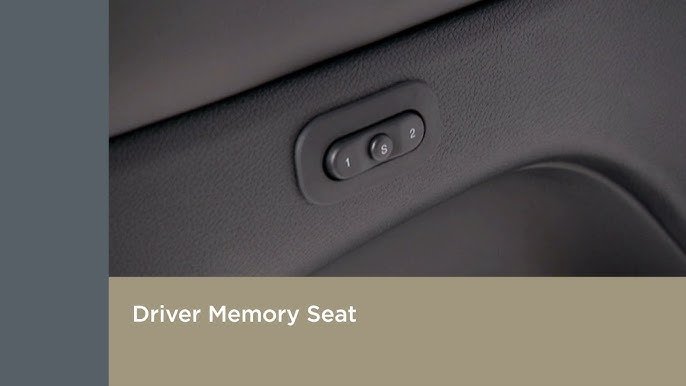
Not every Grand Cherokee has seat memory, so check your owner’s manual or look for the “S” and numbered buttons on the driver’s door panel.
Setting Seat Memory: Step-by-step Guide
Learning how to set the seat memory in your Jeep Grand Cherokee is simple, but a few small details make a big difference.
1. Start The Car
Turn the ignition to “On” or start the engine. You can’t program seat memory with the car off.
2. Adjust Your Settings
Move the driver’s seat, mirrors, and steering wheel (if equipped) to your favorite positions. Take your time fine-tuning now saves hassle later.
On the driver’s door panel, you’ll see three buttons: “S” (Set), “1,” and “2.”
| Button | Function |
|---|---|
| S | Set memory |
| 1 | Recall/Save Profile 1 |
| 2 | Recall/Save Profile 2 |
4. Save Your Position
Press and hold the “S” button. Within five seconds, press and hold “1” (or “2” for the second profile).
Hold both for about two seconds. You’ll hear a chime this confirms your settings are saved.
5. Test The Memory
Move the seat and mirrors to different positions. Then, press and hold the “1” or “2” button.
Everything should move back to your saved settings.
Non-obvious tip: If your Jeep uses a smart key (Key Fob), you can link your memory profile to your fob. This way, when you unlock the car, it automatically adjusts for you. See your manual for instructions, as the process varies by year.
Making The Most Of Seat Memory
Seat memory is more than just convenience. Here’s how to maximize its benefits:
- Save for Different Drivers: Assign “1” to yourself, “2” to your partner or another driver.
- Use for Different Situations: If you drive long and short trips, use “1” for a relaxed position and “2” for a more upright setting.
- Adjust For Parking: Some drivers set one memory position for easy entry/exit—moving the seat back and raising the steering wheel.
Here’s a practical example:
Suppose you’re over six feet tall, but your spouse is much shorter. Without seat memory, every driver change means several minutes of adjusting.
With memory, it takes just one button press.
Common Mistakes To Avoid
Many Jeep Grand Cherokee owners miss out on full seat memory benefits due to small errors:
- Not Saving Properly: If you release the “S” or “1”/”2″ buttons too soon, the settings won’t save. Always wait for the chime.
- Forgetting to Set Mirrors: The system saves mirror positions too. Don’t forget to adjust them before saving.
- Programming with the Car Off: The memory feature only works when the ignition is on.
Another point many miss: adjusting the steering wheel before saving. If your model includes this feature, always set it last, after seat and mirrors.
Troubleshooting Seat Memory Issues
Sometimes, the seat memory may not work as expected. Here’s what to check:
- No Chime: Settings aren’t saved. Try again, making sure you press the buttons correctly.
- Memory Not Working: Ensure the vehicle is in Park and the door is closed when programming.
- Smart Key Not Linking: Reprogram the key fob following the steps in your manual. Battery issues can also affect this.
- Feature Not Available: Some trims or older models don’t have seat memory. Double-check your car’s specs.
If problems continue, visit your Jeep dealer. Electrical or software issues may need professional help. For more details, the official Jeep website is helpful: Jeep Owner Resources.
When To Re-set Your Seat Memory
You might need to update your seat memory if:
- Your posture or preferences change over time
- You switch drivers often
- You install new seat covers or accessories that affect your position
To update, just repeat the same steps new settings will overwrite the old ones.
Frequently Asked Questions
How Do I Know If My Grand Cherokee Has Seat Memory?
Look for buttons labeled “S”, “1”, and “2” on the driver’s door. If you don’t see them, check your owner’s manual or the official Jeep website for your model year.
Can I Set Seat Memory For More Than Two Drivers?
No, the system only supports two memory profiles “1” and “2”. For more drivers, you’ll need to readjust manually or overwrite an existing profile.
Will Seat Memory Save My Lumbar Support Setting?
Yes, in most Jeep Grand Cherokee models with power lumbar, the lumbar setting is included in the seat memory. Test this by adjusting lumbar, saving, and recalling your profile.
Why Won’t My Seat Memory Recall Settings When I Unlock With My Key Fob?
You may need to link your seat memory profile to your key fob. This usually involves holding the “set” button, then the desired number button, while your key fob is in the car. See your manual for details.
Does Seat Memory Reset If My Battery Dies?
No, seat memory is stored in the vehicle’s system and will not be lost if the battery is disconnected or goes dead.
Getting your seat memory set up correctly saves time, boosts comfort, and makes every drive feel tailored to you. Taking a few minutes to set it now means less frustration later—no more fiddling with controls every time you get in. For more model-specific help, always consult your owner’s manual or your local Jeep dealer.