Setting the clock in your Jeep Wrangler may seem simple, but if you’re new to the vehicle or haven’t used the controls before, it can be confusing. Whether you own a classic model or a newer version, having the correct time is important for daily driving and trips. Some models use manual dials, while others have touchscreen systems. This guide will help you set the clock in most Jeep Wranglers, cover common mistakes, and answer frequent questions. Let’s make sure your Jeep Wrangler clock is accurate and easy to adjust.
Understanding Jeep Wrangler Clock Types
Jeep Wranglers have different clock setups depending on the year and trim. Older models usually have manual clocks, while recent versions feature digital displays with touchscreen controls.
Knowing your clock type is the first step.
| Model Year | Clock Type | Adjustment Method |
|---|---|---|
| 1997-2006 | Manual | Physical buttons |
| 2007-2017 | Digital display | Radio/Menu buttons |
| 2018-present | Touchscreen (Uconnect) | On-screen controls |
Tip: Always check your owner’s manual for your specific model. The clock setup can change between trims and years.
Step-by-step Guide: Setting The Jeep Wrangler Clock
Each Jeep Wrangler model has its own process. Here’s how to set the clock for the three main types.
Setting Manual Clock (1997–2006)
- Locate the clock buttons. Most older Wranglers have “H” (Hour) and “M” (Minute) buttons on the dashboard or radio.
- Press and hold the ‘H’ button. The hour will advance. Release when you reach the correct hour.
- Press and hold the ‘M’ button. The minute will advance. Stop at the correct minute.
- Check AM/PM. Some models don’t display AM/PM, so verify with another device.
Non-obvious insight: If the buttons are worn or sticky, use a small tool like a pen tip for easier pressing. Avoid using sharp objects to prevent damage.
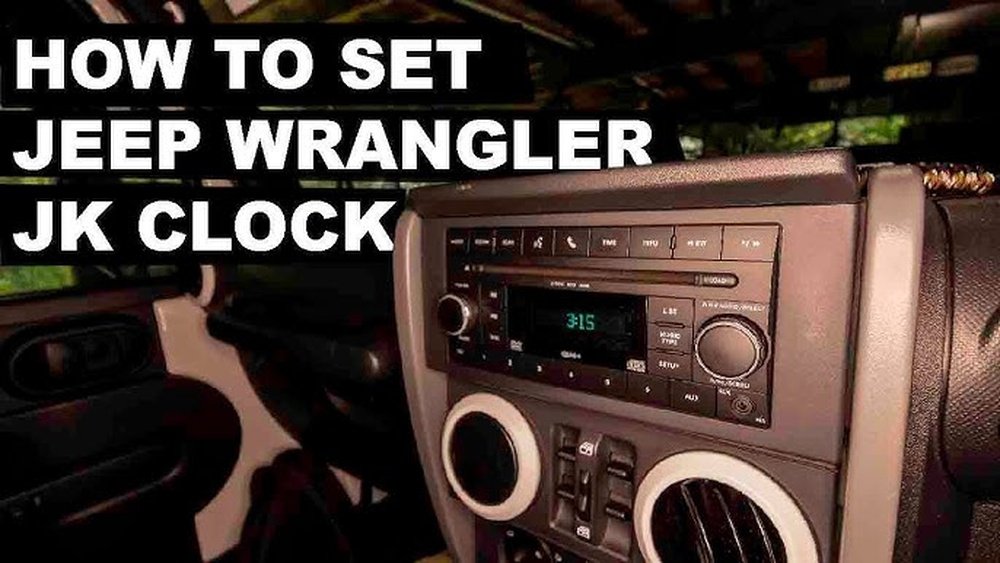
Setting Digital Clock (2007–2017)
- Turn on the ignition. The radio display should light up.
- Press ‘Menu’ or ‘Setup’. Find the clock settings on the radio or display.
- Adjust hour and minute. Use the tuning knob or arrow keys.
- Confirm the new time. Press “OK” or “Set” to save.
Practical tip: Some radios require you to cycle through options. If you miss the clock, repeat the steps slowly.
Setting Touchscreen Clock (2018–present)
- Access Uconnect screen. Tap “Settings” on the main menu.
- Select ‘Clock & Date’. This option may be under “Display” or “General.”
- Adjust time. Tap the hour and minute to change. Use “AM/PM” toggle if needed.
- Save changes. Tap “Save” or exit; settings are usually updated automatically.
Beginner mistake: Not pressing “Save” can leave the clock unchanged. Always confirm before leaving the menu.
| Clock Type | Common Error | Fix |
|---|---|---|
| Manual | Buttons not responding | Check for dirt or stuck buttons |
| Digital | Radio menu confusion | Consult manual or try radio reset |
| Touchscreen | Settings not saving | Ensure you tap “Save” |
Tips For Accurate Time Setting
- Set during daylight. Visibility is better, reducing mistakes.
- Check against your smartphone. Phones sync time automatically.
- Avoid daylight saving confusion. Jeep Wranglers don’t always auto-update for daylight saving. Adjust manually twice a year.
- Battery check. If your clock resets often, your car battery may be weak.
Example: In a 2015 Wrangler, the clock reset after every engine start. Replacing the battery solved the issue.
Why Your Clock Matters
A clock that’s off by even a few minutes can disrupt your schedule. For drivers using their Wrangler for work or travel, accurate time helps with appointments and trip planning.
Newer models also use the clock for automatic systems, like scheduled maintenance reminders.
Keeping your clock accurate ensures these systems work correctly.

Common Mistakes To Avoid
- Rushing through menus. This can cause accidental changes.
- Ignoring AM/PM settings. Some models default to 12-hour format.
- Forgetting to save. Digital and touchscreen systems require confirmation.
- Not checking after a battery change. Clock resets are common after battery swaps.
- Using wrong buttons. Manual models often have similar-looking buttons for radio and clock.
Comparison: Manual Vs. Touchscreen Clock Setting
| Feature | Manual | Touchscreen |
|---|---|---|
| Ease of use | Simple, but limited | More options, intuitive |
| Speed | Quick | Usually fast, but more steps |
| Adjust for daylight saving | Manual adjustment | May auto-update (if GPS present) |
| Error risk | Button wear, missed presses | Menu confusion, not saving |
Troubleshooting Jeep Wrangler Clock Issues
Sometimes the clock won’t set or keeps resetting. Here’s what to do:
- Clock won’t change: Double-check you’re in the right menu. Restart the system if needed.
- Clock resets after ignition: Test your battery. If it’s weak, replace it.
- Touchscreen freezes: Restart the Uconnect system. If problem continues, consult your dealer.
- Buttons not working: Clean around the buttons. Dust or dirt can block movement.
Non-obvious insight: Some aftermarket radios need a separate setup for the clock. If you’ve replaced your Jeep’s stereo, check the new manual.
Frequently Asked Questions
How Do I Know Which Clock Type My Jeep Wrangler Has?
Check your model year and trim. Older Wranglers use manual clocks, mid-years use digital, and recent models use touchscreens. If unsure, look for clock buttons or a touchscreen display.
Does The Jeep Wrangler Clock Auto-update For Daylight Saving Time?
Most manual and digital clocks do not auto-update. Touchscreen models with GPS sometimes do, but always check after daylight saving changes.
My Clock Keeps Resetting. What Should I Do?
This usually means a battery issue. Check your car battery’s health. If the battery is fine, there may be a wiring problem.
Can I Set The Clock While Driving?
Yes, but it’s safer to adjust when parked. Touchscreen systems may disable settings while the car is in motion for safety.
Where Can I Find Official Instructions For My Jeep Wrangler?
The best source is your owner’s manual or Jeep’s official website. For extra help, visit Jeep Owners Manuals.
Whether you drive a classic Wrangler or a new model, setting the clock is easy once you know the steps. Accurate time keeps your day running smoothly and your Jeep’s features working as intended.
If you run into problems, use these tips to troubleshoot.
With a bit of practice, you’ll always have the correct time on your dashboard.


















