Setting the clock in a car might seem simple, but if you drive a 2014 Jeep Patriot, finding the right steps can be tricky. Many drivers get confused because the Patriot’s clock settings are hidden behind menus or buttons that are not clearly labeled. If you want your dash clock to show the correct time—especially after daylight savings or battery changes—this guide will help. You’ll learn step-by-step instructions, practical tips, and answers to common questions. With clear explanations and simple words, you can set your clock without stress.
Understanding Your Jeep Patriot’s Clock
The 2014 Jeep Patriot uses a digital clock displayed on the radio screen. Most models have either the basic Uconnect radio or the standard AM/FM/CD unit. The clock setting method is almost the same for both, but knowing which radio you have can help.
- Basic radio: Buttons labeled “Clock,” “Time,” or similar.
- Uconnect: More menu-driven, with options in the settings.
Some drivers miss that the clock is tied to the radio, not the dash. If your radio is not working, you cannot set the time.
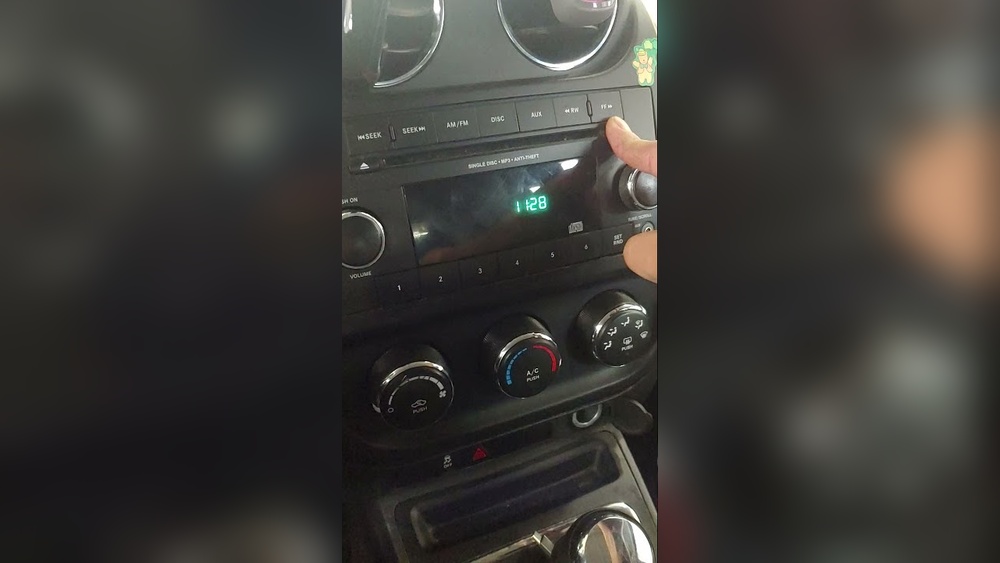
Step-by-step: How To Set Clock On 2014 Jeep Patriot
Follow these steps to set your Jeep Patriot’s clock. Each step is simple, but pay attention to small details.
1. Turn On The Ignition
Start your car, or turn the key to “ACC. ” The radio must be powered.
On the basic radio, look for a button labeled “Clock” or “Time. ” On Uconnect, press “Menu” or “Settings. ”
Hold down “Clock” or “Time” for a few seconds. The display should start flashing.
4. Adjust The Hours
Use the “Tune” knob or arrow buttons to change the hour. Some radios use the “Seek” button.
5. Adjust The Minutes
Press the button again to switch to minutes. Use the knob or arrows to set the correct minute.
6. Save Your Settings
Press “Clock,” “Time,” or “Menu” again to confirm. The display will stop flashing.
7. Check The Clock
Look at the radio screen to make sure the time is correct.
Many drivers forget to press and hold the button, leading to confusion. Also, some models require you to press “Clock” twice once to start and once to save.
Practical Tips For Setting The Clock
- Set the clock while parked to avoid distractions.
- If you’re changing the clock for daylight savings, double-check AM/PM.
- If your radio is aftermarket, the steps may be different.
- If the display is dim or off, check your fuse or battery.
Common Problems When Setting The Clock
Some Jeep Patriot owners face issues. Here are solutions:
- Buttons not responding: Try turning the car fully on, not just ACC.
- Display not flashing: Press and hold the button longer.
- Radio not working: Clock cannot be set if the radio is broken.
- Aftermarket radio: Refer to your radio’s manual.
Data Table: Radio Types And Clock Setting Methods
Here’s a quick comparison of radio types found in the 2014 Jeep Patriot:
| Radio Type | Button Used | Setting Method |
|---|---|---|
| Basic AM/FM/CD | Clock/Time | Press and hold, adjust with knob or seek |
| Uconnect | Menu/Settings | Navigate to clock, adjust via touchscreen |
| Aftermarket | Varies | Refer to manual |
Why Setting The Clock Matters
A correct clock helps with time management, reminders, and punctuality. It can also make your driving experience safer no more guessing the time while driving.
Some states require visible clocks for commercial drivers.

Table: Time Change Impact Examples
If you forget to update your clock, here’s how it can affect you:
| Scenario | Impact |
|---|---|
| Daylight savings change | Arrive late or early to work |
| Long trips | Miss scheduled stops |
| Medical appointments | Risk missing appointments |
Non-obvious Insights For Jeep Patriot Owners
Many owners don’t realize that:
- The radio clock is linked to the main battery. If your battery dies, the clock will reset.
- If you disconnect the battery for repairs, always check your clock afterward.
- Some Jeep Patriots have a hidden “factory reset” that can erase clock settings if pressed by mistake.
Mistakes To Avoid
- Trying to set the clock while driving. This is unsafe and distracting.
- Using the wrong button. Double-check labels—some buttons look similar.
- Ignoring manual instructions. The Jeep Patriot manual has clear steps for both radio types. If you’re stuck, check the manual or visit a dealer.
Where To Find More Information
If you need detailed instructions or troubleshooting, the Jeep Patriot Owner’s Manual is helpful. You can also find guides on Jeep’s official website.

Frequently Asked Questions
Can I Set The Clock If My Radio Is Broken?
No. The clock is tied to the radio. If your radio is not working, you cannot change the time.
How Do I Know Which Radio I Have?
Look for labels like Uconnect or AM/FM/CD on your radio. If you’re unsure, compare your radio to images in the owner’s manual.
What Happens If I Disconnect The Battery?
Your clock will reset to 12:00 or blank. You’ll need to set the clock again after reconnecting.
Is The Process The Same For All Jeep Patriot Models?
Most 2014 Jeep Patriots use similar steps, but aftermarket radios may differ. Always check your radio type first.
Can I Set The Clock Using Voice Commands?
No. The 2014 Jeep Patriot does not support voice command clock setting. You must use the radio buttons or touchscreen.
Setting the clock on your 2014 Jeep Patriot is quick once you know the right steps. Use the guide above, avoid common mistakes, and check your radio type.
Keeping your clock updated makes every drive easier and safer.


















