Rewiring a Power Wheels Jeep is one of those DIY projects that can make a huge difference. Maybe your child’s ride-on Jeep stopped working, or you want to upgrade it for more speed, longer battery life, or new features.
The process may sound technical, but with the right guidance, you can do it safely at home even if you’re not an electrician.
This guide will walk you through everything you need to know, from planning and tools to step-by-step wiring, practical tips, and mistakes to avoid.
You’ll also find real-world examples and answers to common questions, making sure your rewiring project is a success.
Understanding Power Wheels Jeep Wiring
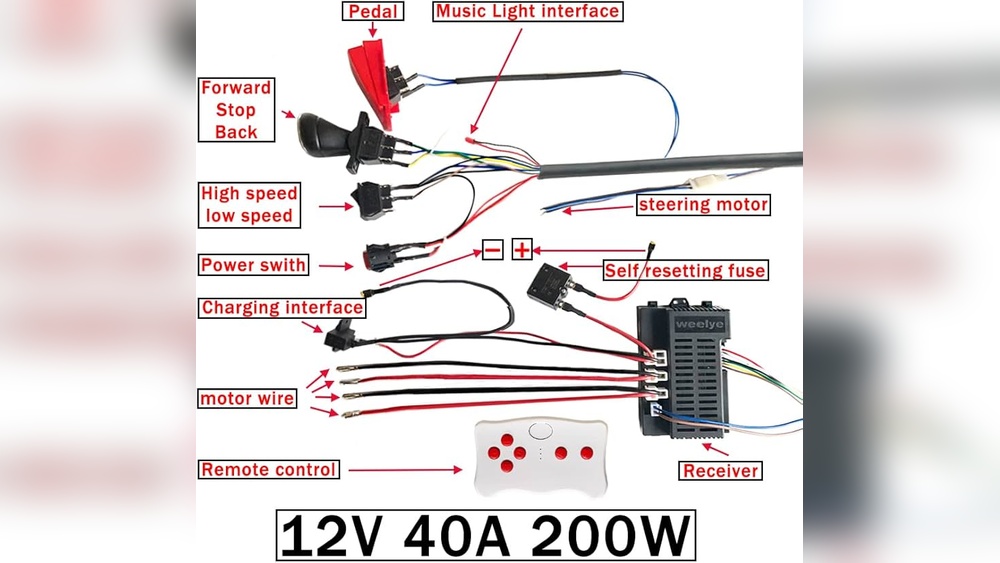
Before you start rewiring, it’s important to know what’s inside a Power Wheels Jeep. Most models use a simple electrical system with:
- 12-volt or 24-volt battery
- Motor
- Foot pedal switch
- Gear selector
- Fuse or circuit breaker
- Wiring harness
Each part connects in a loop. When your child presses the pedal, the circuit completes, sending power to the motor.
Problems usually happen when wires break, connectors loosen, or components fail.
Common Reasons To Rewire
- Worn out wiring: Old wires can fray or corrode.
- Upgrading battery: Switching from 12V to 24V for more speed.
- Adding new features: Lights, horn, or second motor.
- Replacing broken parts: After a crash or wear and tear.
Knowing your goal helps you plan the project and choose the right materials.
Gathering Tools And Materials
For a safe and effective rewiring job, you’ll need a few basic tools and parts. Here’s a list to get you started:
- Wire cutters/strippers
- Screwdrivers (Phillips and flathead)
- Electrical tape
- Heat shrink tubing
- Soldering iron and solder (optional but recommended)
- Replacement wiring (16-18 gauge for most models)
- Connectors (spade, ring, butt)
- Multimeter (to test voltage and continuity)
- Zip ties (for neatness)
- Replacement fuse (if needed)
- Battery (12V or 24V, depending on upgrade)
- Motor (optional for speed upgrades)
Always check your Jeep’s manual or look online for wiring diagrams. Some models have unique layouts.
Safety First: Precautions And Tips
Working with electricity—even low voltage—can be dangerous if you’re not careful. Here are some safety tips:
- Disconnect the battery before touching any wires.
- Wear gloves to protect against sharp parts.
- Work in a dry area to avoid shocks.
- Double-check connections with a multimeter.
- Never use damaged tools.
- Keep small parts away from children.
Most Power Wheels use low voltage (12 24V), so the risk is low, but caution is always wise.
Step-by-step: How To Rewire A Power Wheels Jeep
Let’s break down the rewiring process into clear steps. This section assumes you’re replacing old wires and possibly upgrading components.
1. Remove The Old Wiring
Start by removing the seat and any panels covering the battery and wiring. Use a screwdriver to open the battery compartment.
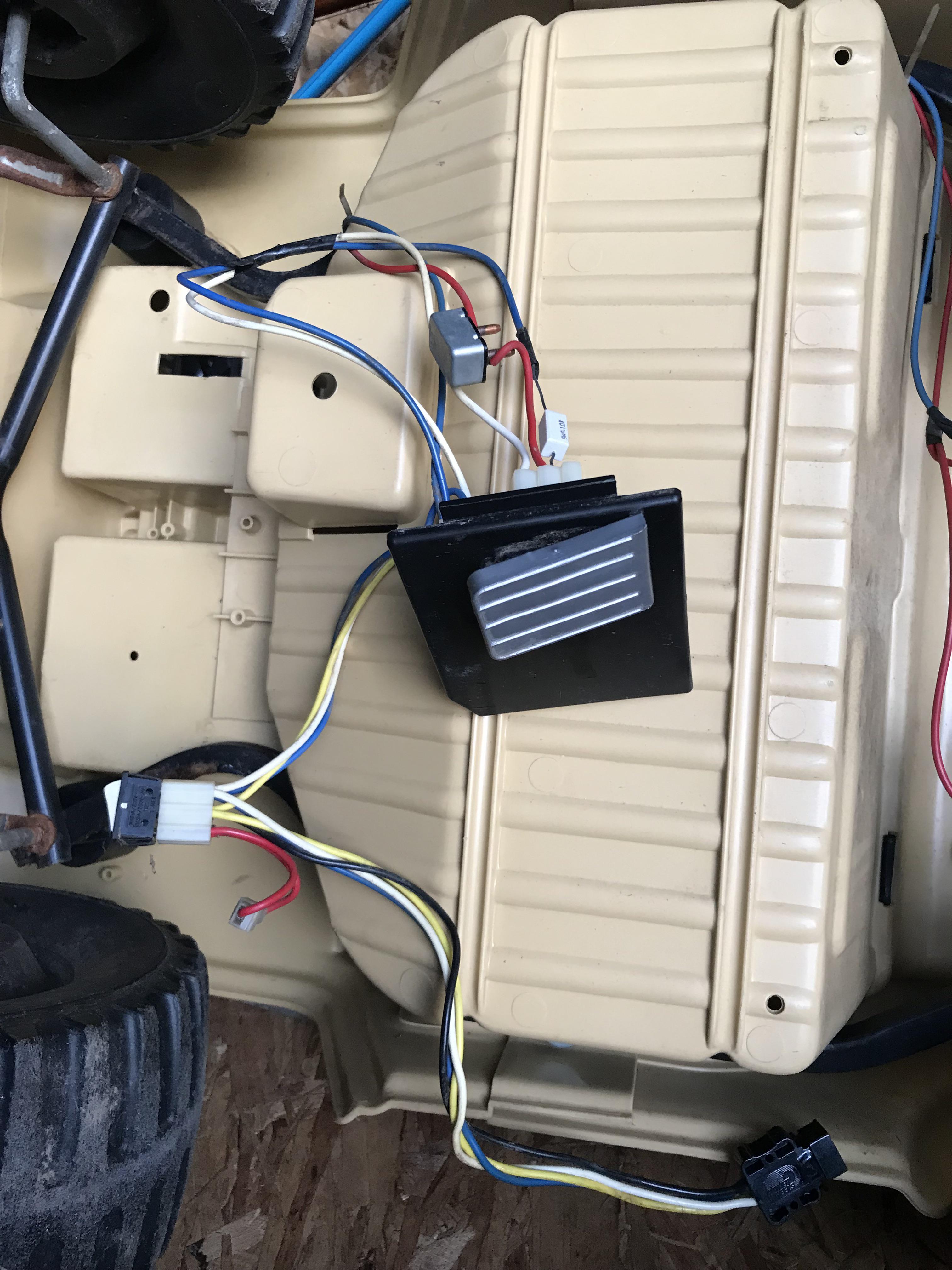
Take photos of the wiring before you disconnect anything this will help you remember how to reconnect.
- Disconnect the battery first.
- Remove all connectors from switches, motors, and battery.
- Carefully pull out old wires, noting their routes.
2. Inspect Components
Check each part for damage. Look at the motor, switches, and battery terminals. If you see rust or broken plastic, consider replacing those parts.
3. Prepare New Wires
Cut new wires to length. Use wire strippers to remove about ¼ inch of insulation from each end.
If you’re upgrading to a higher voltage, use thicker wires (16 gauge for 12V, 14 gauge for 24V).
4. Connect Components
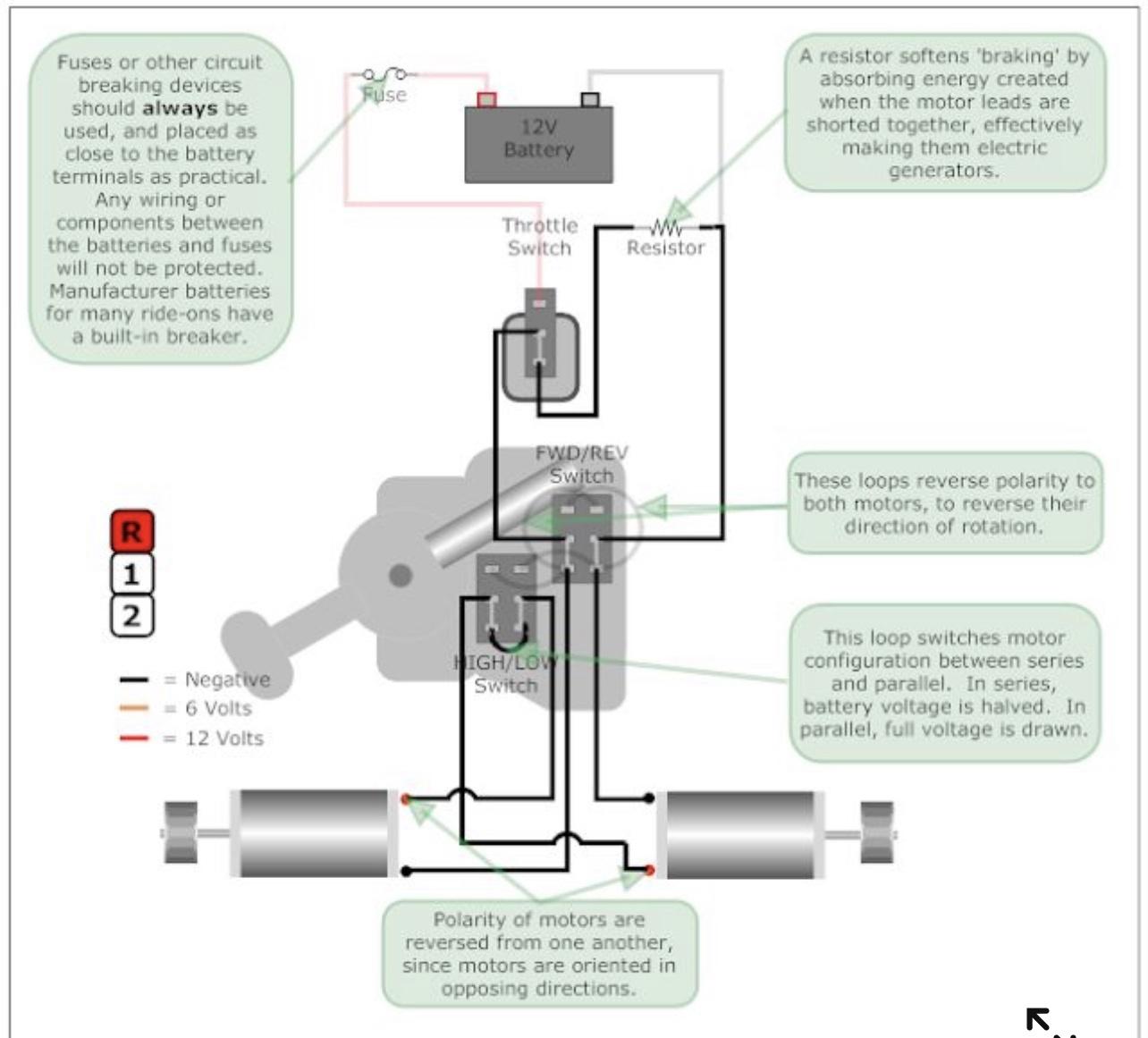
Follow the original wiring diagram—or your photos—to connect each part:
- Battery positive to fuse/circuit breaker.
- Fuse to foot pedal switch.
- Switch to motor.
- Motor back to battery negative.
Use connectors or solder for strong joints. Cover exposed connections with heat shrink tubing or electrical tape.
5. Secure And Organize
Use zip ties to keep wires neat and out of moving parts. Avoid sharp bends or pinched wires.
Make sure wires don’t rub against plastic or metal edges.
6. Test The System
Reconnect the battery. Use a multimeter to check voltage at each component.
Press the pedal does the motor run smoothly? Try all switches and features. If something doesn’t work, check your connections.
7. Final Assembly
Replace panels and seat. Make sure everything is tight and secure.
Let your child try the Jeep in a safe area watch for overheating, strange noises, or slow movement.

Upgrades And Customizations
Many people use rewiring as a chance to upgrade their Power Wheels Jeep. Here are some popular options:
- Upgrading to 24V: Doubles speed, but can stress the motor.
- Adding LED lights: For nighttime fun.
- Installing a second motor: For more power on rough terrain.
- Adding a sound system: Small speakers for music.
Each upgrade adds complexity. Make sure your wires and connectors can handle extra power.
If adding features, use separate fuses for safety.
Comparing Batteries And Motors
Choosing the right battery and motor is key for performance. Here’s a quick comparison:
| Battery Type | Voltage | Run Time | Speed | Cost |
|---|---|---|---|---|
| Lead Acid | 12V | 30–45 min | 3–4 mph | $30–$50 |
| Lead Acid | 24V | 20–35 min | 6–7 mph | $50–$80 |
| Lithium | 12V | 60–90 min | 3–4 mph | $60–$90 |
| Lithium | 24V | 45–70 min | 6–8 mph | $90–$120 |
Lithium batteries are lighter and last longer, but cost more. If you upgrade, make sure the motor can handle extra voltage.
| Motor Type | Voltage Supported | Speed | Durability | Noise |
|---|---|---|---|---|
| Standard Brushed | 12V | 3–4 mph | Medium | Low |
| High Performance Brushed | 24V | 6–7 mph | Low | Medium |
| Brushless | 12–24V | 6–8 mph | High | Low |
Brushless motors are more efficient and durable but may need a special controller.
Real-world Example: Rewiring And Upgrading
Let’s look at a real case. Mike’s Power Wheels Jeep stopped working after two years. The battery was dead, and wires were loose. He decided to upgrade:
- Replaced battery with a 24V lithium model
- Installed thicker 14 gauge wires
- Added a fuse for extra safety
- Upgraded motor to brushless type
After rewiring, his Jeep ran faster (up to 8 mph), and battery life doubled. The new wiring was neater, and overheating stopped.
Mike learned that using high-quality connectors and checking every joint with a multimeter prevented most problems.
Common Mistakes And How To Avoid Them
Many beginners make errors that can cause damage or safety issues. Here are some to watch out for:
- Using thin wires: Can overheat and melt.
- Skipping the fuse: Leaves your Jeep unprotected.
- Poor connections: Loose wires cause power loss.
- Ignoring battery specs: Wrong voltage can damage the motor.
- Not testing each step: Harder to find mistakes later.
Double-check every connection, and always use a fuse. If you’re unsure, ask for help on forums or from a local electrician.
Practical Tips For Beginners
- Take clear photos before starting.
- Label wires with masking tape.
- Use heat shrink tubing for durable insulation.
- Buy a wiring kit—many online stores offer complete sets.
- Watch YouTube videos for visual guides.
Most Power Wheels Jeep rewiring projects can be done in 2 3 hours. Don’t rush, and keep all screws and parts organized.
Maintenance After Rewiring
Once you’ve finished, regular maintenance keeps your Jeep running smoothly:
- Check wires for wear every month.
- Clean battery terminals with a dry cloth.
- Test fuse and switches regularly.
- Store indoors to avoid moisture damage.
If you notice slower speed, strange sounds, or battery issues, check your wiring first.
Advanced Customization Ideas
If you enjoy tinkering, there are many ways to make your Power Wheels Jeep unique:
- Add remote control for parent supervision.
- Install Bluetooth speakers.
- Use paint and decals for style.
- Add seatbelts for safety.
Each upgrade adds wiring complexity. Plan ahead and keep diagrams handy.
Sourcing Quality Parts
Buy parts from trusted sources. Avoid cheap wires or batteries they may fail quickly.
Search forums and review sites for recommendations. For battery and motor upgrades, check compatibility with your Jeep model.
For detailed wiring diagrams and official parts lists, see Fisher-Price Power Wheels.
Frequently Asked Questions
Can I Upgrade A 12v Power Wheels Jeep To 24v?
Yes, but you must use thicker wires, a stronger motor, and a new fuse. Check if your Jeep’s plastic gears can handle extra speed.
Upgrade only if you feel comfortable with more complex wiring.
How Long Does Rewiring Take?
Most projects take 2 3 hours for a basic rewiring. Upgrading features or motors may add extra time.
Organizing tools and planning ahead can save time.
What Gauge Wire Should I Use?
For 12V, use 16 gauge. For 24V upgrades, use 14 gauge. Always choose wires rated for automotive use.
Is Soldering Necessary?
No, but soldering makes connections stronger and less likely to fail. If you don’t have a soldering iron, use high-quality crimp connectors.
What’s The Safest Way To Test After Rewiring?
Always test with the Jeep’s wheels off the ground. Use a multimeter to check voltage and continuity.
If you notice overheating or odd sounds, stop and check connections.
Rewiring a Power Wheels Jeep is a rewarding project that can bring new life to an old toy. With careful planning, the right tools, and a bit of patience, you can improve performance, add new features, and keep your child’s ride safe and fun.
Remember take photos, use quality parts, and don’t skip safety checks. Happy rewiring!