Resetting the GPS in your Jeep Grand Cherokee can quickly solve problems like incorrect routes, slow response, or frozen screens. Many drivers experience GPS issues, especially in older models or after a software update. Knowing how to reset your GPS can save time and prevent frustration on the road. This guide explains the complete process, covers common mistakes, and shares tips for getting your navigation back on track.
Why Gps Problems Happen In Jeep Grand Cherokee
GPS systems in cars rely on both hardware and software. Signal issues, outdated maps, or software glitches can cause the GPS to act up. For example, poor satellite reception in tunnels or city centers can confuse the navigation. Sometimes, a simple reset brings everything back to normal without needing a trip to the dealer.
Quick Steps To Reset Gps In Jeep Grand Cherokee
The exact reset method depends on your Jeep’s model year and the type of infotainment system installed. Most Grand Cherokees use either the Uconnect system or a basic navigation unit. Here’s how you can reset the GPS for both:
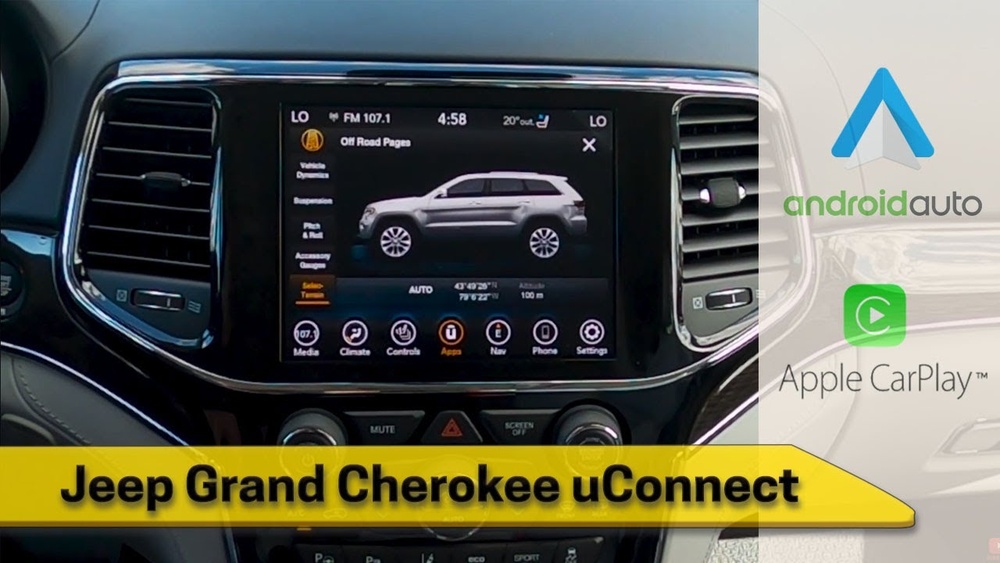
For Uconnect Systems (2014 And Newer)
- Turn on the ignition but do not start the engine.
- Wait for the Uconnect system to load fully.
- Press and hold the volume and tuner knobs together for about 10–20 seconds.
- The screen will go black and then show the Uconnect logo.
- Release the knobs. Your system is now rebooting.
This soft reset does not erase your saved addresses or preferences. It simply restarts the system and clears minor glitches.
- Power on the vehicle.
- Locate the NAV or Menu button near the screen.
- Press and hold the button for 10 seconds.
- Watch for the screen to flicker or go blank.
- Once the system reboots, check if the GPS works correctly.
If your system does not reboot, consult your owner’s manual. Some older models require a fuse pull or battery disconnect for a hard reset.

Data Table: Reset Methods By Model Year
Here’s a quick reference for common Jeep Grand Cherokee GPS systems and their reset methods:
| Model Year | Infotainment System | Reset Method |
|---|---|---|
| 2014–2024 | Uconnect 4/5 | Hold Volume + Tuner Knobs |
| 2011–2013 | Uconnect Touch | Hold NAV/Menu Button |
| 2010 and earlier | MyGIG/REC/RER | Fuse Pull/Battery Disconnect |
When A Gps Reset Is Needed
Not every navigation issue needs a full reset. Look for these signs before you take action:
- Frozen maps or blank screens
- Wrong vehicle position on the map
- Constant recalculating or lost GPS signal
If these problems happen only once, try restarting your car first. If issues return, then a reset is the next step.
Other Troubleshooting Tips
A reset fixes many problems, but not all. Here are extra steps if your GPS is still not working:
- Check for software updates: New updates can fix bugs and improve performance. Download updates from the official Jeep site or through the Uconnect app.
- Verify GPS antenna connection: If your car recently had windshield or radio work, the antenna might be loose.
- Clear stored destinations: Too many saved addresses can slow down some systems.
- Inspect for physical damage: Water leaks or dashboard damage can affect wiring.
Data Table: Common Gps Problems And Solutions
This table summarizes frequent GPS issues and what you can do:
| Problem | Possible Cause | Recommended Action |
|---|---|---|
| Screen frozen | Software glitch | Soft reset the system |
| Wrong location | Poor satellite signal | Move to open area, reset system |
| No sound directions | Audio settings or bug | Check volume, reset if needed |
| Won’t load maps | Outdated software/maps | Install latest updates |
Hard Reset: When And How
Sometimes, a soft reset does not fix deep system errors. A hard reset clears all user data and returns the GPS to factory settings. Use this only if other steps fail, as you will lose saved locations and preferences.
Performing A Hard Reset
- Go to the Settings menu on the touch screen.
- Find System Information or Factory Reset.
- Follow prompts to confirm. The system will erase all data and reboot.
After a hard reset, you must re-enter your favorite addresses and connect your phone again.
Not-so-obvious Tips
Many drivers forget to update their map data. Even if the GPS works, old maps can lead you down closed roads or cause long detours. Set a reminder to check for updates every six months.
Another detail: If you use accessories like dash cams or phone chargers, they can sometimes cause electrical interference with the GPS. Try unplugging these devices if you notice sudden GPS issues.
Data Table: Soft Reset Vs Hard Reset
Comparing the two reset types helps you choose the right one:
| Reset Type | Data Loss | Best For | Time Needed |
|---|---|---|---|
| Soft Reset | No | Minor glitches, frozen screen | 1–2 minutes |
| Hard Reset | Yes (all user data) | Major errors, software bugs | 5–10 minutes |
When To Ask A Professional
If your GPS still does not work after all these steps, it might be a hardware issue. Problems with the GPS antenna or internal wiring should be checked by a qualified Jeep technician. Attempting to fix these yourself can void your warranty.
You can find more details and updates about Jeep’s navigation systems at the official Jeep Uconnect page.
Final Thoughts
A working GPS is essential for safe and stress-free driving in your Jeep Grand Cherokee. Most navigation problems can be fixed with a quick reset or update. Remember to check for software and map updates regularly, and do not ignore small glitches—they can grow into bigger issues over time. If you run into stubborn problems, do not hesitate to seek help from a Jeep service center.
Frequently Asked Questions
How Often Should I Reset My Jeep Grand Cherokee’s Gps?
You should only reset your GPS if you notice problems like freezing, incorrect routes, or lost signals. Routine resets are not needed if the system works well.
Will Resetting The Gps Delete My Saved Addresses?
A soft reset will not erase your data. However, a hard or factory reset will remove all saved locations, preferences, and paired devices.
What If My Gps Still Doesn’t Work After A Reset?
If a reset does not solve the issue, try updating the software or checking the GPS antenna connection. If problems continue, visit a certified Jeep technician.
Can I Update My Jeep Grand Cherokee’s Gps Maps Myself?
Yes. Most modern Uconnect systems allow you to update maps by downloading new files from Jeep’s website or using the Uconnect app.
Follow the official instructions for your model year.
Is There A Way To Prevent Gps Issues In My Jeep?
Keep your system updated, avoid using too many connected devices, and do not block the dashboard area near the windshield. Regular maintenance helps prevent most GPS problems.



















