Programming your Jeep’s Homelink system makes life easier. Imagine opening your garage door from your vehicle, no remote needed. Homelink is a built-in feature in many Jeep models, letting you control garage doors, gates, and even home lighting. Learning to program Homelink is simple, but a few steps must be followed carefully. This guide walks you through each part, with clear explanations and practical advice. Even if English isn’t your first language, you’ll find this easy to follow.
What Is Jeep Homelink?
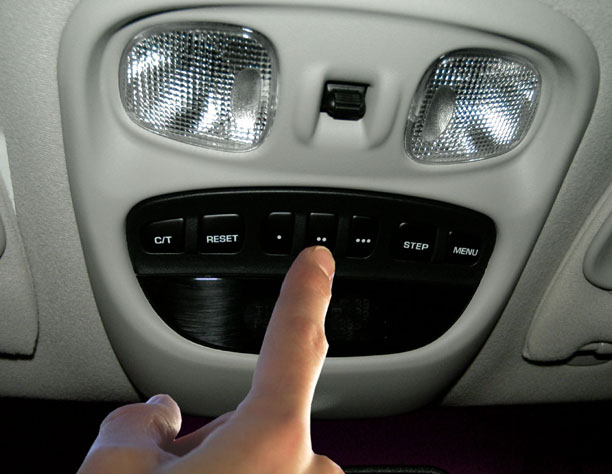
Homelink is a wireless control system built into your Jeep, usually found on the overhead console or sun visor. It can store up to three different codes, meaning you can control multiple devices. Many owners use it for garage doors, but Homelink also works with security gates and some home automation systems.
Key benefits:
- No need for extra remotes
- Safer operation while driving
- Works with most brands
According to Homelink, over 40 million vehicles are equipped with this system. Compatibility covers 98% of garage door openers in the US.
Preparing To Program Homelink
Before you start, a bit of preparation helps everything go smoothly:
- Check your Jeep’s manual for Homelink location and instructions.
- Find your garage door remote or gate remote. You’ll need it for programming.
- Park your Jeep outside the garage. This avoids accidental door movement during setup.
- Make sure the garage opener is working and has fresh batteries.
Programming usually takes less than 10 minutes. Some newer garage openers use a “rolling code” technology; older models may be simpler.

Step-by-step Programming Guide
Follow these steps to set up Homelink in your Jeep:
- Turn on ignition. You don’t need to start the engine, but power must be on.
- Locate the Homelink buttons. Usually, there are three. Pick one to program.
- Clear previous codes (optional). Hold the two outer buttons for about 10 seconds until the indicator light starts flashing. Release the buttons.
- Hold the remote near Homelink. Press and hold both the remote button and the Homelink button you want to program. Keep them about 1–2 inches apart.
- Wait for the indicator light. The Homelink light will change from slow blinking to fast blinking. This means programming is successful.
- Test the programmed button. Press the Homelink button. The garage door or gate should respond.
- If your opener uses rolling codes, press the “Learn” button on your garage opener (usually on the motor unit). Then, within 30 seconds, press the Homelink button again.
Example: Programming With Rolling Code
Many garage openers made after 1996 use rolling codes. Here’s how:
- Press the “Learn” button on the opener.
- Within 30 seconds, press the Homelink button three times (holding each time for 2 seconds).
- Watch for garage door movement or a flashing light on the opener.
Common Programming Issues And Solutions
Sometimes, Homelink doesn’t program on the first try. Here are a few common problems and fixes:
- Weak remote battery: Replace batteries before programming.
- Wrong button timing: Make sure to hold both buttons long enough.
- Too far from opener: For rolling code, you may need to be closer to the motor unit.
- Device not compatible: Check if your opener is Homelink compatible (most are).
Here’s a quick comparison of opener types and Homelink compatibility:
| Opener Type | Year Range | Homelink Compatible? |
|---|---|---|
| Fixed Code | Before 1996 | Yes |
| Rolling Code | 1996–present | Yes (extra step) |
| Smart Home Devices | 2010–present | Usually |
Jeep Models With Homelink
Not every Jeep has Homelink, but it’s common in newer models. Here’s a data table showing recent Jeep vehicles:
| Model | Year | Homelink Standard? | Homelink Optional? |
|---|---|---|---|
| Grand Cherokee | 2017–2024 | Yes | No |
| Wrangler | 2018–2024 | No | Yes |
| Compass | 2019–2024 | No | Yes |
| Renegade | 2020–2024 | No | Yes |
If your Jeep doesn’t have Homelink, you can often add it with a dealer-installed kit.
Practical Tips For Easy Programming
- Try programming during the day, so you can see indicator lights clearly.
- Keep your remote’s battery fresh. Weak batteries are a top reason for failure.
- Don’t rush. Hold each button until the Homelink light changes.
- If you have multiple devices (like two garage doors), program each button separately.
- Write down which device matches which button for easy recall.
Non-obvious insight: Some newer Jeep models use a touchscreen for Homelink setup. Check your manual if you don’t see physical buttons.
Another insight: Homelink can also work with some smart home systems. If you have smart lighting, check your system’s compatibility.

Safety And Security Considerations
Programming Homelink is safe, but a few security tips help protect your home:
- Always clear old codes when selling your Jeep.
- Don’t program Homelink while inside the garage with the door closed.
- If your opener uses rolling codes, it’s harder for thieves to copy the signal.
Homelink is tested for reliability and safety. For more details on Homelink’s technology and compatibility, see the official Homelink website.
Frequently Asked Questions
How Many Devices Can I Program With Jeep Homelink?
You can program up to three devices. Each button controls one device, such as a garage door, gate, or lighting system.
Does Homelink Work With All Garage Door Openers?
Homelink is compatible with most brands. Some very old openers (before 1996) may not work, but nearly all rolling code and fixed code openers are supported.
Can I Reprogram Homelink If I Move?
Yes. You can clear old codes and set up new ones at any time. Hold the two outer buttons for 10 seconds to erase all codes, then follow the programming steps.
What Should I Do If Homelink Won’t Program?
Check the remote battery, follow the steps exactly, and make sure your opener is compatible. If rolling code is used, don’t skip the “Learn” button step.
Is Homelink Safe From Hacking?
Homelink uses encrypted signals and rolling code technology for newer openers. This makes it very difficult for hackers to copy your code.
Learning to program Jeep Homelink gives you greater convenience and security. With these easy steps and practical advice, you can set up Homelink in minutes.
Remember to check your Jeep model, follow the instructions, and enjoy the benefits of a smarter, safer drive.