Programming the garage door opener in your Jeep Grand Cherokee can make daily life smoother. Imagine opening your garage door without fumbling for a remote—just a quick press inside your vehicle. Many owners find the process confusing, but with the right steps, it’s simple and takes only a few minutes. This guide covers every detail you need to set up your Grand Cherokee’s built-in opener, avoid common mistakes, and understand how the system works.
What Is The Jeep Grand Cherokee Garage Opener?
Most recent Grand Cherokee models come with HomeLink, a universal garage door opener system built into the vehicle’s overhead console. HomeLink can control up to three garage doors, gates, or other compatible devices. It works by learning the signal from your standard garage remote, then sending that signal from your Jeep.
Here’s a quick look at what you’ll find inside your Jeep:
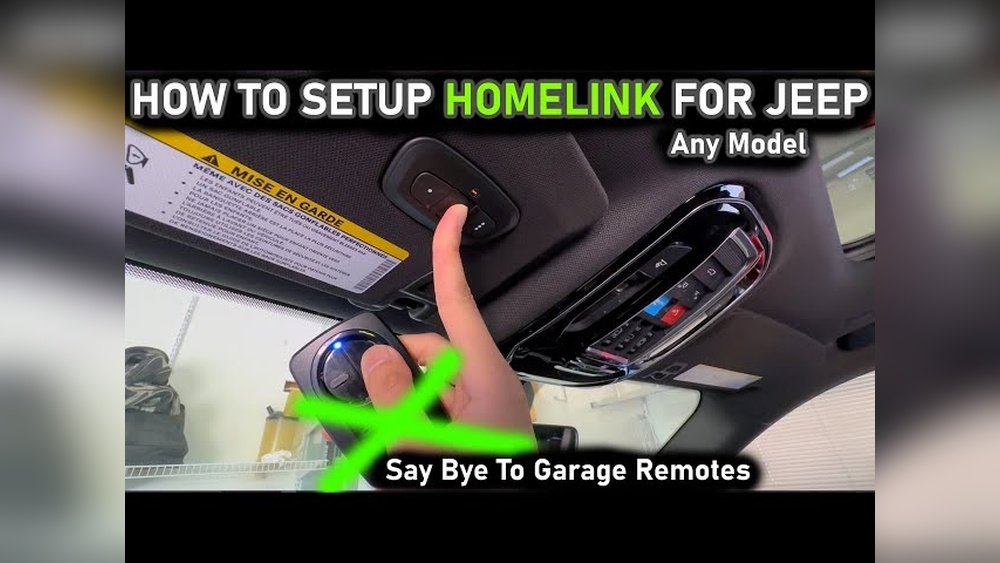
| Feature | Location | Purpose |
|---|---|---|
| HomeLink Buttons | Overhead Console | Store and send remote signals |
| Status Indicator Light | Near HomeLink Buttons | Shows programming status |
| Owner’s Manual | Glove Compartment | Reference for troubleshooting |
Preparing To Program Your Opener
Before starting, check these essentials:
- Your garage door opener remote (with fresh battery)
- Access to the garage door motor unit (usually on the ceiling)
- Your Jeep keys (ignition in ACC or ON)
- Know whether your garage uses a rolling code (most newer models do)
Rolling code systems add security by changing the code every use. If your opener was made after 1996, it likely uses rolling codes.
Step-by-step: Programming The Jeep Grand Cherokee Opener
Follow these steps to program your Grand Cherokee’s garage door opener.
1. Clear Previous Codes (first-time Setup)
If the vehicle is new to you or you want to reset, clear all codes first:
- Press and hold the two outer HomeLink buttons.
- Keep holding until the indicator light flashes rapidly (about 20 seconds).
- Release both buttons.
Clearing is only needed once.
- Hold your garage remote close to the HomeLink buttons.
- Press and hold both the desired HomeLink button and the button on your remote.
- The indicator will change from slow to rapid flashing.
- Release both buttons.
If the light flashes quickly, basic programming is complete. For non-rolling code openers, you’re done.
For rolling code systems, continue to the next step.
3. Sync With Rolling Code Garage Openers
- Locate the “Learn” or “Smart” button on your garage motor unit. This is usually under a light cover.
- Press this button (you’ll have about 30 seconds for the next step).
- Return to your Jeep and press the just-programmed HomeLink button for two seconds, then release.
- Repeat pressing the button up to three times until your garage door moves.
This syncs the Jeep with your garage system’s rolling code.
Common Problems And Solutions
Programming doesn’t always work on the first try. Here’s a look at frequent issues and what you can do.
| Problem | Possible Cause | Solution |
|---|---|---|
| Button doesn’t program | Weak remote battery | Replace the battery |
| Garage doesn’t respond | Missed rolling code sync | Repeat Learn button step |
| Interference | Nearby electronics | Try with engine off |
Tip: Hold the remote within one inch of the HomeLink button during programming. Distance can affect learning.
When Programming Fails: What To Check
Sometimes, the system simply won’t program. Don’t give up—check these:
- Remote Compatibility: Very old or rare remotes may not work. Check for HomeLink compatibility or look for updates at the official HomeLink site.
- Garage Opener Age: Openers before 1993 may lack safety features and are not compatible.
- Repeating Steps: If you try too quickly, the system might not register. Wait a few seconds between attempts.
- Vehicle Power: Make sure your Jeep is in ACC or ON, not just Accessory.
Real-world Example
Let’s say you have a 2021 Jeep Grand Cherokee and a Chamberlain rolling code garage opener. You begin by clearing previous codes.
Then you program the HomeLink button as described above. When the indicator flashes rapidly, you press the Learn button on your Chamberlain opener, then quickly hit the HomeLink button in your Jeep.
The garage door opens and closes success! This process usually takes under five minutes.
Extra Tips For Success
- Program with the vehicle parked outside, away from the garage, to avoid accidental door movement.
- Have a second person help if your garage motor is far from your Jeep.
- Label which button controls which door if you program more than one.
- If you move homes, remember to clear old codes for security.
Safety And Security
Jeep Grand Cherokee garage openers are convenient, but remember:
- Never program while the car is moving.
- If you sell your Jeep, clear all HomeLink codes.
- Don’t give out your programmed remote codes to others.

Key Differences: Built-in Opener Vs. Standard Remote
Here’s how the built-in system compares to a handheld remote:
| Feature | Built-In HomeLink | Handheld Remote |
|---|---|---|
| Convenience | Integrated in vehicle | Separate device |
| Security | Cleared before resale | Can be lost/stolen |
| Number of Devices | Up to 3 | Usually 1 |
Frequently Asked Questions
Can I Program Multiple Garage Doors With My Jeep Grand Cherokee?
Yes, you can program up to three different devices using the three HomeLink buttons. Just repeat the programming process for each device.
What Should I Do If The Indicator Light Doesn’t Flash?
Check if the remote battery is strong, and make sure you’re holding the buttons close enough together. Try again, and consult your owner’s manual if it still doesn’t work.
Does The Jeep Grand Cherokee Support All Garage Door Brands?
HomeLink supports most modern brands, but some very old or specialty systems may not be compatible. Visit the official HomeLink site for compatibility checks.
Hold the desired HomeLink button until the indicator flashes, usually about 20 seconds. This erases only that button’s code, not the others.
Is Programming Safe To Do Myself?
Yes, programming is safe. Just park your Jeep outside, keep clear of the garage door’s path, and follow the steps carefully for safety.
Setting up your Jeep Grand Cherokee garage opener doesn’t have to be a headache. With these steps, you’ll enjoy hands-free garage access and greater convenience every day.



















