If you own a Jeep Grand Cherokee, you know how useful a garage door opener can be. It allows you to open your garage without leaving your car—a small convenience that saves time every day. But many owners find the process of programming their Jeep’s built-in garage door opener confusing, especially if they’ve lost the manual or are dealing with older garage systems. This guide will walk you through every step, sharing tips and clear instructions to help you succeed on your first try.
Understanding Your Jeep’s Garage Door Opener System
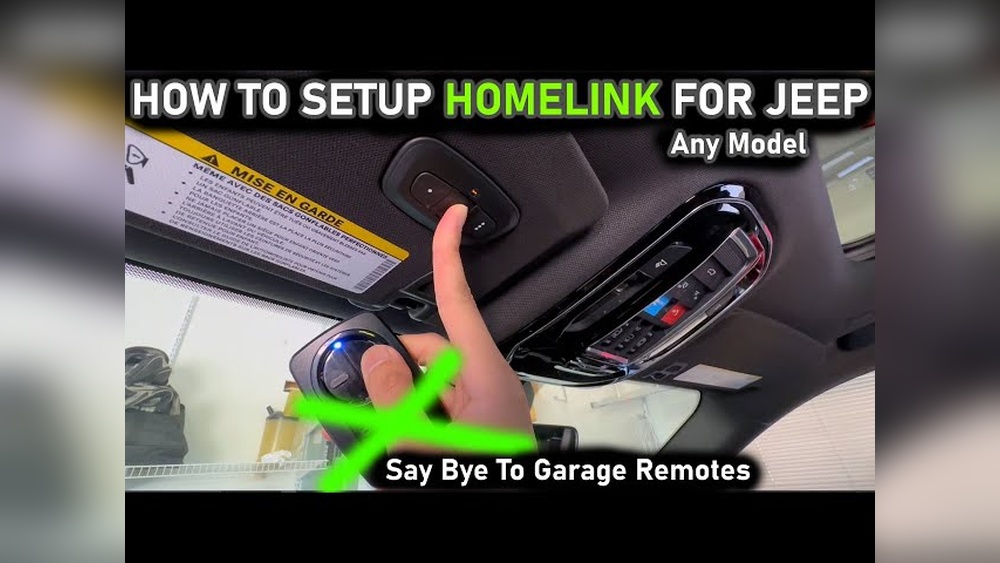
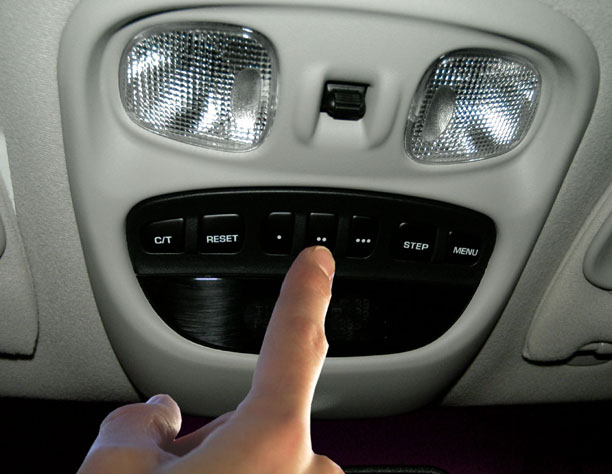
Most Jeep Grand Cherokees are equipped with the HomeLink system. This system is built into the overhead console, usually near the interior lights. It features three programmable buttons. You can program these buttons to operate garage doors, gates, and even home lighting.
Not all garage door openers are compatible with HomeLink. Most openers made after 1996 work, but some older models may need extra steps or a bridge adapter. If your garage door uses “rolling code” technology (more secure and common after 1996), you will need to press a button on the opener’s motor during programming.
Here’s a quick comparison of compatibility:
| Opener Type | Year Range | HomeLink Compatible? |
|---|---|---|
| Fixed Code | Pre-1996 | Usually (may need a bridge) |
| Rolling Code | 1996–Present | Yes |
| Smart Openers | 2015–Present | Often (check manufacturer) |
Tip: Always check your garage door opener brand and model. Some brands like Chamberlain, LiftMaster, and Genie have special instructions or require accessories.
What You Need Before Programming
Before starting, gather these items:
- Your Jeep Grand Cherokee keys
- The remote control for your garage door opener (the hand-held transmitter)
- A sturdy ladder (if your opener’s “Learn” button is on the ceiling unit)
- A helper, if possible (not required, but makes it easier)
Important: Make sure your garage door area is clear of obstacles and people. The door may move during programming.

Step-by-step Guide: Programming Your Jeep Grand Cherokee Garage Door Opener
Follow these steps carefully for a successful setup. The process is the same for most Grand Cherokees from 2011 to the present, but older models are similar.
1. Clear Previous Homelink Settings (if Needed)
If you just bought your Jeep or if you want to erase old codes, clear the system first.
- Turn on the ignition (engine can be off).
- Press and hold the two outer HomeLink buttons (usually marked with dots or a house icon).
- Hold for about 10 seconds until the indicator light blinks rapidly, then release.
- Your system is now reset.
Note: Clearing the codes will remove all previous programming.
Now, program one of the three HomeLink buttons.
- Hold the garage door remote 1–3 inches from the HomeLink panel.
- At the same time, press and hold the desired HomeLink button and the button on your remote.
- Keep holding until the HomeLink indicator light changes from slow to rapid blinking (usually after 20–30 seconds). Then release both buttons.
- If the indicator stays solid or blinks slowly, repeat the process.
- Some remotes may require you to press and release the remote button every two seconds instead of holding.
3. Sync With Rolling Code Opener (if Applicable)
If your garage opener uses rolling code technology, there’s an extra step.
- Go to your garage door opener motor (mounted on the ceiling).
- Locate the “Learn,” “Program,” or “Smart” button (usually on the back or side).
- Press the “Learn” button. A light will start blinking (you have 30 seconds).
- Within 30 seconds, return to your Jeep and press the programmed HomeLink button for 2 seconds, then release. Repeat this press/hold/release action up to 3 times, or until your garage door moves.
Tip: Some openers require you to do this step twice. If the door doesn’t move, try again.
Stand outside your garage. Press the programmed HomeLink button in your Jeep. The garage door should open or close. If it doesn’t:
- Repeat the rolling code sync step.
- Double-check that you pressed the correct HomeLink button.
- Make sure you completed the “Learn” button step within 30 seconds.
You can program up to three buttons for different doors or gates. Repeat the steps above for each button.
Common Mistakes To Avoid
- Not holding the buttons long enough during programming.
- Waiting too long between pressing the garage “Learn” button and the HomeLink button.
- Forgetting to clear old codes before starting.
- Using a weak or dead remote battery.
Troubleshooting: If Programming Fails
Even with careful steps, problems can happen. Here’s how to fix common issues:
Homelink Light Won’t Blink Fast
- Make sure the remote’s battery is fresh.
- Move the remote closer or farther from the HomeLink panel.
- Try the “press, release, press” method instead of holding the remote button.
Garage Door Doesn’t Move
- Repeat the rolling code syncing steps.
- Check the opener manufacturer’s instructions.
- Some openers need a bridge adapter. Visit the HomeLink website for compatibility info.
- Make sure your Jeep’s ignition is on during programming.
- Some models require the engine running.
- If you disconnect your Jeep’s battery, you may need to reprogram HomeLink.
Expert insight: Some newer garage openers have extra security features. If you can’t program your Jeep after several tries, your opener may need a compatibility bridge. These are small devices that connect HomeLink to your opener. Check your opener brand’s website for more info.

Special Cases: Smart And Myq Garage Openers
Many modern homes now use smart garage door openers like LiftMaster MyQ. Some of these systems do not use traditional radio frequencies. If you have a MyQ or Wi-Fi enabled opener, HomeLink may not work unless you buy a compatibility bridge.
Here’s a quick look at which openers may need a bridge:
| Brand | Model Year | Bridge Needed? |
|---|---|---|
| LiftMaster MyQ | 2017–Present | Usually |
| Chamberlain Wi-Fi | 2016–Present | Often |
| Genie Aladdin | 2018–Present | Sometimes |
| Old Genie | Pre-2015 | No |
Pro tip: Always check your garage opener’s manual or website before starting. Some openers can be updated with firmware for better compatibility.
Jeep Grand Cherokee Model Differences
Not all Grand Cherokees have the same HomeLink setup. Here’s a comparison:
| Model Year | HomeLink Location | Special Features |
|---|---|---|
| 2011–2021 | Overhead console | Standard HomeLink |
| 2022–Present | Overhead (with Uconnect) | May have extra settings in Uconnect |
| Pre-2011 | Sun visor or overhead | Older HomeLink version |
Insight: On some newer models, you can customize HomeLink settings using your Jeep’s Uconnect touchscreen. Check your owner’s manual for extra features.
Safety Tips When Programming
- Never program HomeLink while the vehicle is in gear or driving.
- Keep people and pets clear of the moving garage door.
- Always test the door’s auto-reverse feature after programming. Place a small object in the door’s path and make sure it reverses.
- Do not let children play with HomeLink buttons.
When To Call For Help
If your Jeep’s HomeLink system will not program after following all steps:
- Contact your Jeep dealer or service center. Sometimes a technical update is needed.
- Call your garage door opener manufacturer for advanced troubleshooting.
- Visit the official HomeLink programming page for videos and support.
Frequently Asked Questions
How Many Garage Doors Can I Program To My Jeep Grand Cherokee?
You can program up to three different garage doors or other devices, as there are three HomeLink buttons.
Can I Program My Jeep’s Homelink Without The Original Remote?
No. For most openers, you need the original remote for the first programming step.
If you lost it, you may need to buy a replacement from your opener’s manufacturer.
Why Won’t My Jeep Homelink Work With My Garage Door Opener?
Check if your opener uses rolling code or is a “smart” system. Some require a compatibility bridge.
Make sure you followed the “Learn” button syncing step correctly.
Does Programming Homelink Erase My Remote Or Other Cars?
No. Programming HomeLink in your Jeep only teaches your Jeep’s system.
Your original remotes and other vehicles will still work.
Is It Safe To Use Homelink In My Jeep Grand Cherokee?
Yes. The system uses secure codes and cannot be easily hacked.
Always keep your Jeep locked to prevent unauthorized use.
Programming your Jeep Grand Cherokee garage door opener may take a few tries, especially if you are new to the process. With patience, the right steps, and some practical troubleshooting, you’ll have your HomeLink system working smoothly. If you run into problems, don’t hesitate to consult your Jeep manual or seek support online. This small upgrade adds daily comfort and a touch of modern convenience to your driving routine.


















