Programming your 2022 Jeep Grand Cherokee garage door opener is a task many owners want to do quickly and safely. Having your garage door open at the press of a button inside your Jeep adds real convenience, especially during bad weather or late nights. But if you’ve never done it before, the steps can feel confusing. This guide will walk you through the process with practical advice, tips, and answers to common questions.
Understanding Your Jeep’s Garage Door Opener
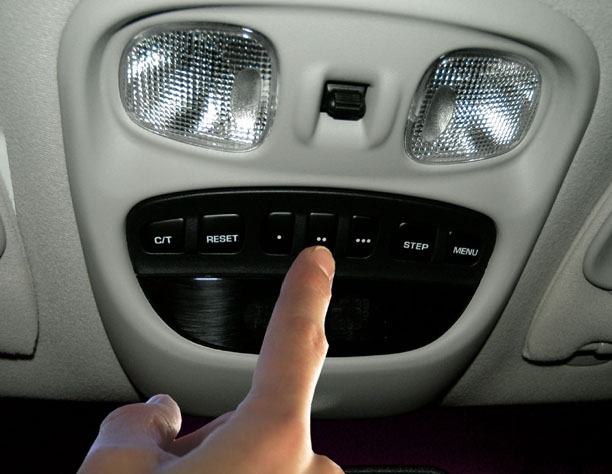
The 2022 Jeep Grand Cherokee uses the HomeLink system—a built-in universal transmitter. It’s usually on the ceiling above the rearview mirror or on the sun visor. The HomeLink system can control up to three different garage doors, gates, or home lighting devices. Before you start, check your garage door opener’s manual and make sure you have a fresh battery in your garage remote.
Key Features Of The Homelink System
- Controls up to three devices
- Works with most garage door brands
- Simple button interface
- Built-in to vehicle for security
Preparing To Program
Before starting, park your Jeep outside the garage for safety. Make sure your vehicle is in Park and the engine is off, but keep the ignition on (ACC mode). Have your garage remote and Jeep key fob within reach.

What You Need
- Your garage door remote
- Jeep’s owner’s manual (for reference)
- A ladder (if your opener requires pressing a “Learn” button)
- Patience—some steps require quick actions
Step-by-step Programming Instructions
Follow these steps to program your Jeep Grand Cherokee’s HomeLink garage door opener. Most users complete the process in under 10 minutes.
1. Clear Previous Programming (if Needed)
If your Jeep is new, you can skip this. For used vehicles, clear old codes:
- Press and hold the two outer HomeLink buttons (1 and 3).
- Hold for about 20 seconds until the indicator light flashes rapidly.
- Release both buttons. The system is now reset.
Decide which of the three HomeLink buttons (1, 2, or 3) you want to use for your garage door. Most people use the first button.
3. Prepare The Garage Door Remote
Hold your garage door remote close (1–3 inches) to the HomeLink buttons. Press and hold the remote button and the chosen HomeLink button at the same time.
- The HomeLink indicator light will flash slowly, then quickly.
- When it flashes quickly, release both buttons.
4. Sync With Garage Door Opener
Some newer garage doors use a rolling code for security. This means you’ll need to press a “Learn” or “Smart” button on your garage opener motor.
- Climb a ladder (if needed) and locate the “Learn” button on the garage door opener.
- Press and release the “Learn” button. You have 30 seconds to return to your Jeep.
- Press and hold the programmed HomeLink button in your Jeep for 2–3 seconds. Repeat until the door moves.
Insight: Many people make the mistake of waiting too long after pressing the “Learn” button. Be quick—if you miss the 30-second window, start again.
5. Test The System
Press the programmed HomeLink button. The garage door should open or close.
If it does not, repeat the sync process. Sometimes, it takes two or three tries.
Common Problems And Solutions
Programming does not always work the first time. Here’s how to solve common issues:
- Remote battery is weak: Replace it before programming.
- Signal interference: Move the Jeep closer or further from the opener.
- Wrong button: Make sure you use the correct “Learn” button (not “Lock” or “Light”).
- Multiple garage doors: Program each door to a separate HomeLink button.

Comparing Garage Door Opener Brands
Not all openers work exactly the same with HomeLink. Here’s a quick comparison of popular brands:
| Brand | Rolling Code | HomeLink Compatible | Special Steps Needed |
|---|---|---|---|
| Chamberlain/LiftMaster | Yes | Yes | Press “Learn” button |
| Genie | Yes | Yes | May require extra bridge |
| Craftsman | Yes | Yes | Standard steps |
| Older brands | No | Sometimes | May need HomeLink repeater |
Tip: If your garage opener is older than 1996, it may not work with HomeLink without a special adapter.
Safety And Security Tips
- Always program your opener with the garage door closed.
- Don’t leave your Jeep running in a closed garage.
- If you sell your Jeep, clear the HomeLink memory.
Homelink Vs. Remote: A Quick Look
Some people wonder if HomeLink is better than the standard remote. Here’s a comparison:
| Feature | HomeLink | Garage Remote |
|---|---|---|
| Built-In | Yes | No |
| Battery Needed | No | Yes |
| Can Lose/Misplace | No | Yes |
| Security | High | Medium |
Non-obvious insight: Some insurance companies see built-in openers as safer, which may lower theft risk ratings.
Extra Troubleshooting Advice
If you’ve tried everything and the system still won’t program, check your Jeep’s fuse box. Sometimes, the fuse for the HomeLink system can blow.
Also, make sure your garage opener’s antenna is hanging down and not broken.
Another insight: Some garage doors use a frequency that is blocked by LED lights in the garage. Try turning off these lights during programming.
For more detailed information, see the official HomeLink guide.

Frequently Asked Questions
How Many Garage Doors Can I Program To My Jeep?
You can program up to three garage doors or devices, using the three HomeLink buttons.
What If My Garage Door Opener Is Not Compatible?
You may need a HomeLink Compatibility Bridge. Check with your opener’s brand or HomeLink’s website.
Yes. Hold the button you want to erase until the light starts flashing, then release. Only that button is cleared.
Is Programming Safe To Do Myself?
Yes, if you follow safety rules and avoid standing under the garage door. If unsure, ask a professional.
Will Programming The Jeep Delete My Remote Control Settings?
No, your original garage remotes will still work. HomeLink only copies the signal.
Programming your 2022 Jeep Grand Cherokee garage door opener gives you more comfort and less clutter. Once set up, you’ll never search for your remote again. With these steps, you can enjoy seamless entry to your home every day.