Pairing your phone with a Jeep Wrangler Bluetooth system is a simple way to make hands-free calls, stream music, and use voice commands while driving. Many drivers struggle with connecting their device, especially if they are new to the Wrangler’s infotainment system.
This guide will walk you through the process step by step, highlight important tips, and answer common questions. Whether you have the latest model or an older Jeep Wrangler, you’ll find clear instructions and practical advice below.
Understanding Your Jeep Wrangler Bluetooth System
Most Jeep Wranglers from 2011 onwards feature a Bluetooth-enabled Uconnect system. This lets you link your smartphone wirelessly. The Uconnect system comes in various versions—some models have touchscreens, others use buttons. Knowing which version you have helps, but the pairing steps are similar for all.

Here’s a quick look at the most common Uconnect systems found in Jeep Wranglers:
| Model Year | Uconnect Version | Bluetooth Supported |
|---|---|---|
| 2011–2014 | Uconnect 130/430 | Yes |
| 2015–2017 | Uconnect 430/430N | Yes |
| 2018–2023 | td>Uconnect 4/4C/4C NAVYes |
If your Jeep is older than 2011, it may not support Bluetooth. Always check your owner’s manual or the Uconnect website for details.
Step-by-step Guide: Pairing Jeep Wrangler Bluetooth
Pairing your phone takes just a few minutes. Follow these steps for a smooth connection:
1. Turn On Your Jeep
Make sure your Wrangler is running or in accessory mode. The infotainment system needs power.
2. Enable Bluetooth On Your Phone
Go to your phone’s Settings, select Bluetooth, and turn it on. Your phone should now be discoverable.
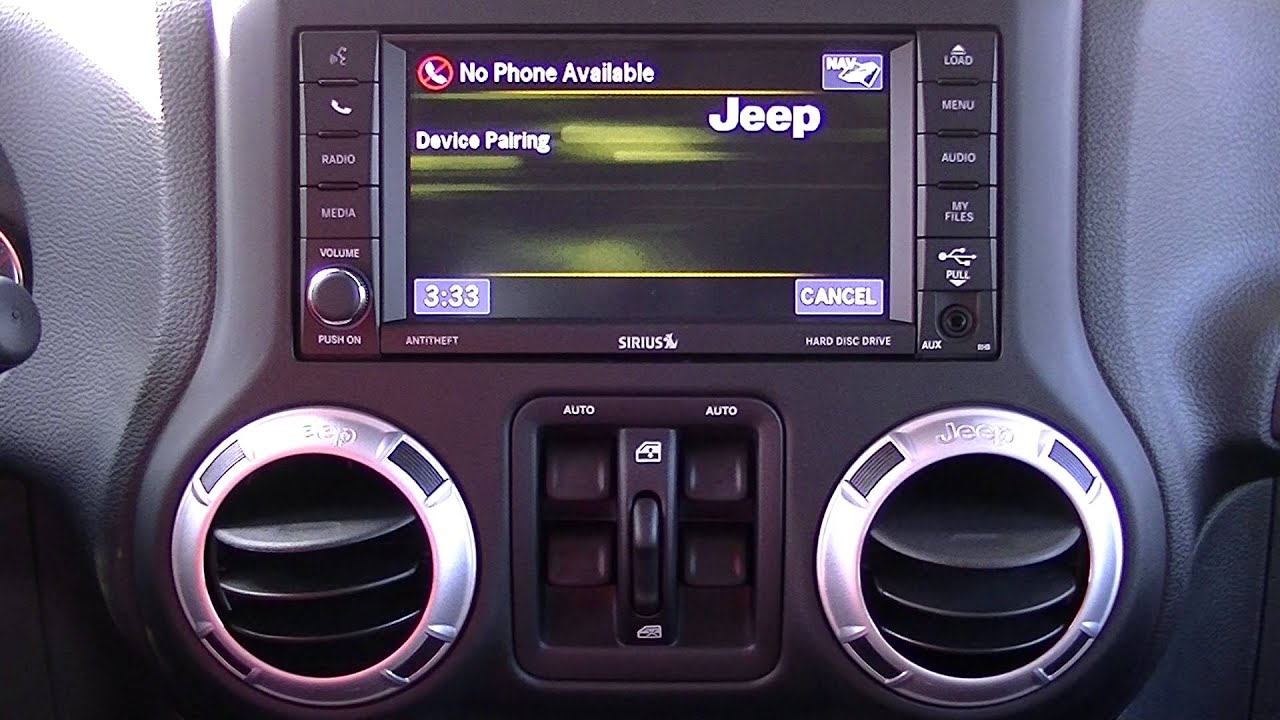
On your Jeep’s dashboard, press the Phone button. If it’s your first time, the system may prompt you to start pairing.
4. Select ‘add Device’
On the screen (or by using menu buttons), choose Add Device or Pair New Device.
5. Choose Your Jeep In Phone Settings
On your phone, look for your Jeep’s name (like “Uconnect” or “Wrangler”) under available devices. Tap to connect.
6. Confirm The Pin
A PIN code appears on both your phone and Jeep screen. Make sure they match, then accept on both devices.
7. Finish Pairing
Wait for the system to confirm connection. You may be asked to allow access to contacts and messages grant permissions for hands-free calling.
Here’s a comparison of pairing difficulty for different Jeep Wrangler years:
| Model Year | Pairing Steps | Common Issues |
|---|---|---|
| 2011–2014 | Manual menu navigation | Slow response |
| 2015–2017 | Touchscreen options | Connection drops |
| 2018–2023 | Quick pairing, voice prompts | Rare issues |
Troubleshooting Common Bluetooth Problems
Even with a clear process, issues can pop up. Here are the most frequent problems and solutions:
- Phone Won’t Connect:
Make sure Bluetooth is on and visible. Restart your phone and the Jeep system.
- Connection Drops:
Update your phone’s operating system and check for Uconnect software updates. Remove old paired devices from the Jeep.
- Poor Audio Quality:
Move your phone closer to the dashboard. Avoid pairing while driving in areas with heavy electronic interference.
- Cannot Access Contacts:
Grant the necessary permissions when pairing. If you missed this, disconnect and reconnect.
For more advanced troubleshooting, visit the official Jeep Uconnect support page.
Useful Tips For A Smooth Pairing Experience
Pairing can fail for small, overlooked reasons. Here are two key tips many beginners miss:
- Delete Old Devices:
Your Jeep can only remember a limited number of paired devices (usually up to 7). If pairing fails, check the list and remove unused devices.
- Keep Software Updated:
Both your phone and the Uconnect system need updates. Outdated software can block Bluetooth functions.
Check settings for updates at least once a year.
Another practical tip: If you frequently switch phones or drivers, use the primary driver’s phone as the first paired device. The Jeep will auto-connect to the first device it sees, making your daily routine smoother.
What You Can Do With Jeep Wrangler Bluetooth
Once paired, Bluetooth offers several features:
- Hands-Free Calling:
Answer or make calls without touching your phone.
- Voice Commands:
Use voice controls to dial numbers, play music, or send messages.
- Music Streaming:
Play songs from apps like Spotify or Apple Music directly through Jeep speakers.
- Text Messaging:
Some Uconnect versions let you read messages aloud or reply with voice.
Here’s a quick comparison of features by Uconnect version:
| Uconnect Version | Hands-Free Calling | Music Streaming | Text Messaging |
|---|---|---|---|
| 130/430 | Yes | Limited | No |
| 430N | Yes | Yes | No |
| 4/4C/4C NAV | Yes | Yes | Yes |
Frequently Asked Questions
How Many Devices Can I Pair With My Jeep Wrangler?
Most Jeep Wranglers allow up to seven devices to be paired. Only one can be active at a time. If you reach the limit, delete older devices to add new ones.
Does Bluetooth Work With All Smartphones?
Bluetooth works with most smartphones, including Android and iPhone. However, very old phones or outdated operating systems may not connect smoothly.
Can I Play Music Through Bluetooth?
Yes, you can stream music from your phone to your Jeep speakers if your Uconnect version supports it. Check your system’s feature list if you’re not sure.
Is Bluetooth Safe While Driving?
Bluetooth helps drivers stay hands-free and focused. Still, always use voice commands and avoid distractions for safety.
What Should I Do If Pairing Fails?
Restart your phone and the Jeep’s system. Delete old paired devices.
If problems continue, check for software updates or contact Jeep support.
Pairing your Jeep Wrangler Bluetooth system gives you safer, smarter driving. With these clear steps and tips, you’ll enjoy all the benefits of wireless connectivity.
Remember to keep your software updated and remove unused devices for the best experience. If you run into trouble, use the troubleshooting section above or visit the official Jeep Uconnect support page.
Happy driving!