Every child loves the thrill of driving their very own Power Wheels Jeep. These battery-powered ride-on cars bring outdoor fun to backyards everywhere. But for many kids, the excitement grows when they discover their Jeep has a built-in radio. Music or even simple radio sounds can turn a simple ride into a real adventure. However, for parents and kids, figuring out how to operate the radio isn’t always obvious. This guide explains everything you need to know about using the radio on a Power Wheels Jeep, from finding the controls to fixing common problems.
Understanding Your Power Wheels Jeep’s Radio
Not all Power Wheels Jeeps have the same features. Some older models include a simple AM/FM radio with a dial, while newer versions often feature a digital audio player with preloaded tunes and sometimes even Bluetooth. Before you start, check the model you own. The Jeep’s manual (usually found online if you’ve lost the paper copy) will list the radio type and features.
Common Types Of Radios
- Analog AM/FM radio: Simple knob or dial, picks up local stations.
- Digital MP3 player: Plays preset songs, uses buttons for control.
- Bluetooth-enabled units: Connect with smartphones for custom music.
Each type has its own operation steps, but all are designed for child safety and ease of use.
Getting Started: Power And Safety
Before turning on the radio, make sure the Power Wheels Jeep is properly charged and assembled. The radio draws power from the main battery, so a weak battery can cause low volume or no sound.
Safety First
- Always supervise children while the Jeep is in use.
- Keep the Jeep away from water, which can damage the radio.
- Show your child how to adjust the volume to protect their ears.
Locating And Understanding The Controls
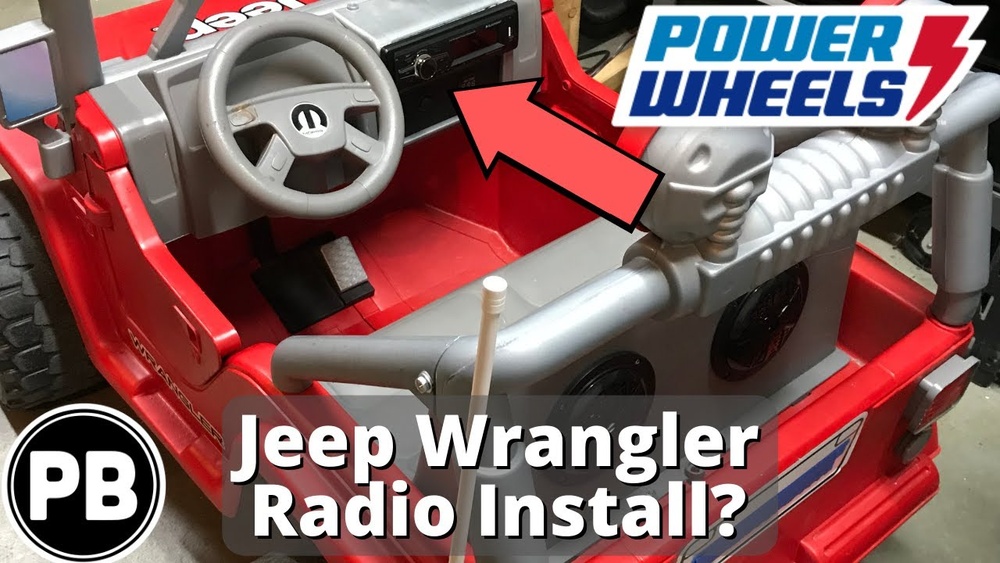
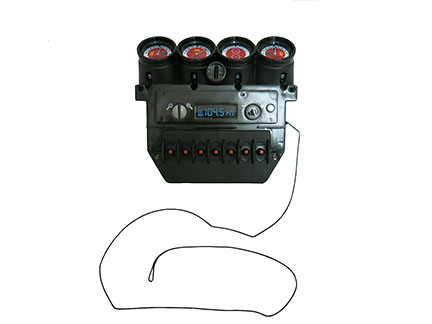
Most Power Wheels radios are built into the dashboard. Look for:
- Power button (may be labeled ON/OFF)
- Volume knob or buttons (often marked with + and -)
- Tuning dial (for analog radios)
- Song/Mode buttons (for digital units)
- Bluetooth button (on select models)
Some models use bright colors or icons (like a music note) to help kids identify controls.
Example Dashboard Layout
Here’s a sample comparison of three common Power Wheels Jeep radio dashboards:
| Model | Radio Type | Main Controls | Special Features |
|---|---|---|---|
| Jeep Wrangler Classic | Analog AM/FM | Power, Volume, Tuning | Simple speaker |
| Jeep Rubicon Digital | MP3 Digital | Power, Volume, Song skip | Preloaded music |
| Jeep Rubicon Deluxe | Bluetooth Digital | Power, Volume, Bluetooth | Connects to phone |
Step-by-step Guide To Operating The Radio
1. Turn On The Jeep
Most radios are powered by the Jeep’s main battery. Turn the ignition key or push the power button to activate the Jeep. Some radios have a separate ON/OFF button.
2. Activate The Radio
- Analog radios: Press or slide the ON/OFF switch.
- Digital radios: Press the power button (sometimes labeled with a music note).
- Bluetooth radios: Hold the Bluetooth button to enter pairing mode.
A light or sound often signals that the radio is on.
3. Adjust The Volume
- Use the volume knob or + and – buttons.
- Start at a low level, especially for young children.
- Some radios have a maximum volume to protect young ears.
4. Select Music Or Stations
- AM/FM: Use the tuning knob to find a local station. Move the knob slowly; the small speakers may not catch weak signals.
- Digital: Press the song skip button (often marked with arrows or numbers) to cycle through songs.
- Bluetooth: Pair your device by selecting the Jeep radio on your phone’s Bluetooth menu. Play music from any app.
5. Stop Or Change Audio
- Press the power button to turn off the radio.
- For digital models, a “mode” button may switch between music and radio functions.
Troubleshooting Common Problems
Even with simple controls, sometimes the radio doesn’t work as expected. Here are practical solutions for the most common issues.
Radio Won’t Turn On
- Check the main battery: If the Jeep won’t drive, the radio won’t play.
- Loose wires: Inspect the radio’s connections under the dashboard.
- Radio fuse: Some models include a small fuse for the radio circuit.
No Sound Or Low Volume
- Volume too low: Check the volume setting.
- Speaker blocked: Clear any debris from the speaker area.
- Battery low: Recharge the Jeep; radios often need full power to work well.
Bluetooth Won’t Connect
- Out of range: Stay within 10-15 feet of the Jeep.
- Already paired: If another device is connected, disconnect it first.
- Bluetooth reset: Turn the Jeep off, wait 10 seconds, then try pairing again.
Static Or Poor Reception
- AM/FM limitations: Small radios in toys have weak antennas. Try moving the Jeep to a different spot or switch to digital music if possible.
- Weather: Rain or clouds can affect radio signals.
Non-obvious Tips For Better Use
Many parents and kids overlook some useful tricks when using the Power Wheels Jeep radio.
- Preload favorite songs: For digital radios with USB or SD card slots, you can sometimes add your child’s favorite music (check your model’s instructions).
- Teach sharing: If siblings ride together, teach them to take turns choosing music or stations.
- Use the pause feature: Some digital radios let you pause music, which is handy for instructions or snack breaks.
- Night driving: Some Jeep radios have glowing buttons or dashboard lights, making nighttime use safer and more fun.
- Spare battery: Heavy use of the radio drains the battery faster. Consider a spare battery for longer play sessions.
Comparing Radio Features On Popular Power Wheels Jeeps
It’s helpful to know what radio features come with different Jeep models, especially if you’re shopping or troubleshooting.
| Feature | Classic Model | Digital Model | Bluetooth Model |
|---|---|---|---|
| AM/FM Radio | Yes | No | No |
| Preloaded Songs | No | Yes | Yes |
| Bluetooth | No | No | Yes |
| Volume Control | Knob | Buttons | Buttons |
| Song Skip | No | Yes | Yes |
Maintenance And Care For The Radio
A little attention keeps the Jeep’s radio working well for years.
- Clean with a dry cloth: Never use water or cleaners on the dashboard.
- Check battery terminals: Corroded connections can block power to the radio.
- Store indoors: Sun and rain can damage plastic dashboards and electronics.
- Avoid overcharging: Follow the manual’s charging instructions to protect the battery and radio.
Safety And Volume Guidelines
Children’s ears are sensitive. The American Academy of Pediatrics suggests keeping sound levels below 85 decibels for young kids. Power Wheels radios are limited in volume, but it’s smart to:
- Limit radio use to one hour at a time.
- Keep the volume at 50% or less, especially if your child is close to the speakers.
- Remind children not to place their ears directly on the speaker grille.
Advanced Features: Using Bluetooth And Usb
Some newer Power Wheels Jeeps come with Bluetooth and USB options. Here’s how to get the most out of them:
Bluetooth Pairing
- Turn on Bluetooth on your phone.
- Power on the Jeep and press the Bluetooth button.
- Select the Jeep radio from your phone’s available devices.
- Play music from your phone. Control volume on both the phone and the Jeep.
Usb/sd Card Music
- Load MP3 files onto a USB drive or SD card.
- Plug into the slot on the dashboard.
- Use the Jeep’s controls to skip or repeat songs.
These features allow for more variety and personalization. Always use simple, kid-friendly songs to keep the ride safe and enjoyable.
When To Call For Help
Sometimes, the radio just won’t work, even after troubleshooting. If you’ve checked the battery, wires, and controls, it may be time to contact Power Wheels customer service or a local repair shop.
Do not open the dashboard or attempt repairs yourself, as this could void your warranty or create a safety risk.
You can find helpful support directly on the manufacturer’s website or from their official parts and repair partners.
A Real-world Example
Imagine your child is riding their Power Wheels Jeep Rubicon, eager to listen to their favorite tune. You follow these steps: turn on the Jeep, press the radio power button, adjust the volume, and select a song with the skip button. The music plays, and your child’s smile says it all. If the music suddenly stops, you check the battery and discover it’s low—problem solved with a quick recharge. This simple process keeps playtime fun and stress-free for everyone.
Frequently Asked Questions
How Do I Know If My Power Wheels Jeep Has A Radio?
Check the dashboard for audio controls or look in the manual. Most newer models list radio features on the box or product page. If you see a speaker grille and buttons or a tuning dial, your Jeep likely has a radio.
Can I Connect My Phone To The Jeep’s Radio?
Only Power Wheels Jeeps with Bluetooth capability support phone connections. Pairing is easy: turn on Bluetooth on your device, select the Jeep from the list, and play music. Older or basic models do not support this feature.
Why Does The Radio Sound Distorted?
Distortion usually means the battery is low or the speaker is blocked by dirt. Recharge the battery and clean the speaker area. If the problem continues, the speaker may be damaged and need repair.
How Can I Add My Own Music To The Jeep Radio?
Some digital and Bluetooth models support USB drives or SD cards. Load MP3 files onto the drive, insert it into the dashboard slot, and use the Jeep’s controls to play your music. Check your manual for supported formats and instructions.
What Should I Do If The Radio Stops Working?
First, check the main battery and all connections. Make sure the radio’s power button is on and the volume is up. If there’s still no sound, consult your manual or contact Power Wheels support for help. For more troubleshooting, visit the official Mattel Service Site.
Power Wheels Jeeps with radios offer more than just a ride they create an experience. With this guide, you’re ready to help your child enjoy music, learn about basic electronics, and ride safely.
A little practice and care will keep the fun going for years to come.